LSF (Light Steel Framing)
Anatomy of a wall
Take the boards off an LSF wall and what is left is a steel grid in which every piece has a name, a role and a section. This page opens the wall piece by piece, from the track to the board, and shows what carries load, what braces, what only encloses and what the engine checks in each one.
Overview
A wall is a grid, and every member has a name
Take the boards off an LSF wall and a steel grid is left: two horizontal tracks, one on the floor and one at the top, and between them studs standing every 600 mm. Where there is a door or a window, the grid rearranges itself around the opening. At mid-height, a line of blocking and a strap hold the studs sideways. And somewhere along the wall, an X strap keeps the panel from racking into a parallelogram.
Each of these pieces has a role, and the role decides three things: the section, how it connects to its neighbors and what the engine checks in it. Knowing the name of each piece is what lets you read the bill of materials, the sheet and the CalcSteel check table without stumbling.
The example is the single-story house that runs through the LSF articles: 9 x 7 m, 2.80 m ceiling height, a roll-formed project on the FRAMECAD F325iT. The front wall has a 0.80 x 2.10 m door P1 and a 1.20 x 1.00 m window J1 with the sill at 1.00 m.
- 600 mm: stud spacing, half of the 1.20 m board
- 2.80 m: ceiling height of the example house
- 1.381 kg/m: the C 89x41/39x12x0.95 of every C piece in the wall
- 1.40 m: unbraced length of the stud with the line at mid-height
A single section. On the FRAMECAD F325iT the roll former forms one section: the 0.95 mm C 89x41/39x12. Track, stud, king stud, head track, sill, blocking and the members of the lattice header all come out of it, each with a code and with the machine operations at its ends.
The whole wall
The front wall, piece by piece
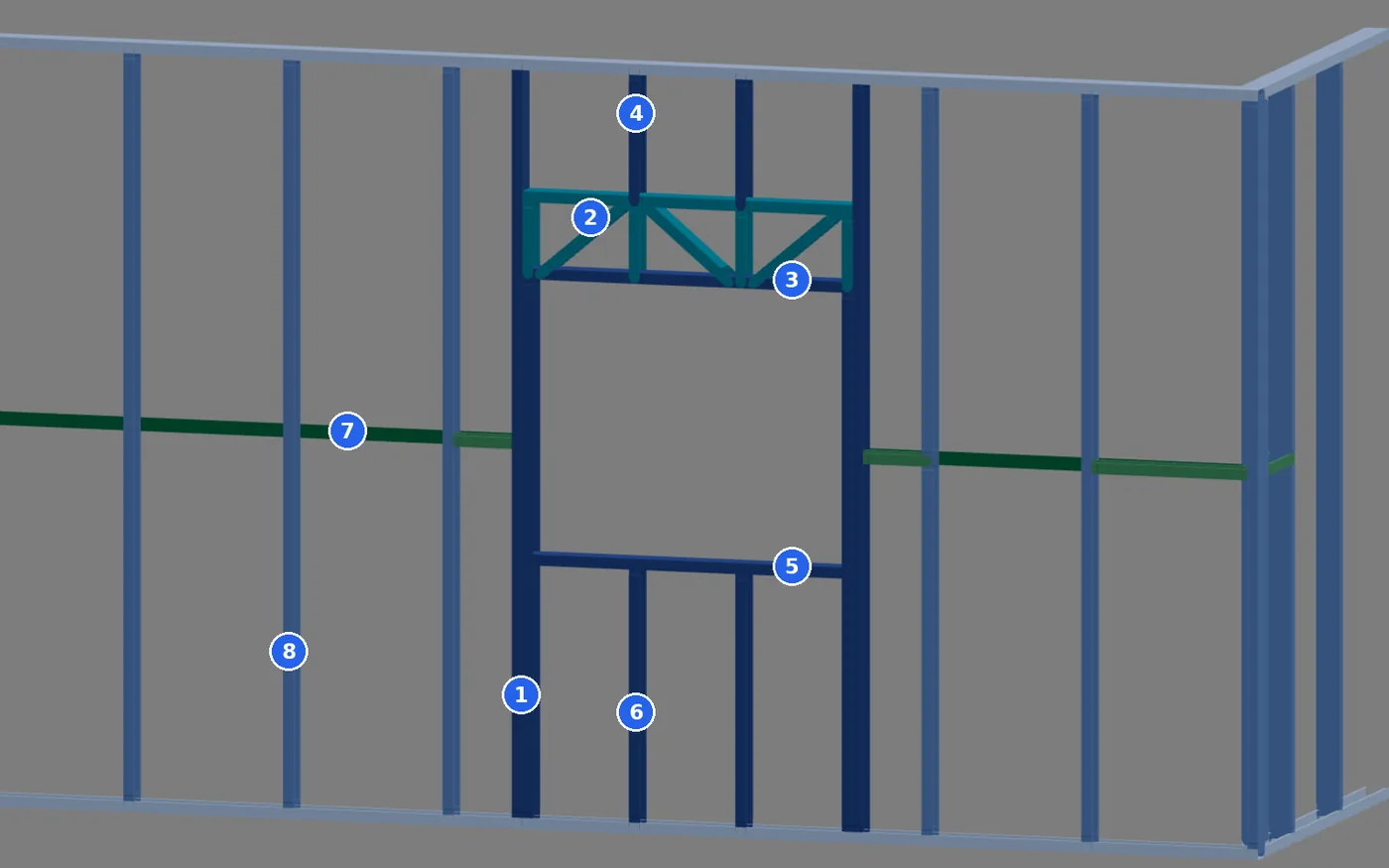
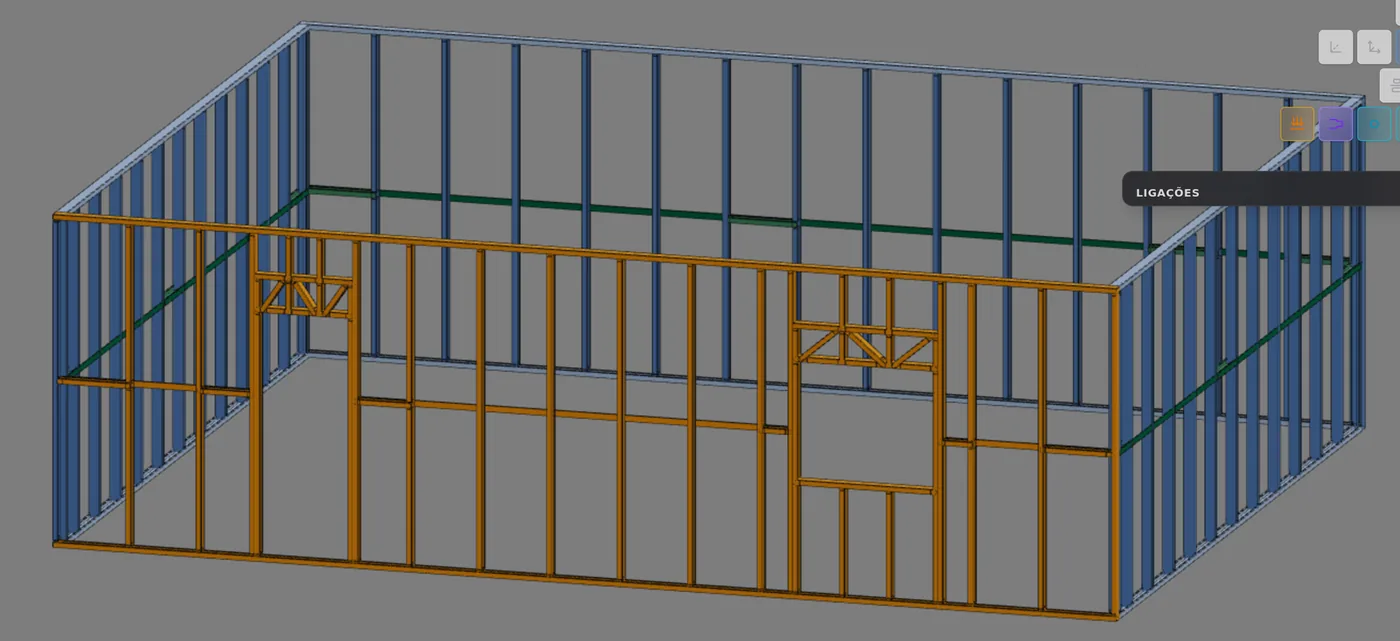
The figure below is the front wall of the house in the CalcSteel 3D view, without boards, seen from outside. The door is on the left, the window on the right, and the colors are the ones the 3D view gives each role: light blue for the track, mid blue for the stud, dark blue for the opening pieces, teal for the header lattice and green for the bracing.
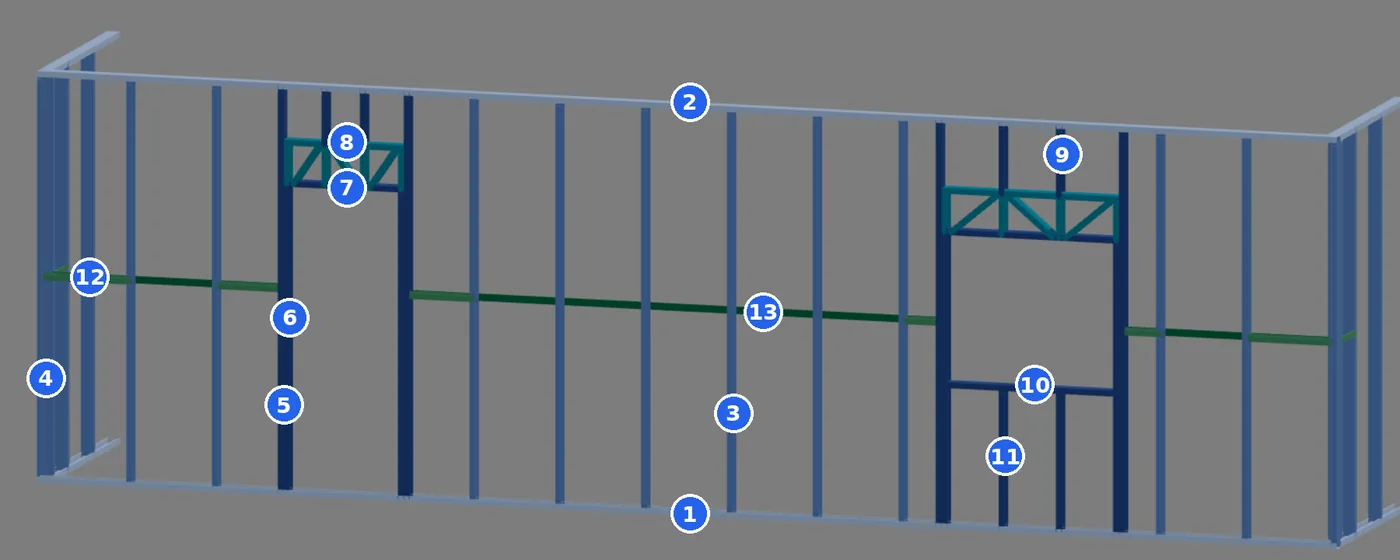
- Bottom track, fixed to the floor
- Top track, which closes the top
- Stud, at 600 mm spacing
- Corner stud, where the wall meets the side wall
- King stud, the full-height piece beside the opening
- Jack stud, which supports the head track
- Head track, the horizontal track over the opening
- Lattice header, which carries the load over the opening
- Cripple above the opening, short, from the header to the track
- Sill, the bottom of the window
- Cripple below the sill, short, from the track to the sill
- Blocking, between two studs
- Strap, the horizontal strap at mid-height
Two pieces are missing from the picture, and both show up further on: the X strap, placed with the Strap and blocking tool (see Blocking and bracing), and the board, which closes both faces (see What carries load and what only encloses). What the app calls a short stud, numbers 9 and 11, is the cripple of English-language manuals.
Name, label, color, class and section
Every member of the wall is created with a label. On the opening, header and bracing pieces it starts with the role code: KO, JK, HT, BQ. Studs and track segments get M or G and a number, and the app names them by wall and position, such as "montante 3" (stud 3) or "guia inferior" (bottom track). The class groups the members of the same section, and it is through the class that you change the section of many pieces at once.
| Piece | Label | 3D color | Class | Default section | On the F325iT |
|---|---|---|---|---|---|
| Bottom and top track | G or M, numbered | track | GUI | C 89x41/39x12x0.95 | BOTTOMPLATE, TOPPLATE |
| Stud and corner stud | M numbered; QN | stud | MNT | C 89x41/39x12x0.95 | STUD (M) |
| King stud | KO | opening | MNT | C 89x41/39x12x0.95 | STUD |
| Jack stud | JK | opening | MNT | C 89x41/39x12x0.95 | TRIMSTUD |
| Cripples above the opening and below the sill | CT, CB | opening | MNT | C 89x41/39x12x0.95 | STUD |
| Head track, the track of the header | HT | opening | GUI | C 89x41/39x12x0.95 | HEADPLATE |
| Sill | SL | opening | GUI | C 89x41/39x12x0.95 | SILL |
| Lattice header: chord, diagonal, vertical and end post | BS, DG, WV, TP | lattice | GUI, MNT | C 89x41/39x12x0.95 | TOPCHORD, WEB |
| Blocking | BQ | blocking | BLQ | C 89x41/39x12x0.95 | NOG |
| Strap (horizontal) | FC | strap | CIN | RET 50x0.95 | not on the machine |
| X strap | FX | strap | FIT | RET 50x0.95 | not on the machine |
Why everything comes out in 0.95
A roll-formed project on the F325iT has its section fixed by the machine: every C piece comes out with the stud section. That is why the lattice header, the head track and the sill are also 0.95 mm C 89, 1.381 kg/m. The 1.15 mm that Steel and sections shows in the Header row of the Structure tab applies to the solid header, the one made of full sections, which the opening also accepts.
The strap does not go through the roll former
The strap and the X strap are flat steel strips, the catalog RET 50x0.95, 0.373 kg/m. They are not formed on the F325iT and carry no machine operations: they are cut to length and screwed to the face of the studs. They belong to a tie class, and that has a consequence in the calculation (see What the engine checks).
Colors from the 3D "by role" mode, the default. Sections and weights from the CalcSteel catalog, October 2026. File codes from the app's FRAMECAD connection model.
Shortcuts
- W↵
Exterior wall
Draws the wall point by point. Type a distance and Enter.
- Home
3D view
Goes to 3D at the last camera pose. With the wall view open, closes it.
The standards
Three standards give the pieces their names and rules
NBR 16970-2, part of the Brazilian LSF standard, covers structural design: it defines the pieces and says how the panel works. NBR 16970-3 covers interfaces, and it is the one that deals with the window opening and where a cabinet can be fixed. NBR 14762 is the Brazilian standard for cold-formed steel sections, where the checks of each member come from. The items below are the ones this page uses.
| Item | What it says | Piece |
|---|---|---|
| 16970-2, 3.5 | track: section applied at the base and top of panels | G |
| 16970-2, 3.6 | stud: vertical section subject to gravity, wind and seismic forces | M, QN, KO, JK |
| 16970-2, 3.8 | header: beam that transfers forces at the top of an opening | header, HT |
| 16970-2, 3.3 and 3.9 | blocking and strap: lateral restraint of the sections | BQ, FC |
| 16970-2, 3.12 | lateral restraint of the panel, against displacement and distortion, by strap or vertical truss | FX |
| 16970-2, 4.1 | sections on a module that is a submultiple of the boards; studs aligned from story to story (in-line framing) | spacing |
| 16970-2, 4.2 | sections in the same vertical line without misalignment and facing the same side | M |
| 16970-2, 7.1 and 7.2 | effective restraint: the unbraced length is the distance between restraints; minimum strength and stiffness | BQ, FC |
| 16970-2, 8.2 | Table 3, maximum displacements by type of piece | all |
| 16970-3, 4.2.1 | window opening: window plus finishes and the boards lining the opening; sill with a 5% slope | opening |
| 16970-3, 5.3.2 and 5.3.3 | fixing objects to single or double studs; reinforcement planned before boarding | M |
| 14762, 9.7 to 9.9 | compression, bending and combined bending of the member; 9.7.4 limits slenderness to 200 | standing pieces |
| 14762, 9.6 | tension | FC, FX |
| 14762, Annex D | concentrated force on the web, without a stiffener | supports |
| 14762, 10.5 | self-tapping screw connection | connections |
Restraint that counts.
Under item 7.1 of 16970-2, only restraint placed perpendicular to the stud, with enough strength and stiffness, shortens the unbraced length. That is why blocking and strap are design pieces, not finishing.
The board and the Brazilian standard.
16970-2 counts panel restraint by strap or vertical truss (3.12). Whatever the board adds as bracing is up to the designer, and in CalcSteel it is an explicit choice (see What carries load and what only encloses).
Track, stud and spacing
The stud fits into the track, and the spacing comes from the board
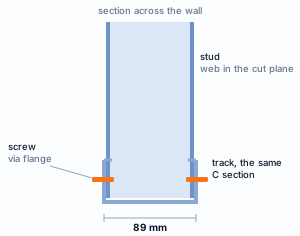
The fit, the most repeated connection in the house
The stud goes down between the flanges of the track. On the F325iT, when its end does not fit, the machine crushes it (the swage), the track lip is cut where the stud sits, and both pieces come out with the recessed hole (dimple) where the screw goes. That is the fit of the FRAMECAD model, the same at the top and the bottom.
The app's Brazilian market fastening rule calls for 2 wafer-head 4.2x19 screws per end, through the flange. The track works lying flat, fixed to the floor or to the track of the story below, and passes to the support what each stud brings.
On the wall card, the Fit badge counts the joints that touch with no gap, and Web ⊥ wall confirms that every section has its web crossing the thickness of the wall.
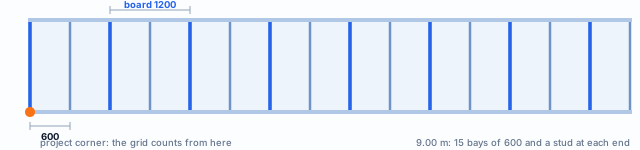
The 600 mm spacing is half of the 1.20 m board, and that is what 16970-2 asks for in item 4.1: a module that is a submultiple of the board, so that every joint has a stud behind it. The app's Brazilian market offers 400 and 600 mm, with 600 selected. The app always counts the grid from the same corner of the project, not from the start of each wall, so that parallel walls and stacked stories have their studs on the same line. Every wall closes with a stud at each end, even if the last bay comes out shorter than the spacing.
At the corner there are two studs, one from each wall
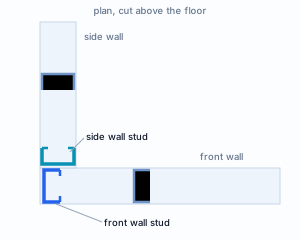
Where two walls meet in an L, each one has its own stud at the corner, with its web crossing its own thickness. The wall that runs to the corner closes with its end stud; the one that butts against it gets a stud of its own, the corner stud, label QN, oriented in its plane. In the FRAMECAD model that is the corner: two studs, one from each wall, screwed to each other, with no closed box and no clip. The same applies to the T joint.
The corner is where foreign manuals talk about a double stud: in the finished wall, there are two pieces side by side. The market fastening rule calls for hex-head 4.8x19 screws in a zigzag, every 200 mm, at the corner, the T and the X.
The example house has four L corners, and the card of each wall shows it in the 4 joints · 4 L badge.
How the pieces of the wall meet
The app's FRAMECAD connection model has four kinds of joint. In a fit, the end goes in between the flanges of the other piece. In an overlap, the piece passes over the flanges of the other, with its web notched. In bearing, it only rests against it. And in a mid-span crossing, two pieces cross away from their ends. When the receiving piece shows its open side, it is a fit; when it shows its web, it is an overlap.
| Arriving piece | Onto | Kind |
|---|---|---|
| everything that stands: M, KO, JK, CT, CB | track, head track, sill, header chord | fit |
| blocking, head track, sill | the standing pieces | overlap |
| diagonal and vertical of the lattice header | chord and head track | fit, inclined on the diagonal |
| solid header | king stud and jack stud | bearing |
| jack stud, cripple above the opening, king stud | solid header | bearing |
| strap and X strap | face of the studs | not on the machine, screws only |
The opening
The window: the opening interrupts studs, and something has to carry their load
Window J1 is 1.20 m wide. At 600 mm spacing, two studs would fall inside the opening. They do not just disappear: the load that would come down through them is carried by the header, which hands it sideways to the studs that frame the opening. That is why the opening is the part of the wall with the most pieces per meter.
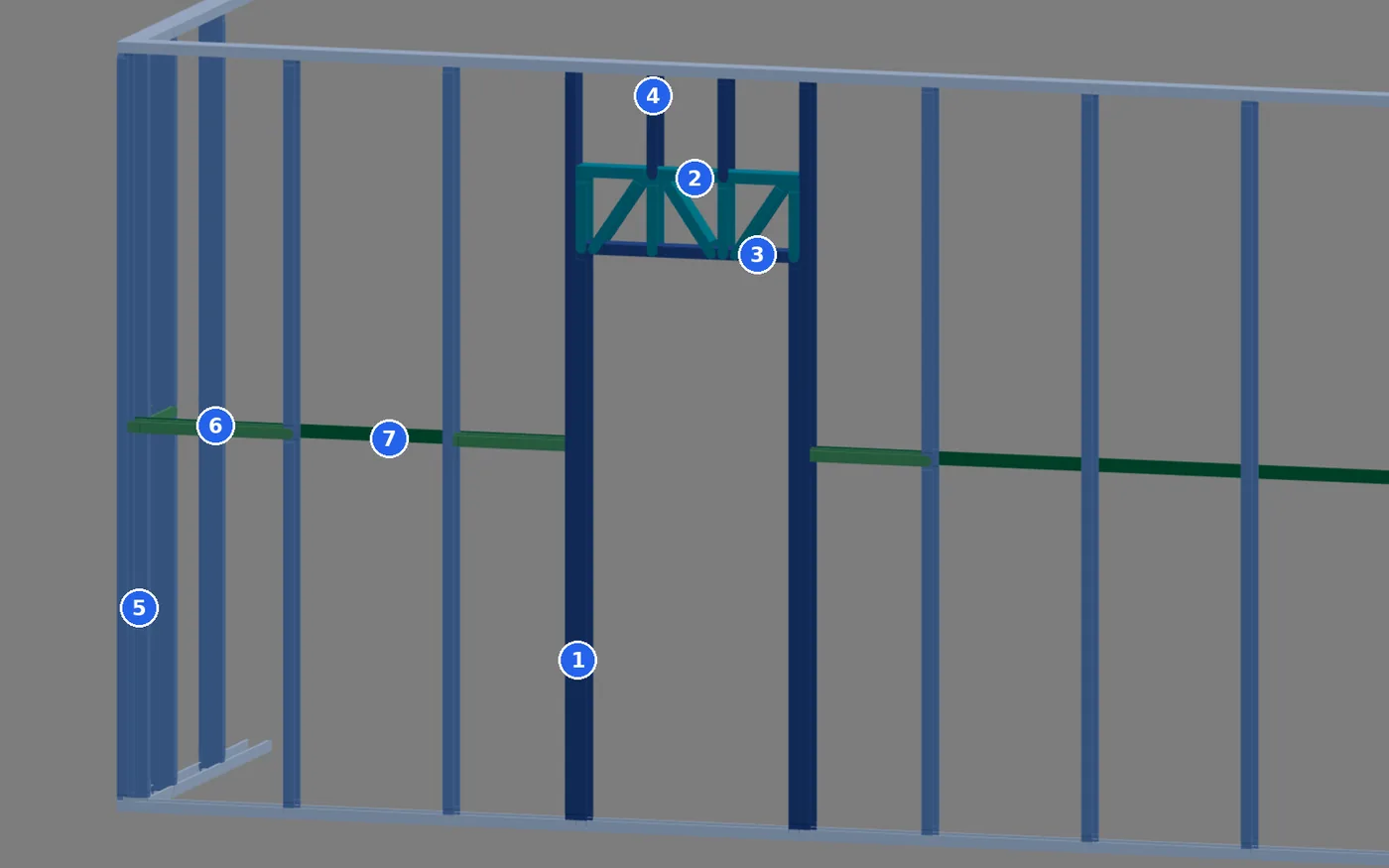
King stud (KO). Full height, from the bottom track to the top track, on each side of the opening. It holds the wall beside the window against the wind.
Jack stud (JK). Set against the king stud, it rises to the head track and supports it. The house uses the Single option of the opening dialog, one jack stud per side.
Head track (HT). The horizontal track over the opening, at the top of the window, at 2.00 m. The pieces above rest on it.
Header. Here, a lattice header: a chord on top, the head track below and verticals and diagonals between the two, 300 mm deep, the default of the opening dialog.
Cripples (CT and CB). The upper ones go from the header to the top track; the lower ones, from the bottom track to the sill.
Sill (SL). The bottom of the window, installed open side down: the lower cripple goes into its open side, as a fit.
NBR 16970-3, 4.2.1.
The structural opening is larger than the window: add to it the thickness of the finishes and of the boards lining the opening, and the sill needs a minimum slope of 5%.
The door, with dimensions, and the back-to-back king stud
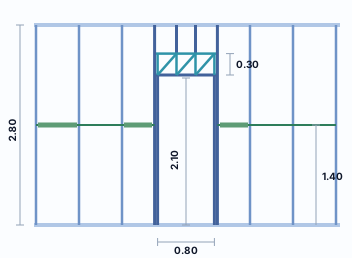
The door repeats the window without the sill: a full-height king stud on both sides, a jack stud up to the head track at 2.10 m, the 0.30 m lattice header above and, from it to the top track, two cripples. The door has a 0.80 m opening and the header spans all of it.
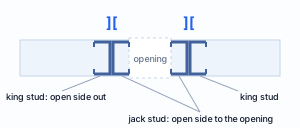
Back to back
In the FRAMECAD model the king stud sits back to back with the jack stud, like the pair of brackets ][: the king stud with its open side facing away from the opening, the jack stud and the end post of the header with their open side toward the opening. The two webs touch and are screwed through the web, with hex-head 4.8x19 screws every 600 mm, at least two, under the market rule.
Lattice or solid
The opening dialog offers a lattice header, the one in this house, or a section header. The section header is solid: Box (two sections lip to lip), I (two sections back to back through the web) or Single, and it rests on the jack stud. It is the one that uses the section from the Header row of the Structure tab, the 1.15 mm C, and it is covered in detail in Headers.
Shortcuts
- D↵
Add door
Opens the door panel, then click the wall. When armed, disarms.
- J↵
Add window
Opens the window panel, then click the wall. When armed, disarms.
- G↵
Header
Click a header to open its opening in the footer.
Blocking and bracing
Blocking and strap: the line that cuts the stud in half
A 2.80 m stud in compression, on its own, buckles sideways in a single wave, from floor to ceiling. If a piece holds it at mid-height, the wave has to fit in 1.40 m, and the force it can take rises a lot, because the critical load falls with the square of the length. That piece is the bracing line: a strap, the horizontal strap screwed to the face of the studs, and blocking, pieces of section lying flat between two studs, which give the line something to bear against.
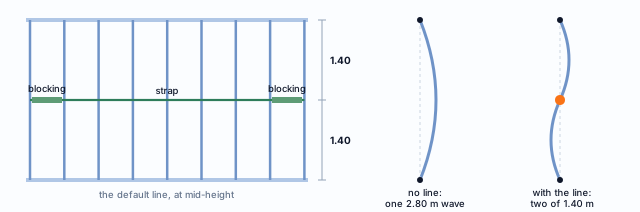
The wall is created already braced
Every new LSF wall in CalcSteel is created with one line at mid-height: with a 2.80 m ceiling height, the stud has 1.40 m unbraced. The strap goes on one face and stops at door and window openings; in each continuous run of it, blocking goes into the first and the last bay between studs, so the line has something to anchor to at both ends, and every 3.60 m, under the market rule. It is the same piece as the Strap and blocking tool: you can remove, change or add lines with it.
The market rule, in the tool
When you place bracing with the tool, the app's Brazilian market rule divides the height into equal parts of at most 1.25 m, counting the tracks. With a 2.80 m ceiling height that gives two lines, at 0.93 m and at 1.87 m, and the stud has 0.93 m unbraced.
Where it meets another wall, the strap of the butting wall stops at the face of the continuous one, without crossing it; the strap of the continuous wall runs to the end. The blocking passes over the flanges of the studs with its web notched: that is the overlap of the FRAMECAD model. And the line only counts as restraint because it is perpendicular to the stud and has strength and stiffness, as NBR 16970-2 requires in items 7.1 and 7.2.
The X strap holds the whole wall against the wind
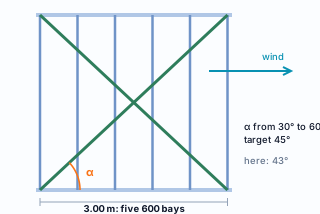
Blocking and strap hold each stud. Holding the wall is the job of another piece. Pushed sideways by the wind, a grid of studs and tracks with simple connections racks into a parallelogram. The X strap, two diagonals of steel strap from the foot of one standing piece to the head of another, prevents that: one of the diagonals stretches and holds.
In the app it is placed with the Strap and blocking tool, X strap type. The section is RET 50x0.95, the same as the strap, and by default the X strap goes on both faces of the wall: on one face only, it would twist the stud. The angle to the horizontal stays between 30° and 60°, and automatic placement aims for 45°.
Strap is thin sheet: it stretches well and cannot take compression. In each wind direction, the diagonal in tension does the work. That is why the X has two diagonals, and why the engine calculates the strap as a tie (see What the engine checks).
The warning the engine gives. If a direction of the plan has no X strap or vertical truss, the calculation shows a warning, in red, naming the direction left unbraced (X or Z): "Light steel framing: no X strap or vertical truss braces the X direction. Sheathing alone does not count as bracing: draw the strap or the truss on the walls in that direction." The example house gets its straps in Straps and blocking.
Shortcuts
- BL↵
Strap and blocking
Places bracing strap and blocking between studs.
What carries load and what only encloses
Three jobs: carry, brace and enclose
Carries load
Track, stud, corner stud, king stud, jack stud, head track, header, cripples and sill. They take the weight of the roof, the ceiling and the wall itself, plus the wind, and carry it all down to the foundation.
Braces
Blocking and strap, which hold each stud sideways; X strap, which holds the whole panel. They carry almost no gravity load, but without them the load-bearing pieces buckle too early.
Only encloses
Boards, insulation, membrane and finishes. They add weight and pass the wind to the grid but, by default in the app, they do not count as structure.
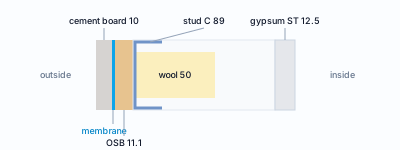
The weight of the enclosure
| Layer | kgf/m² |
|---|---|
| Exterior board | 10 |
| Interior board | 12 |
| Exterior finish | 12 |
| Interior finish | 1 |
Default for the app's Brazilian market: 35 kgf/m² of wall, about 0.34 kN/m².
The default board is 1.20 x 2.40 m. Outside, 11.1 mm OSB, fastened with bugle-head 4.2x32 screws every 150 mm at the edges and 300 mm in the field, a water-resistive membrane and 10 mm cement board; in the middle, 50 mm mineral wool; inside, 12.5 mm standard gypsum board. The board enters the calculation as weight and as the surface that takes the wind and passes it to the studs.
The board as bracing is your choice.
On the Structure tab, the "Board bracing" block has four switches: restrain distortion and reduce buckling, through the exterior panels and through the interior ones. All of them start off. Turning one on tells the engine that the board braces the studs, and the app itself flags it as outside the Brazilian standard and the responsibility of the designer. By default, the steel does the bracing.
The wall in the app: one click and the card tells you what it is
Click a wall in the 3D view or in plan and it turns orange, with a card underneath. The front wall of the house shows up as Parede 4 (wall 4), exterior, 9.00 m.

| Field | What it is |
|---|---|
| Length | the length of the wall, read-only: 9.00 m |
| Spacing | the distance between studs, in mm, editable wall by wall: 600 |
| Studs | how many standing members the wall has, counting those of the opening, the header and the corner; editable |
| Auto divide | redistributes the studs evenly, with no short panel at the end; it is grayed out on a wall with an opening, like this one, because the opening breaks the division |
| Span and Angle | the stories the wall spans (here, Ground floor) and its direction in plan (0.0°) |
| Fit 104/104 | of the 104 joints between a stud end and a track, 104 touch, with no gap |
| Web ⊥ wall ok | no stud has its web out of the direction of the wall thickness; the corner stud, turned toward the other wall, does not count as misaligned |
The buttons in the top row open the outputs of the wall: Sheet, Panel plan, Details, Connections, Typicals, Project cut list and Open view. The outputs have pages of their own: LSF sheets, Standard details and Cut list, takeoff, DXF and IFC; Connections opens the Connections panel. The Edit button opens the wall to work on it piece by piece, and Editing tools walks through it.
Shortcuts
- ED↵
Edit the wall
Edits the elements of the selected wall. Again, finishes.
with one wall selected
- AV↵
Wall view
Opens the elevation of the selected wall, seen from outside. Again, goes back.
with one wall selected
- AD↵
Auto divide
Spreads the studs evenly. With studs selected in the view, only that stretch.
with one wall selected
- PN↵
Panel sheet
Creates the panel sheet of the selected walls, or opens the existing one.
with walls selected
- PP↵
Panel plan
Creates a panel plan of the wall's storey, a new one each time.
with walls selected
- LO↵
Project cut list
Creates the missing cut list sheets of the project and opens the first.
with walls selected
What the engine checks
Each piece, its own check
The LSF engine builds the member model of the whole house, computes the forces for each combination and checks each member under NBR 14762, with the LSF rules of NBR 16970-2 on top. The role of the piece decides what goes into the calculation.
| Piece | What the engine checks | Basis |
|---|---|---|
| Stud and corner stud | compression, bending from wind and both combined, with the unbraced length between bracing lines; slenderness up to 200; mid-height displacement up to h/300, measured between the ends | 14762: 9.7, 9.8, 9.9, 9.7.4; 16970-2: 7.1, Table 3 |
| King stud, jack stud, cripples | they work as studs; the cripples are pinned at the ends, because they bear on a continuous piece | same |
| Track | a member of the model, segment by segment, from stud to stud; web crippling where the standing piece bears; a segment shorter than the section depth is not a beam and gets no bending checks | 14762: 9.8, Annex D |
| Head track and sill | members pinned at the ends, checked with the forces from the model | 14762: 9.7 to 9.9 |
| Lattice header | chord, head track, verticals and diagonals as truss members, each with its own force | 14762: 9.6 to 9.9 |
| Solid header | pinned at the ends; deflection up to L/500 | 16970-2: Table 3 |
| Blocking | compression, over its own length, under the bracing force of the line | 16970-2: 7.2; 14762: 9.7 |
| Strap | tension only, under the same force; the stiffness of the line against the required minimum | 16970-2: 7.2; 14762: 9.6 |
| X strap | tie: in each combination the diagonal in compression leaves the model, and the one in tension works | 14762: 9.6 |
| The whole wall | top up to H/400 and, between stories, up to h/500; the warning for a direction without bracing | 16970-2: 8.2 |
The force in the bracing line
For each braced stud, NBR 16970-2 (7.2) requires a force Fbr = 0.004·NSd and a stiffness Sbr = 2·γr·NSd/Lbc, with γr = 1.35. The engine adds up the shares of all the studs the line braces, combination by combination, up to the point where it is anchored, and checks strap and blocking with that sum, in a step of its own: the line does not enter the member model of the house.
Why the strap leaves the model
A strap in compression buckles under almost nothing. If the model kept it, it would carry a compression it cannot carry. In each combination the engine removes the diagonal in compression and redoes the calculation, and only the one in tension stays, as in the real wall.
And what stays with the designer
Knowing what the engine does not check is as useful as knowing what it does. Three items of the wall stay outside the member calculation and are the responsibility of the design.
- The strength of the connections. The number of screws at each joint comes from the market fastening rule: it is a construction rule, and the app counts and lists it. The strength of the self-tapping screw, in shear and pull-out, is item 10.5 of NBR 14762, and it is not part of the member checks.
- Anchorage to the foundation. The anchors that hold the bottom track to the foundation and keep the wall from overturning and lifting under wind are item 6 of NBR 16970-2. The support reactions come out of the calculation; designing the anchorage is up to the project.
- The board as structure. With the board bracing switches off, the default, the board is only weight and wind surface. Turning a switch on makes the engine count on it, and the responsibility for that choice is yours.
The Brazilian market fastening rule
| Joint | Screw | Quantity |
|---|---|---|
| Stud in track | wafer-head 4.2x19, through the flange | 2 per end |
| Opening pieces | hex-head 4.8x19, through the web | every 600 mm, at least 2 |
| Corner, T and X | hex-head 4.8x19, in a zigzag | every 200 mm |
| Track splice | wafer-head 4.2x19 | 4 on each side, 150 mm overlap |
| OSB 11.1 board | bugle-head 4.2x32 | 150 mm at the edges, 300 mm in the field |
Default values for the app's Brazilian market, editable, based on the IFSul LSF handbook and the OSB DATec 015. The 200 mm spacing at the corner is the app default.
Fixing to the finished wall, NBR 16970-3, 5.3.2 and 5.3.3.
Heavy objects are fixed to the stud, single or double, with a screw or a screw and anchor, with 400 mm between points. Sink and laundry countertops, TV brackets, accessibility devices and hammock hooks need reinforcement planned in the design and installed before boarding.
Shortcuts
- Ctrl+Enter
Calculate the project
Sends the project to the engine, like the Calculate button.
Summary
The wall, in one line
Tracks on the floor and at the top → studs every 600 mm, counted from the corner of the project → one stud from each wall at the corner → around the opening, king stud, jack stud, head track, header and cripples → a line of blocking and strap at mid-height → X strap in both directions → board that encloses and adds weight.
The example so far
- 9 x 7 m: single story, four L corners
- 2.80 m: ceiling height
- P1 J1: 0.80 x 2.10 door and 1.20 x 1.00 window
- 1.40 m: unbraced stud
Sources for this page.
ABNT NBR 16970-2:2022 (3.3, 3.5, 3.6, 3.8, 3.9, 3.12, 4.1, 4.2, item 6, 7.1, 7.2, 8.2 and Table 3). ABNT NBR 16970-3 (4.2.1, 5.3.2, 5.3.3), from the national public consultation text. ABNT NBR 14762:2010 (9.6, 9.7, 9.7.4, 9.8, 9.9, 10.5, Annex D), cited by item. CBCA manual Steel Framing: Engenharia, 2.2.2 and example 6.4: bracing line at mid-height. IFSul LSF handbook and OSB DATec 015: fastening and enclosure. CalcSteel FRAMECAD connection model, October 2026: codes, joint kinds, corner and back-to-back king stud. Sections, spacings, loads, boards and market rules: CalcSteel catalog, October 2026. The screenshots are from the app; the diagrams are our own drawings.