LSF (Light Steel Framing)
Hip-roof garage
A 6 x 6 m garage with a 5 m garage door, a side door and a hip roof. Little wall and one large opening: the example shows where to put the garage door, how to frame the opening and how to close the bracing when the garage door wall has no room for a strap.
Overview
Little wall, one large opening
The garage is the opposite of the 60 m² house. There, there were eight walls and six small openings; here there are four walls, none of them interior, and one of them is almost all garage door: a 5.00 m opening in a 6.00 m wall.
That changes three decisions. Where to put the garage door relative to the roof, how to span the 5.00 m without a stud in the middle, and how to brace the garage door wall when no solid panel is left for the strap. Each one has its own tool, and the example shows the order in which they come in.
The rest is the usual path: wizard, walls, openings, strap, bracing lines, roof, calculation and outputs, one step per tool, with the page that teaches it.
The brief
What the client asked for
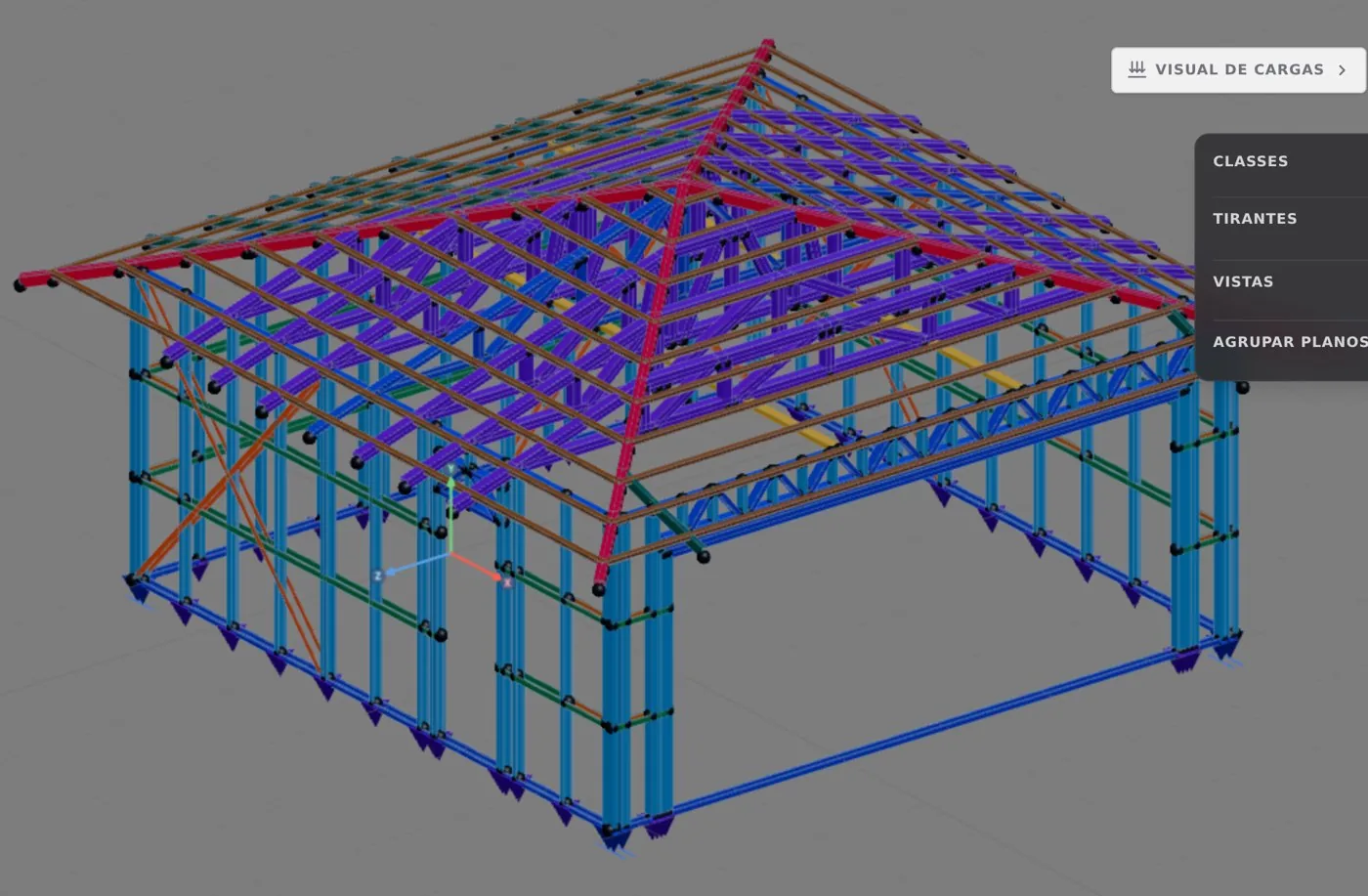
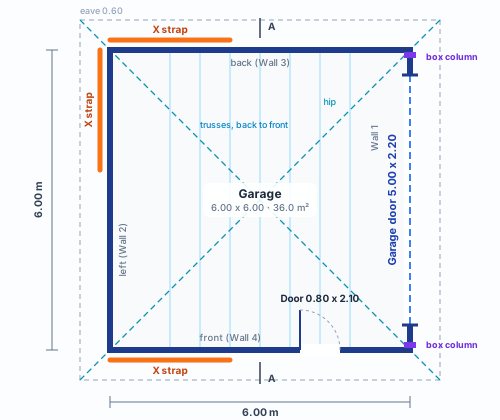
A 6.00 x 6.00 m square on the axes, with no interior wall, for one car and a workbench. The 5.00 x 2.20 m garage door is on the right-hand wall, which the app calls Wall 1; the 0.80 x 2.10 m door is on the front (Wall 4), near the garage door corner. The back and the left are solid walls. The roof slopes down on all four sides.
| item | value |
|---|---|
| Built area | 36.0 m² (6.00 x 6.00 m on the axes) |
| Ceiling height | 2.60 m, one story |
| Walls | four exterior, no interior |
| Garage door | 5.00 x 2.20 m, in Wall 1, centered |
| Side door | 0.80 x 2.10 m, Wall 4, from 3.80 to 4.60 m |
| Roof | hip roof, 30%, 0.60 m eave, ceramic tile |
What this example adds
Three tools the 60 m² house did not use: the Header changed on a single opening, the wall Lattice truss, partial, over the garage door, and the box Column at the corners. One roof decision: with four slopes, the garage door sits on a side that takes little load. And one fix through the profile card.
Section and the garage door wall
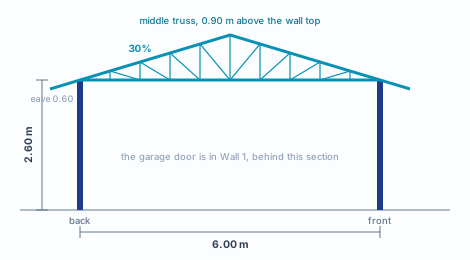
Section A cuts the garage from back to front and shows the 2.60 m ceiling height and the planes at 30% (16.7°), with the 600 mm eave on both sides. On a square with a hip roof, the four planes meet at a single point: four hips and no ridge.
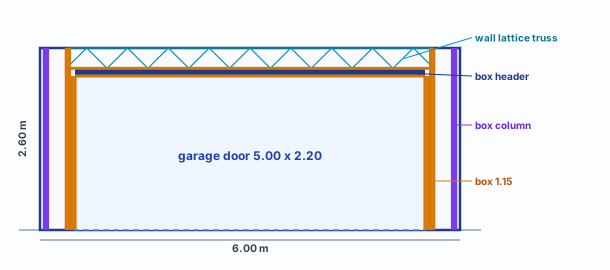
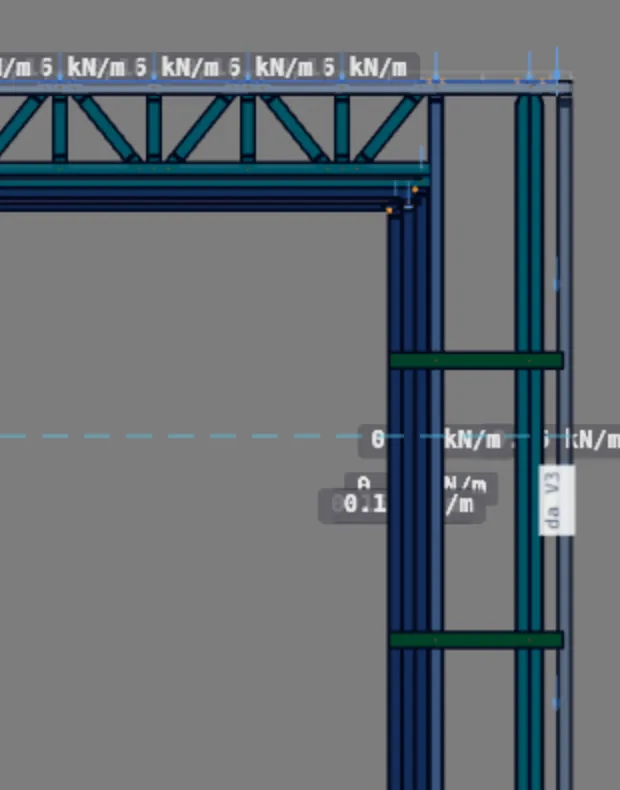
The elevation of Wall 1 shows how the garage door opening is closed at the top. The low header (box, 89 mm) bears on the jack studs; the wall lattice truss fills the band between the header and the top track and spans the opening from stud to stud, from 0.375 to 5.625 m, with its ends on the cluster of upright members that flanks the garage door. At each corner, a box column runs from track to track. In amber, the members boxed at 1.15 mm: those on the side of the opening (step 13) and those the calculation asked for (The calculation).
The decisions
Before the first click
Most rows are the defaults of the new project wizard with the Brazil market. The four at the bottom belong to this example, and each one is explained in the assembly step where it comes in.
| decision | value in this garage | where to learn it |
|---|---|---|
| Market and standards | Brazil, NBR 8800 and NBR 14762 for the cold-formed steel design | The standards, Market and catalog |
| Fabrication | new roll-formed project, FRAMECAD F325iT roll former | New project wizard, Roll-former file |
| Wall steel and section | ZAR-230; C 89 x 41 x 12 mm, 0.95 mm sheet, for stud, track and blocking | Steel and sections, New project wizard |
| Module | studs every 600 mm | Anatomy of a wall, Exterior walls |
| Stories | one, 2.60 m ceiling height, intermediate floor on "Without" | New project wizard, Floors |
| Joints | four L corners; no interior wall, no T | Wall joints |
| X bracing | X strap in the corner panel with no opening on the back, the left and the front, on both faces, with a double stud at the end | Straps and blocking |
| Bracing lines | Blocking with the market rule: two lines at 0.87 and 1.73 m, on all four walls | Bracing |
| Roofing and wind | ceramic tile; wind per NBR 6123:2023 with the wizard defaults: V0 = 40 m/s, terrain II, class B, enclosed garage, q = 85 kgf/m² (831 Pa) | Roof, Loads |
| Garage door header | Box, C 89 at 1.15 mm, two jack studs per side; the side door keeps the project rule | Headers |
| Wall lattice truss | partial, on the top track, pointing down, 291 mm deep, from stud to stud (0.375 to 5.625 m): the bottom chord bears on top of the header and ends beside the opening | Lattice trusses |
| Garage door wall | the strap does not fit; a box column against each corner, from track to track; the nine members on the side of the opening boxed at 1.15 mm (step 13) | Columns, Straps and blocking, Studs |
| Roof | by outline, hip roof at 30%, 600 mm eave; trusses parallel to Wall 1 and the roof classes at 1.15 mm | Roof trusses, Roof, Trusses as plane frames |
The rule of the three garage door decisions. First the roof, because it says how much load reaches the garage door wall. Then the opening: a low header with a wall lattice truss above it. Last the bracing, because the strap can only be decided once you know how much solid panel is left. When none is left, the upright members at the ends and beside the opening hold the wall in its own plane, and those are the ones the calculation looks at first.
The assembly
From the wizard to the openings
One step per tool, in the order the garage was built. In parentheses, the page that teaches the step.
1. New project through the wizard (New project wizard)
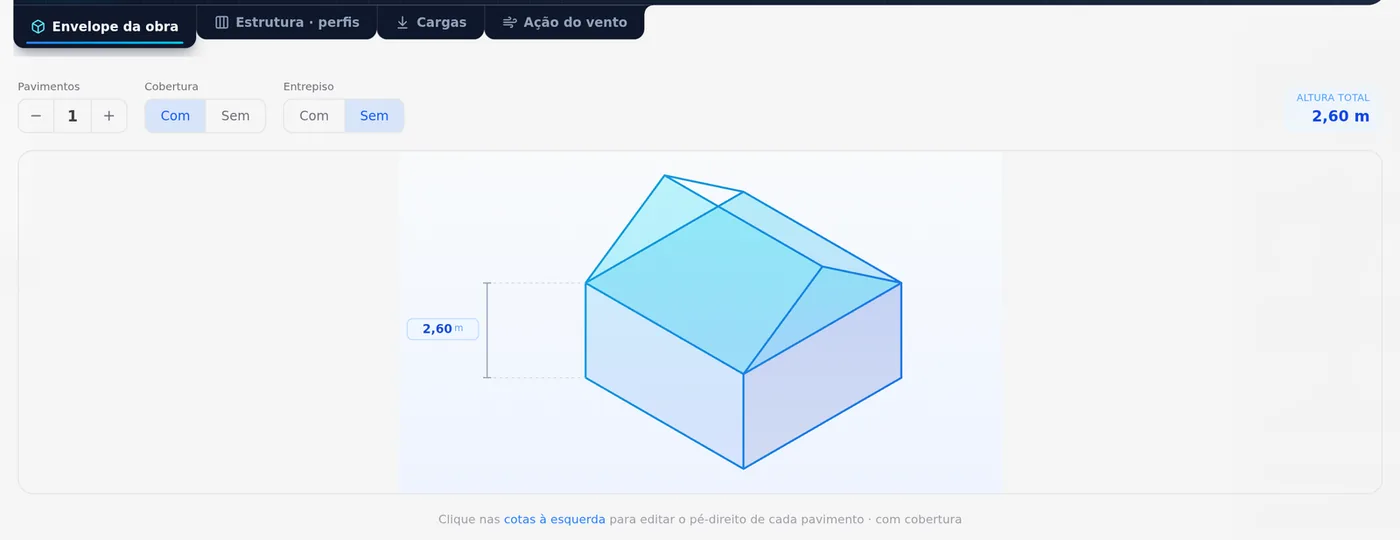
Brazil market, roll-formed project on the FRAMECAD F325iT, one story, intermediate floor on "Without" and roof on "With". The only field that leaves the default is the ceiling height: 2.60 m, typed in the stories step.
2. The perimeter with Exterior wall (Exterior walls)
In Plan, four 6.00 m sides typed in, the last one closing on the starting point. The four corners become L joints on their own. With no interior wall, there is no T joint to decide: the whole garage has four joints.
3. The garage door and the door with Opening (Doors and windows)
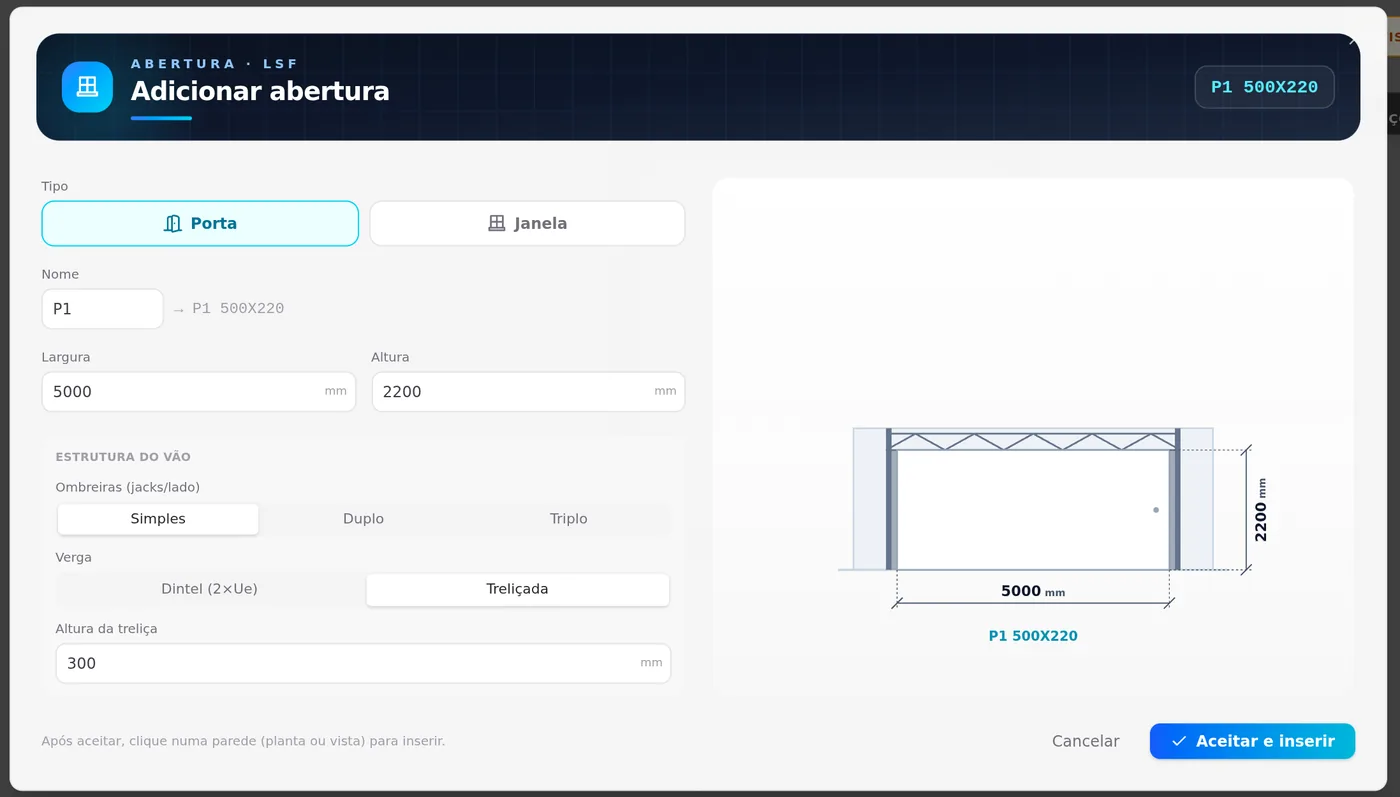
Two openings of the door type. The 5000 x 2200 mm garage door in the middle of Wall 1, with 0.50 m of wall on each side, and the 800 x 2100 mm door in Wall 4, centered 4.20 m from the left corner. Both go in with Single jambs. In the Header field the dialog offers Box (2×Ue) and Lattice; the garage door goes in with the 300 mm Lattice that comes selected.
The garage door wall: header and bracing
4. The garage door header as Box, with two jack studs (Headers)
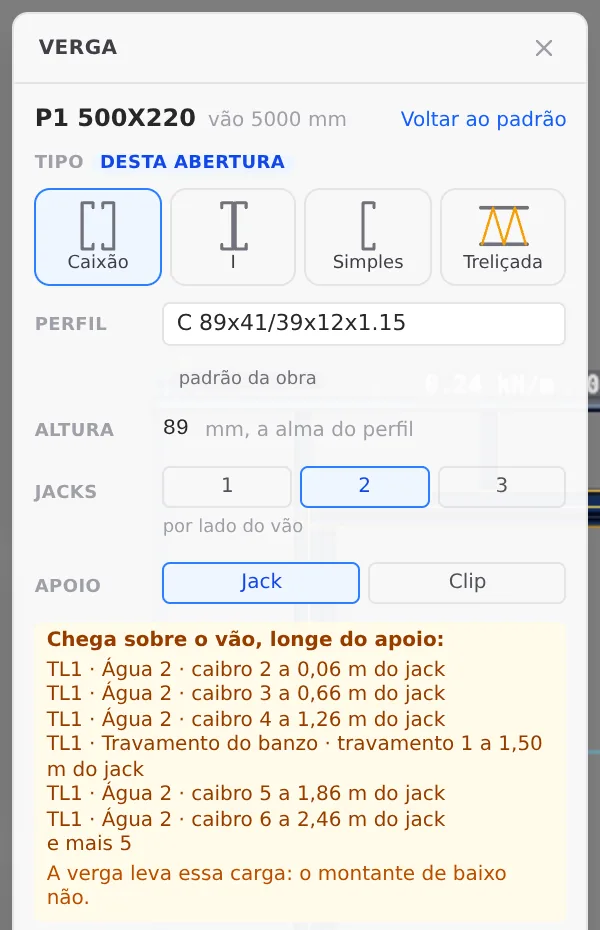
With the Header tool, one click over the garage door opening opens the box for that opening. In Type, switch to Box: two C sections facing each other, the make-up a stick-built project uses by default. In Jack studs, choose 2 per side of the opening: with 5.00 m, each end of the header takes twice the load of an ordinary door, and two jack studs share the support. The box marks "this opening" and shows the section (C 89 at 1.15 mm, the project default) and the 89 mm depth. The side door does not change.
Box, I and Single are the three make-ups of the Box (2×Ue) header in the insert dialog (two Cs facing each other, back to back, or just one); Lattice is the fourth option. Changing it here applies to this opening only, and "Back to default" undoes it.
The header stays low on purpose. The box warns what lands on the opening, away from the support: the rafters of the plane that slopes onto Wall 1 and a roof chord brace. What collects that load and spans the 5.00 m is the wall lattice truss of step 7, which will fill the top band; the header keeps the jack studs and the support of the truss bottom chord.
5. Why there is no strap on Wall 1 (Straps and blocking)
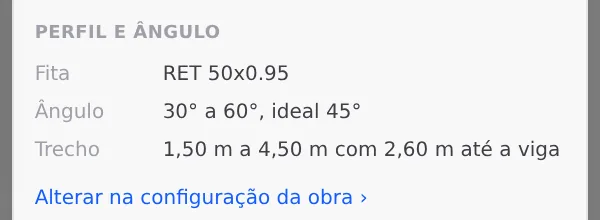
The Strap and blocking box states the market rule: an angle of 30° to 60°, ideally 45°, and, with 2.60 m up to the beam, a span of 1.50 m to 4.50 m. Beside the garage door there are 0.50 m left on each side, a third of the minimum. Try the span and the tool refuses: "no stretch of this wall fits the strap: solid wall is missing between openings".
Without a strap, Wall 1 works as a frame: the corner columns (step 6), the truss above (step 7) and the upright members that flank the opening hold the wind in its plane together. That is why the calculation looks at those members first (The calculation). The other three walls get the strap as usual (step 8), and they are the ones that brace the garage.
Columns at the corners and a truss over the opening
6. The box column against each corner (Columns)
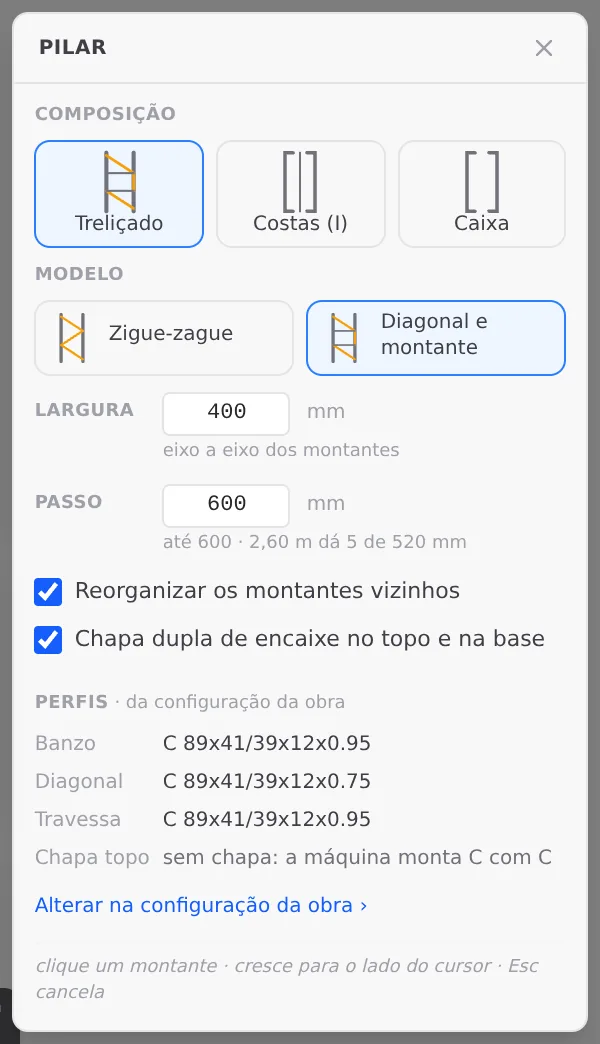
Without a strap, the corners of Wall 1 are the points that hold the frame, and the Columns page says how: a column against the corner, as a box when it sits next to an opening. Between the corner and the garage door there are 0.50 m left, already taken by the jamb and the jack studs; the lattice column, at 400 mm, would take the whole stretch. The box fits beside the corner stud.
Column tool, make-up Box: two C 89 studs at 0.95 mm, the sections from the project settings. One click on the stud right after the corner, and it becomes the column, from track to track. Repeat at the other corner.
7. The wall lattice truss, partial, over the opening (Lattice trusses)
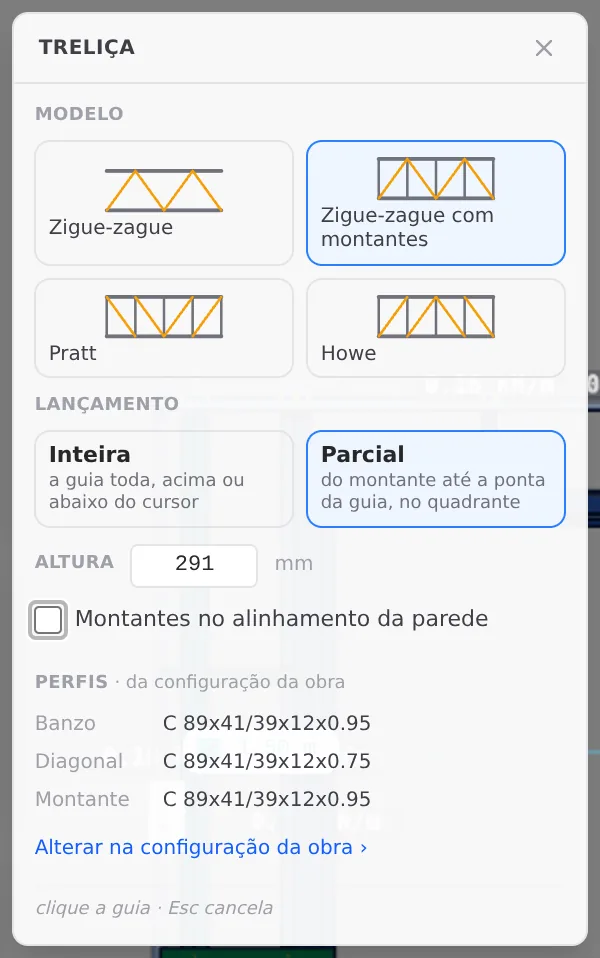
In the Wall 1 view, the Lattice tool with the Zigzag with verticals model and the Partial placement, which runs from a stud to the end of the track, in the chosen quadrant. The right depth is that of the free band between the top of the header and the top track: from the top of the header, 2.309 m above the floor, to the top track, at 2.60 m, there are 291 mm. At 295 mm the ghost already turns red, and the box explains: "Its chord sits below the header of a door or window in this wall". Type 291 mm and turn off "Studs in the wall alignment", so the truss verticals follow the truss spacing and not that of the opening.
Three clicks: the top track, from below it; the stud at 0.375 m, the first of the cluster of upright members beside the garage door; and the quadrant to the right, pointing down. The truss runs to the last stud before the corner, at 5.625 m, and the inspector shows Partial, 5250 mm. Both ends sit on the cluster that flanks the opening, and the bottom chord bears on top of the header.
Strap, bracing lines and roof
8. The strap on the three solid walls (Straps and blocking)
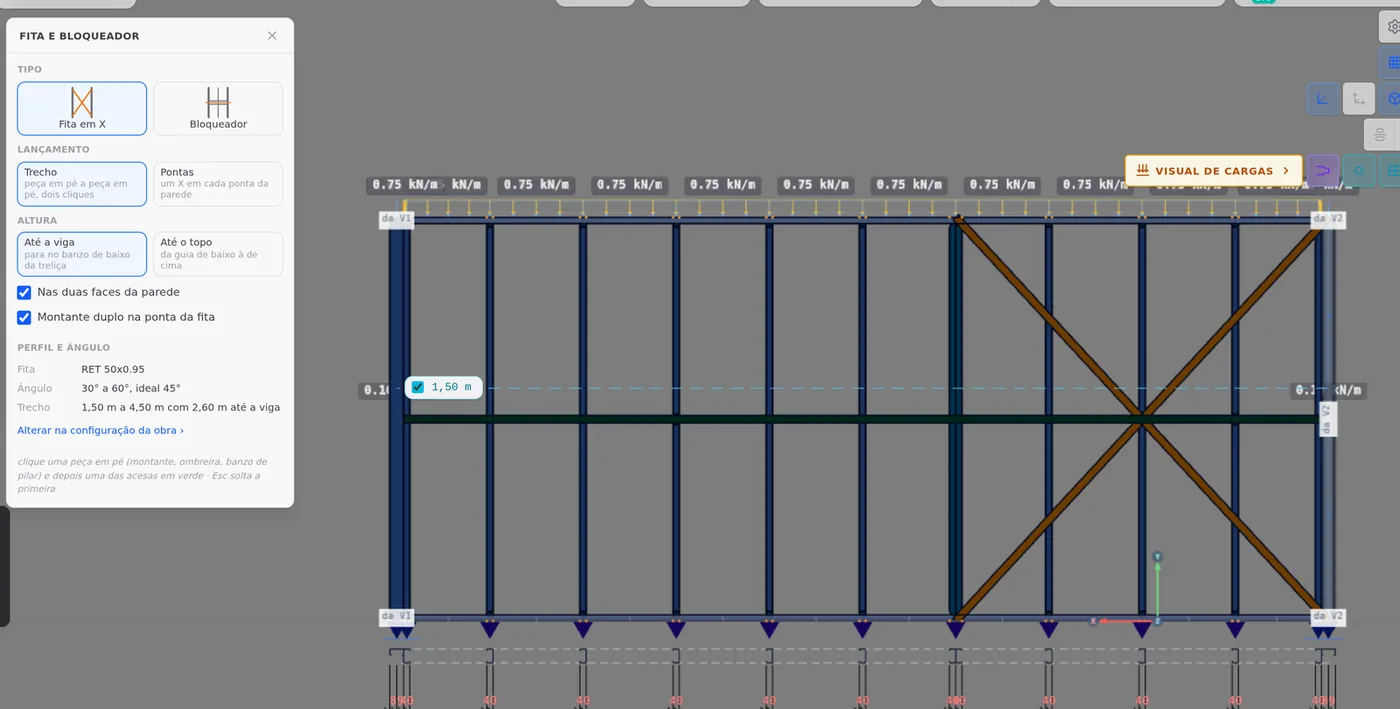
In the view of the back (Wall 3), the left (Wall 2) and the front (Wall 4), the Strap and blocking tool with X strap, Span placement, "On both faces of the wall" and "Double stud at the strap end" turned on. On each one, a click on the corner stud and another on the stud 2.40 m from it: the span fits the 1.50 to 4.50 m range. On the front, the X goes in the left corner, away from the door.
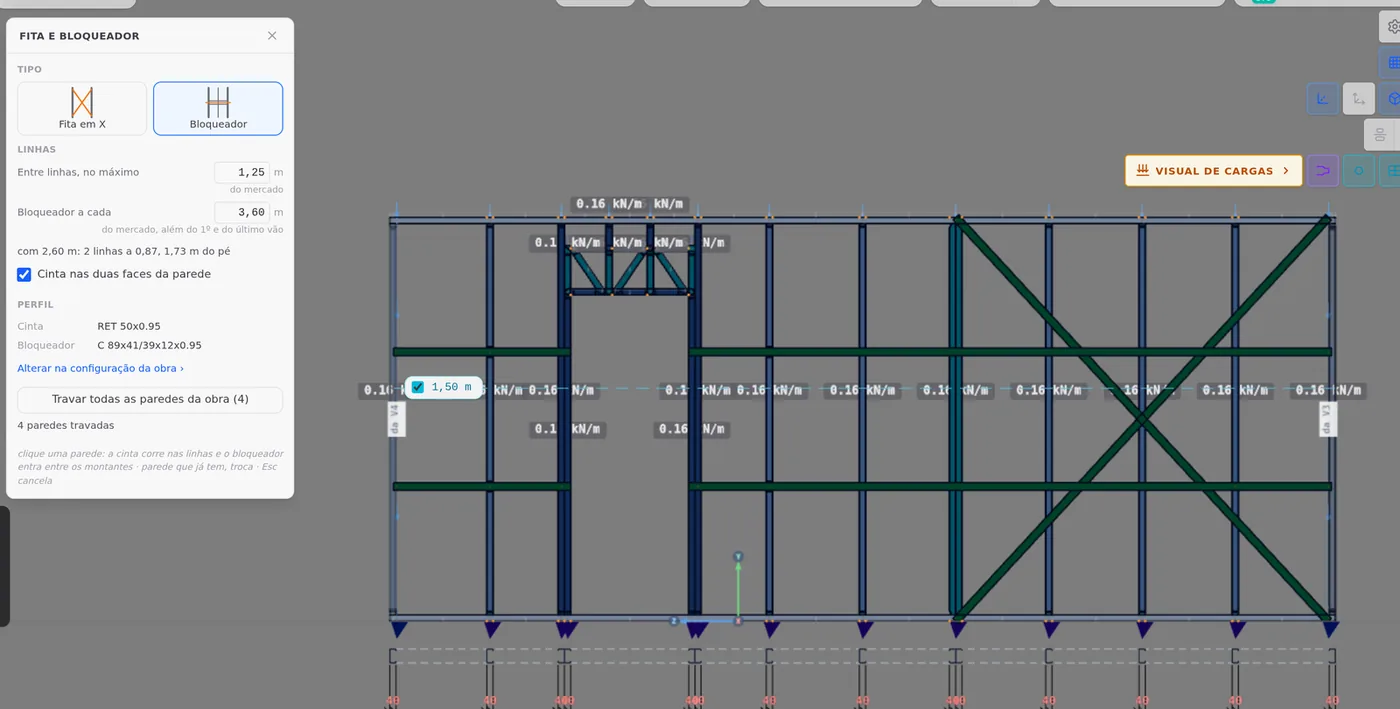
9. The bracing lines on all four walls (Bracing)
The same tool with the Blocking type and the button that braces every wall in the project: the box says "4 walls braced", with strap and blocking on the two lines of the rule.
10. The hip roof (Roof trusses and Roof)
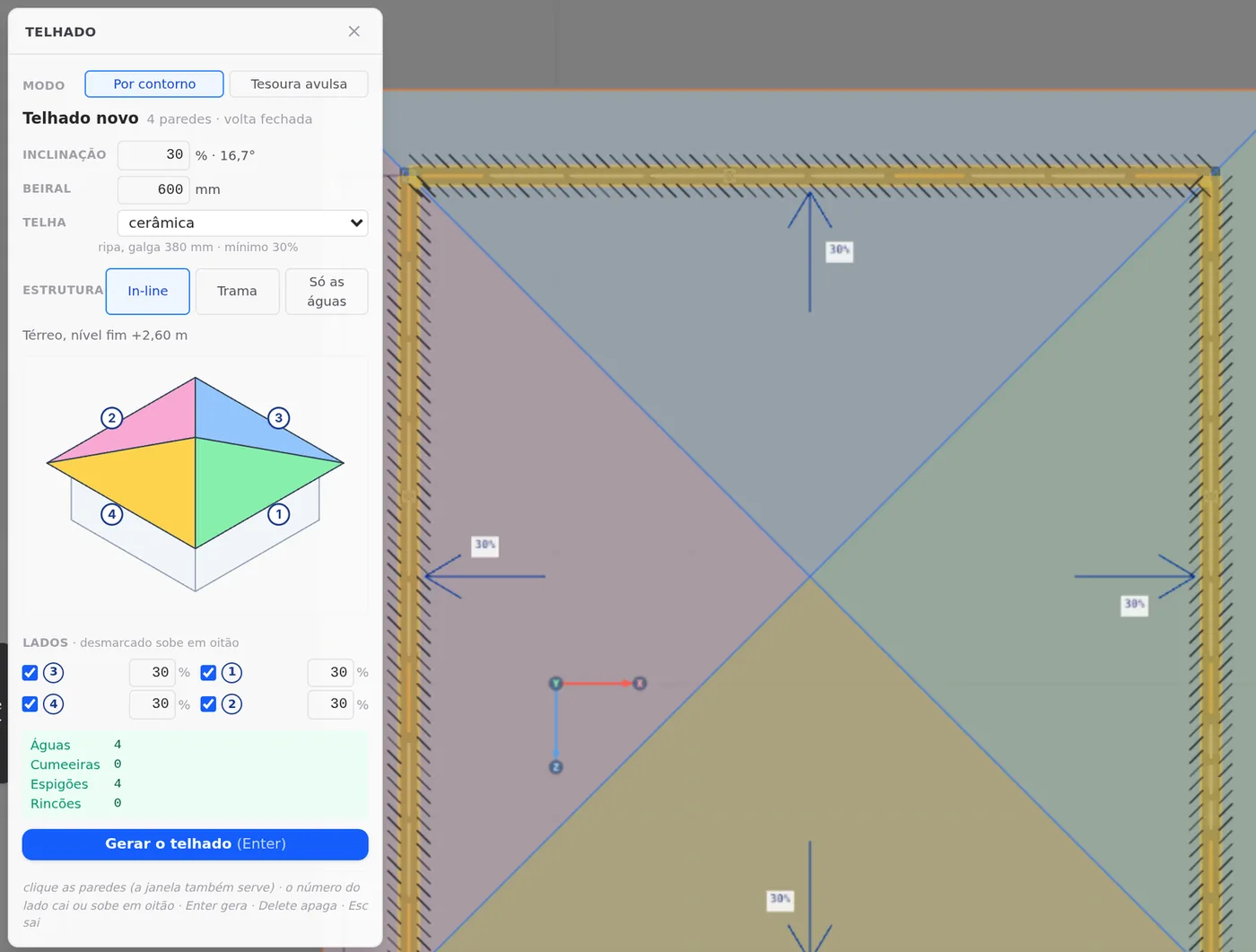
Roof tool, By outline mode: one click on each wall closes the loop, and all four sides are marked as "slopes down". A pitch of 30%, an eave of 600 mm, ceramic tile and In-line structure. The box summary checks the shape before generating: 4 planes, 0 ridges, 4 hips and 0 valleys. Enter generates it.
Checking the trusses and strengthening the roof
11. Where the trusses landed (Roof trusses)
After generating, check the trusses by the bar labels, TL:TL1:T1 to TL:TL1:T7. In this garage all seven run from back to front, parallel to Wall 1, every 600 mm, from 1.20 m to 4.80 m from the left corner, and each one lands on a stud of the back wall and of the front wall.
That is the orientation you want. The garage door sits on a hip side, which takes only the end of the plane; no truss bears over the 5.00 m opening, and the load that reaches Wall 1 is that of the members the header box already pointed out. Had the trusses come out spanning across the garage, bearing on Wall 1, the garage door opening would carry a whole truss every 600 mm.
12. The roof classes at 1.15 mm (Trusses as plane frames)
In the class list, change the section of Tesoura comum (common truss), Tesoura truncada (truncated truss), Espigão (hip) and Caibro (rafter) to C 89x41/39x12, 1.15 mm. It is the lesson of the 60 m² house: with ceramic tile, the top chord at 0.95 mm does not pass combined compression and bending, and changing the class changes all its bars at once. On Tesoura truncada, also check Caixote [] (box), as the Espigão already comes: the top chord of the flat top is long and in compression, and the box doubles the section.
13. The members on the side of the opening boxed at 1.15 mm (Studs)
Without a strap, the upright members that flank the garage door carry the wind in the plane of Wall 1, and they are the ones that receive the ends of the header and of the truss. On each side, the cluster has the stud where the truss ends (at 0.375 m and at 5.625 m), the king stud and the two jack studs; over the opening, the head track. That makes nine members, and they are boxed at 1.15 mm.
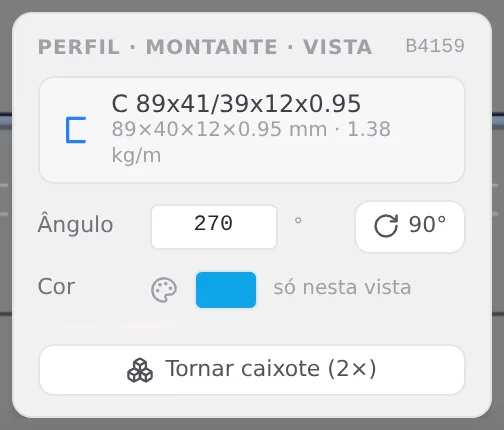
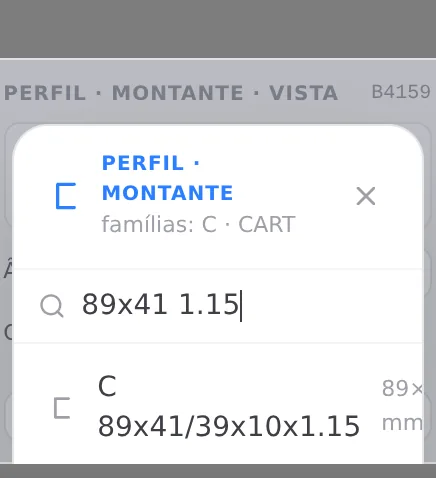
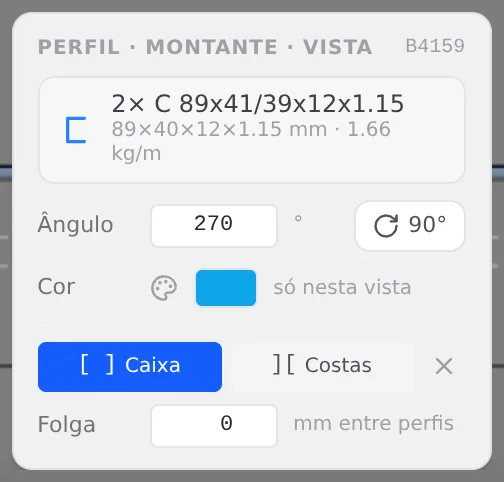
In the Wall 1 view, select one of them. In the profile card, next to the bar card, click the section name and search for 89x41 1.15: the list shows the one with a 10 mm lip first, and the project one is C 89x41/39x12x1.15. Then Tornar caixote (2×) (to box it), with Caixa (box) and gap 0. Repeat on the other eight.
Shortcuts
- W↵
Exterior wall
Draws the wall point by point. Type a distance and Enter.
- AB↵
Opening in the wall
Opens the door or window panel for the wall open in the view.
wall view open
- G↵
Header
Click a header to open its opening in the footer.
- BL↵
Strap and blocking
Places bracing strap and blocking between studs.
- C↵
Column
Places an LSF column: click a stud.
- U↵
Lattice truss
Places a flat lattice truss on the wall track.
- T↵
Roof
Arms the roof: click the outer ring of walls and Enter. When armed, disarms.
in plan view
- AV↵
Wall view
Opens the elevation of the selected wall, seen from outside. Again, goes back.
with one wall selected
- PL↵
Plan view
Goes to plan view. With the wall view open, closes it and keeps the wall selected.
The calculation
First calculation, fix and the green badge
14. The loads (Loads)
Nothing is entered by hand. The wizard stored the loads per area and the wind data, and Load cases shows three cases: PP Parede (wall dead load), PP Telhado (roof dead load) and SC Telhado (roof live load). The eight wind cases, four directions with two Cpi each, are created at calculation time, and the standard combines everything into 26 combinations.
15. The first calculation (Loads and Reading the results)
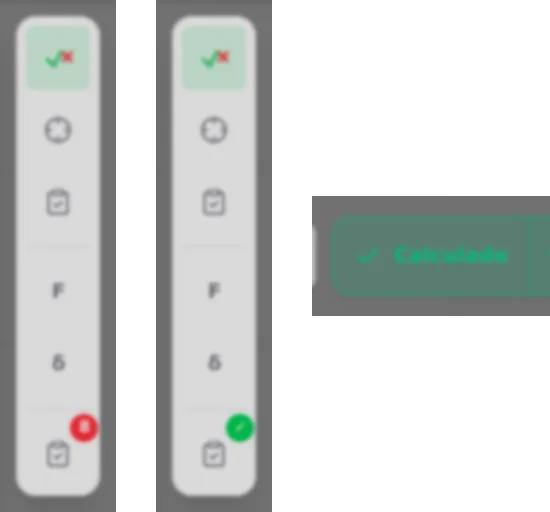
Calculate in the LSF panel. The badge of the results card flags 8 failed out of 621 checks, all in Wall 1 and all in combinations with wind at 90° or at 270°, which blows along the Z axis: it hits the back and the front head-on and runs in the plane of the garage door wall.
| members | what they are | ratio | check |
|---|---|---|---|
| M31, M32, M33 | 4 cm track stubs, 0.95 mm, between the upright members of the cluster on one side of the garage door, at the foot of the wall | 1.73 · 1.11 · 1.93 | shear |
| M51, M52, M53 | the same stubs, in the cluster on the other side | 2.10 · 1.07 · 1.77 | shear |
| JB11, JB12 | the two pieces of the truss bottom chord, 2× 0.95 mm | 1.30 | slenderness |
Without a strap, what holds Wall 1 in its plane is the cluster of upright members on each side of the opening, tied together by the bottom track. The track stubs between those members are the shortest stretch of the path, and the shear concentrates in them. The truss bottom chord is long and slender: it fails in slenderness, which is the length over the radius of gyration of the section.
16. The fix, through the profile card (Studs and Trusses as plane frames)
The path is the one from step 13. In the Wall 1 view, zoom in on the foot of the cluster and click each stub (the bar card shows a length of 0.04 m); in the profile card, C 89x41/39x12x1.15 and Tornar caixote (2×), with Caixa and gap 0. On the truss bottom chord, the member whose label starts with TB:, the same change. It is the rule of Trusses as plane frames: a thicker sheet barely changes the slenderness, and the box changes the section.
17. Calculate again
The badge turns green and the button goes back to Calculated. The six stubs close between 0.34 and 0.78, and the bottom chord at 0.848.
- 621: checks in the results card
- 0: failed, with the green badge
- 0.848: highest ratio, in the truss bottom chord
- 26: design combinations
The governing members
With the garage green, the results card and the calculation report say who works hardest. The two pieces of the truss bottom chord, JB11 and JB12, are members of the analysis model, and their ratio is read in the report, at the top of section 4, the summary of checks. The others open through the bar report, with a click in 3D.
| member | section | ratio | governing check | combination |
|---|---|---|---|---|
| JB11 and JB12, truss bottom chord | 2× C 89, 1.15, Caixa | 0.848 | slenderness | CB11 and CB23 |
| M3, back wall stud under the truss at 1.80 m | C 89, 0.95 | 0.837 | combined compression and bending | CB25 |
| JK:3r3clp:P1:R0, garage door jack stud | 2× C 89, 1.15, Caixa | 0.837 | combined compression and bending | CB10 |
| M51, track stub of the cluster | 2× C 89, 1.15, Caixa | 0.783 | shear | CB13 |
| VG:3r3clp:P1, garage door header | C 89, 1.15, box | 0.04 | combined tension and bending | CB15 |



No member in the table is governed by CB2, the one with vertical loads only: all of them come from wind at 90° or at 270°. The CB25 of M3 takes the dead loads at 1.4, the live load at 0.7 and the V4− wind (270°) at 1.4; M1012, on the front, comes right behind, at 0.826 in CB13. The CB11 of the chord takes the dead loads at 1.0 and the V2+ wind (90°) at 1.4: the self-weight relieves instead of adding. The roof stays far away: a top chord of truncated truss T7 at 0.51 and one of common truss T4 at 0.43, in CB2.
Shortcuts
- Ctrl+Enter
Calculate the project
Sends the project to the engine, like the Calculate button.
The outputs
Garage sheets
18. Sheet and panel plan (LSF sheets)
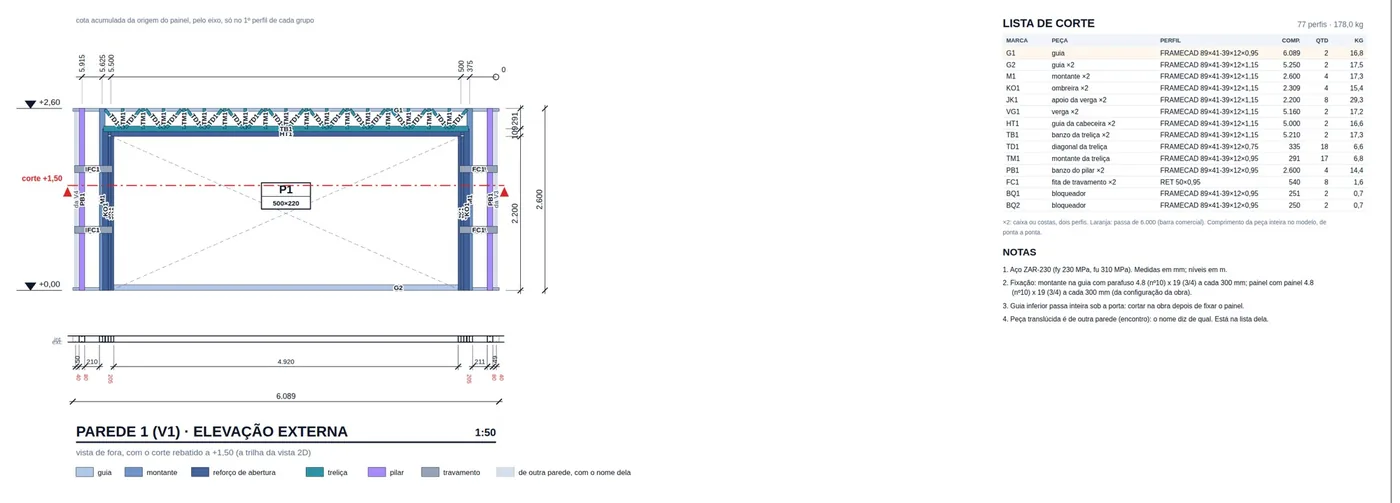
Click Wall 1 and the footer of the LSF tab shows its name, "exterior · 6.00 m", and the output buttons: Edit, Sheet, Panel plan, Details, Joints, Typicals, Project cut list and Open view. The Sheet for Wall 1 carries the exterior elevation at 1:50, with the P1 500x220 garage door, the truss above it and the columns at the corners, and beside it the panel cut list: 77 members and 178.0 kg. The Panel plan numbers the four walls from V1 to V4 and marks the X strap on the three solid walls. Downloading in PDF or DXF follows LSF sheets.

Cut list, takeoff and calculation report
19. Cut list and takeoff (Cut list, takeoff, DXF and IFC)
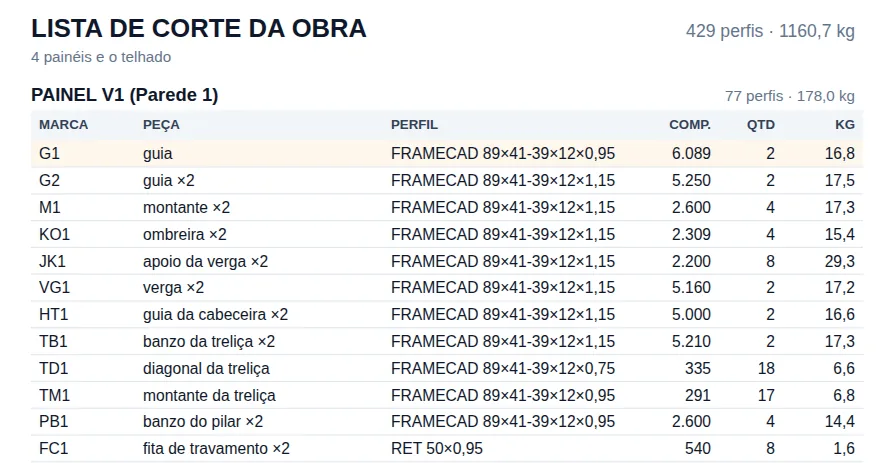
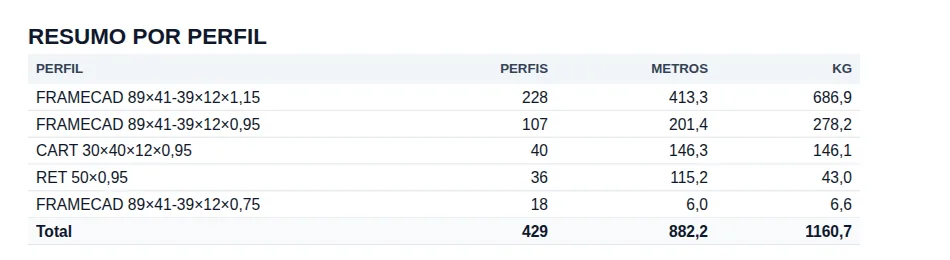
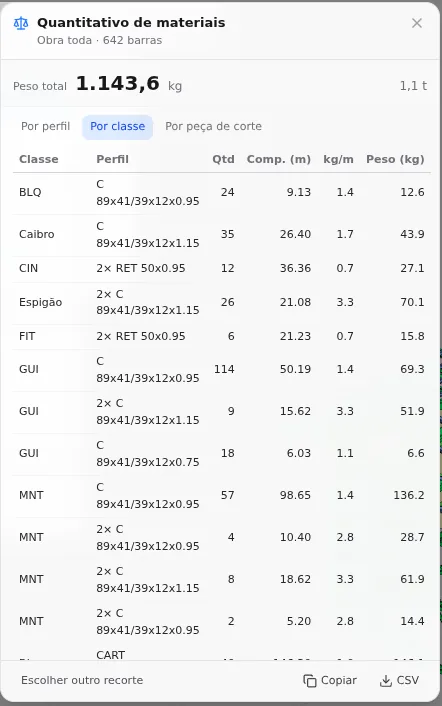
Project cut list, in the same footer, gathers the four walls and the roof: 429 members and 1,160.7 kg. The Material takeoff adds up the 642 bars of the model: 1,143.6 kg. The two outputs count in different ways, as Cut list, takeoff, DXF and IFC shows: the list belongs to the shop, piece by piece, and the takeoff belongs to whoever buys and compares projects. The weight of the project is read in the takeoff.
20. The calculation report (Calculation report)
With more than 300 bars, the report is built on the server: through the report button on the results card, under Full project, the card Generating the calculation report… turns into Calculation report ready, with Download PDF.
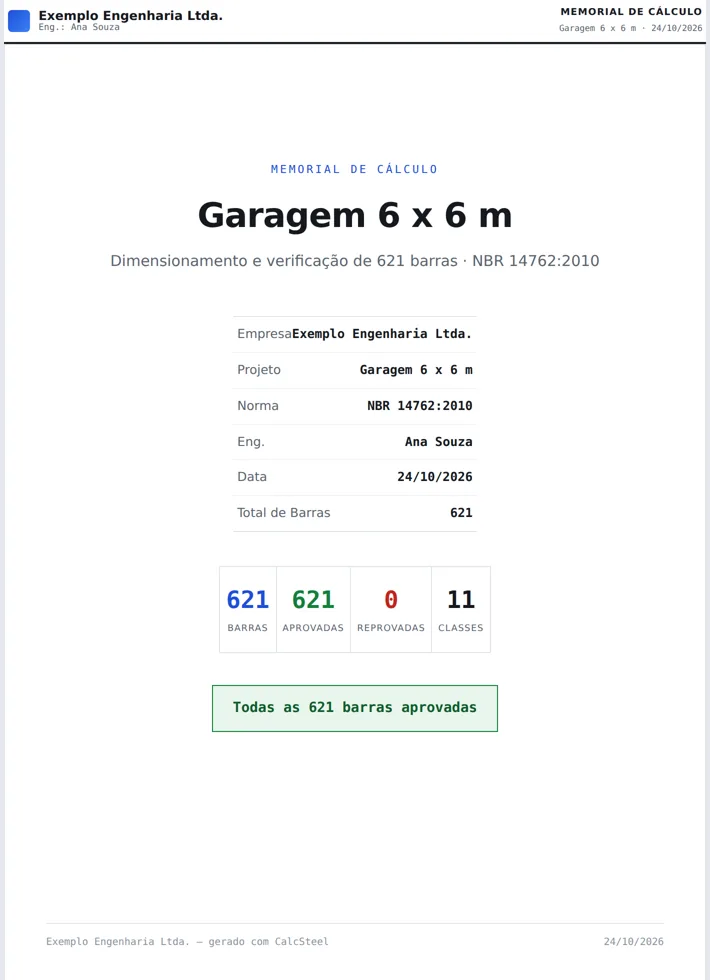
On the cover, per NBR 14762: 621 bars, 621 passed, 0 failed, 11 classes. The report counts the bars the engine checked, not the 642 drawn: the analysis model splits some members and leaves others out, such as the battens. Section 4 of the report, the summary of checks, sorts the bars by η, with JB11 and JB12 at the top (0.848). The wall table carries the stud that governs each wall (M3, 0.837, on the back) and the straps, between 0.30 and 0.43; the opening table, the header, the king stud and the jack studs.
Shortcuts
- PN↵
Panel sheet
Creates the panel sheet of the selected walls, or opens the existing one.
with walls selected
- PP↵
Panel plan
Creates a panel plan of the wall's storey, a new one each time.
with walls selected
- LO↵
Project cut list
Creates the missing cut list sheets of the project and opens the first.
with walls selected
The numbers
The garage in numbers
The final numbers, all read on the app screens: bars and meters in the status bar, below the 3D; the weight in the takeoff; checks, failures and the highest ratio in the results card and in the calculation report.
- 642: bars in the model
- 620.60 m: of section in the model
- 1,143.6 kg: of steel, from the takeoff
- 31.8 kg/m²: of steel per plan area
| number | value | where to read it |
|---|---|---|
| Model bars | 642 | status bar |
| Section in the model | 620.60 m | status bar |
| Steel | 1,143.6 kg | material takeoff (Cut list, takeoff, DXF and IFC) |
| Steel per plan area | 31.8 kg/m² | 1,143.6 kg over the 36 m² measured on the axes |
| Steel in the roof | 718.9 kg, 63% of the total | takeoff by class: trusses, hips, rafters, battens and chord bracing |
| Cut pieces | 429 members, 882.2 m, 1,160.7 kg | project cut list |
| Combinations | 26 | results card |
| Checks | 621, none failed | results card and report cover |
| Highest ratio | 0.848, truss bottom chord, slenderness, CB11 | calculation report, section 4 |
| First calculation | 8 failed; the worst, 2.10, on stub M51, shear, CB13 | results card |
The number to compare. The garage weighs 31.8 kg/m², against 22.8 kg/m² for the 60 m² house. The garage door wall weighs little in that sum (panel V1 has 178.0 kg in the list, 90 kg more than V2). On a small square with a hip roof and ceramic tile, the roof takes almost two thirds of the steel, and the Tesoura truncada alone, boxed at 1.15 mm, weighs 407.8 kg. Compare projects with the same roof; a lighter tile pulls the number down.
Checklist
The garage, end to end
Each row is a step on this page, with the page that teaches it. The five rows from "Roof before the opening" to "Side of the opening" are those of the garage door wall, and they apply to any project with a large opening.
| check | how to know it is right | where to learn it |
|---|---|---|
| New project through the wizard | Brazil market, FRAMECAD F325iT, one 2.60 m story, intermediate floor on "Without" | New project wizard |
| Perimeter | four 6.00 m sides, four L joints | Exterior walls, Wall joints |
| Openings | 5000 x 2200 garage door in the middle of Wall 1, 800 x 2100 door in Wall 4 | Doors and windows |
| Roof before the opening | the TL:TL1:T# trusses parallel to the garage door wall, each one over a stud | Roof trusses, Roof |
| Garage door header | the Header box says Box "this opening", with 2 jack studs per side, and the warning lists what lands on the opening | Headers |
| Columns at the corners | one box column against each corner of Wall 1, from track to track | Columns |
| Wall lattice truss | the inspector says Partial, 5250 mm: top track, pointing down, 291 mm, from 0.375 to 5.625 m, with no red ghost | Lattice trusses |
| Side of the opening | the nine members (the stud at the truss end, the king stud, two jack studs on each side and the head track) as 2× C 89x41/39x12x1.15, Caixa | Studs |
| Strap | a 2.40 m X in the corner panel of the three solid walls, on both faces | Straps and blocking |
| Bracing lines | "4 walls braced", two lines at 0.87 and 1.73 m | Bracing |
| Roof classes | common truss, truncated truss, hip and rafter at 1.15 mm; truncated truss and hip as Caixote [] | Trusses as plane frames |
| Calculation | green badge, 621 checks and 0 failed; the six track stubs at the foot of the cluster and the truss bottom chord boxed at 1.15 mm; highest ratio 0.848 | Loads, Studs, Reading the results |
| Outputs | sheets, cut list, takeoff and calculation report | Calculation report, LSF sheets, Cut list, takeoff, DXF and IFC |