LSF (Light Steel Framing)
Lateral system and diaphragm
Wind pushes the house sideways, and something has to take it down to the ground. This page follows that path, from the wall that catches the wind to the diaphragm that shares it out and the X straps that take it down to the foundation, and shows how to read the X strap, the horizontal strap and the blocking in the report.
Overview
What holds the house sideways
In Straps and blocking and in Bracing you draw the X straps and the lines of strap and blocking. There the subject is the tool. Here it is the system: how the wind crosses the house, how much reaches each member and what the engine checks on each one.
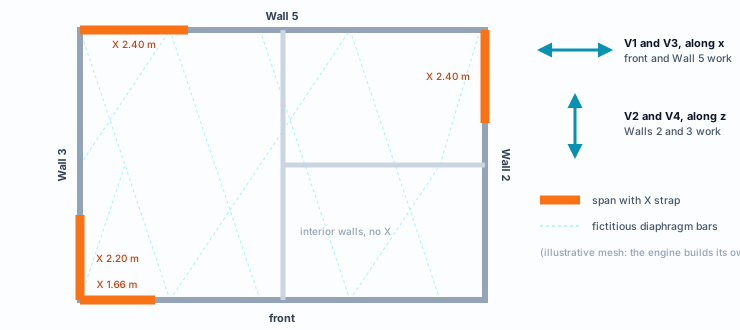
The example house has an X in four walls: the front, Wall 2, Wall 3 and Wall 5. That makes eight RET 50 x 0.95 straps, two per wall. There is no bracing drawn at the top of the walls or in the roof plane. In those planes the engine assumes the ceiling and the roof slopes work as a rigid diaphragm, and says so.
The calculation of the whole house, on screen, gives 1,113 checks and 8 failed bars, none of them in the lateral system. The eight straps pass, from 0.50 to 0.59, all governed by tension: they are on both faces of the wall, and the calculation adds the two. This page reads the strap that passes, shows why it passes and, in a trial undone at the end, what happens without the second face.
What it is for
The path of the horizontal force
A wall of studs and tracks resists wind blowing straight at it well: each stud works as a beam between the base and the top. What it cannot hold on its own is the force in its own plane, the one that tries to rack the frame. That force has to take another path, and the drawing shows which.
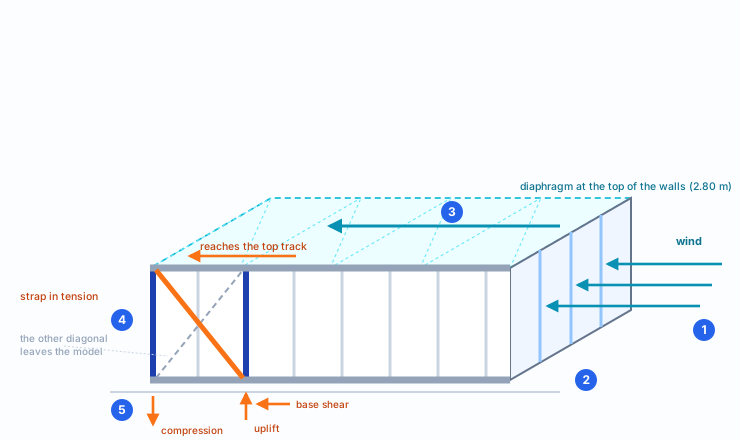
1. The wall facing the wind takes the pressure on its cladding and passes it to the studs.
2. Each stud carries part of that force to the bottom track and part to the top track.
3. The diaphragm, the rigid plane of the ceiling at the top of the walls, collects the top part and shares it among the walls parallel to the wind.
4. In those walls, the X strap takes the force from the top track down to the base. One diagonal works at a time, the one in tension.
5. At the base, the vertical component of the strap lifts one end of the wall and pushes the other down, and the horizontal component passes to the foundation. That is the anchorage, which the design sizes separately.
The diaphragm shares, and the stiffer wall takes more
In the plan of the house, each wind direction has two walls with an X. Wind along x (cases V1 and V3) goes down through the front and Wall 5; wind along z (V2 and V4), through Walls 2 and 3. The assumed diaphragm ties the top of every wall into one rigid plane, and it decides how much each wall gets.
Force in the working strap, per wind case
| Case | Walls | Force in the strap |
|---|---|---|
| V1 | front · Wall 5 | 8.98 kN · 9.31 kN |
| V3 | front · Wall 5 | 8.61 kN · 9.67 kN |
| V2 | Wall 2 · Wall 3 | 8.38 kN · 9.54 kN |
| V4 | Wall 2 · Wall 3 | 8.63 kN · 9.24 kN |
Force of each case alone, without factors, with the internal pressure of sign "−". With the one of sign "+", the numbers change by less than 0.1 kN.
No wall takes everything, and the two walls of each direction do not take the same. Two effects explain the table.
Stiffness. The diaphragm shares the wind by the stiffness of each wall. The front has the narrowest X, 1.66 m at 59°, and gives more: its strap takes 8.98 kN, which horizontally is 8.98 × cos 59° ≈ 4.6 kN. Wall 5, with an X of 2.40 m at 49°, takes 9.31 × cos 49° ≈ 6.1 kN, about 57% of the wind in that direction.
Angle. Walls 2 and 3 split the wind close to half and half, 5.5 and 5.9 kN horizontally. In the strap, the difference grows: 9.54 kN in Wall 3, at 52°, against 8.38 kN in Wall 2, at 49°. The force in the strap is the horizontal force divided by cos θ, and the steeper strap needs more force to give the same component.
In V1 one diagonal of each X works; in V3, the other: each strap is designed by the wind that stretches it.
What the standard says
Tension in cold-formed sections, and the stud restraint
The strap is a thin plate, the RET 50 x 0.95, and the engine checks it as a tension member under ABNT NBR 14762:2010, the Brazilian standard for cold-formed steel members; on both faces, it adds the two plates. Horizontal strap and blocking come under NBR 16970-2:2022, the Brazilian light steel framing design standard, which says how much a restraint has to resist and how stiff it has to be to brace the stud. The table ties each check on screen to its clause.
| Check on screen | Member | Clause | What it checks |
|---|---|---|---|
| Tension | strap, horizontal strap | 14762, 9.6.2 | The design tensile strength: the least of gross-section yielding, rupture away from the connection and net-section rupture. |
| Slenderness | strap, horizontal strap | 14762, 9.6.3 | Recommends L/r up to 300 for a tension member. On screen it is information: it does not fail. |
| Slenderness | blocking | 14762, 9.7.4 | KL/r of the compression member does not exceed 200. |
| Bracing (force) | horizontal strap, blocking | 16970-2, 7.2 | Fbr = 0.004 · NSd, added over the studs the line braces. |
| Bracing (stiffness) | horizontal strap, blocking | 16970-2, 7.2 | Sbr = 2 · γr · NSd / Lbc, with γr = 1.35. |
NBR 14762:2010 · 9.6.2.
Nt,Rd is the least of three values: a) gross-section yielding, A·fy/γ with γ = 1.10; b) rupture away from the connection region, An0·fu/γ with γ = 1.35; c) net-section rupture at the connection, Ct·An·fu/γ with γ = 1.65.
NBR 16970-2:2022 · 7.2.
The stud can be braced by relative or nodal restraints. The restraint resists Fbr = 0.004 NSd and has a minimum stiffness Sbr = 2γrNSd/Lbc, with γr = 1.35 and Lbc the distance between restraints.
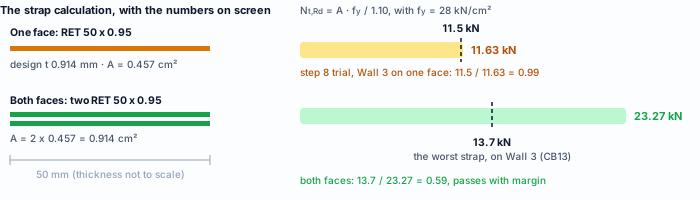
The thickness that goes into the calculation. The strap is galvanized steel (ZAR). The note to the section tables of NBR 15253:2014, the Brazilian standard for LSF sections, deducts 0.036 mm of coating, both faces together: the 0.95 mm strap is calculated with 0.914 mm. The Tension card shows both thicknesses, the nominal one and the design one.
Design recommendations
1. Read the strap by tension
On the strap, the only check that can fail is tension. Compression and bending come out as N/A: in each wind case, the engine takes the diagonal that would be in compression out of the calculation and redoes it with the stretched one only.
2. On both faces, the calculation adds the two straps
The eight straps of the house are on both faces of the wall, and the calculation counts both: the area in the Tension card is 0.91 cm², twice the 0.457 cm² of one strap, and the strength goes from 11.63 kN to 23.27 kN. The stiffness of the X doubles too, and the stiffer wall draws more wind. Steps 7 and 8 remove the second face in a trial and show the difference on screen.
3. Prefer the flatter X
For the same horizontal force, the flatter strap stretches less: the force in the strap is the horizontal force divided by the cosine of the angle. The market range goes from 30° to 60°, with 45° as the target, and it is a market rule, not a code one (see Straps and blocking).
4. If it still falls short, a bigger strap
Tensile strength grows in the same proportion as the area, and the area is width times design thickness: a wider or thicker strap, as Straps and blocking shows. The thickness that counts is the one without the zinc, 0.914 mm on the 0.95 strap.
5. Or share the force with one more X
A second X in the same direction shares the wind among more straps. It is the way out when the thicker gauge does not exist in the catalog of the project's market.
The eight straps of the house, in the calculation on screen
| Wall | X | Angle | Ratio of the two |
|---|---|---|---|
| Front (z = 3.2) | 1.66 m | 59° | 0.53 · 0.54 |
| Wall 2 (x = 4.7) | 2.40 m | 49° | 0.53 · 0.50 |
| Wall 3 (x = −4.3) | 2.20 m | 52° | 0.56 · 0.59 |
| Wall 5 (z = −3.8) | 2.40 m | 49° | 0.59 · 0.58 |
The worst diagonal of each X sits between 0.53 and 0.59. The front keeps up with the others with the narrowest X precisely because, being more flexible, it gets less wind: the diaphragm sends most of it to Wall 5. Each diagonal of an X has its own ratio, because each one is the stretched one for one wind direction.
Do not widen the X just to pass. The X that gets stiffer draws more wind to its wall. The right calculation is the engine's: change it and recalculate.
Step by step
1. Calculate and open the view of Wall 3
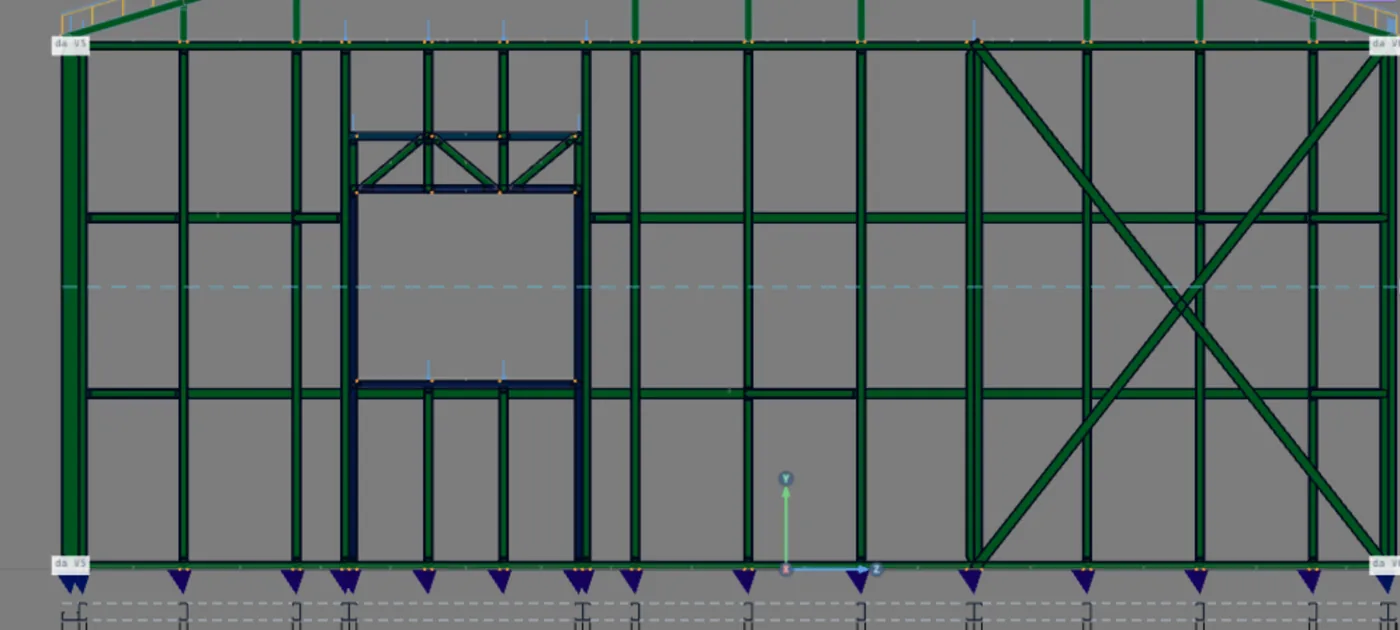
Calculate the project, with the loads and the wind described in Loads. In the Plan, click Wall 3 and then Open view. The wall shows head-on, with the X near the front end, between z = 1.0 m and z = 3.2 m.
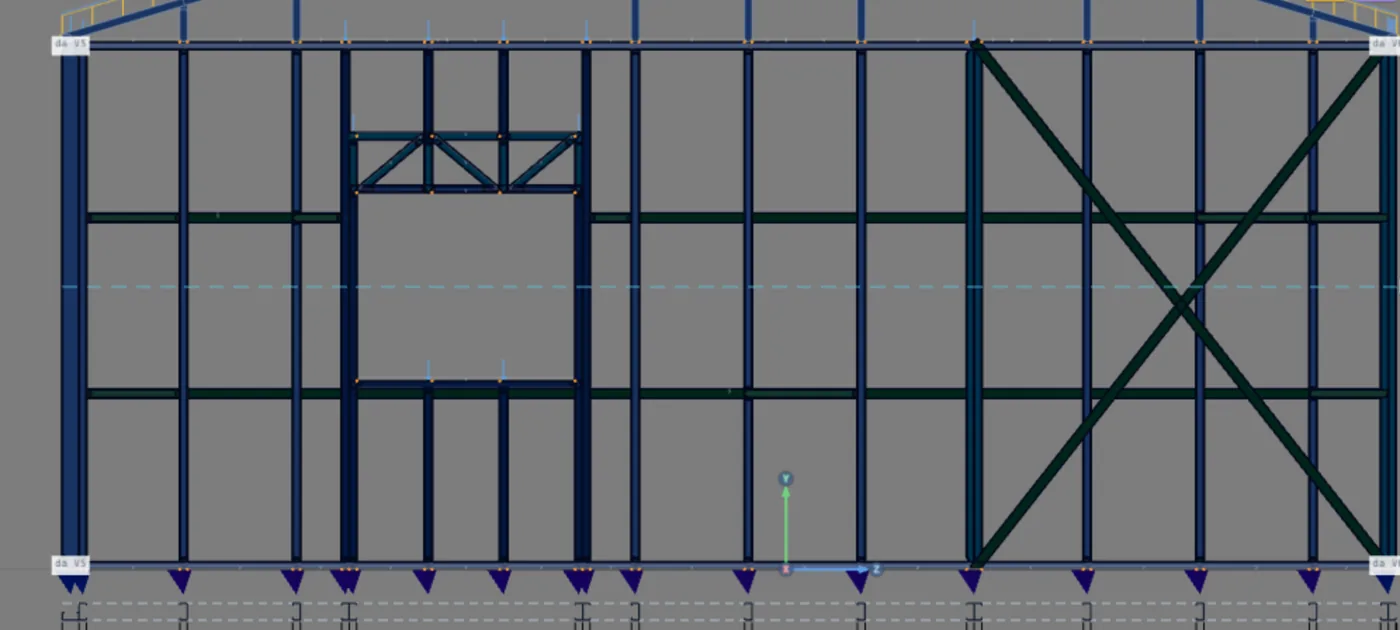
2. Turn on the colors
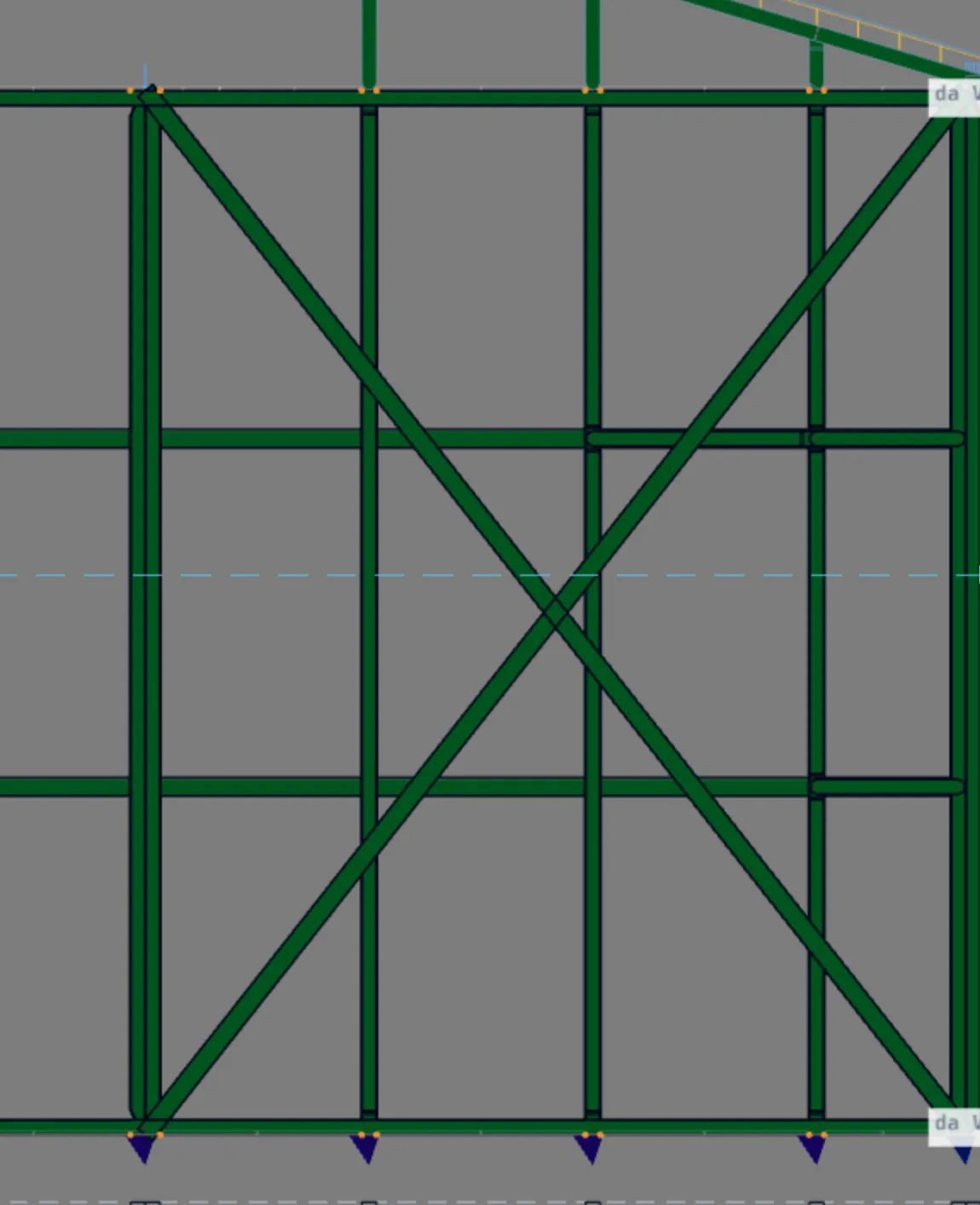
Turn on the check colors with the toolbar button. Green passes; red fails. Both diagonals of the X turn green: 0.56 and 0.59. The horizontal straps and blocking, the horizontal members at one third and two thirds of the height, too.
With the colors on, a click reads. Clicking a bar opens its report. With the colors off, the same click selects the strap and opens the inspector, where its options are changed.
3. Click the strap and read the header
With the colors on, click the diagonal that rises toward the front. The report opens with the strap label (FX), the section, the length of 3.56 m, the standard and the material. On the last line, the verdict and the governing check.

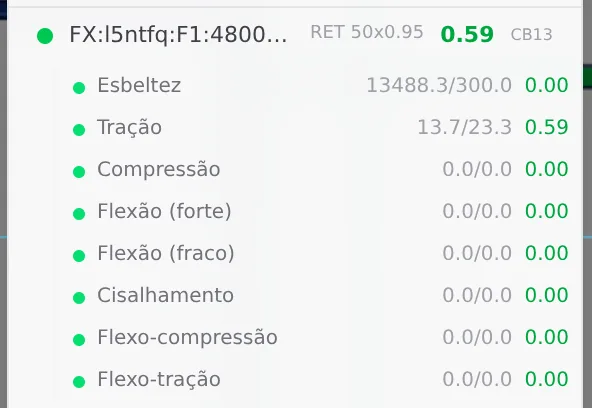
- 0.59: tension, the governing check, in CB13
- 13.7 kN: force in the stretched strap
- 23.27 kN: strength: gross-section yielding
- 0.91 cm²: area of both faces, 2 × 0.457
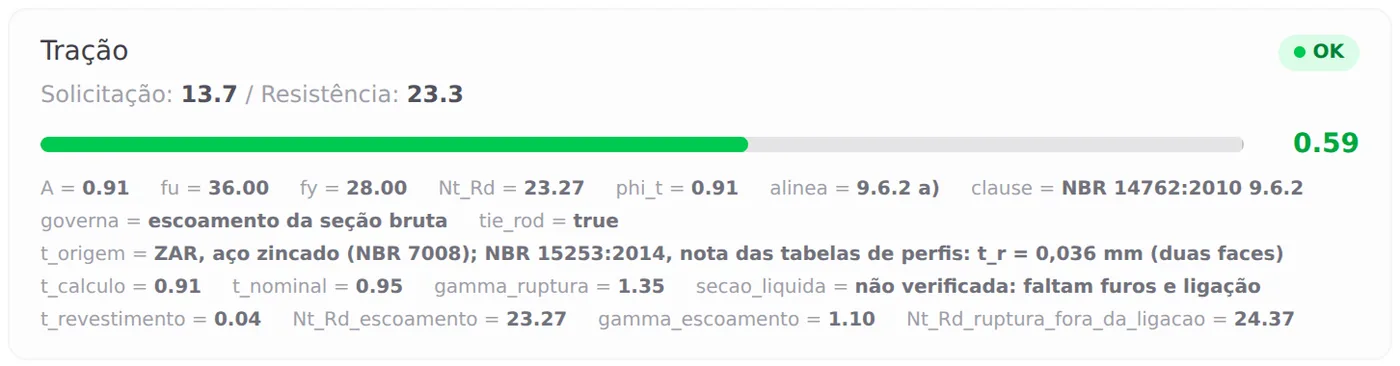
What each field says. A = 0.91 cm² is the area of the two straps, 2 × 5.0 cm × 0.0914 cm; the design thickness also reads 0.91, in mm, and that is only a coincidence. The clause and the governing calculation say which of the three calculations in the standard gave the lowest value: here, 9.6.2 a), gross-section yielding. Combination CB13 is 1.4·PP1 + 1.4·PP2 + 0.7·SC + 1.4·V2− (90°): the wind along z, which Walls 2 and 3 hold.
What stays with you. The net-section line is marked as not checked, pending the holes and the connection. Clause c) depends on the screws at the end of the strap, which are set in the connection detail. The connection of the strap to the stud is part of the design.
4. Scroll the report to Slenderness
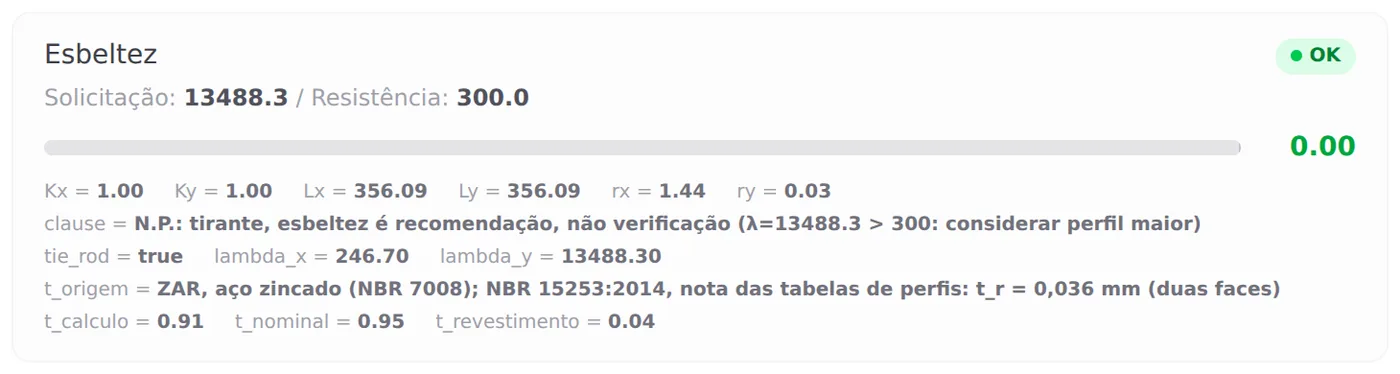
The strap is a 0.9 mm plate. Its radius of gyration about the weak axis is t/√12, about 0.03 cm, and L/r goes past 13 thousand; adding the second face doubles the area but does not change the radius of gyration. NBR 14762 only recommends the limit of 300 for a tension member (9.6.3), and the strap exists to work stretched: the engine notes the number and does not fail it. Compression and bending come out as "N/A: tie rod, only tension is checked".

5. Check in the Bar Verification list
The Bar Verification button opens the list for the whole project. The top counts the failed bars: 8, and none is a strap. Click the row of a strap and it expands with each check, demand over capacity.

6. Click the horizontal strap and the blocking
The horizontal strap and the blocking do not carry the wall's wind: they brace the stud against weak-axis buckling. The engine takes them out of the model, uses their line as a braced point in the stud's buckling length and then checks them as restraints, under NBR 16970-2, 7.2. How to draw the line is in Bracing.



The force. The line adds up the compression of the studs it braces, combination by combination. On the horizontal strap of Wall 3 the governing sum is 27.05 kN, in CB7, and 0.004 × 27.05 gives 0.1 kN.
The stiffness. The horizontal strap offers E·A/s, with s the stretch between two studs: 20,000 × 0.457 / 43.19 = 211.6 kN/cm. The horizontal strap only works in tension and sits on one face of the wall: its strength and area are those of one strap.
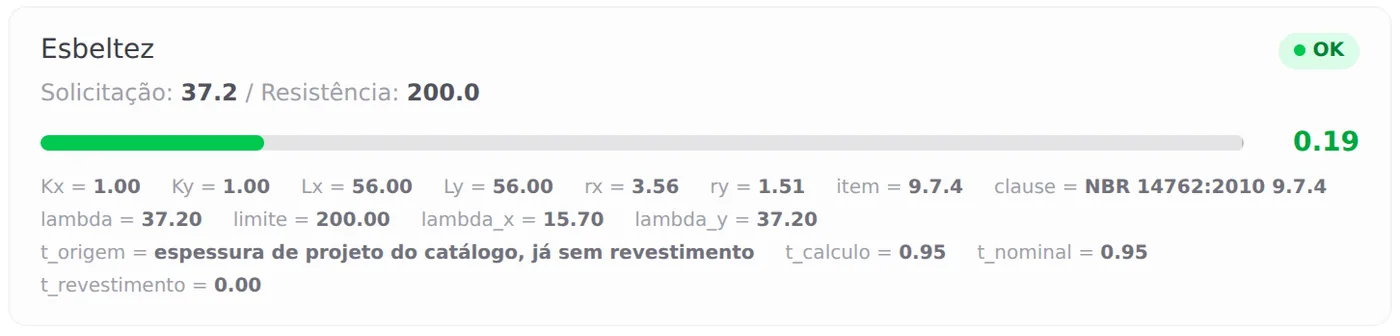
The blocking is a C section between two studs, checked in compression. At 0.56 m, slenderness governs: 37.2 against 200, under clause 9.7.4.

Why the strap does not show up in bracing. Only the strap stays in the analysis model and carries the wind. The horizontal strap and the blocking leave it and count for what they do to the stud: the low ratio of a horizontal strap says nothing about the X in the same wall.
Trial: the strap on one face only
Steps 7 and 8 are a trial, done on screen only: they remove the second face of a strap, calculate and are undone at the end with Ctrl+Z. Nothing goes into the saved project.
7. Clear On both faces on the Wall 3 strap
With the colors off, click a diagonal of Wall 3: the strap inspector opens, as in step 4. Click On both faces to clear it. The change is immediate: each diagonal, which had two straps, now has one. The inspector belongs to one strap only: Wall 3 changes, and the other three walls stay on both faces.

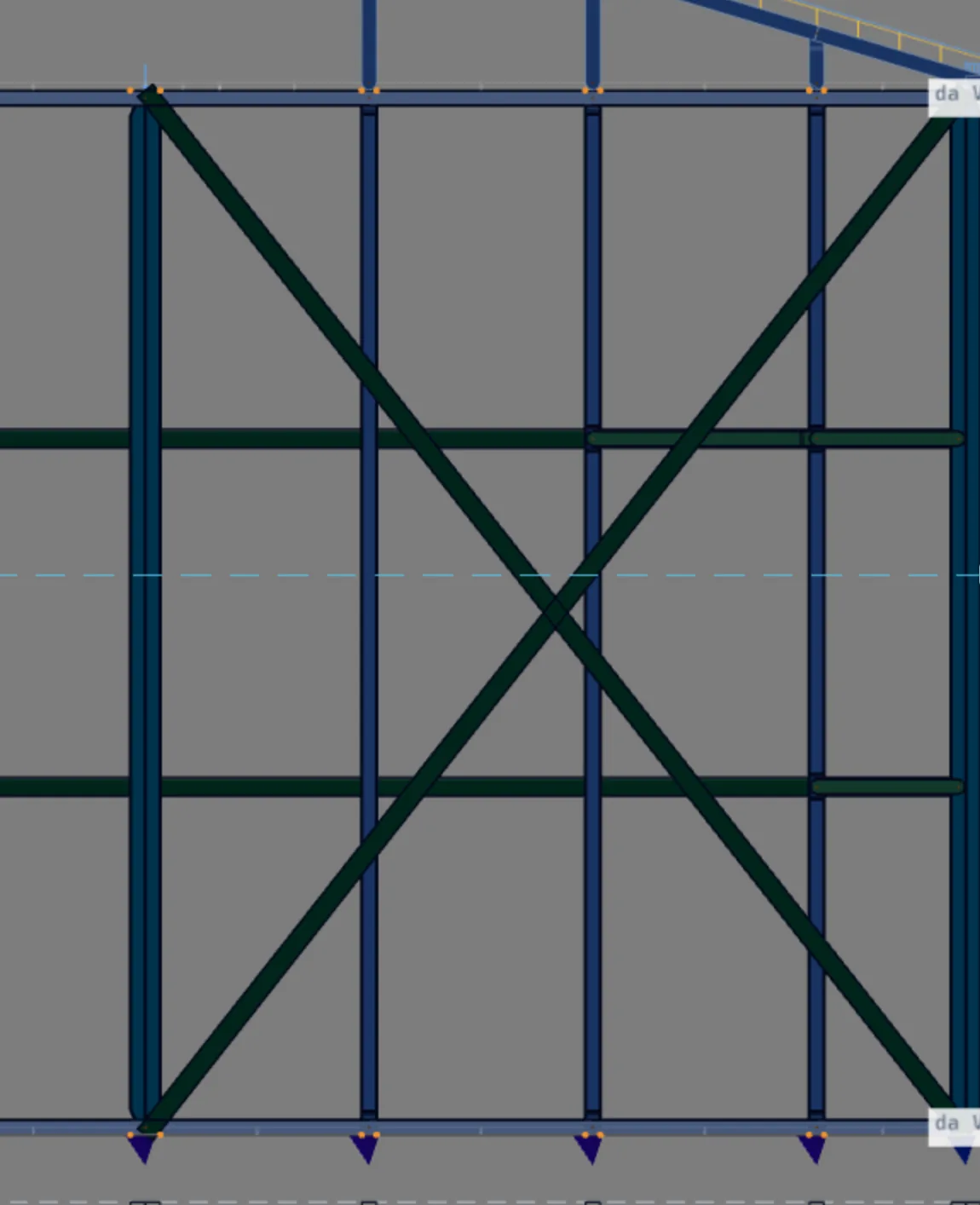
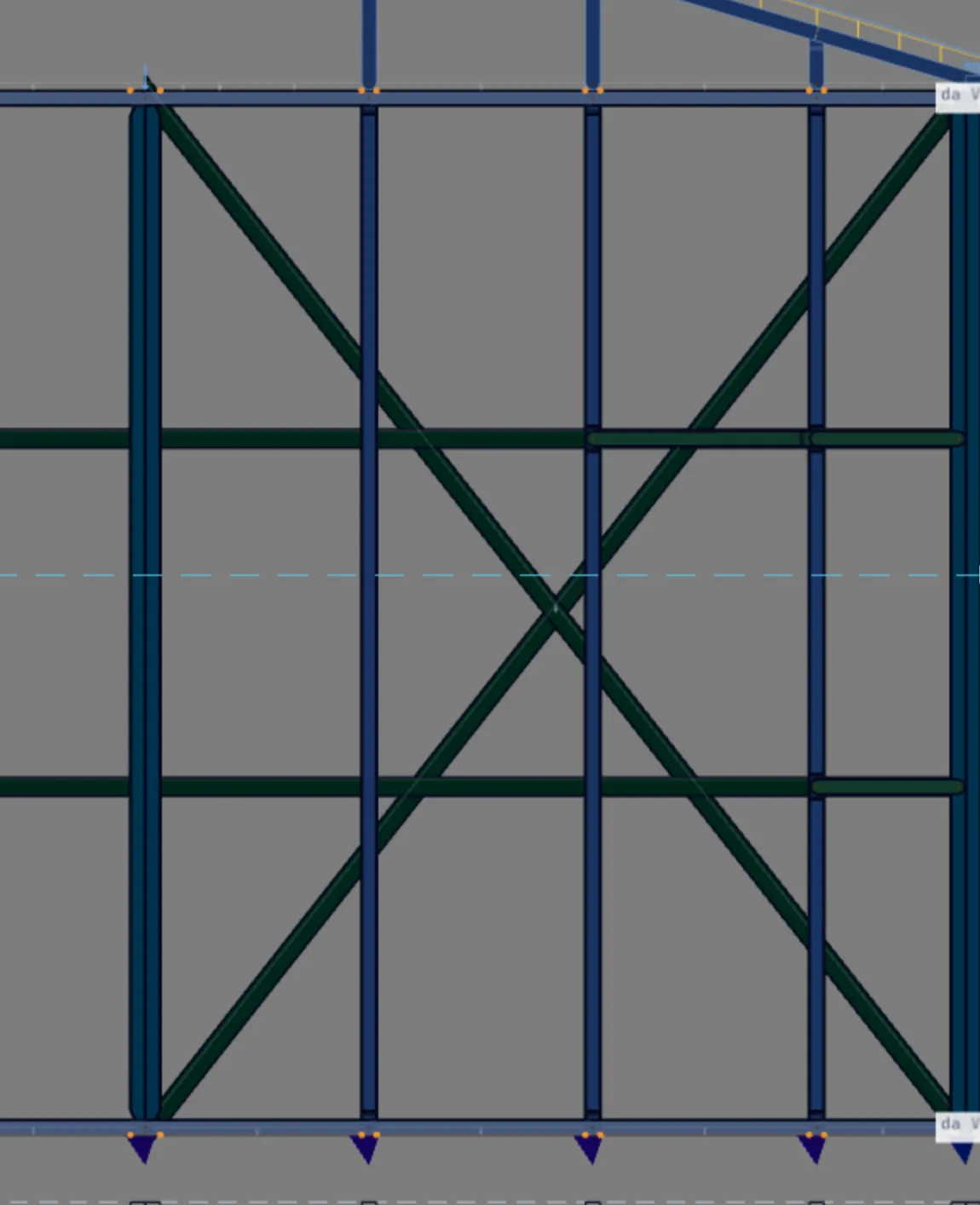
This is a trial. The change stays on screen only until someone saves. Do not save: step 8 calculates, reads and undoes.
8. Calculate and open the strap report
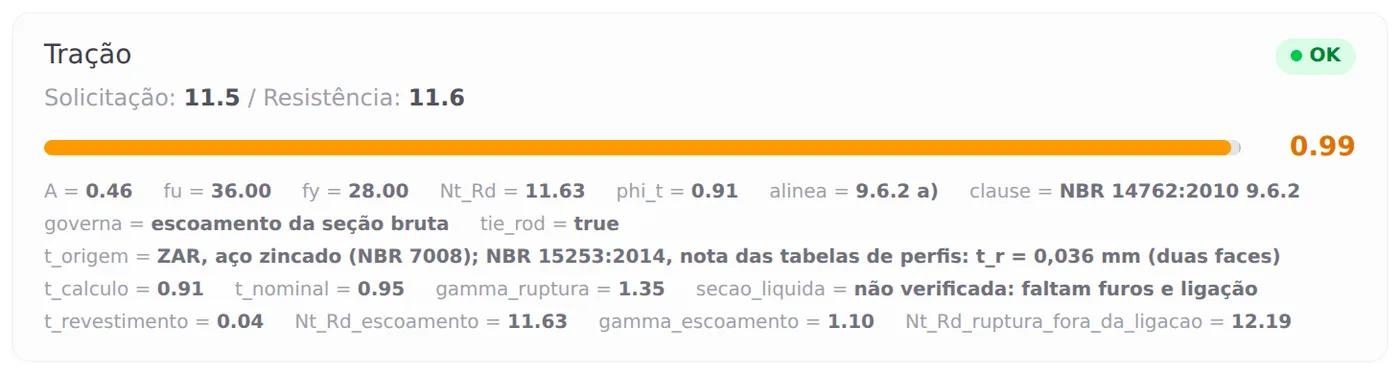
Calculate. Turn on the colors and click the diagonal of Wall 3: the report opens on the remaining strap. It is the same report as in steps 3 and 4, now with one plate instead of two.

- 0.99: tension of the worst strap (was 0.59)
- 11.5 kN: force in the strap, CB13 (was 13.7)
- 11.63 kN: strength, with A = 0.46 cm² (was 23.27)
- 1,342.1 kg: steel of the project in the status bar (was 1,344.7)
| Wall | On both faces | W3 on one face |
|---|---|---|
| Front | 0.53 · 0.54 | 0.53 · 0.54 |
| Wall 2 | 0.53 · 0.50 | 0.59 · 0.57 |
| Wall 3 | 0.56 · 0.59 | 0.95 · 0.99 |
| Wall 5 | 0.59 · 0.58 | 0.58 · 0.58 |
The strength dropped by half, and the ratio did not double. On one face only, the X of Wall 3 becomes more flexible, and the diaphragm passes part of the wind to Wall 2, the other wall in the same direction. In wind V2, the Wall 3 strap went from 9.54 to 8.04 kN, and the Wall 2 strap from 8.38 to 9.47 kN. That is why the force dropped from 13.7 to 11.5 kN, and the ratio stopped at 0.99. It is a calculation you check in the engine, not by rule of three. The other failed bars of the project do not change: the same eight members, with the same ratios.
Undo the trial. Close the report and press Ctrl+Z: the strap goes back to both faces, with two plates on each diagonal. Calculate again: the Wall 3 strap goes back to 0.59, and the project to 8 failed bars, with nothing saved.
Shortcuts
- Ctrl+Enter
Calculate the project
Sends the project to the engine, like the Calculate button.
- PL↵
Plan view
Goes to plan view. With the wall view open, closes it and keeps the wall selected.
- AV↵
Wall view
Opens the elevation of the selected wall, seen from outside. Again, goes back.
with one wall selected
- Home
3D view
Goes to 3D at the last camera pose. With the wall view open, closes it.
Parameters
What each choice changes in the calculation
The strap options live in three places, which Straps and blocking and Bracing show: the box of the Strap and blocking tool, the inspector of a placed strap and the project settings. What matters here is the effect of each one on the members the engine checks.
| Parameter | Where | What it changes in the calculation |
|---|---|---|
| Section of the Bracing role | project settings, Structure tab | The thickness and area of the strap, and so its tensile strength. The horizontal strap uses the same role. |
| Span of the X | Strap and blocking tool: the two studs clicked | The angle of the diagonal. Flatter, less force in the strap for the same wind, and more wall stiffness. |
| Up to the beam · Up to the top | Strap box and inspector | The height of the diagonal, and with it the angle. Up to the beam, the strap stops at the bottom chord of the truss. |
| On both faces of the wall | Strap box and inspector | Draws the second strap, and the calculation adds the two: the area, the strength and the stiffness of the diagonal double (steps 7 and 8). |
| Double stud at the end | Strap box and inspector | The upright member where the strap anchors: two studs instead of one. |
| Bracing lines | Blocking type of the same tool (see Bracing) | Where the stud is braced about the weak axis. Each line becomes a restraint, checked for force and stiffness. |
The numbers the engine uses
| Value | Where it comes from | What for |
|---|---|---|
| γ = 1.10 · 1.35 · 1.65 | NBR 14762, 9.6.2 a), b) and c) | Gross-section yielding, rupture away from the connection, rupture at the connection. |
| 0.036 mm | NBR 15253, table note | Zinc deducted from the strap (both faces). |
| L/r ≤ 300 | NBR 14762, 9.6.3 | Recommendation for a tension member: shown, does not fail. |
| KL/r ≤ 200 | NBR 14762, 9.7.4 | Limit for the blocking, which works in compression. |
| 0.004 · γr = 1.35 | NBR 16970-2, 7.2 | Force and stiffness required of each bracing line. |
| 0.01 kN · 10 passes | the engine | A diagonal with compression above 0.01 kN leaves the case, and the calculation is redone until none changes, in up to 10 passes. |
Changed it? Calculate. The colors, the report and the list show the last calculation. After changing the strap, the faces or the section, press Calculate before reading again.
Shortcuts
- BL↵
Strap and blocking
Places bracing strap and blocking between studs.
- CFG↵
Project settings
Opens the project wizard: envelope, structure, loads and wind.
Common mistakes and warnings
What tends to mislead when reading
- Reading the strap slenderness as a failure. The Wall 3 strap has L/r of 13,488 against 300, and the card stays green. For a tension member the standard recommends, it does not require, and the engine notes the number without failing it.
- Clearing the second face thinking it is only drawing. The calculation adds the two straps. Without the second face, the Wall 3 strap went from 0.59 to 0.99 in the trial: it passed, but with no margin at all.
- Checking only one diagonal of the X. Each diagonal is the stretched one for one wind direction. On Wall 3, one gives 0.56 and the other 0.59. Both have to pass.
- Copying the result of one wall to another. The same RET 50x0.95 strap, on both faces, gives 0.54 at the front and 0.59 on Wall 5. The wind is shared by stiffness, and each wall is read in its own view.
- Looking for the strap in the bracing list. Horizontal strap and blocking brace the stud and leave the model; the strap stays and carries the wind. A horizontal strap at 0.01 says nothing about the X in the same wall.
The diaphragm warnings
After the calculation, the open combinations card shows the model mismatches button. Three of them are about the diaphragm of this house:
Model mismatch · level 2.80 m.
"Light steel framing: there is no horizontal strap drawn at level 2.80 m. The calculation assumed the floor (or ceiling) as a rigid diaphragm, with 97 fictitious bar(s) that do not appear in the outputs. Check that the sheathing and connections provide it."
Model mismatch · slopes 1 and 2 of roof TL1.
"… has no roof bracing drawn. The calculation assumed the roof plane as a rigid diaphragm, with 27 fictitious bar(s) [37 on slope 2] that carry the gable wind to the walls and do not appear in the outputs. Check that the sheathing, battens and connections provide it."
They are not errors: they are assumptions of the calculation, said out loud. The sharing shown in What it is for holds if the ceiling and the roof work as a diaphragm. Either the design ensures that through the sheathing and the connections, or it draws the bracing of that plane, and then the bracing enters the calculation in place of the fictitious bars.
What the engine checks
It checks the path that is drawn
The engine checks each member of the path that is in the model: the strap in tension, under NBR 14762, and the horizontal strap and blocking as stud restraints, under NBR 16970-2, 7.2. Where no bracing is drawn at the top of the walls or in the roof plane, it assumes the rigid diaphragm and says so in the model mismatches.
Where to read each thing
| I want to know | Where |
|---|---|
| whether the X passes | the colors, in the wall view |
| the force in the strap and its strength | the bar report, Tension card |
| every strap in the project | the Bar Verification list |
| whether the horizontal strap and the blocking hold the stud | the bar report, Bracing cards |
| which assumptions the calculation made | the combinations card, model mismatches |
| the anchorage at the corners | the calculation report, walls section (see Calculation report) |
What stays with the designer
- The connection of the strap to the upright member. The screws, and with them the net-section rupture (NBR 14762, 9.6.2 c), which depends on the number and diameter of the holes. Design the connection under the same standard.
- The anchorage at the corners. The report gives the force at each wall corner, taken from the support reactions in the ULS combinations. The anchor bolt and its anchorage in the concrete are designed separately, with the manufacturer's capacity.
- The diaphragm. Where the calculation assumed the ceiling or the roof as a rigid plane, the sheathing and the connections have to provide it. If they do not, draw the bracing of that plane: it enters the calculation in place of the fictitious bars.
- Where the bracing lines end. The engine checks whether the line reaches a braced wall and warns when the force has nowhere to go. The connection of the line to the strap, and of the blocking to the stud, are design details.
- The strap on site. A slack strap does not work until the wall moves enough to stretch it: specify the strap tensioned during erection.
Shortcuts
- Ctrl+Enter
Calculate the project
Sends the project to the engine, like the Calculate button.
Summary
The path, in one line
Calculate → Plan, click the wall, Open view → turn on the colors → click the strap and read Tension → check the Bar Verification list → read the diaphragm assumptions in the combinations card. In the trial: clear On both faces in the inspector, calculate, read, undo with Ctrl+Z and calculate again.
The example so far
- 0.59: strap on both faces, in tension
- 0.99: the same strap on one face only (trial)
- 0.01: horizontal strap, bracing (force)
- 0.19: blocking, by slenderness