LSF (Light Steel Framing)
Lattice trusses
A wall truss lives in the plane of the wall, attached to a track, and works as a deep beam that spans the stretch where there are no studs below. This page shows the Lattice truss tool on the LSF card: the four models, full or partial, direction and depth, what it writes into the wall and what the engine checks on it.
Overview
A lattice beam inside the wall
The Lattice truss has its own button on the LSF card. It starts from a track of the wall, the top or the bottom one, and grows up or down. The track becomes one of the chords; the tool adds the other chord, the diagonals and, depending on the model, the verticals. Inside the wall, the studs that cross its band are cut at the new chord.
It is not the roof truss (see Roof trusses), which spans the roof from wall to wall, nor the lattice header (see Headers), which sits at the head of a single opening. The wall truss runs along the track, full length or over a stretch, and passes over openings, columns and studs.
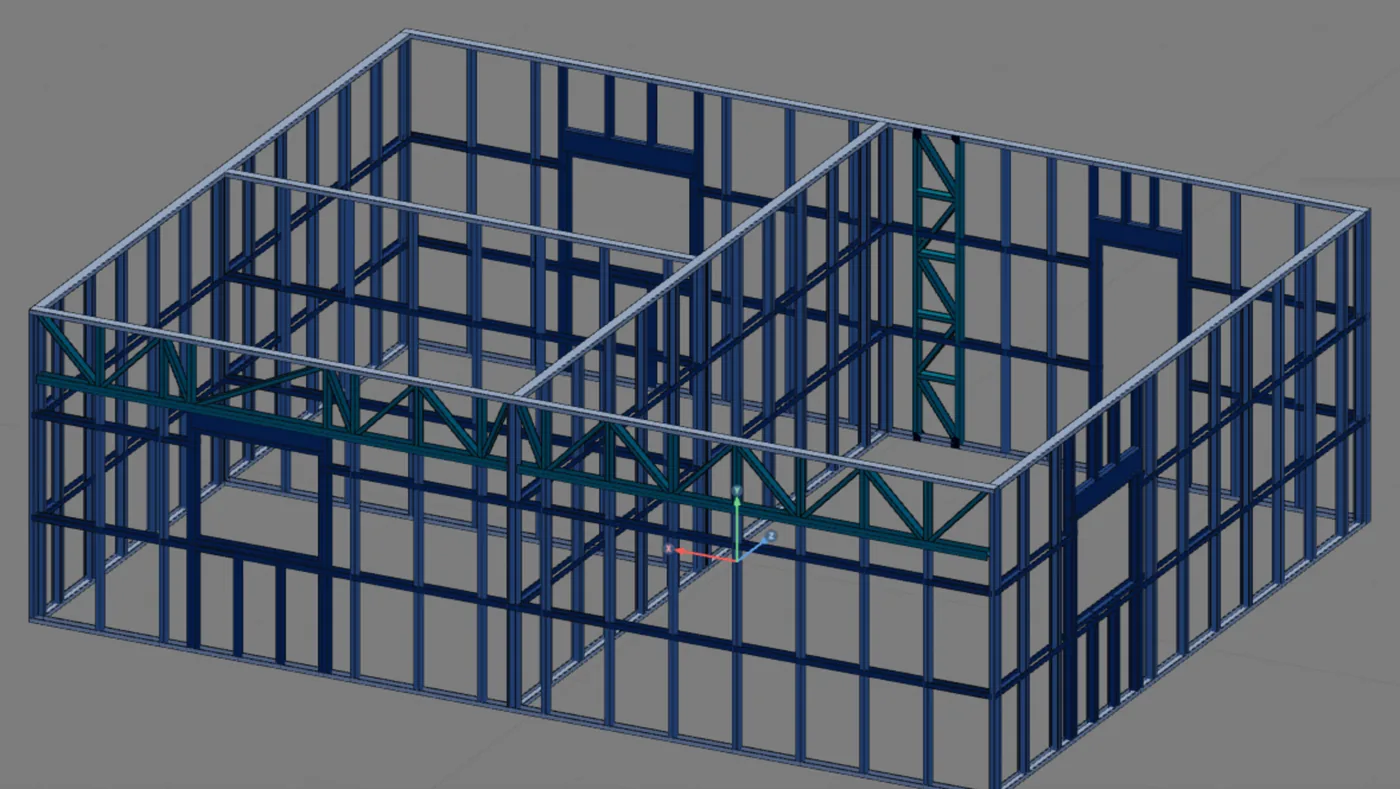
In the example house: T1, full length, under the top track of the back wall, 600 mm deep, in the zigzag with verticals model. Its chord sits at 2.20 m, exactly at the top of the J3 header. The design recommendation explains why at the back and not at the front.
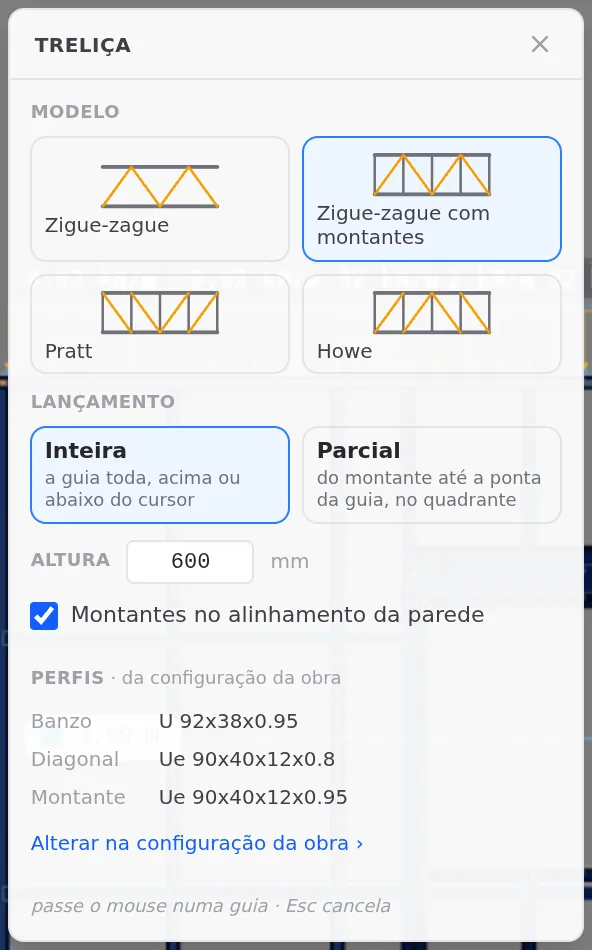
Stick-built or roll-formed. The screens on this page show a stick-built project, where the truss uses the U 92x38x0.95 track for the chord, Ue 90x40x12x0.8 for the diagonal and Ue 90x40x12x0.95 for the vertical. In a roll-formed project, the default for a new project, all members come from the C 89x41 the machine forms: 0.95 mm for the chord and the vertical, 0.75 mm for the diagonal. The tool, the models and the refusals work the same way in both (see Steel and sections).
What it is for
A beam in the plane of the wall
An LSF wall takes the load down through the studs, one every 60 cm. Where a stud is missing (over a wide opening, over a column that stops below the top, along a stretch that has to stay clear), the track alone cannot span the gap. The truss solves it in the plane of the wall: two parallel chords, joined by diagonals and verticals, form a beam as deep as you choose, and the load travels along the members as axial force down to the full-height studs.
The position reads in two words: the track (top or bottom) and the direction (up or down). Top track going down and bottom track going up stay inside the wall: the new chord is an I, two tracks back to back, and the studs that cross the band are cut at it. The other two stay outside: the truss rises above the top, or drops below the base, the new chord is a single track, and it is the wall track that becomes an I along the stretch.
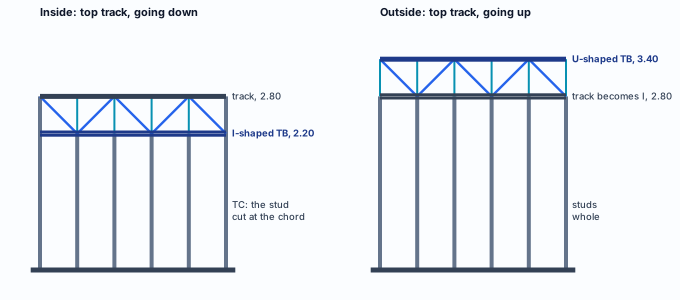
Inside (left), the piece of stud within the band comes out, and what is left below is the TC. Outside (right), the studs stay whole and the truss sits above the wall. Our drawing, not to scale.
Three trusses in CalcSteel LSF
| Member | Where it lives | What it spans | Where |
|---|---|---|---|
| Roof truss | on top of the walls, across the house | the roof span, from wall to wall | Roof trusses |
| Lattice header | at the head of an opening | the span of a door or window | Headers |
| Wall truss | in the plane of the wall, attached to a track | the whole track, or a stretch of it, over openings, columns and studs | this page |
Inside or outside: inside, the truss takes up wall height and has to live with doors, windows and columns; outside, it does not touch the openings, but it takes up the space above (or below) the wall, where there may be another wall or the ground.
Four models, four members
The box offers four models. Zigzag has only diagonals, alternating from one chord to the other, with a truss vertical only at the free edges. Zigzag with verticals adds a vertical at every node. Pratt and Howe also have a vertical at every node and differ in the direction of the diagonals: in Pratt they run down from the top chord toward the center; in Howe, they run up. In the Brazil market, the default is zigzag with verticals.
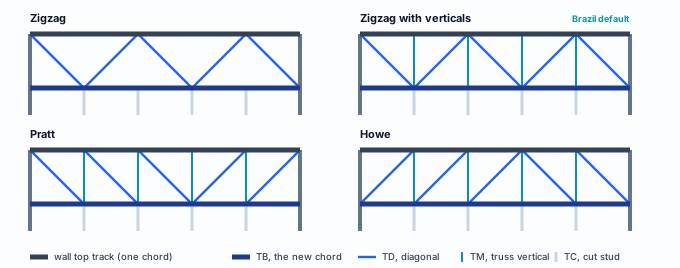
The four models inside the wall, under the top track, with the nodes over the wall studs. Our drawing, not to scale.
What the truss writes into the wall
| Member | What it is | Section | In the analysis |
|---|---|---|---|
| TB | the new chord. Inside, an I of two tracks back to back, split at the face of each stud that stays whole. Outside, a single track | the track section (Chord, in the box) | chord: deflection at L/250 between nodes; in the plane of the wall, buckles between nodes |
| TD | one diagonal per panel, seated on the face of the chord | the diagonal section | truss web, pinned at both ends |
| TM | the truss vertical, at every node (in zigzag, only at the free edges) | the vertical section | truss web, pinned at both ends |
| TC | the piece left of a wall stud cut by a truss inside the wall | the wall stud section | stud: deflection at h/300 on the chord line |
The wall track gets no new label: it is the other chord. Inside, where there is a full-height wall stud at the node (the end stud, the junction stud, the one marking the edge of the stretch), no TM goes in: the wall stud is already the post of that node.
What the standard says
Restraint, alignment and deflection
NBR 16970-2, the Brazilian LSF standard, has no section of its own for the wall truss. It comes up at four points, and each member is designed to NBR 14762, the Brazilian cold-formed steel standard.
NBR 16970-2 · 3.12.
Defines lateral restraint as the component that restrains the displacements and the distortion of the panel, and lists vertical trusses among the means. In the project check, the diagonal of a truss that runs from track to track counts as bracing, alongside the X strap; a band truss, like the T1, works as a beam (see what the engine checks).
NBR 16970-2 · 4.1.
The studs of one story line up with those of the story below, with the floor joists and with the roof structure. In the truss, the Studs in the wall alignment checkbox puts the nodes over the studs that already exist.
NBR 16970-2 · 4.8 g.
The project drawings show the splices and reinforcements of sections and the typical truss nodes. The tool draws the members; the node detail belongs to the design.
NBR 16970-2 · 4.9 and 8.2, Table 3.
Analysis and design to NBR 14762 and NBR 8800. Table 3 gives L/250 for roof beams, L/350 for floors and L/500 for beams that support columns or wall panels, with L the theoretical span between supports.
NBR 14762 · 9.7.4 and 9.6.3.
The slenderness ratio of compression members does not exceed 200; for tension members, up to 300 is recommended. In a truss, slenderness is governed by the length between nodes: hence the importance of alignment and depth.
NBR 14762 · Annex D.
Members without stiffeners under concentrated force: web crippling. It applies where a concentrated force reaches the web of a section, such as a stud bearing on the web of the track.
What the standard does not say
| Value | Where it comes from |
|---|---|
| Zigzag with verticals | Brazil market rule, stored in the CalcSteel settings: the truss starts with verticals, in the tool and in the AI |
| 600 mm deep, minimum 150 | tool constants, not from the standard |
| Minimum stretch of 30 cm | tool constant: a shorter stretch is not a truss |
| 30 cm of stud left | tool constant: inside, the truss leaves at least that much wall |
| Diagonal from 30° to 60° | Brazil market rule for the lattice column (Columns); in the wall truss, the angle stays with the designer |
Design recommendation
Where the truss fits in the example house
The 9 x 7 m example house does not need a truss to stand: every opening has a header, and the roof trusses (see Roof trusses) bear on studs. The question is a different one: if the design calls for a lattice beam at the top of a wall, which wall takes it without undoing what is already placed? The tool answers through its refusals and through what changes when it writes.
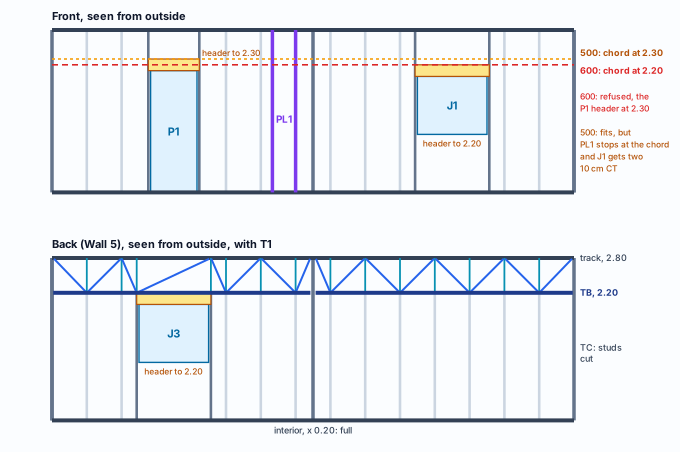
The two long walls seen from outside, with the heights measured in the capture. Our drawing, not to scale.
Back, full length: it fits
- The J3 header reaches 2.20 m, where the chord of a 600 mm truss sits: the opening framing stops at it and the truss passes over in one piece.
- There is no column to shorten, and no short stud left over.
- The TMs land on the TCs, and the roof trusses, at 0.60 and 1.20 m from the corner, bear on two of them.
- It is the placement the AI makes on automatic: top track, going down, 600 mm.
Front: it undoes work
- At 600 mm the chord sits at 2.20 m, below the P1 header, which reaches 2.30 m: refused.
- At 500 mm it fits, but PL1 stops at the chord and loses a diagonal and a strut.
- Over J1, whose header reaches 2.20 m, two 10 cm studs are left up to the chord.
- Partial, to the right of the door, also fits, and PL1 shrinks the same way.
The limits of the choice. J3 is at the limit: with a taller header, or a deeper truss, the back wall refuses too. Over J3 the panel has 1.22 m clear: check the diagonal angle there. Without the studs in the alignment, two extra nodes go in over J3.
Step by step
The captures start from the example house as it stood after Bracing: perimeter, interior walls, openings, headers, PL1, F1 and bracing. The roof trusses (see Roof trusses) are left out of the images and change nothing here: the truss sits below the top track, and the roof trusses on top of it.
1. Open the back wall view
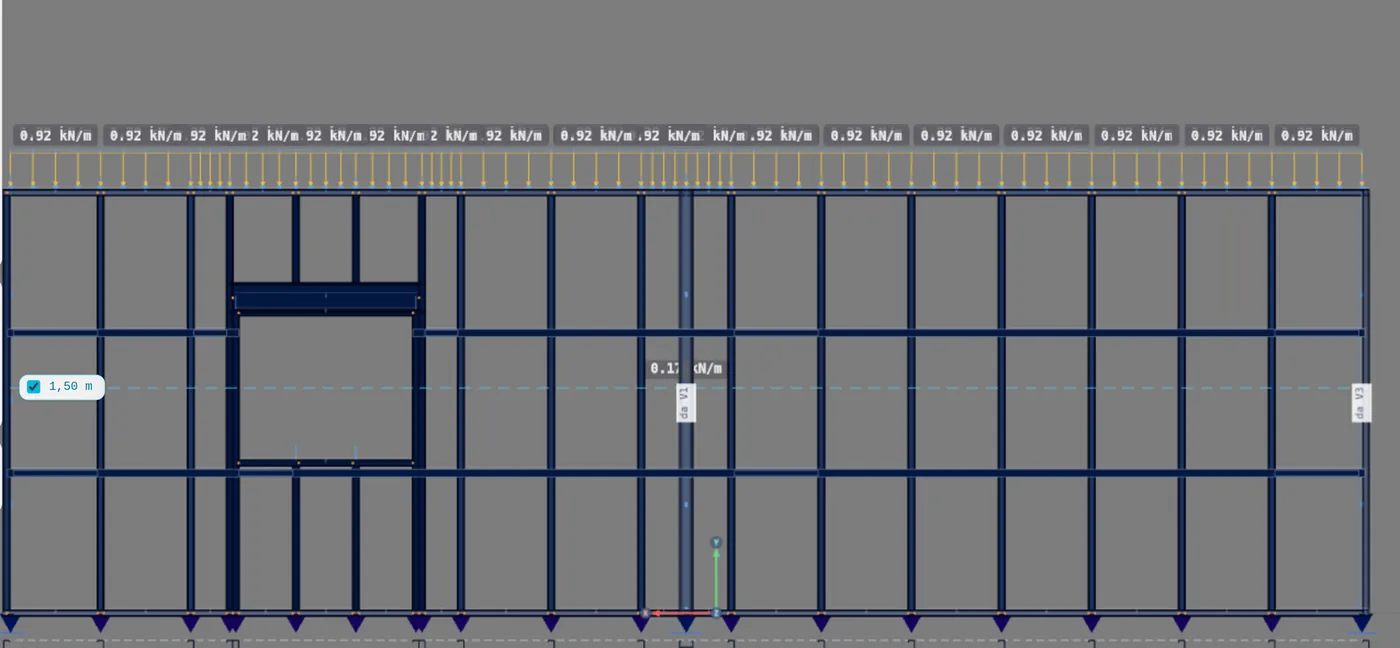
In the plan, select the back wall and click Open view on its card, in the footer. The view shows Wall 5 from outside: J3 on the left, the interior wall in the middle, where the junction stud stays whole.
2. Arm the Lattice truss
On the LSF card, click Lattice. The box opens with the market model, Full, 600 mm and the alignment checked. Its footer tells you the step: hover over a track · Esc cancels.
3. Hover over the track: the cursor side is the direction
With the cursor just below the top track, the orange ghost shows inside, going down. Just above, it shows outside, going up. The box does not change: the cursor side decides.
4. Click: the T1 is written
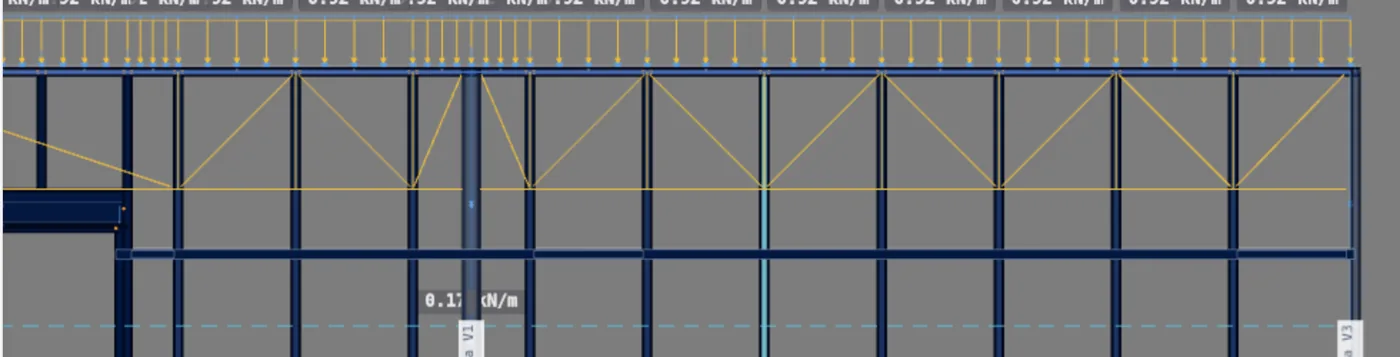
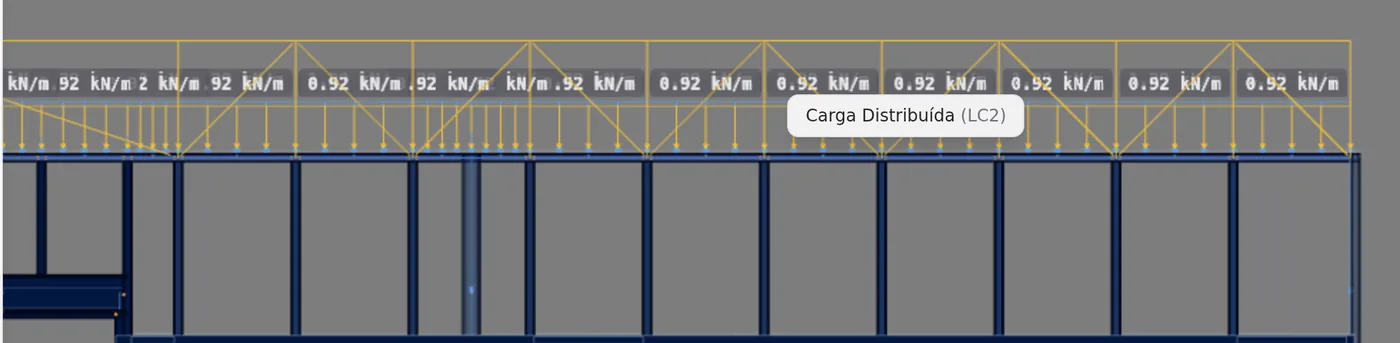
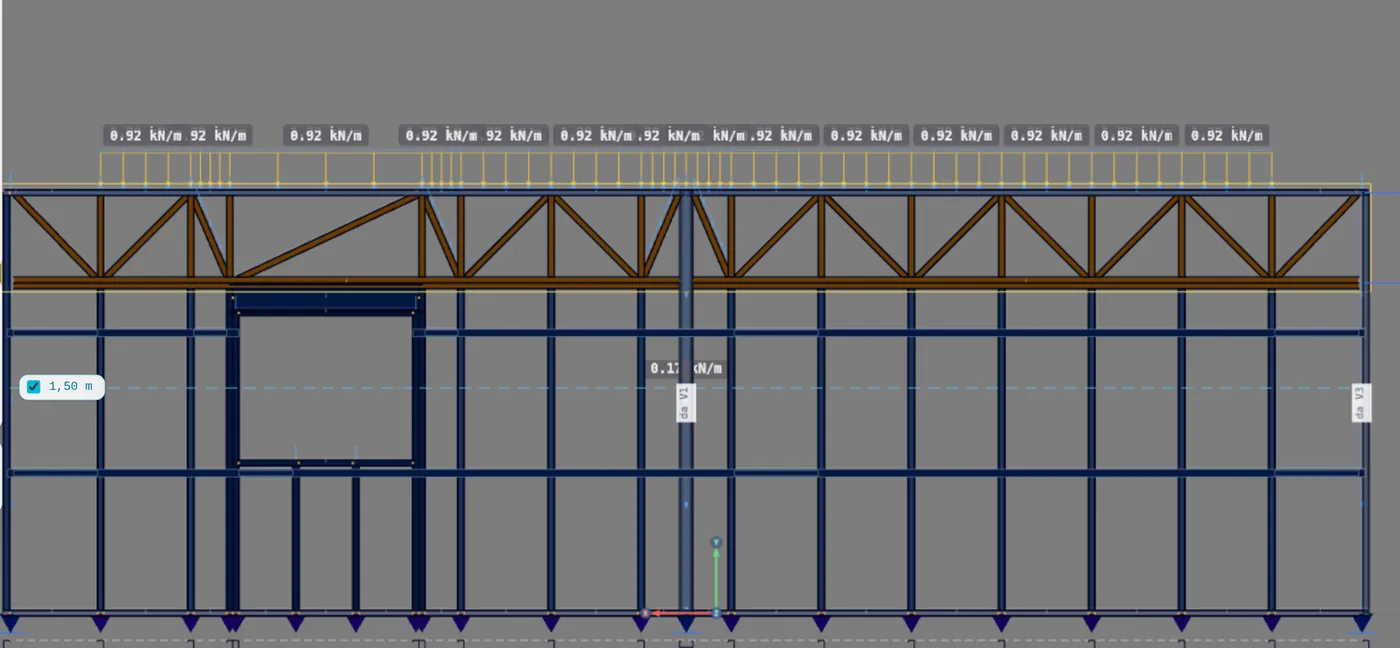
The click writes the truss in a single undo step, selects the new truss and disarms the tool. At the back, at 600 mm, it writes 12 TC, 2 TB, 14 TM and 16 TD. The TB comes out in two pieces because it stops at the face of the interior wall stud, which stays whole.

5. Check J3
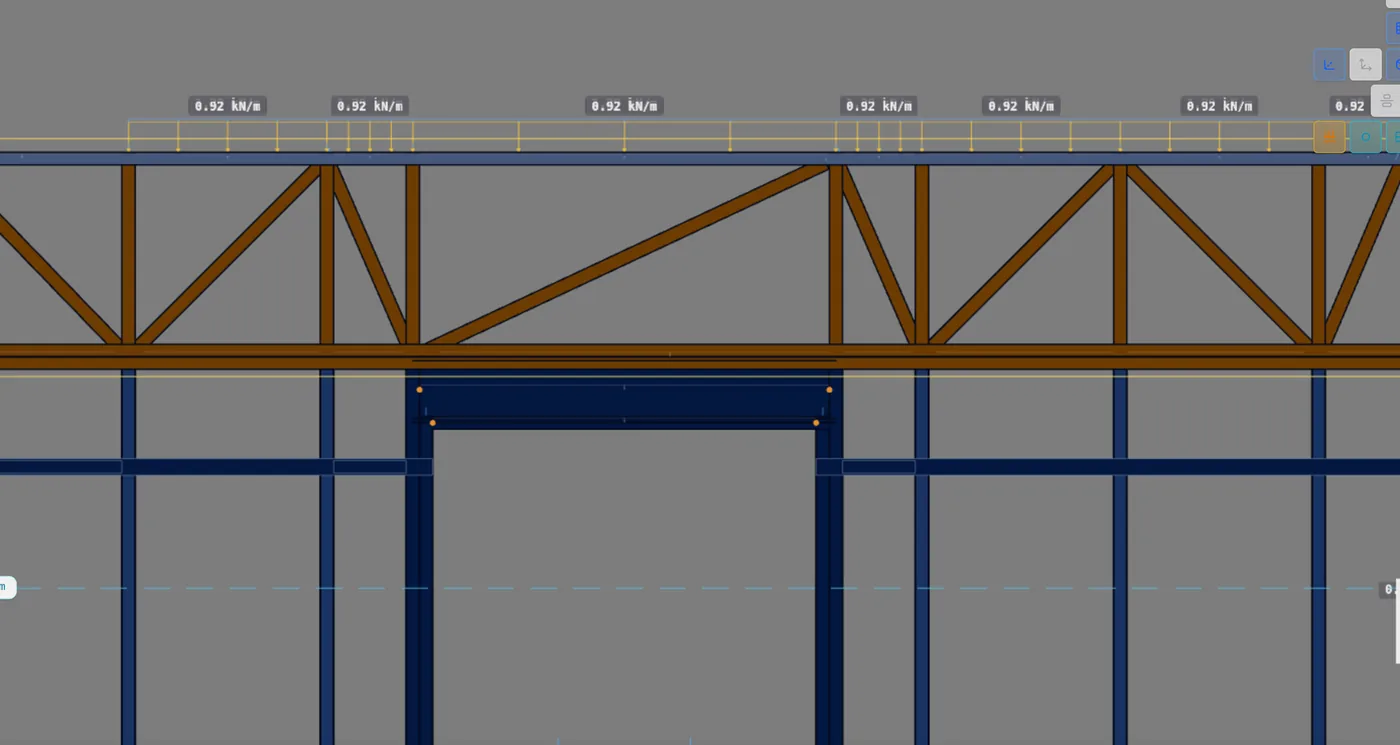
The J3 header reaches 2.20 m, the chord level. Its framing stops there: the jamb stud runs from the floor to the chord, and above it a TM goes up to the track. There is no stud over the opening, so the truss makes one long panel, with a single diagonal.
6. Change the model, and the alignment
With the T1 selected, the four inspector buttons change the model without placing it again. The cut in the wall does not depend on the model: TB and TC stay at 2 and 12. The verticals and the diagonals change.
| On T1, 600 mm | TM | TD |
|---|---|---|
| Zigzag with verticals | 14 | 16 |
| Pratt | 14 | 16 |
| Howe | 14 | 16 |
| Zigzag | 0 | 16 |
| With verticals, no alignment | 16 | 18 |
In zigzag the TM only goes in at the free edges, and both ends of T1 are full-height studs: none is left. Without the alignment, the nodes split the stretch into panels as long as the depth (9.00 m / 0.60 m = 15 panels). On the back wall that grid matches the studs, except over J3: two extra nodes go in there.





7. Try the front, and undo
In the front wall view, the same 600 mm truss turns red, and the box says: its chord sits below the header of a door or window in this wall. The P1 header reaches 2.30 m; the chord would sit at 2.20.
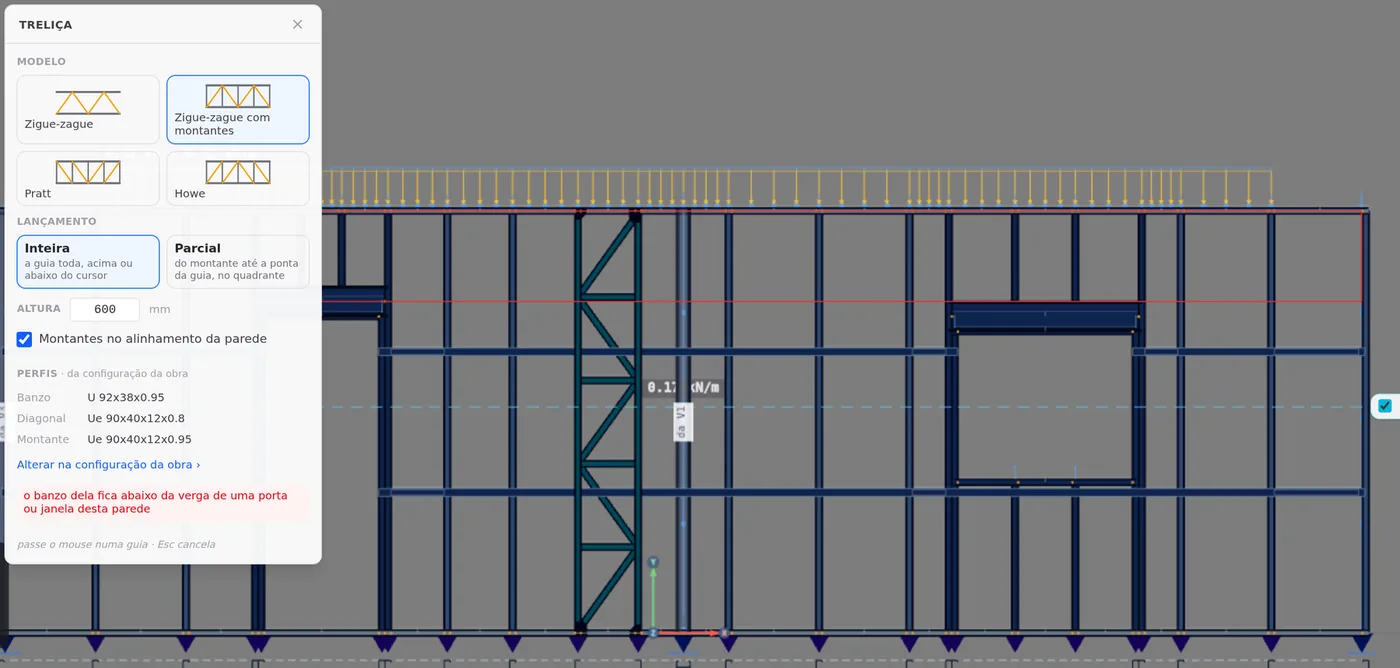
At 500 mm the chord rises to 2.30 m, the top of the P1 header, and the truss fits. When it writes, the wall is rebuilt wherever the truss crosses it: PL1 stops at the chord, and the diagonal and the strut that sat above it come out; over J1, whose header reaches 2.20 m, two 10 cm studs are left.
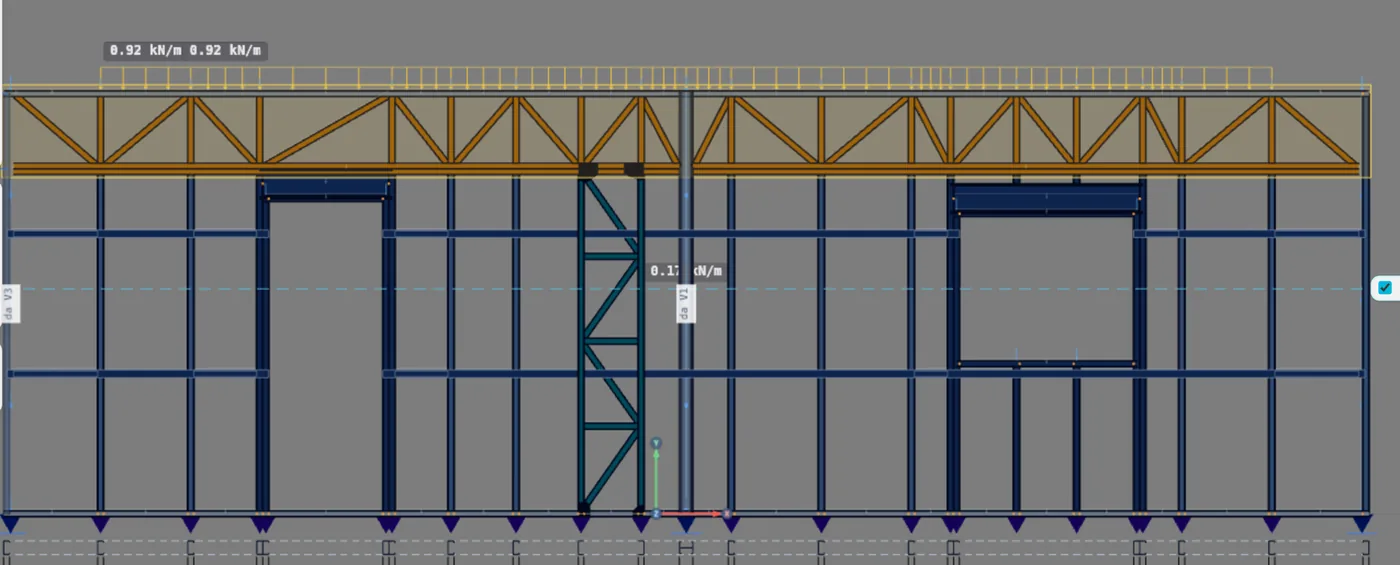
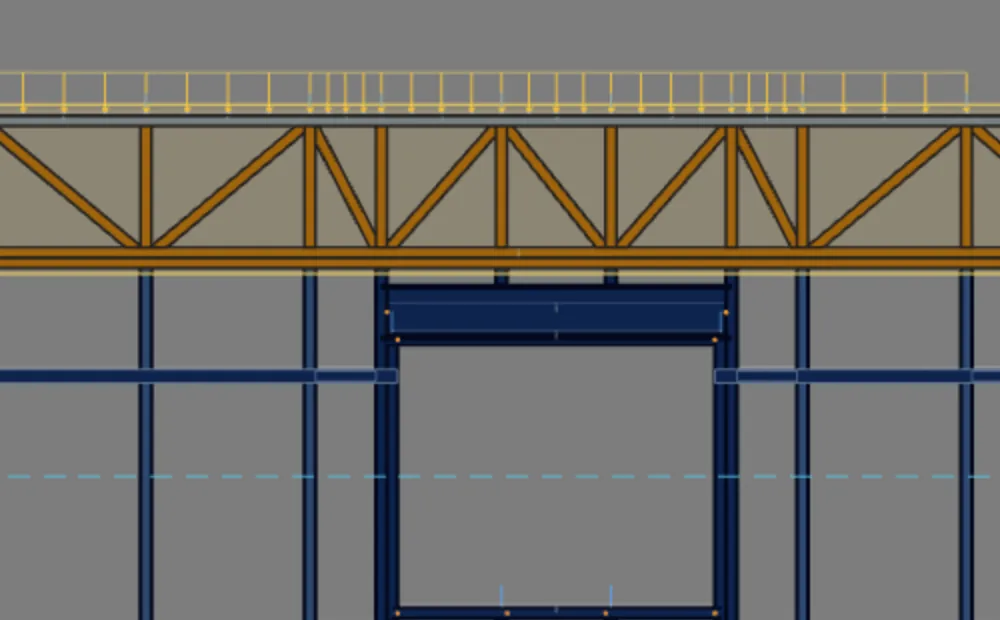
Ctrl + Z undoes the write in a single step: the front returns with PL1 whole and without the short studs. That is what the example does, and the T1 stays at the back.
8. Partial: track, stud and quadrant
In Partial, the truss starts at a stud and runs to another stud or to the end of the track. It takes three clicks, and the box footer follows each one: click the track, click the stud it starts from, click the quadrant. The quadrant gives both sides at once: left or right of the stud, above or below the track. Inside it, the stud (or the column chord) nearest the cursor is the end; near the end of the wall, the truss runs to the end. Esc goes back one step.
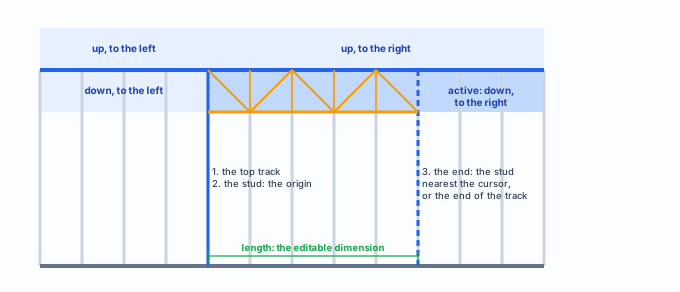
The four quadrants around the chosen stud. Our drawing, not to scale.
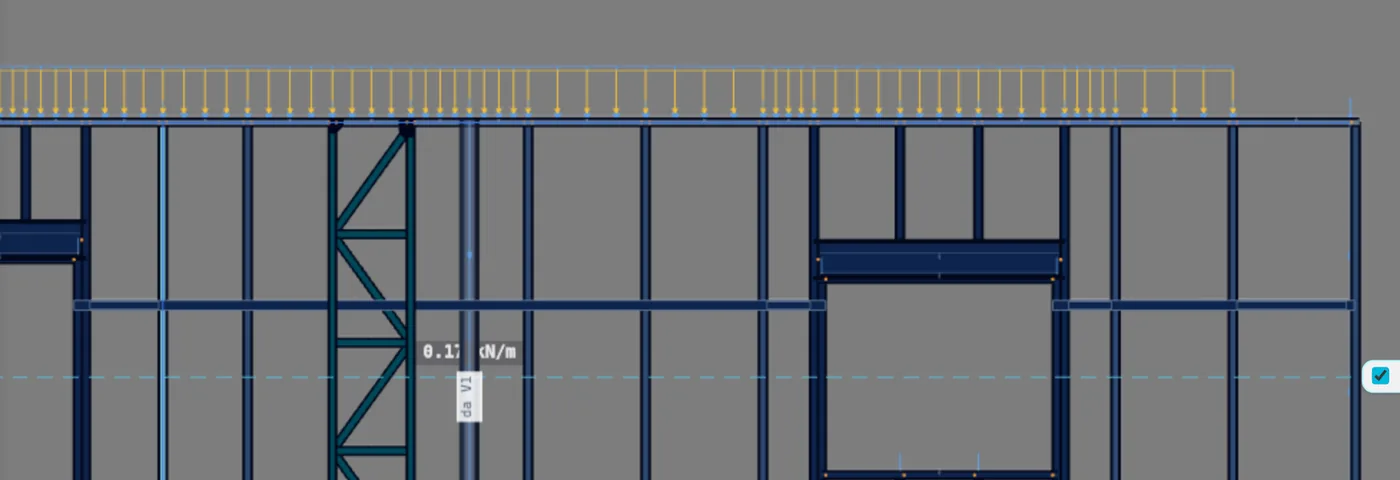
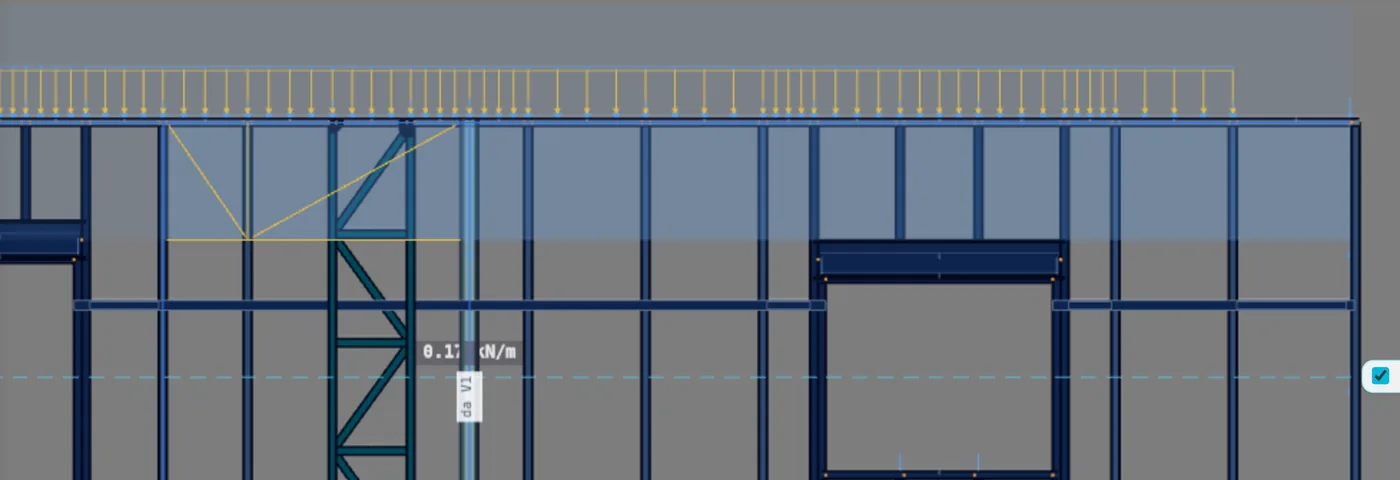
At the front, the 600 mm partial that starts to the right of the door and runs to the end of the track fits, because P1 is outside the stretch. It writes 6 TC, 10 TM and 12 TD, and again the TB in two pieces, split at the interior wall. PL1 shrinks too, now to 2.20 m. The chosen placement stays in the box: the next truss already starts in Partial.
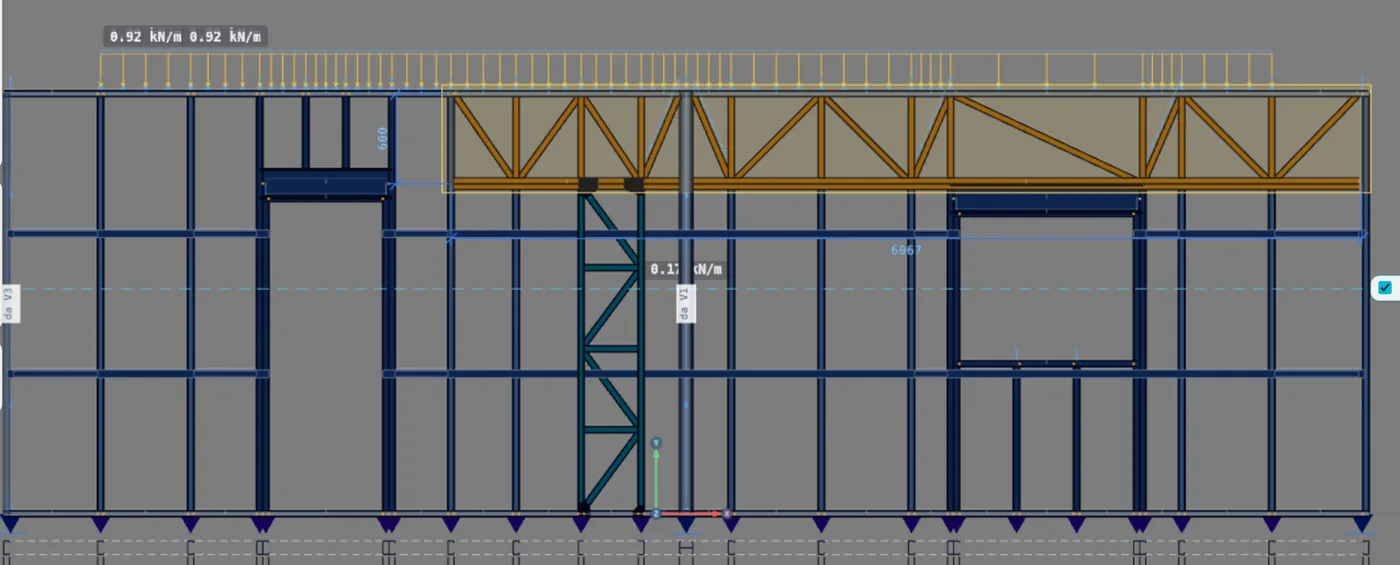
9. Change the depth with the dimension
With the truss selected, the view shows the depth dimension (and, for a partial, the length dimension). Click the number: it becomes a field. Enter writes and Esc cancels. Whatever does not fit is refused right there: the field turns red, and the reason shows when you hover over it.
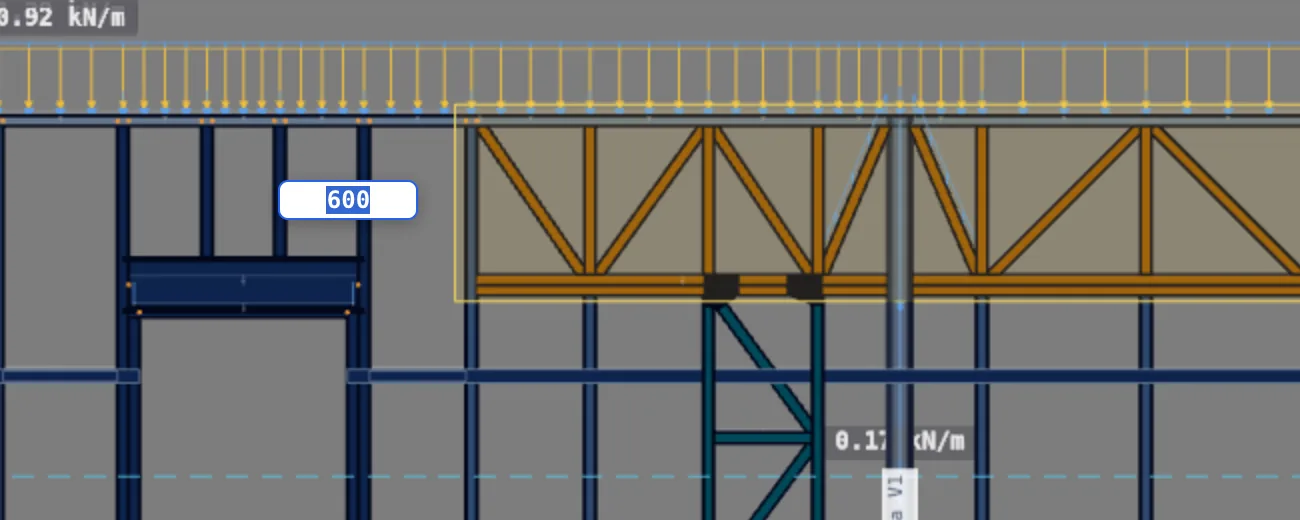
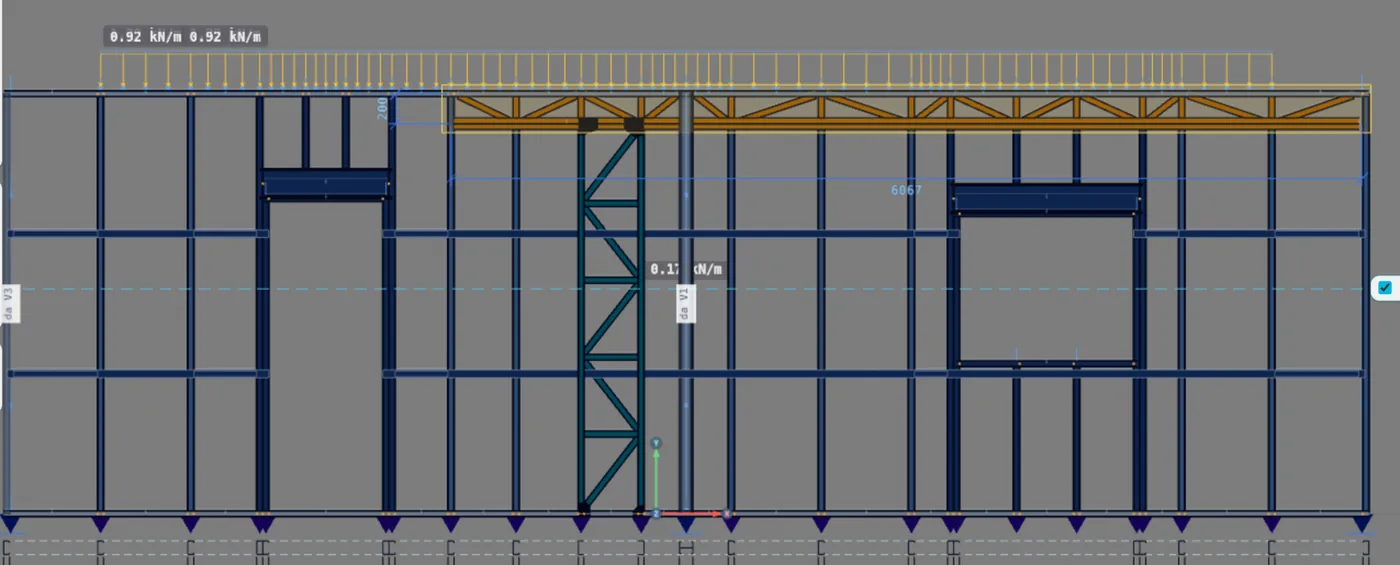
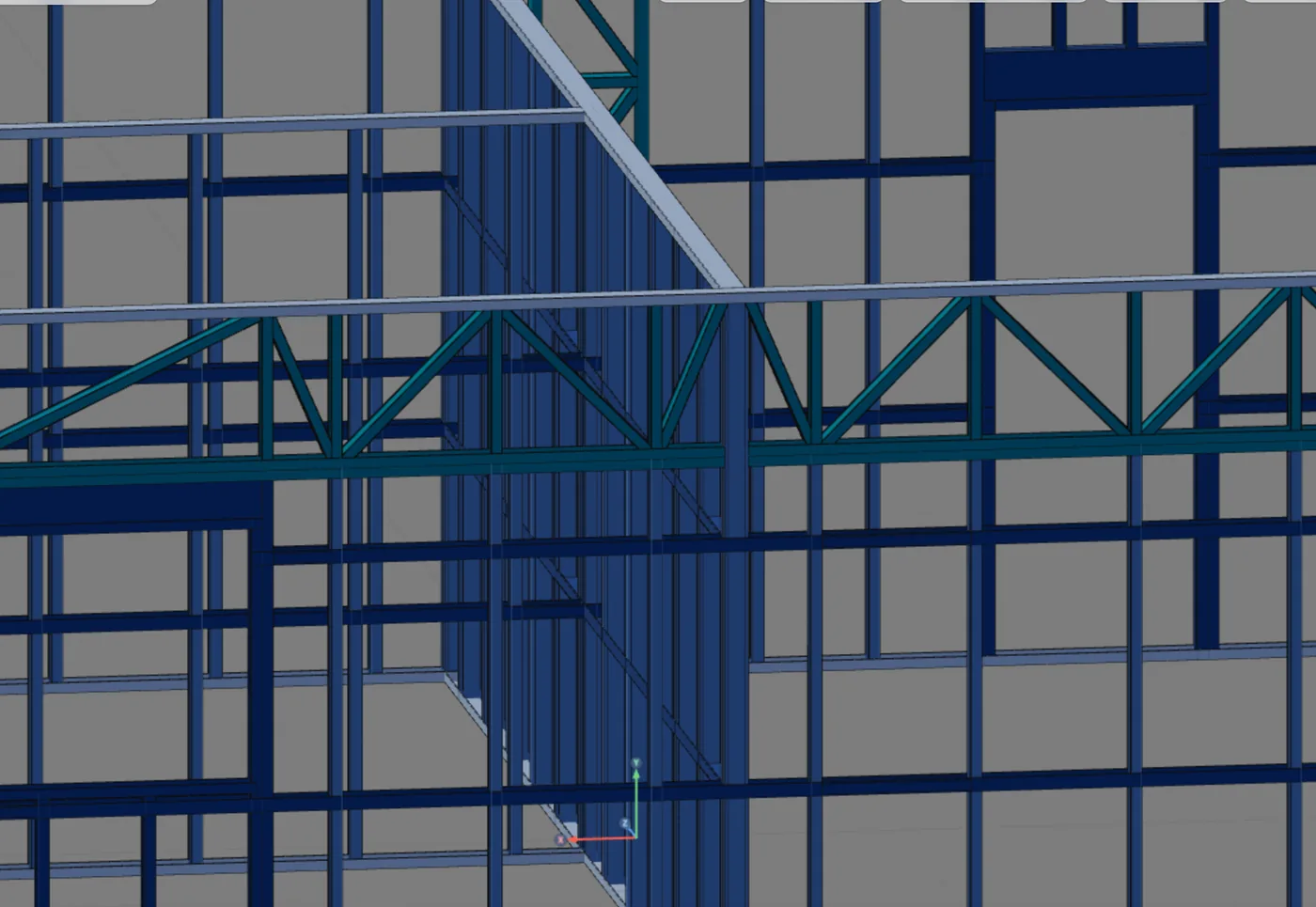
10. Check in 3D
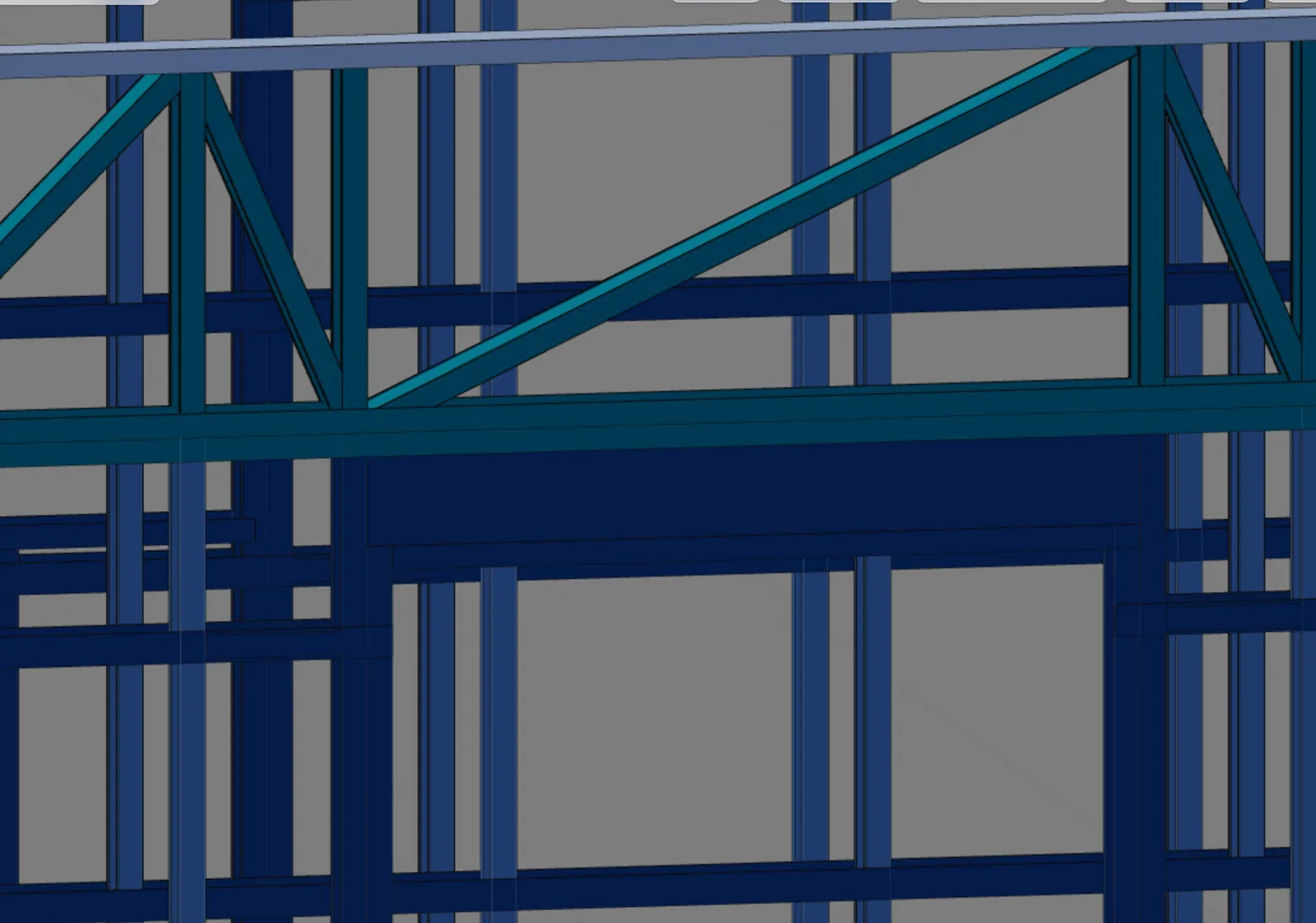
Go back to 3D. The T1 sits in the plane of the back wall, just below the top track. That is the track the roof trusses bear on (see Roof trusses): the two never touch, and each has its own level.
Shortcuts
- U↵
Lattice truss
Places a flat lattice truss on the wall track.
- AV↵
Wall view
Opens the elevation of the selected wall, seen from outside. Again, goes back.
with one wall selected
- PL↵
Plan view
Goes to plan view. With the wall view open, closes it and keeps the wall selected.
- Home
3D view
Goes to 3D at the last camera pose. With the wall view open, closes it.
Parameters
The box, the inspector and the dimensions
The Lattice truss box
| Field | What it does | Default |
|---|---|---|
| Model | Zigzag, Zigzag with verticals, Pratt or Howe | the market one: with verticals, in Brazil |
| Placement | Full: the whole track, above or below the cursor. Partial: from the stud to the stud nearest the cursor, or to the end of the track, in the quadrant | Full |
| Depth | in mm, in steps of 10; below 150, the field goes back to 150 when you leave it | 600 mm |
| Studs in the alignment | checked, the nodes land on the wall studs; unchecked, they are spaced by the depth, in nearly square panels | checked |
| Sections | Chord (the track one), Diagonal and Vertical, read-only: they come from the project settings, through the Change in project settings link | in a stick-built project, U 92x38x0.95, Ue 90x40x12x0.8 and Ue 90x40x12x0.95; in a roll-formed one, C 89x41 of 0.95, 0.75 and 0.95 mm |
The inspector

| Item | What it shows or does |
|---|---|
| Header | the name (T1-V5), the Full or Partial pill, the track, the direction and the wall |
| Model | the same four buttons; changes without placing again |
| Depth and length | fields in mm; whatever does not fit comes back with the refusal reason |
| Delete | deletes the truss (also with the Delete key) and gives back the studs it cut |
The numbers that are not in the box
- 150 mm: minimum depth
- 30 cm: minimum truss stretch
- 30 cm: of stud left inside the wall
- 5 cm: a panel narrower than this gets no diagonal
Shortcuts
- U↵
Lattice truss
Places a flat lattice truss on the wall track.
- Del/⌫
Delete selection
Deletes the selected walls, pieces or members.
with a selection
Common errors and refusals
Eight reasons, with the on-screen text
The refusal shows in red in the box, with the ghost in red, and the click writes nothing. Through the dimension, the field turns red with the same text; through the inspector, the text shows as a warning.
- "Stretch too short for a truss (minimum 30 cm)". The partial truss started from a stud too close to the end, or the typed length is short. Fix: another stud, or a longer length.
- "Depth below the minimum (150 mm)". Only through the dimension or the inspector: the box already returns 150 when you type less. Fix: 150 mm or more.
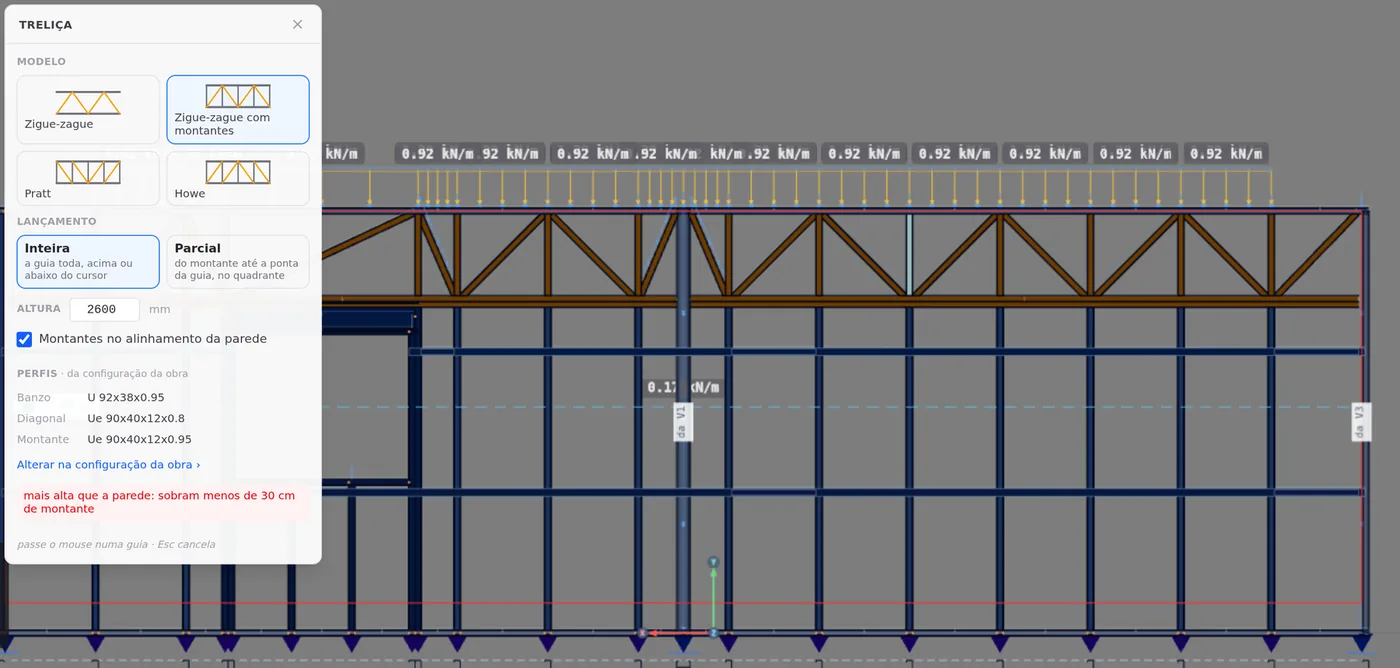
- "Deeper than the wall: less than 30 cm of stud left". Inside, the depth exceeds the wall height minus 30 cm: in the example house, 2.50 m. The capture asked for 2,600 mm. Fix: a shallower truss, or outside.
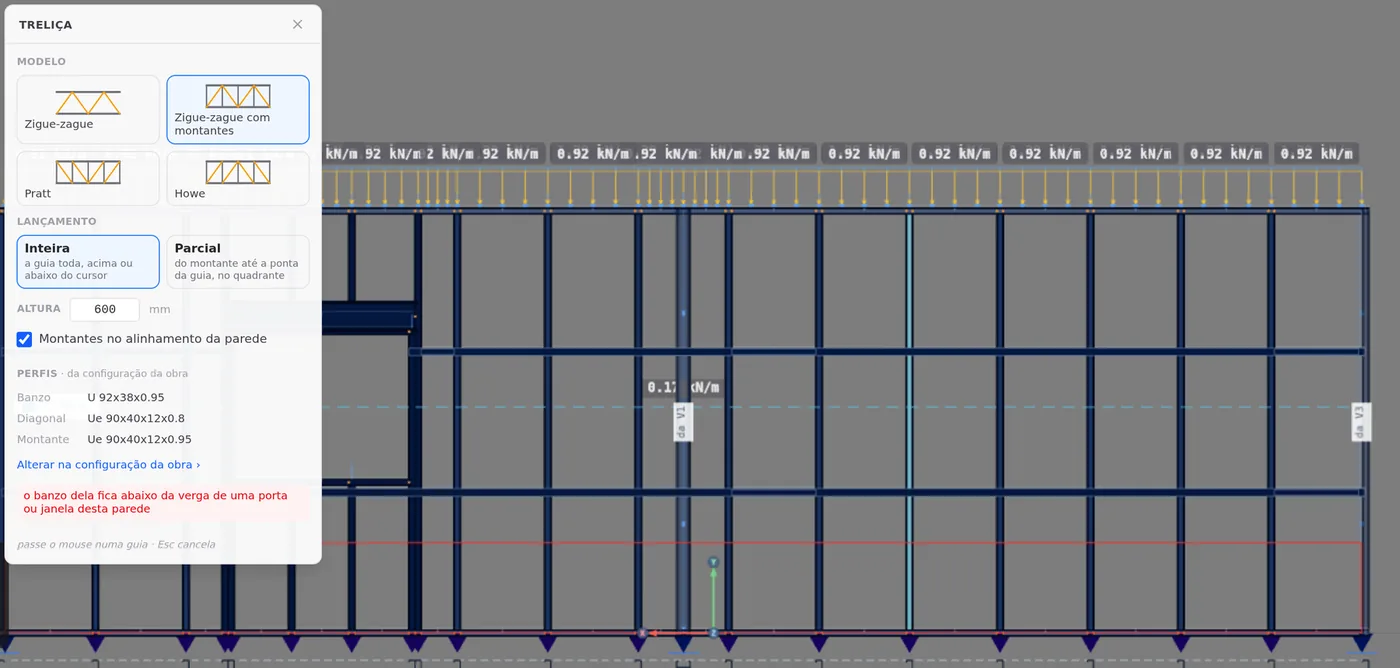
- "Its chord sits below the header of a door or window in this wall". Inside, an opening crosses the stretch and its header goes past the chord. On the bottom track, going up, any opening that crosses the stretch refuses, even a window with a sill above the truss. Fix: a smaller depth, a partial truss clear of the opening, or outside.
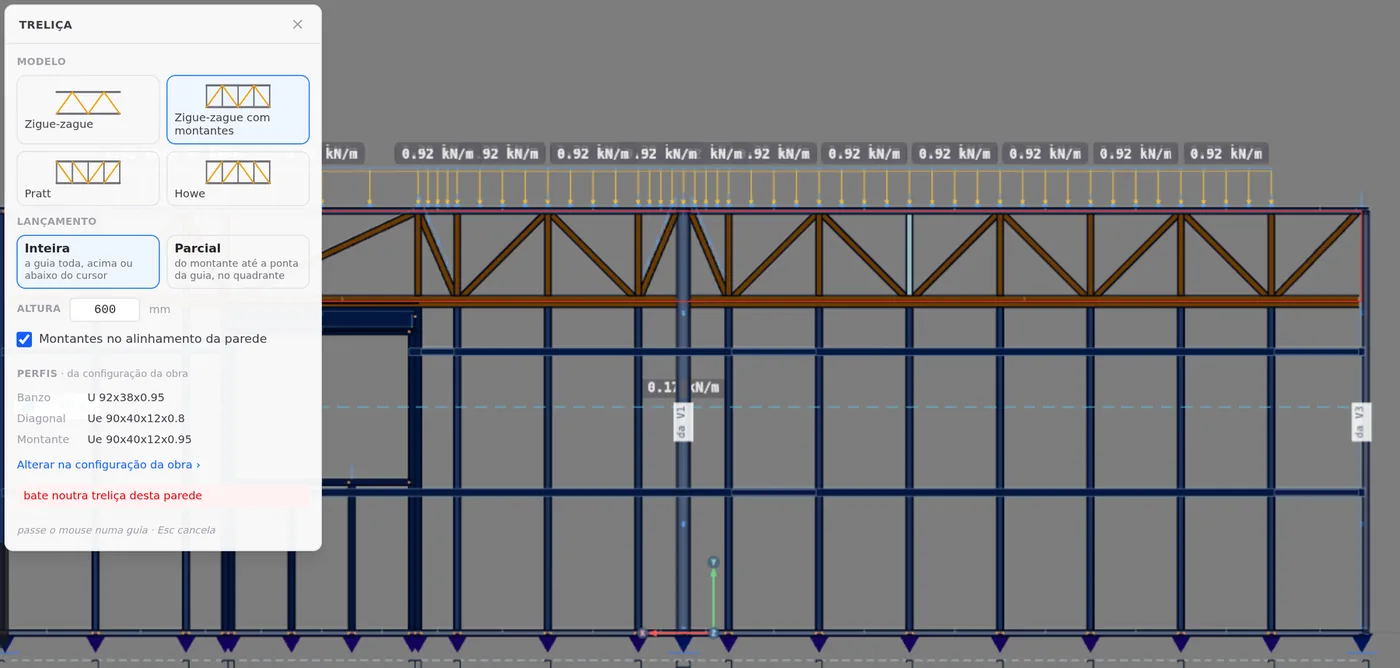
- "Hits another truss in this wall". The bands of two trusses overlap in length and in height. Fix: change the depth, the stretch, or delete the other one.
- "The column below would shrink to its chord and the diagonal would leave the market angle (30° to 60°): change the truss depth". A lattice column under the band would become too short for the column rule. Fix: what the text says, or a partial truss clear of the column.
- "Runs into another wall (the one above or below)". Outside, the band runs into a wall on the same line, on the story above or below. Fix: inside, or shallower.
- "Would go below the ground". Bottom track, going down, on the ground floor. Fix: going up, inside.
What the engine checks
Member by member, and the whole truss
The truss members enter the engine model like the other wall members, with their own assumptions for each. They apply to every wall truss, placed by hand or by the AI.
| Member | Assumption in the model | Deflection |
|---|---|---|
| TB | continuous chord. Ly, Lt and Lb run from node to node, where TD, TM and TC arrive: the plane of the wall is the weak axis of the lying chord. Lx, out of plane, is the whole chord | L/250, with L the stretch between nodes, measured on the chord line |
| TD and TM | truss web, pinned at both ends | h/300, with h the member length, measured on the chord line |
| TC | stud, like the wall studs: Lx is the piece; Ly, Lt and Lb, the largest gap between the bracing lines that cross it | h/300, on the chord line |
The whole truss
Besides the deflection of each member, the engine checks the truss as a beam that supports a wall panel: the largest offset of the TB nodes from the straight line between its ends, in the serviceability combinations, against L/500, with L the length of the TB (Table 3 of NBR 16970-2). Above the limit, the analysis flags the excess.
Bracing
The project check warns, per plan direction, when bracing is missing. The diagonal of a truss that runs from track to track counts, like the X strap. A band truss, between the track and the new chord, like the T1, works as a beam and does not count toward it. It is a presence check; the analysis measures the effect.
Column and opening under the chord
A lattice column under a truss inside the wall stops at the chord, and the chord becomes its support. The framing of an opening that ends at the chord stops there, and the truss passes over in one piece.
The assumptions in this section are those of a new project: CalcSteel versions its calculation, and the result of an older project does not change on its own.
What stays with the designer
- Web crippling (NBR 14762, Annex D) at the truss nodes: the TC under the new chord and the TM at the chord or at the track. The engine applies Annex D to the header over the jack stud, to the foot and head of the stud at the wall track (the TC foot is included here) and to rim and floor joists.
- The angle of the diagonals, especially in the panels over openings.
- The node connections (see Connections panel).
Reading the result: the wall truss enters the analysis member by member: the chord has its deflection checked between nodes, the webs on the chord line, and the whole truss against L/500. The nodes and the connections stay with the designer, as item 4.8 g of NBR 16970-2 requires.
Shortcuts
- Ctrl+Enter
Calculate the project
Sends the project to the engine, like the Calculate button.
Summary
The path, in one line
Plan → wall → Open view → LSF card → Lattice → model, placement and depth → cursor below or above the track → click → inspector: model and alignment → dimension for the depth → 3D.
The example so far
- 1: truss, T1, at the back
- 600 mm: deep, with verticals
- 2.20 m: the chord, at the top of the J3 header
- 44: members: 12 TC, 2 TB, 14 TM and 16 TD