LSF (Light Steel Framing)
Headers, jambs and cripples
A window cuts through studs, and what stood where the opening is now needs another path to the ground. This page shows what the engine checks in each piece around the opening, the header, the king stud, the jack stud and the cripple studs, and where to read the result of each one.
Overview
In Headers the openings of the house took shape: the front door and the three 1.20 x 1.00 m windows, each with a king stud, jack stud, header, head track and cripple studs. There the subject was where each piece is created. Here it is what the engine checks in each of them.
Where there is an opening, the regular stud that would run through it does not exist. The load it would carry has to go around the opening: the header collects it over the opening and hands it to the jack studs, the king stud runs full height beside it and holds the wind, and the cripple studs close what is left above and below.
For the engine, each of these pieces is a bar of the model, with its own support assumption, its own checks and its own governing combination.
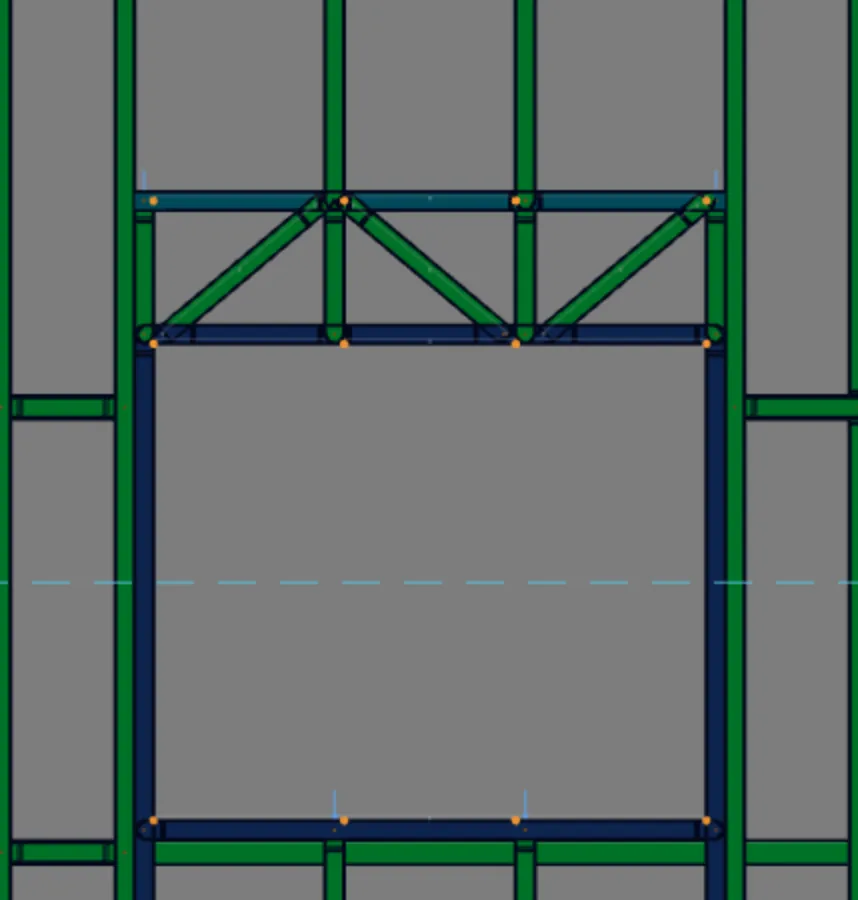
The example is window J1 in the front wall: 1.20 m wide, sill at 1.00 m, top of the opening at 2.00 m and a 300 mm lattice header, in a 2.80 m wall. The numbers come from the calculation of the whole house, on screen: 26 combinations and 1,113 bar segments in the Bar Verification list.
What it is for
The load path around the opening
The opening cuts the wall in the middle of a panel. The drawing below is J1 seen from outside, to scale, with the pieces the app generates for it and the two paths the engine calculates: the weight, which goes down, and the wind, which pushes the wall in or out.
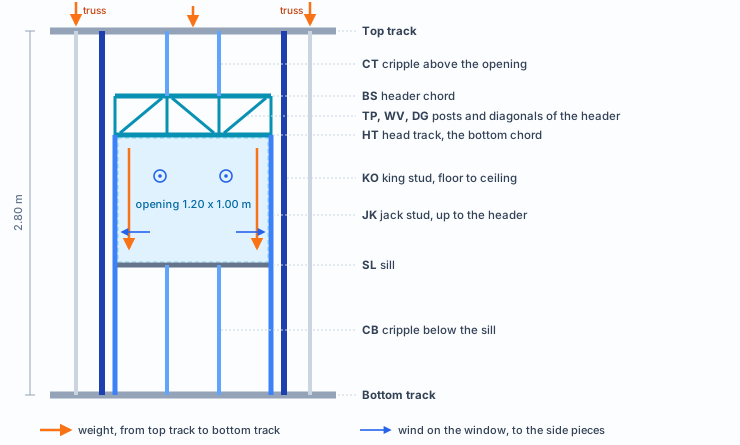
Follow the orange arrows. What reaches the top track over the opening goes down the upper cripple studs to the lattice header. The lattice spans the opening and hands the reaction to the jack studs, which carry it to the bottom track. In the example house the trusses bear on the regular studs at 1.70 m and 3.50 m, outside J1, so the weight crossing this opening is small.
Now the blue arrows. The window frame is not cut out of the wall: it receives the wind pressure on the wall and passes it to the upright pieces around it, each by its tributary area. The king stud, the jack stud and the cripple studs take that push as upright beams supported on the tracks. It is the wind that sizes the side pieces of J1, as the step by step will show.
Each piece with its role and its assumption
The name the screen gives each piece comes from the prefix of its label. That is how you find it in the verification list, and that is how the engine chooses how to model its ends.
| Piece on screen | Prefix | What it does | How the engine models it |
|---|---|---|---|
| king stud | KO | Runs from floor to ceiling beside the opening and holds the wall against the wind. | Stud in a chain. Web crippling at the foot and at the head, on the track. |
| jack stud | JK | Runs from the floor up to the header, against the king stud. | Stud in a chain. The header bears on it. Web crippling at the foot, on the bottom track. |
| header | VG | Solid header: box, I or single, from one support to the other. | Beam pinned at both ends. Bending, shear, deflection up to L/500 and web crippling where it bears on the jack. |
| header chord, post and diagonal | BS, TP, WV, DG | Lattice header: top chord, posts and diagonals over the opening. | Continuous chord. Diagonals and inner posts pinned. |
| head track | HT | Closes the top of the opening. In the lattice header it is the bottom chord. | Pinned at both ends. |
| sill | SL | Closes the sill line. Exists only in windows. | Pinned at both ends. |
| cripple stud above the opening | CT | From the header to the top track, on the wall spacing. | Pinned at both ends. Web crippling at the head, on the top track. |
| cripple stud below the sill | CB | From the bottom track to the sill, windows only. | Pinned at both ends. Web crippling at the foot, on the bottom track. |
- 2.80 m: Lx of the king stud, out of plane: the whole chain
- 0.93 m: Ly, in plane: the longest interval between bracing lines
- 1.20 m: J1 opening, with one jack per side
- 25: J1 bars in the analysis model
The chain. In the model, the king stud is split at the nodes where other pieces meet it: in J1, at 2.00 m, where the head track arrives. The segments do not buckle on their own. The engine recognizes the chain and uses in each segment, out of the wall plane, the length of the whole king stud (Lx = 2.80 m) and, in plane, the longest interval between the bracing that crosses it (Ly = 0.93 m, the strap and blocking of Bracing). The jack stud, split at the sill, follows the same rule with its own height, 2.00 m.
The lattice header replaces the beam with a small truss: top chord (BS), head track as bottom chord (HT), a post at each end (TP), a post at each cripple stud position (WV) and one diagonal per panel (DG). It is light, spans long openings, and every bar is checked.
What the standard says
Cold-formed steel, item by item
The opening pieces are cold-formed Ue sections, and the engine checks them by ABNT NBR 14762:2010, the Brazilian standard for cold-formed steel. NBR 16970-2:2022, the Brazilian LSF standard, brings the deflection limits of the header and the king stud. The table says which item answers for which check in the bar report.
| Check on screen | Item | What it checks |
|---|---|---|
| Slenderness | 14762, 9.7.4 | The slenderness ratio of a compressed bar does not exceed 200. |
| Compression | 14762, 9.7.2 | Axial resistance, with the reduction factor χ for global buckling. |
| Bending, strong and weak axis | 14762, 9.8.2 | Moment resistance: the least of first yield, lateral-torsional buckling and distortional buckling. |
| Shear | 14762, 9.8.3 | Shear resistance of the web. |
| Moment and shear | 14762, 9.8.4 | Both together in the same section: (MSd/MRd)² + (VSd/VRd)² ≤ 1.0. |
| Flexo-compression, flexo-tension and section yielding | 14762, 9.9 | The axial force and both moments at the same time: the sum of the three terms does not exceed 1.0. Section yielding makes the sum without amplifying the moments. |
| Web crippling | 14762, Annex D | The concentrated reaction the web receives where the piece bears (Table D.2). |
| Deflection | 16970-2, 8.2 | Table 3: the header, a beam supporting a wall panel, stays within L/500; the king stud within h/300 at mid-panel, measured relative to its ends. |
NBR 14762:2010 · Annex D.
Web crippling depends on the thickness, the yield strength, the bearing length, the inside bend radius and the flat height of the web. A section with two webs, such as the box header, adds the share of each one.
NBR 16970-2:2022 · 8.2.
Table 3 gives the deflection limits of the LSF pieces. The header is the beam supporting the wall panel above the opening, and its limit is L/500. The king stud, like every stud under wind, stays within h/300 at mid-panel.
How to read each line. Ratio is demand divided by resistance. The bar passes when the largest ratio, the governing one, stays below 1.00. Next to it comes the combination that produced it (CB4, CB16 and so on); Reading the results explains how to read these codes.
Two checks weigh most around the opening. Flexo-compression, because the upright pieces carry a little weight and all the wind on the window at the same time. And web crippling, because a short piece hardly buckles, and what limits it is the concentrated force at the point where it bears.
Design recommendation
1. Make the truss land outside the opening
In the house, the trusses bear on the regular studs beside J1, and the opening only takes what comes through the track. When the roof spacing puts a truss over the opening, the Header box warns in "Load over the opening, away from the support" that the header carries that load.
2. Choose the header type by span and load
Box (two Ue lip to lip) and I (two Ue back to back) have two webs. Single is one Ue only, for a short span and a light load. Lattice puts chords and diagonals over the opening, for a long span. The Headers page gives the route: start from the default and change only the header that fails.
3. More jacks when the reaction grows
The jack stud carries the header reaction down to the bottom track. With a truss or a floor over the opening, go from one to two or three jacks per side (in the opening dialog, "Jambs": Single, Double or Triple): the reaction is shared among them.
4. Read the opening by its worst piece
The piece that governs J1 is the king stud, by the wind, and not the header. For the same window, each wall gives a number:
| J1 120 x 100 | King stud, lower segment | King stud, upper segment | Worst combination |
|---|---|---|---|
| Front wall | 0.760 and 0.764 | 0.774 and 0.769 | CB16 |
| Wall 3 | 0.741 and 0.741 | 0.769 and 0.783 | CB10 |
| Wall 5 | 0.752 and 0.751 | 0.799 and 0.819 | CB4 |
The three windows are identical: same opening, same 300 mm lattice, one jack per side. What changes is the wall, its orientation to the wind and the window position along it. In all three, the governing combination has wind as the principal action, with a factor of 1.4. The same opening may need reinforcement in one wall and not in another.
If a piece goes above 1.00. The king stud works like a stud, and Studs shows what moves the number of an upright piece: the section thickness, the bracing that shortens Ly and the load that reaches it. Change what is needed and calculate again: the whole check runs again.
Step by step
1. Calculate and open the wall view
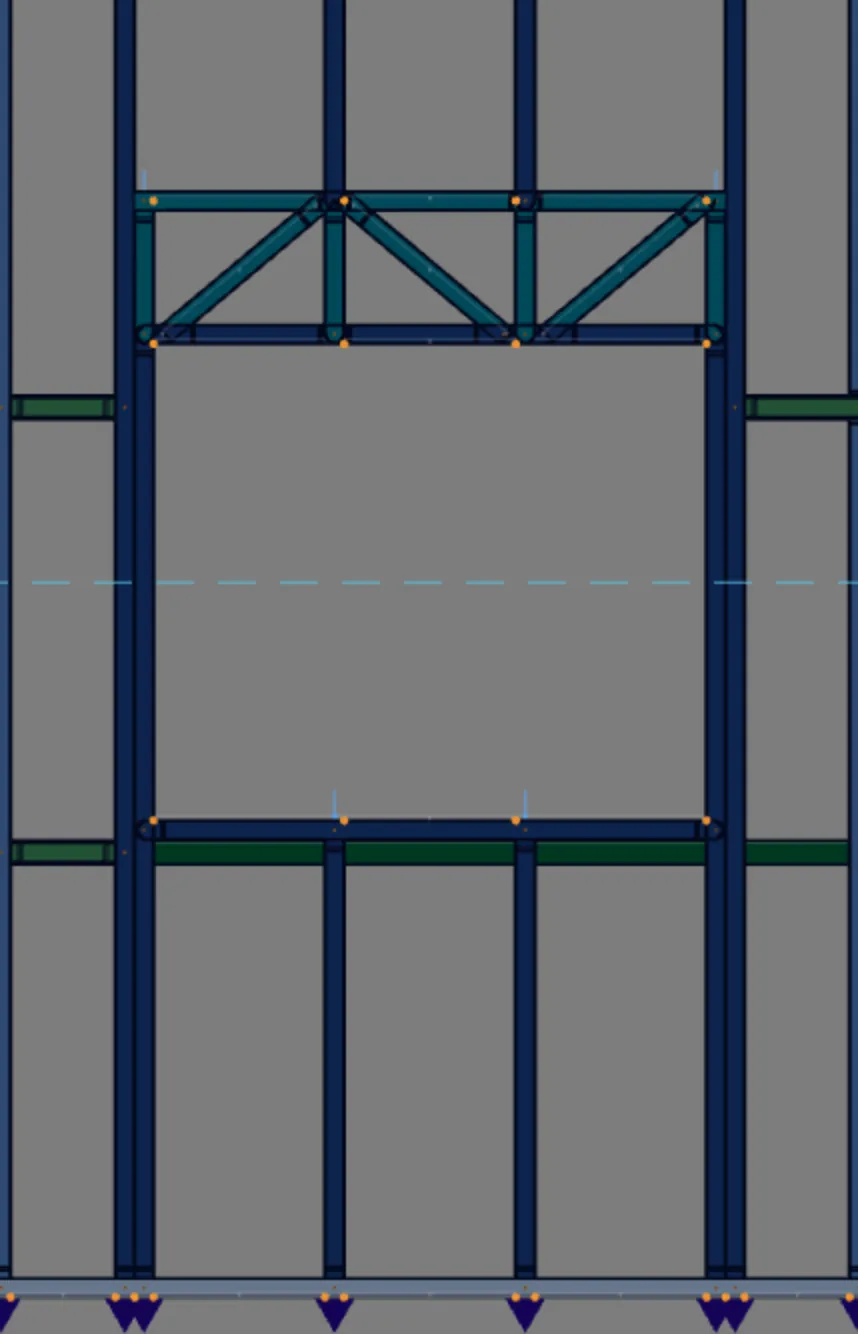
With the house complete, press Calculate. On the first calculation of the project, the result colors turn on by themselves: turn them off with the button in step 2 before selecting the wall. Then, in Plan, select the front wall at a free point of the panel and click Open view on its card: the wall appears head-on, with no other walls in front of it.
2. Turn on the colors
On the results card, the first button, with a green ✓ and a red ×, shows the OK/FAIL colors on the bars. Hovering over it, the tooltip says Verification Colors. Green passes, red fails: it is the reading at a glance. The full reading, segment by segment, is the list in step 4.
With the colors on, a click reads. In this mode, clicking a bar opens its report instead of selecting it. To edit again or select the wall, turn the colors off with the same button.
3. Click the king stud and read the report
With the colors on, a click on a bar opens the Bar Diagnostic Report. Click the left king stud, below the head track. The header of the report gives the piece, the section, the governing ratio and the combination; below comes one card per check, with the standard item, the demand and the resistance.
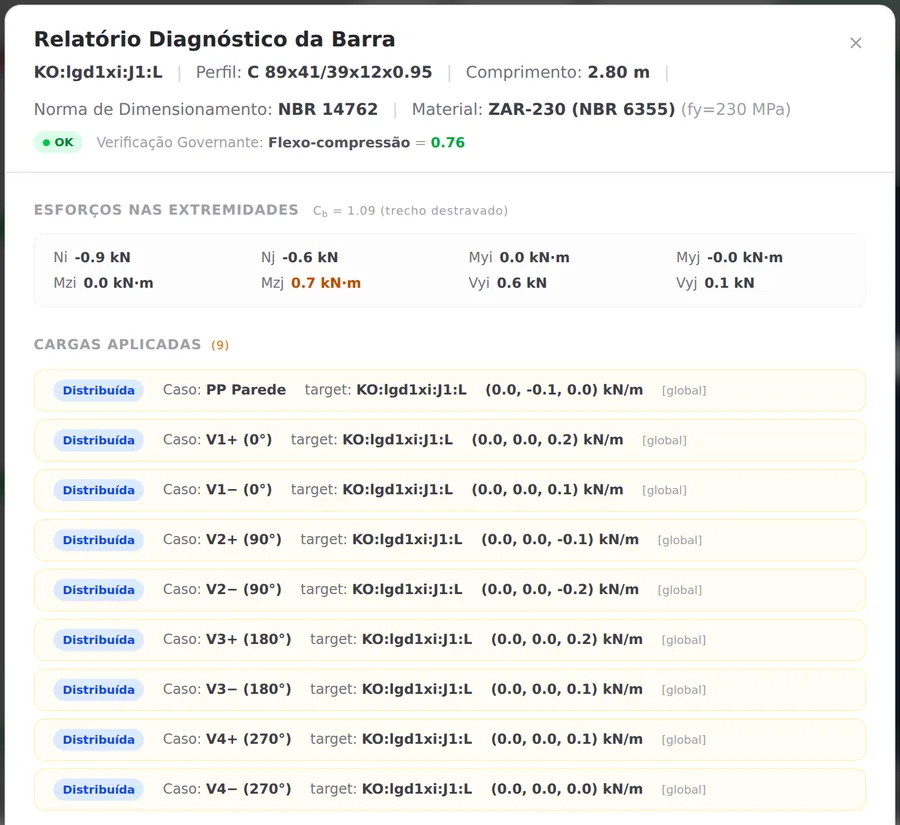
- 0.76: flexo-compression, the governing check, in CB13
- 78.7: slenderness, out of a maximum of 200
- 0.9 kN: compression, against 18.0 kN resistance
- 66.6 kN·cm: strong axis moment, against 96.8
The compression is small. What weighs is the wind moment about the strong axis: 0.69 of the resistance. Flexo-compression adds the three terms, 0.05 from the axial force, 0.70 from the strong axis and 0.01 from the weak axis, and reaches 0.76. The strong axis comes out at 0.70, and not 0.69, because the engine amplifies the first-order analysis moments by 1/(1 − N/Ne), as the card below says.
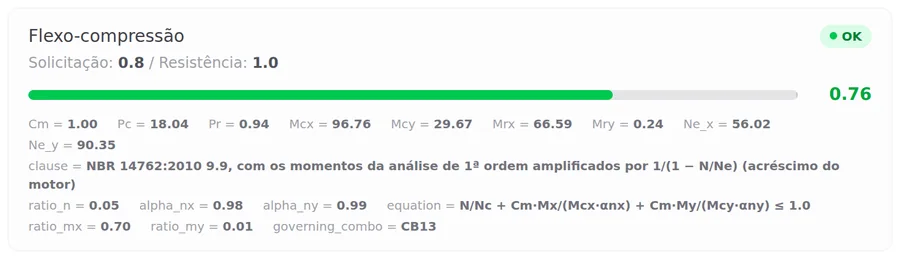
The slenderness of 78.7 comes from Lx = 280 cm and the radius of gyration about the strong axis, 3.56 cm: it is the whole chain, even in this 2.00 m segment. In bending, the unbraced length is Lb = 93 cm, the interval between bracing lines. Web crippling, at the point where the king stud bears on the track, stays at 0.39.
4. Open the Bar Verification list
On the same results card, the Bar Verification button opens the list of every calculated segment, 1,113 in the house, with the label, the section, the ratio and the combination. Click a row and it expands into one row per check.
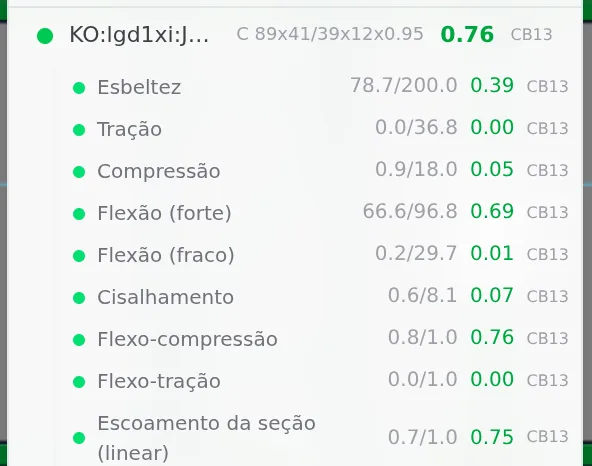
The calculation splits the king stud at the head track node, at 2.00 m. That is why it appears in the list in two rows: the lower one, with its label (KO:lgd1xi:J1:L), and the upper one, which the list shows with the name of the segment in the analysis model (JB2, in the house).
Both segments have the same buckling length, but they reach their number by different paths. Below, almost everything is the wind moment about the strong axis. Above, that moment drops from 66.6 to 59.3 kN·cm and weak axis bending comes in, which hardly exists below. The sums end up side by side, 0.76 and 0.77, and the utilization of the king stud is that of the worst segment.
| Check | Lower segment, 0 to 2.00 m | Upper segment, 2.00 to 2.80 m |
|---|---|---|
| Slenderness | 78.7 of 200 | 78.7 of 200 |
| Compression | 0.9 of 18.0 kN | 0.1 of 18.0 kN |
| Bending, strong axis | 66.6 of 96.8 kN·cm (0.69) | 59.3 of 96.8 kN·cm (0.61) |
| Bending, weak axis | 0.2 of 29.7 kN·cm (0.01) | 4.7 of 31.0 kN·cm (0.15) |
| Shear | 0.6 of 8.1 kN (0.07) | 0.8 of 8.1 kN (0.10) |
| Flexo-compression | 0.76, in CB13 | 0.77, in CB16 |
| Web crippling | 0.6 of 1.5 kN (0.39), in CB13 | 0.9 of 1.5 kN (0.62), in CB13 |
A shortcut for the whole project. In the Calculation report, the openings section already gives, for each opening, the worst piece of each role: header, head track, king stud and jack stud, with the force, the moment, the check, the ratio, the deflection and the web crippling at the support.
5. Check the other pieces of J1
Do the same with each piece: the click opens the report, and the list shows every segment. In the front J1:
| Piece | Ratio | Combination | What governs |
|---|---|---|---|
| jack stud, worst segment | 0.43 | CB16 | flexo-compression, with 25.5 of 96.8 kN·cm about the strong axis |
| cripple stud below the sill | 0.20 | CB13 | web crippling: 0.30 of 1.51 kN |
| cripple stud above the opening | 0.12 | CB13 | web crippling: 0.19 of 1.51 kN |
| sill | 0.13 | CB13 | flexo-compression, almost only strong axis bending: 11.9 of 96.8 kN·cm |
| head track, bottom chord | 0.11 | CB13 | bending with shear (item 9.8.4): shear of 0.8 of 8.1 kN |
| header chord | 0.40 | CB16 | slenderness: 79.7 of 200 |
| header post, at the end | 0.14 | CB16 | flexo-compression |
| header diagonal | 0.17 | CB25 | slenderness: 33.2 of 200 |

The cripple studs are governed by web crippling, not by compression. At 0.50 m and 1.00 m long, they hardly buckle: the compression of the cripple stud below the sill is 0.2 kN against 21.2 kN. What weighs is the wind reaction at the point where the web bears on the track, with 40 mm of bearing.
In the lattice, the top chord has a small force (0.1 kN against 20.5 kN) and a ratio of 0.40 by slenderness: it spans 1.20 m without bracing about the weak axis. The head track, the bottom chord, works in tension at midspan, like every bottom chord of a beam supported at its ends; the segment that governs, at 0.11, is the shear one.
A trial: the same J1 with a box header
The house was designed with a lattice header. To see a solid header in the calculation, change the type in the front J1 and calculate again, without saving. It is a trial on screen: at the end, J1 goes back to lattice, and the project stays as it was.
6. Change the J1 header to Box and calculate
With the Header tool (see Headers), click the J1 opening. On the card, choose Type: Box, two Ue sections lip to lip. The Section field shows C 89x41/39x12x1.15, the header section of the roll-formed project, thicker than the studs. In a stick-built project, the header starts like this, as a box of two Ue 200. The wall is rebuilt right away; then, Calculate.
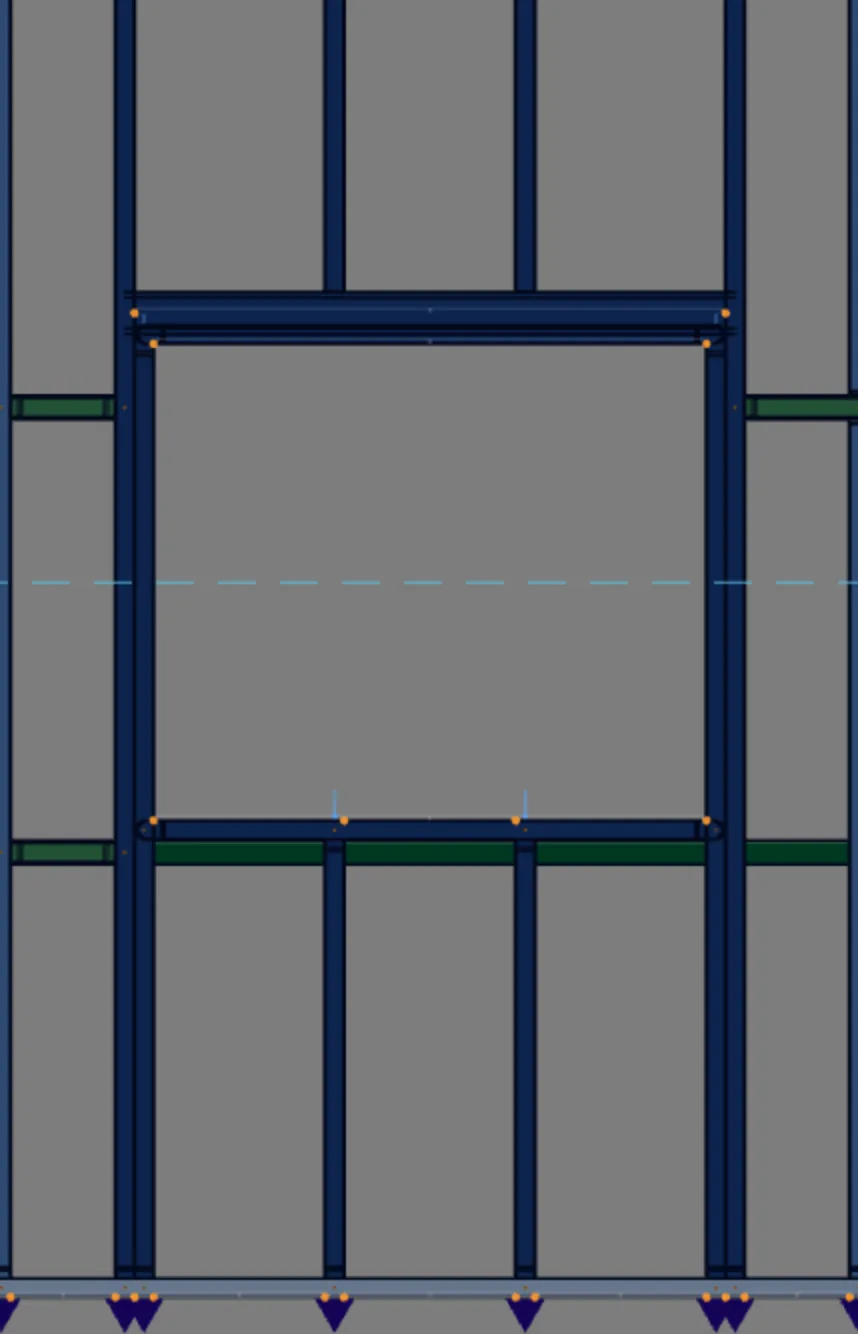
- 0.09: header, worst segment, in CB13
- 1.28 m: header span, from king stud to king stud
- 0.71: king stud, worst segment (was 0.77)
- 0.45: jack stud, worst segment (was 0.43)
What changes in the wall is only the upper core of the opening. With the box, the chord, the diagonals and the posts of the lattice disappear, and the header takes their place. The head track stays at 2.00 m, on the jack studs, and the sill and the lower cripple studs stay as they were.
The calculation returns the same 26 combinations. The pieces around the opening change little: the king stud goes from 0.77 to 0.71 and the jack stud from 0.43 to 0.45. In both, what governs is still wind bending about the strong axis; in the lower segment of the king stud, the moment drops from 66.6 to 61.4 kN·cm.
Undo the trial before saving. Read the numbers, undo the change and calculate again before moving on. That way the report and the list go back to describing the house as it was designed.
7. Click the header and read the checks
With the colors on, click the header. The report opens with its label (VG:lgd1xi:J1), the 1.28 m length, the cold-formed standard, the ZAR-230 steel and the governing check: section yielding (linear), 0.08.

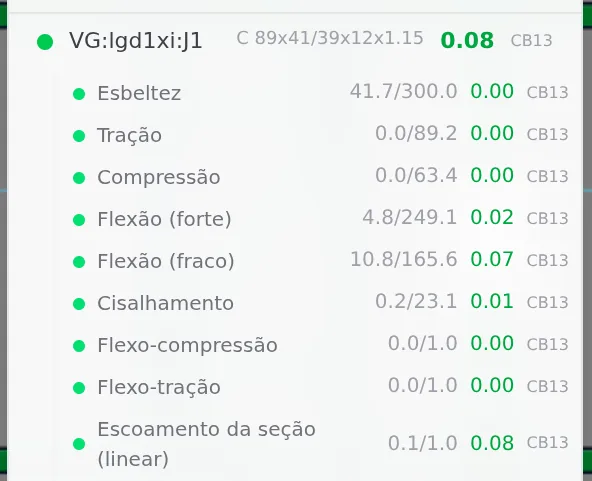
| Check | Demand and resistance |
|---|---|
| Bending, strong axis | 4.8 of 249.1 kN·cm (0.02) |
| Bending, weak axis | 10.8 of 165.6 kN·cm (0.07) |
| Shear | 0.2 of 23.1 kN (0.01) |
| Slenderness | 41.7; with no axial force, the limit does not apply (N.P.) |
| Flexo-compression | 0.00, no compression |
| Section yielding | 0.08, both bending terms added |
The header carries almost no load because no truss bears on J1: the two nearest cross the wall at x = 1.7 m and 3.5 m, outside the opening, which runs from 1.96 to 3.24 m. Weak axis bending, larger than strong axis bending, is the wind on the window pushing the header out of the wall plane.
The header enters the calculation in three segments, of 44, 40 and 44 cm, split where the two upper cripple studs start. As with the king stud, the list shows the row with the header label and the others with the segment name in the analysis model, and the utilization of the header is that of the worst segment: 0.09, one hundredth above the segment the report opens. With two webs, the shear resistance adds both: the shear card shows the webs counted.
To undo. Ctrl+Z undoes the type change in a single step. Or, with the Header tool, set Type back to Lattice. Then Calculate again.
Shortcuts
- Ctrl+Enter
Calculate the project
Sends the project to the engine, like the Calculate button.
- PL↵
Plan view
Goes to plan view. With the wall view open, closes it and keeps the wall selected.
- AV↵
Wall view
Opens the elevation of the selected wall, seen from outside. Again, goes back.
with one wall selected
- G↵
Header
Click a header to open its opening in the footer.
Parameters
What each choice changes in the calculation
The opening parameters live in two places that Headers has already shown: the opening dialog and the Header box. What matters here is the effect of each one on the pieces the engine checks.
| Parameter | Where | What it changes in the calculation |
|---|---|---|
| Door or window | opening dialog | A window has a sill and cripple studs below it. A door has neither. |
| Jambs | dialog: Single, Double, Triple. Header box: Jack studs 1, 2 or 3 | How many jack studs per side. The header reaction is shared among them. |
| Header | dialog: Box (2×Ue) or Lattice | A beam over the opening (VG) or a truss over the head track (BS, TP, WV, DG). |
| Lattice height | dialog, from 100 to 1200 mm; default 300 | The distance between the chords. More height, less force in the chords for the same moment. |
| Type | Header box: Box, I, Single, Lattice | The section of the solid header: two webs or one. It changes bending, shear and deflection: the two webs add up. |
| Section and Height | Header box, solid header only | Moment of inertia and section modulus of the header, and the space it takes above the opening. |
| Support | Header box: Jack or Clip, solid header only | With a clip there is no jack stud: the header is fixed to the king stud with an angle, and the angle stays with the designer. |
| Project rule | Header box: Opening ≥, Section, Type | The solid header of every opening from the minimum width (default 1,800 mm), new ones included. Each opening's own choice overrides the rule. |
| Back to default | Header box | The opening goes back to following the project rule or the project default. |
Section of the pieces around the opening. King stud, jack studs, cripple studs and the web members of the lattice header use the wall stud section; the lattice chord, the head track and the sill use the track section. In the house, roll-formed on the FRAMECAD F325iT, both are the same C 89x41/39x12x0.95, and the 25 bars of J1 come out in it. Only the solid header has its own section: the one in the Section field of the Header box.
Changed it, calculate. The number in the colors, the report and the list is that of the last calculation. After changing the opening, press Calculate before reading again.
Shortcuts
- G↵
Header
Click a header to open its opening in the footer.
- J↵
Add window
Opens the window panel, then click the wall. When armed, disarms.
- D↵
Add door
Opens the door panel, then click the wall. When armed, disarms.
Common mistakes and refusals
What tends to mislead the reading
- Judging the opening by the header. In J1, the lattice header does not go above 0.40. The piece that governs is the king stud, at 0.77, and what governs it is the wind.
- Reading only one segment of the king stud. The calculation splits the king stud at the head track. In the front wall, the lower segment gives 0.76 and the upper one 0.77; in Wall 5, 0.75 and 0.82. Check both in the list, or the worst per role in the report.
- Assuming the weight sizes the side pieces. The compression of the king stud is 0.9 kN against 18.0 kN. The wind moment alone already takes 0.69 of the resistance.
- Copying the result from one window to another. The same J1 gives 0.77 in the front wall and 0.82 in Wall 5. Each opening is read in its own wall.
- Reading slenderness as a force. The 0.40 of the header chord is λ divided by 200, a geometric limit. The force in it is 0.1 kN.
The Header box refusals
The Headers page explains each one on the drawing. They appear before the calculation runs, and none of them changes the project:
| The refusal | What to do |
|---|---|
| The header with this depth goes past the top track. | A shallower section, or a lower opening. |
| The header with this depth runs into the truss that passes over the opening. | A shallower section. |
| With these jacks the opening no longer fits in the wall. | Fewer jacks, or the opening farther from the end. |
| This opening has a lattice header: section and composition belong to the solid header. Change the type to Box, I or Single. | Change the type first. |
| The header is a Ue section (C family). A U track, a hat section or a strap do not work as a beam over the opening. | Choose a Ue. |
| This section is not in the catalog. | Choose a section from the list. |
What the engine checks
It checks what is drawn
Each opening piece is a bar of the model, checked in each of the 26 combinations. The largest ratio of all governs and gives the piece its color.
| Piece | What the engine checks |
|---|---|
| king stud (KO) | Compression and slenderness with the length of the whole chain (9.7.2 and 9.7.4), bending about both axes (9.8.2), shear and moment with shear (9.8.3 and 9.8.4), flexo-compression (9.9), web crippling at the foot and at the head, on the track (Annex D), and deflection h/300 at mid-panel. |
| jack stud (JK) | The same checks as an upright piece, with its own chain, and web crippling at the foot, on the bottom track. |
| solid header (VG) | Bending about both axes, shear with the webs added, moment with shear, section yielding, deflection L/500 and web crippling where it bears on the jack (Table D.2, with the two webs of the box and the I). |
| lattice header and head track (BS, TP, WV, DG, HT) | Each bar as a truss member: tension or compression, slenderness, bending and shear. Continuous chord, pinned web members. |
| cripple studs and sill (CT, CB, SL) | Flexo-compression with the wind on the window and, in the cripple studs, web crippling where they meet the track: the upper ones at the head, the lower ones at the foot. |
| all | The code applicability limit (9.1.2, Table 4): width over thickness of each plate element. |
The bearing length for web crippling is measured on the drawn piece that receives the other: the track, or the jack stud under the header.
What stays with the designer
- The opening connections: king stud, jacks, header and lattice on the track and to each other (see Connections panel).
- With Clip support, the angle that fixes the header to the king stud.
- In the lattice header, the bearing of the head track on the jack stud.
Shortcuts
- Ctrl+Enter
Calculate the project
Sends the project to the engine, like the Calculate button.
Summary
Where to read each thing
| I want to know | Where |
|---|---|
| whether the opening passes | the colors, in the wall view |
| why a piece has that number | the bar report, by clicking with the colors on |
| the number of each segment | the Bar Verification list |
| the worst piece of each role | the openings section of the Calculation report |
| what the header receives over the opening | the Header box, in "Load over the opening, away from the support" |
The path, in one line
Calculate → colors off, Plan, wall selected, Open view → colors on → click the piece and read the report → open Bar Verification and check every segment → change what is needed in the opening and calculate again.
The numbers of the front J1
- 0.77: king stud, worst segment, by the wind
- 0.43: jack stud
- 0.40: header chord, by slenderness
- 0.20: cripple stud below the sill, in web crippling