LSF (Light Steel Framing)
Extension
The 9 x 7 m house is finished and calculated, and the client asks for one more room. The example adds a 3.0 x 3.5 m suite along the path that works: calculate before, extend, calculate after, compare on screen what changed in the members that already existed, and fix it in the same project until no new failure is left.
The brief
A suite against the finished house
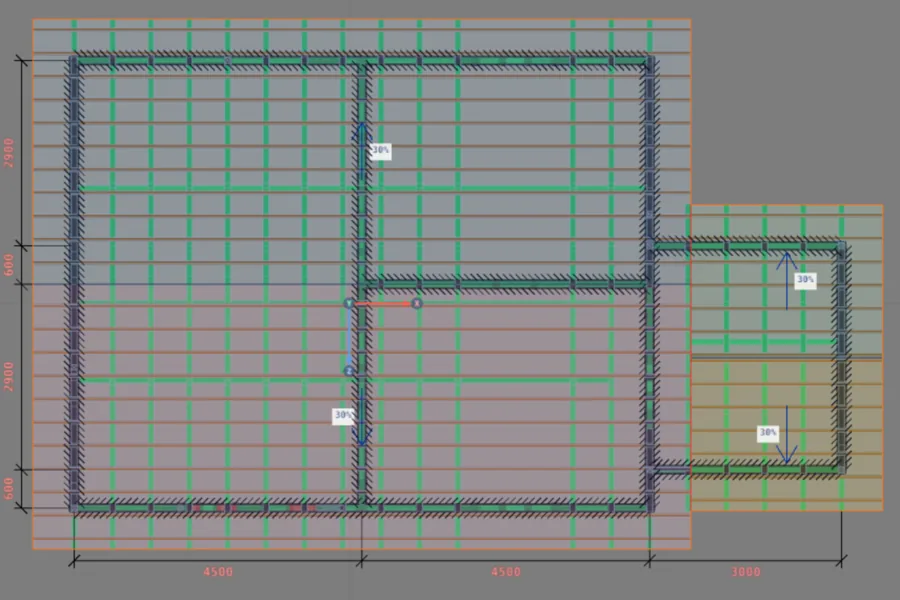
The starting project is the house the calculation pages use, from Loads to Calculation report: 9 x 7 m, single story, wall top at 2.80 m, gable roof at 30% with ceramic tile, calculated and with the report ready. It is not rebuilt: you open the project as it is and the suite goes in on top, with the same tools as a new project. The suite sits against the 7 m side of Wall 2, from 2.90 m to 6.40 m from its start, and connects to the house through a new door opened in the wall that already existed.
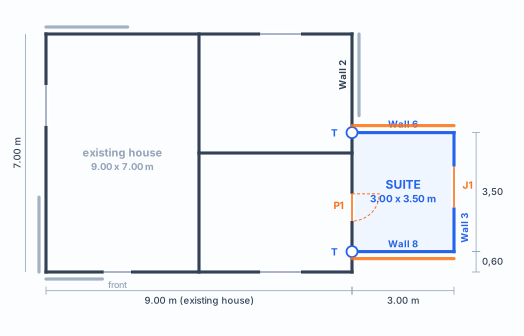
The extension at a glance
| New area | 3.0 x 3.5 m = 10.5 m² (axes). The house goes from 63.0 to 73.5 m² |
| Ceiling height | 2.80 m, the same wall top as the house |
| New walls | three exterior walls: 3.0 m, 3.5 m and 3.0 m, closing on Wall 2 |
| Openings | door P1 0.80 x 2.10 in Wall 2 (existing); window J1 1.20 x 1.00, sill at 1.00 m, in the back wall of the suite |
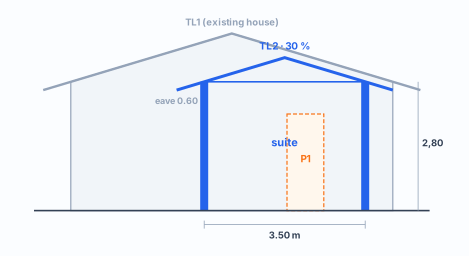
| Roof | the house roof, extended over the suite by outline: 30%, ceramic tile, 600 mm eave, gable at the back. The suite's own roof was the first choice, and it did not pass (step 5 and The calculation) |
The section and the decisions
What you decide before clicking
| Decision | Value in this example | Where to learn it |
|---|---|---|
| Starting project | the 9 x 7 m house, opened as it is, not rebuilt; same market, same machine, same profiles | Loads, Reading the results |
| Where to attach | on the 7 m side of Wall 2, away from the door and the windows that already existed | Wall joints |
| New walls | exterior, 3.0 + 3.5 + 3.0 m, starting and ending on Wall 2 | Exterior walls |
| Joints | two T joints on Wall 2, created when the new wall ends on it | Wall joints |
| New door | P1 0.80 x 2.10 in Wall 2, 5.10 m from its start, lattice header | Doors and windows, Headers |
| Window | J1 1.20 x 1.00, sill at 1.00 m, in the back wall, centered 1.60 m from its start | Doors and windows |
| Roof | first choice: the suite's own, by outline, 30%, ceramic tile, 600 mm eave, Walls 6 and 8 sloping down, 3 and 2 as gables. The house roof stayed, extended over the suite (The calculation) | Roof |
| Bracing | X strap in the two new 3.0 m walls: segment, both faces, double stud, up to the beam | Straps and blocking |
| Wind | the house's, by NBR 6123:2023: V0 = 40 m/s, terrain II, class A, enclosed house, q = 89 kgf/m² (872 Pa) | Loads |
| Fix | the house roof extended over the suite (Walls 6, 3 and 8 in the TL1 outline, 3 as a gable) and three studs of Wall 2 in 1.15 mm through the profile card | Roof, Studs |
The build
Before touching anything, calculate the house as it is
The first calculation of an extension is the one of the house without it. Open the project and press Calculate (Loads). That result is the control: how much each member was using before the suite existed. Without it, after the new calculation there is no way to tell what the extension changed and what was already like that.
- 1,113: checks in 26 combinations
- 8: failed on the badge, the same as in Lateral system and diaphragm and Reading the results
- 0.96: M1012, combined compression and bending in CB4
- 0.50 to 0.59: the X straps of the house
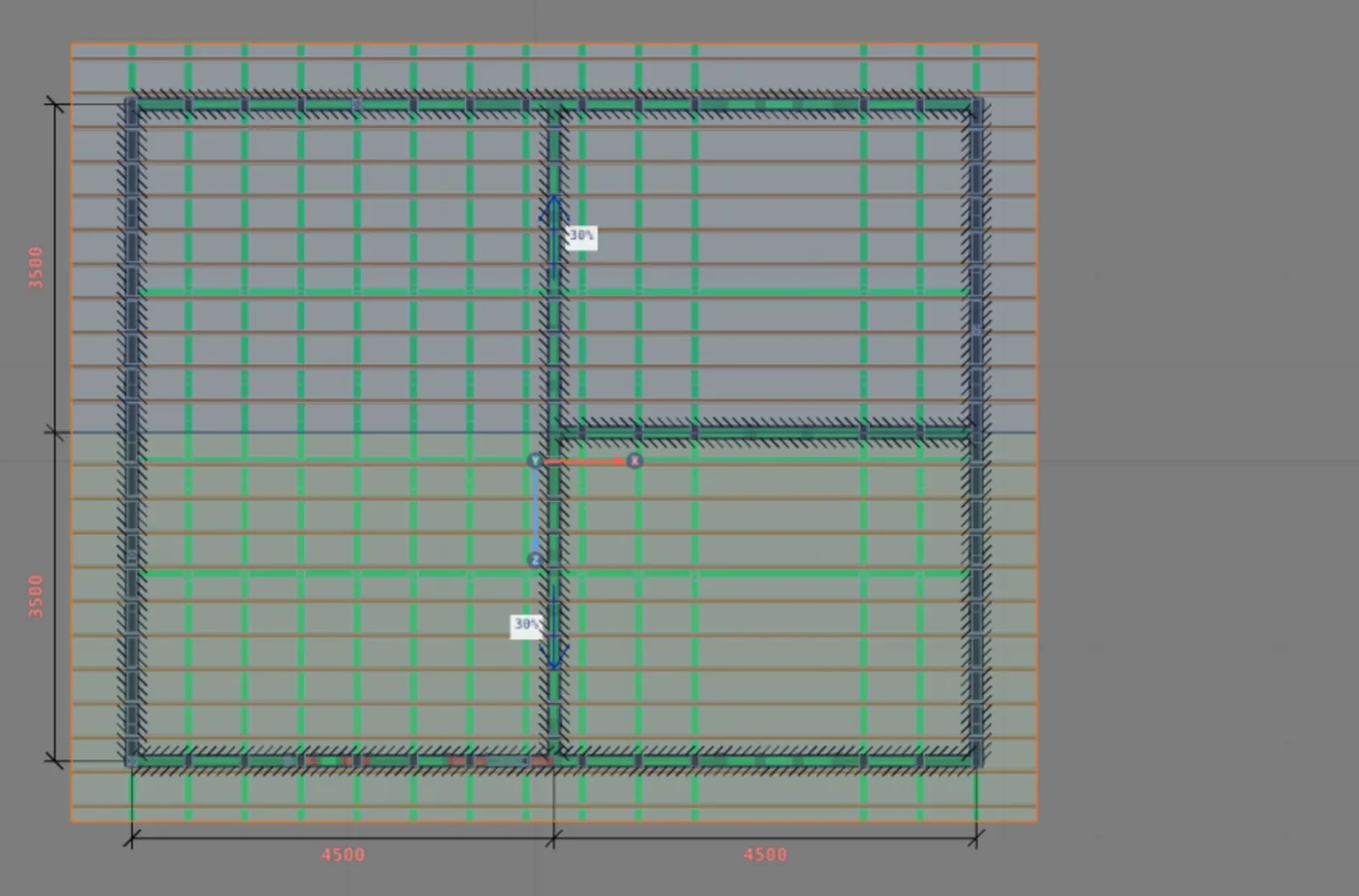
The control has to match. If the badge, M1012 and the straps do not give these numbers, the open project is not the one in the example, and the comparison at the end no longer holds.
Write down first: the members the suite will touch
| Member | Where | Before |
|---|---|---|
| M12 | corner stud of Wall 2 | 0.73 |
| Wall 2 strap | most stressed diagonal | 0.53 |
| Gable T13 | the most stressed member of the truss on top of Wall 2 | 0.50 |
| M186, M177 | top tracks, at the end of the 9 m walls | 0.12 |
| M1012 | stud next to the strap, 9 m wall | 0.96 |
The three suite walls and the two joints
1. Draw the new walls from the wall that exists (Exterior walls)
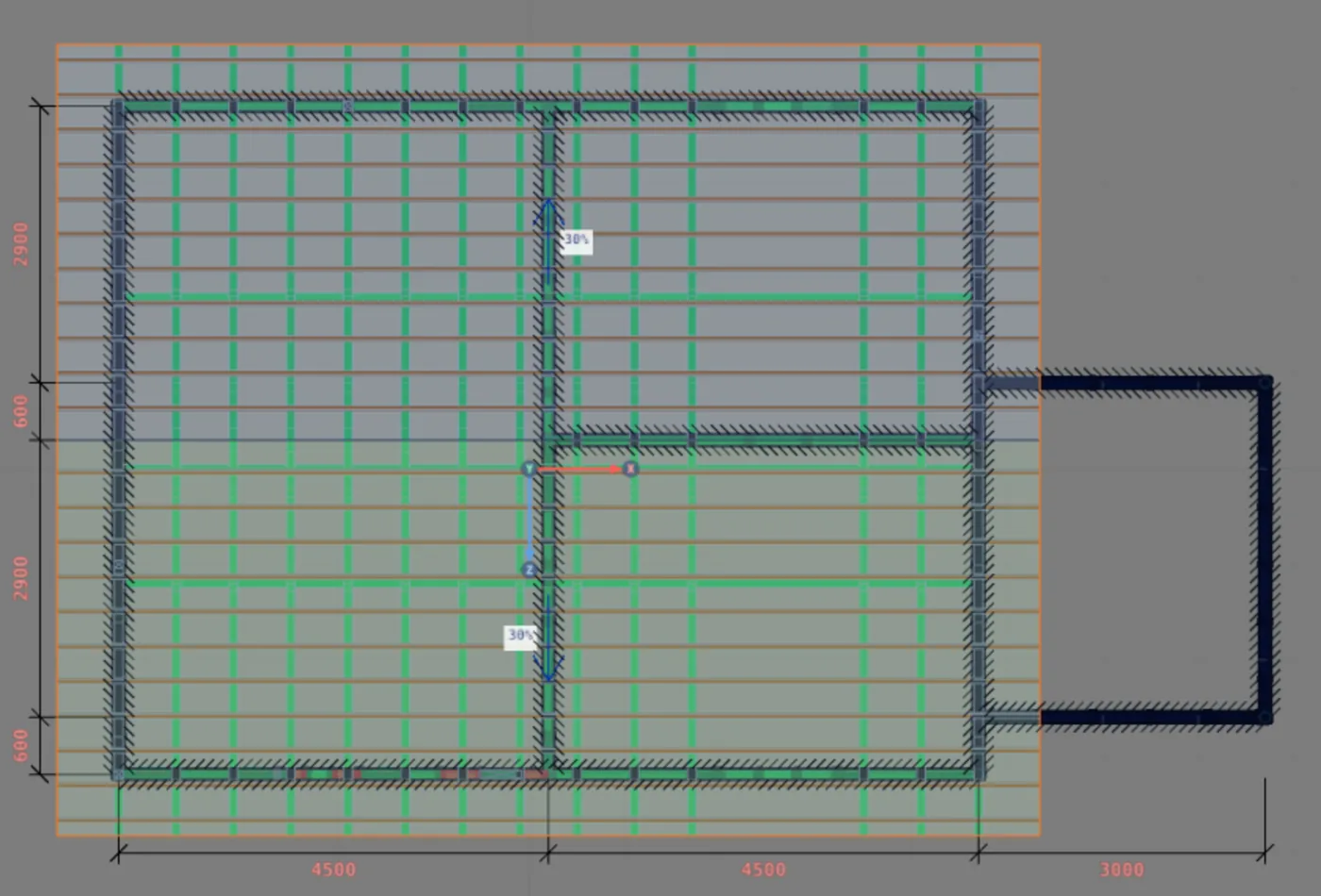
In the LSF tab, choose Exterior wall and click on Wall 2, 2.90 m from its start. Move the cursor outward, type 3.0 m in the measurement box and confirm; then 3.5 m and 3.0 m, ending on Wall 2 again. Each segment becomes a wall: the project goes from 6 to 9.
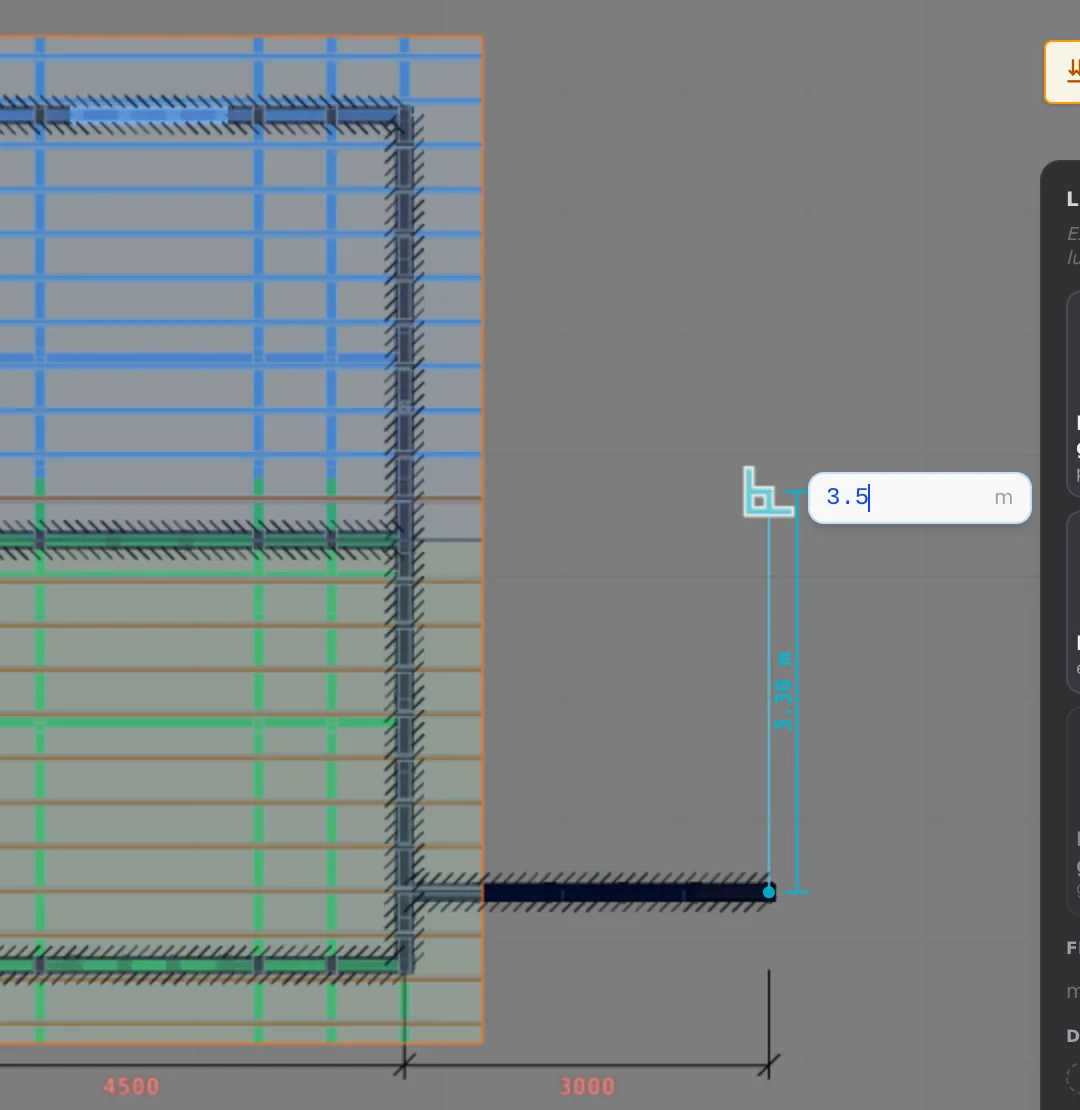
2. Check the T joints on Wall 2 (Wall joints)
When a new wall ends on another, the app creates the T joint on its own, with the back-to-back fold and Wall 2 running continuous. The footer with nothing selected goes from "8 joints, 4 L, 4 T" to "12 joints, 6 L, 6 T": the two T joints on Wall 2 and the two L joints at the suite corners. There is nothing to draw by hand.
The wall names change
The app numbers the walls by their position in the project, and the new ones come in the middle of the count. The three suite walls become Walls 3, 6 and 8, and the old ones shift: the 9 m wall with M1012, which the calculation pages call Wall 5, now shows as Wall 7. Wall 2, the one that receives the suite, is still number 2. On this page the names are those of the extended project.
| Wall | Before | After |
|---|---|---|
| the front one, with the lattice column | Wall 1 | Wall 1 |
| the one that receives the suite (7 m) | Wall 2 | Wall 2 |
| the one on the other side (7 m) | Wall 3 | Wall 4 |
| the interior one in the middle | Wall 4 | Wall 5 |
| the 9 m ones | Walls 5 and 6 | Walls 7 and 9 |
| the suite ones | did not exist | Walls 3, 6 and 8 |
The door in the old wall, the window in the new one
3. Open the door in Wall 2 (Doors and windows and Headers)
In the LSF card, click Add door. In the settings dialog, keep P1 at 800 x 2100 mm with Single jambs, choose the 300 mm Lattice header, like the ones in the house, and click Accept and insert. Take the ghost to Wall 2, between the two joints, and click: the door is centered 5.10 m from the start of the wall, from 4.70 m to 5.50 m. The app redoes the studs of the segment: the common studs that fell in the opening go out and the jambs and the header come in.
4. Put the window in the back wall (Doors and windows)
Again in the LSF card, now Add window: J1 at 1.20 x 1.00 m, sill at 1.00 m, in Wall 3, centered 1.60 m from its start. It is the same window as on the other facades of the house, with the same header.
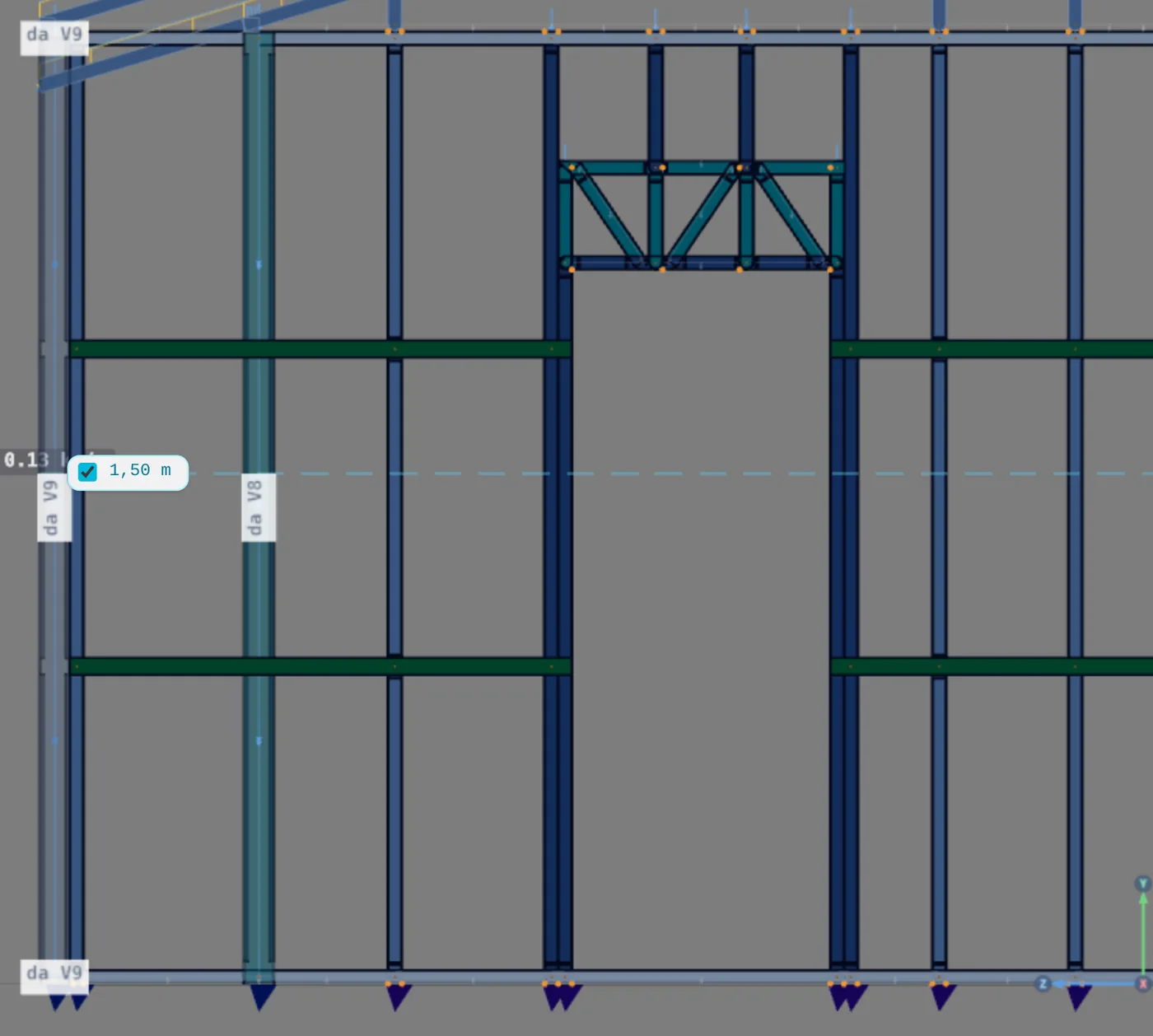
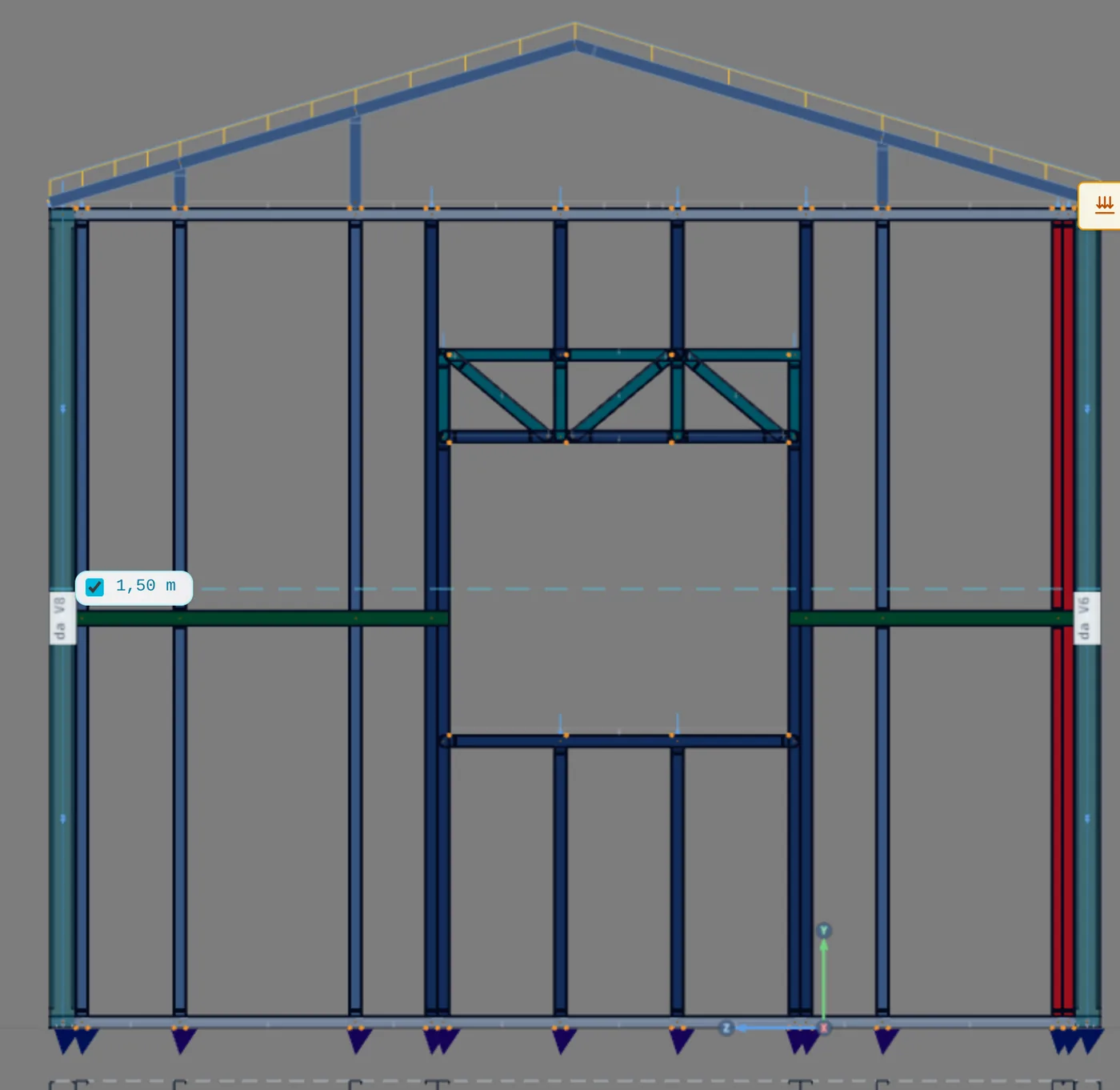
A door in a wall that already exists is the sensitive point of an extension. The old wall was already calculated with the studs where they were. The door and the two joints change their positions, and it is in this wall that the calculation afterward will show the difference.
A roof of the suite's own, by outline
5. Generate TL2 from the four suite walls (Roof)
Open the Roof in By outline mode and click the walls of the outline: the three suite walls and Wall 2, which closes the outline. The box says "4 walls · closed outline". Use the same values as TL1: 30%, 600 mm eave, ceramic tile, in-line structure. On the sides, let only the long ones slope down (Walls 6 and 8) and mark Wall 3 and Wall 2 as gables.
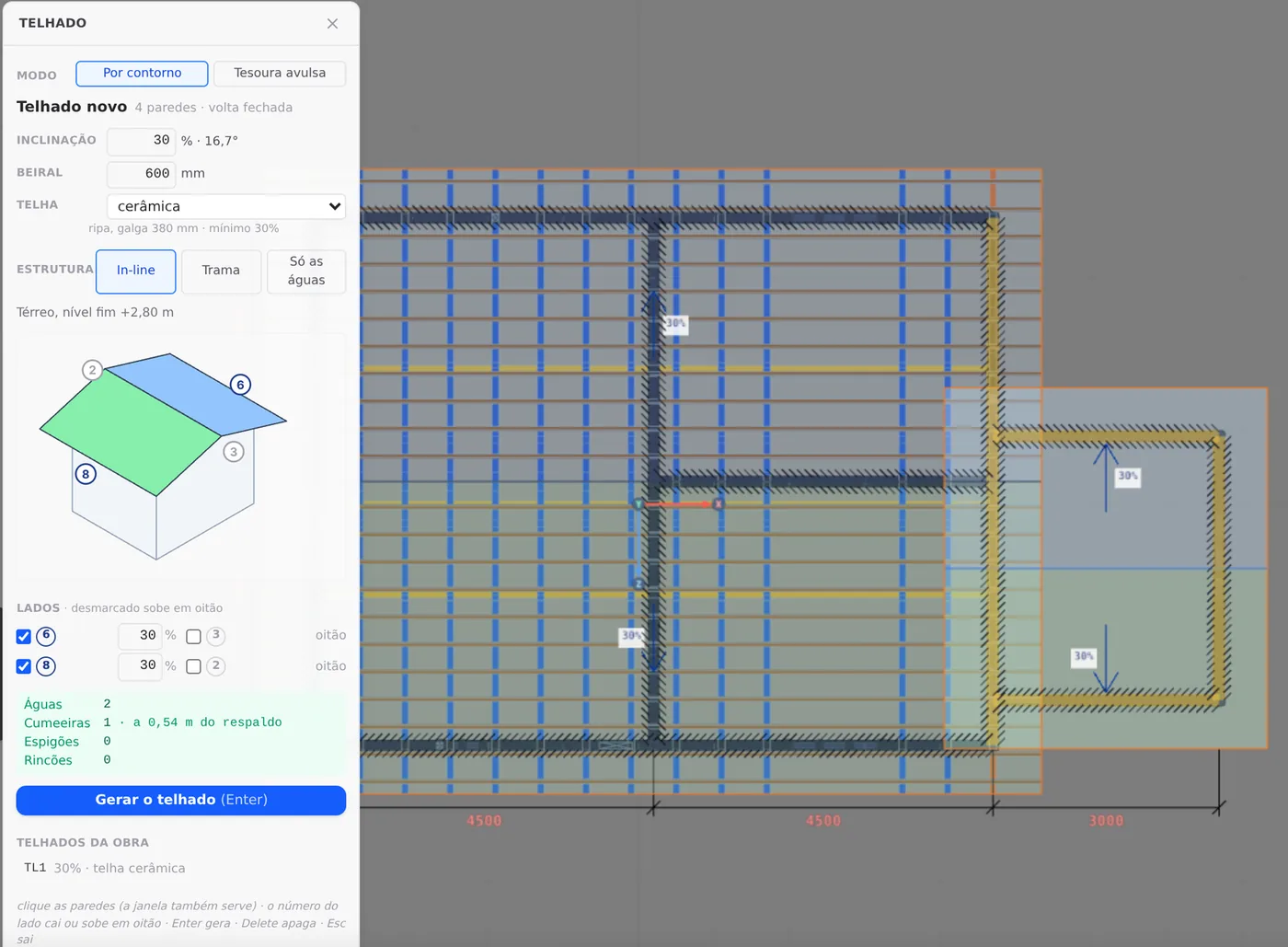
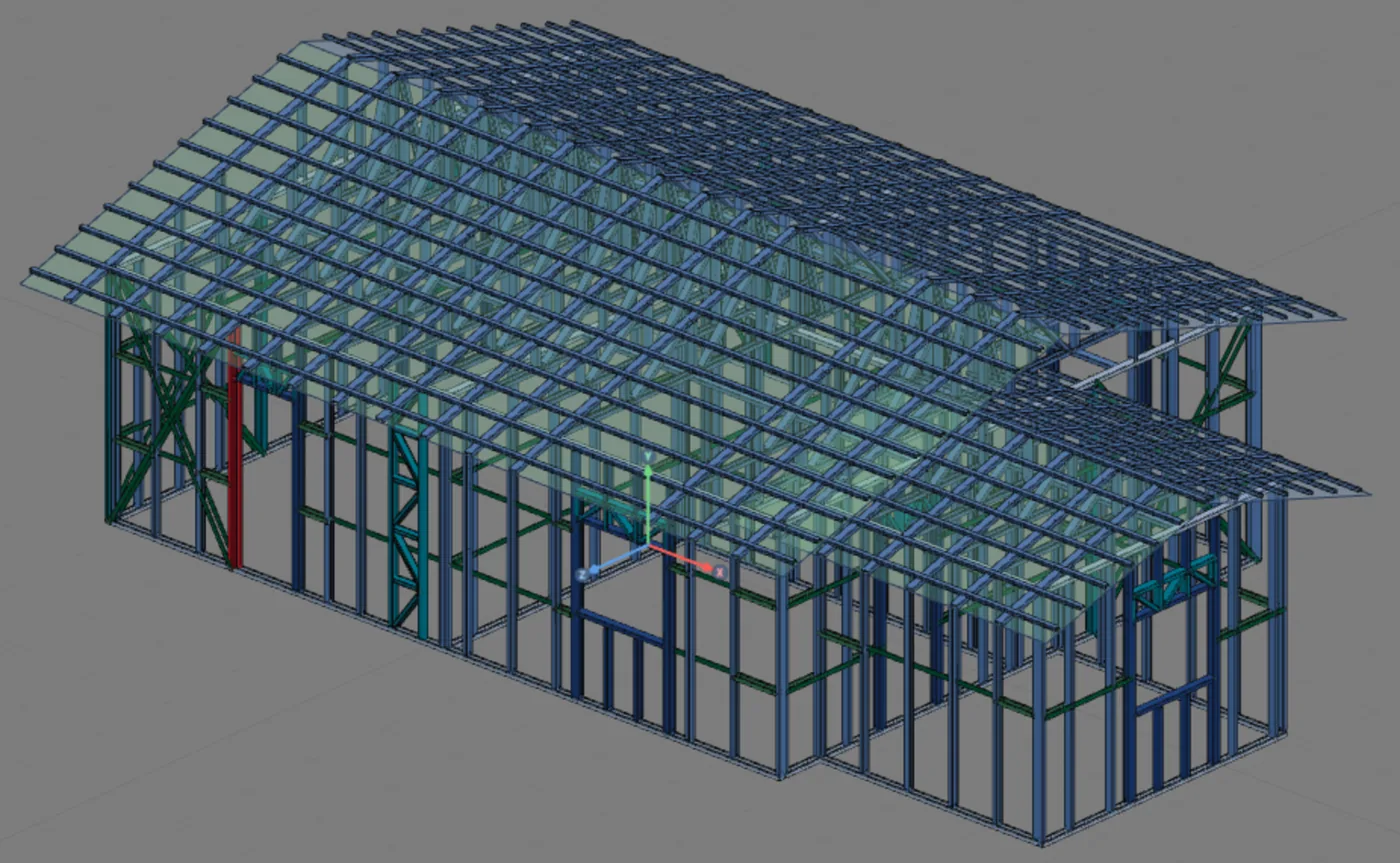
The app message confirms what came out: "Roof TL2: 2 planes, ridge 0.54 m above the wall top. 6 in-line trusses, studs aligned in 1 wall". The project goes from 1,206 to 1,338 bars.
It was the first choice, and it did not stay: the calculation afterward shows what it put in the plane of Wall 2, and step 7 replaces it with the house roof extended (The calculation).
The X strap in the new walls
6. Brace the two 3.0 m walls (Straps and blocking)
The suite is a new box of exterior walls, and the wind that hits it needs a path down to the foundation, as in the house. Open the view of Wall 6, choose Strap and blocking with X strap, placement Segment, on both faces, with a double stud and up to the beam, and click the first and the last stud of the wall. Repeat on Wall 8. Wall 3, 3.5 m long, has the window in the middle and gets no strap: the two walls that run in the direction of the house hold the suite in that direction, and Wall 2 holds it in the other.
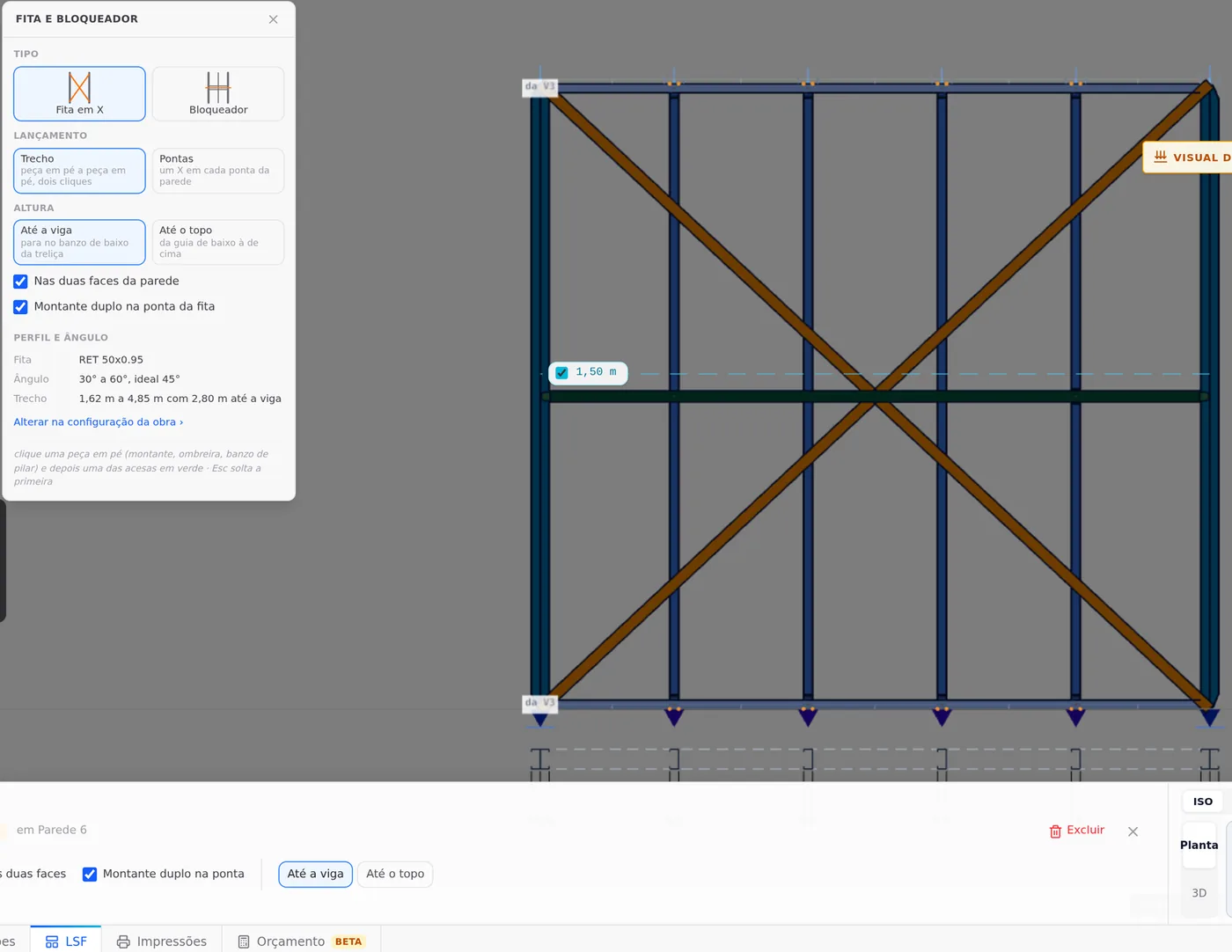
Without the strap, the calculation warns you
Calculated without the two straps, the extended house fails 27 members, the worst at 3.38. With them, 17. The strap is not decoration on a new wall: it is what takes the wind on the suite down.
NBR 16970-2:2022 · 8.2, Table 3.
Horizontal displacement of the wall: h/500, 5.6 mm on the 2.80 m one. On the new wall, as on the old ones, what holds that number is the strap.
Shortcuts
- Ctrl+Enter
Calculate the project
Sends the project to the engine, like the Calculate button.
- W↵
Exterior wall
Draws the wall point by point. Type a distance and Enter.
- D↵
Add door
Opens the door panel, then click the wall. When armed, disarms.
- J↵
Add window
Opens the window panel, then click the wall. When armed, disarms.
- T↵
Roof
Arms the roof: click the outer ring of walls and Enter. When armed, disarms.
in plan view
- BL↵
Strap and blocking
Places bracing strap and blocking between studs.
- AV↵
Wall view
Opens the elevation of the selected wall, seen from outside. Again, goes back.
with one wall selected
- PL↵
Plan view
Goes to plan view. With the wall view open, closes it and keeps the wall selected.
The calculation
Calculate again, and read the difference
With the suite built, press Calculate again. The project now has 1,339 bars and the engine returns 1,369 checks in the same 26 combinations. The badge says 17 failed. Before fixing anything, separate what belongs to the extension from what already belonged to the house.
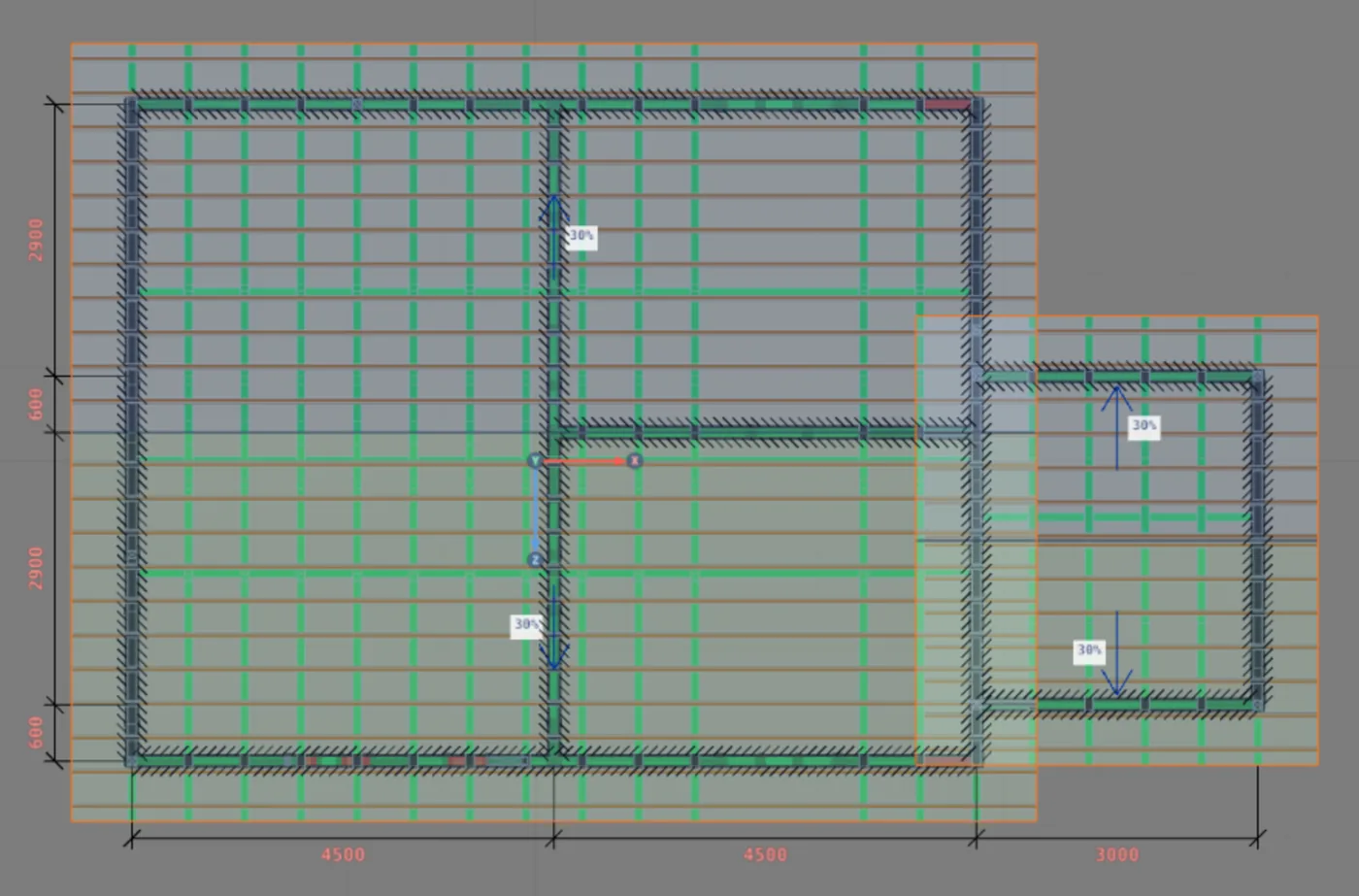
Twelve new failures, almost all in the plane of Wall 2. Ten are members that already existed; the other two are the double studs where the new straps reach Wall 2. The suite walls, the door, the window, the header and TL2 pass. Only M1015, in Wall 7, is away from that plane. The load reaching these members changed with the suite, and steps 7 and 8 show the fix.
How to separate them. Open the list of checks in the results card (Reading the results) and compare it with the control's, member by member, by position: the label of a stud that changed place is not the same before and after.
The 17 failures, separated
| Group | How many | Worst |
|---|---|---|
| Already the house's | 5 of the 8 | the same members as in the control |
| Gable truss T13 of TL1 | 6 | 2.03, top chord at the corner |
| Top tracks at the corners | 2 | 3.32, M186 |
| Stud M12 of Wall 2 | 1 | 1.57 |
| Doubles at the end of the new straps, at the joint | 2 | 1.23 and 1.04 |
| Stud of Wall 7 | 1 | 1.01, M1015 |
Of the house's 8, 3 now pass: the two pieces of the lattice column and one stretch of track. The combination that governs the new ones is almost always CB7 or CB8, wind V1− at 0°; M12 governs in CB10 (V2+, at 90°) and M1015 in CB25 (V4−, at 270°).
What the extension changed in the members that already existed
The table follows the members written down before the build and the ones the suite touched closely. The "One roof" column is the house with the suite roof replaced by the house roof extended; the last one, after the three thicker studs (steps 7 and 8).
| Member | What it is | Before | Extended | One roof | Fixed |
|---|---|---|---|---|---|
| M12 | corner stud of Wall 2 | 0.73 | 1.57 | 1.03 | 0.82 |
| Trusses on Wall 2 | chords and diagonals in the plane of the shared wall | 0.50 | 2.03 | 0.52 | 0.49 |
| M186, M177 | top tracks at the end of the 9 m walls | 0.12 | 3.32 and 3.14 | 0.28 and 0.05 | 0.26 and 0.05 |
| Strap W2 | the most stressed diagonal of Wall 2 | 0.53 | 0.80 | 0.84 | 0.84 |
| Studs W2 | common studs of Wall 2 under the strap | 0.72 to 0.75 | 0.76 to 0.81 | 0.76 to 0.86 | 0.76 to 0.86 |
| Strap double | double stud at the end of the Wall 2 strap | 0.65 | 0.76 | 0.72 | 0.72 |
| T joints | doubles at the end of the W6 and W8 straps, on Wall 2 | did not exist | 1.23 and 1.04 | 1.20 and 1.02 | 0.99 and 0.84 |
| Door P1 | jambs and studs of the opening | did not exist | 0.43 to 0.71 | 0.44 to 0.81 | 0.43 to 0.81 |
| Header | lattice header of P1 | did not exist | 0.14 | 0.14 | 0.14 |
| M1012 | stud next to the strap, Wall 7 | 0.96 | 0.92 | 0.91 | 0.91 |
| M1015 | stud right after the strap, Wall 7 | 0.96 | 1.01 | 0.95 | 0.95 |
| M1 | corner stud, Walls 4 and 7 | 0.97 | 0.74 | 0.68 | 0.68 |
| 9 m straps | straps of Walls 7 and 9 | 0.53 to 0.59 | 0.27 to 0.39 | 0.24 to 0.32 | 0.24 to 0.32 |
| Strap W4 | strap of Wall 4, the 7 m one on the other side | 0.56 to 0.59 | 0.61 to 0.63 | 0.59 to 0.61 | 0.59 to 0.61 |
What got worse
Everything in the plane of Wall 2: the TL1 gable that sits on it, the corner stud, the two new joints and the strap of the wall itself. In the 9 m walls, only the last stretch of the top track, next to the corner with Wall 2.
What got better
The straps of the 9 m walls dropped from 0.53 to 0.59 down to 0.27 to 0.39. The new straps of Walls 6 and 8 run in the same direction and share with them the wind in that direction. The studs next to them follow: M1 goes from 0.97 to 0.74.
Two trusses in a single plane
The first suspect was the studs. The door and the two joints changed the common studs in the middle of Wall 2, and the TL1 gable, which is born aligned with them, lost the ones in the middle. The test is cheap and is in Exterior walls: 400 mm spacing on Wall 2, more studs below and above. Calculated that way, the house got worse: 18 failures, the worst at 3.54. It was not a lack of studs.
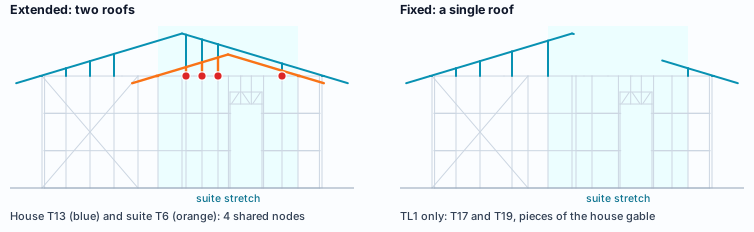
What was in the plane of Wall 2
Two trusses. TL1 closes the house with T13, the gable truss on top of Wall 2. TL2, generated by outline with Wall 2 as a gable, put T6, its own gable truss, in the same plane: the two share 4 nodes. And the 600 mm eave of the house gable projects over the suite roof. The wind at 0° hits this facade, and the calculation shows where the pair weighs: on the top chord of T13, on M12 and on the last stretch of the top track of the two 9 m walls, M186 and M177.
Two trusses in the same plane are solved in the model, not with reinforcement. A thicker profile in the track and the chord would pay in steel for what is a modeling matter. The fix removes one of the two: the suite roof becomes part of the house roof.
A single roof: the house's, extended over the suite
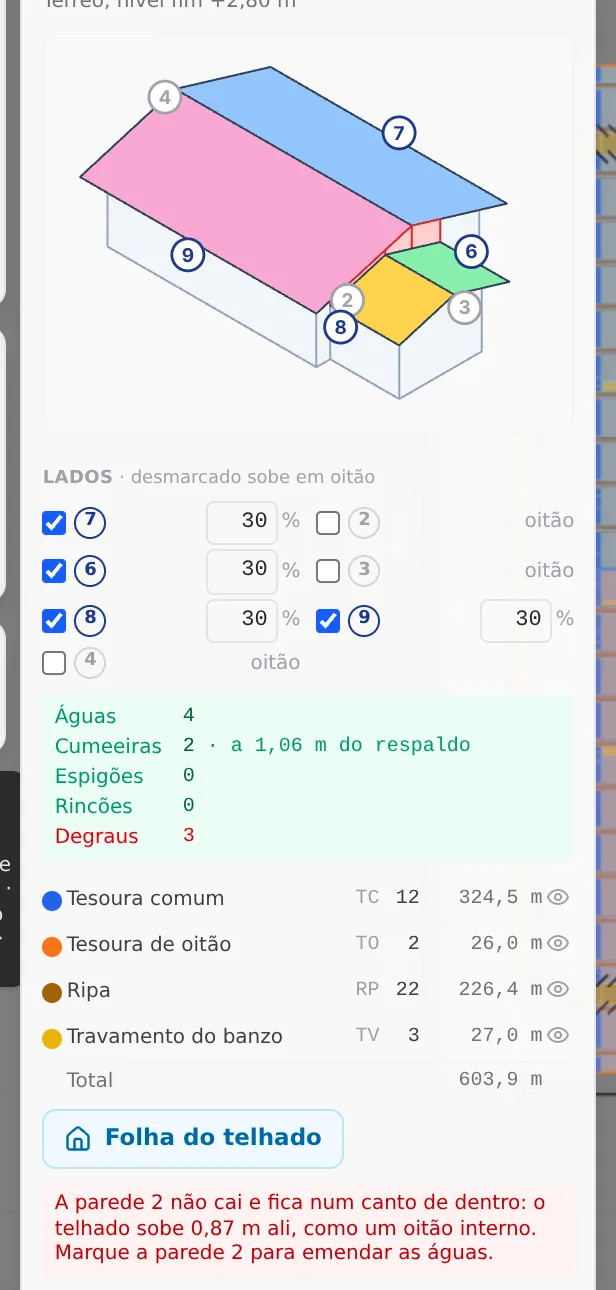
The fix starts with the cause, and the cause is in the modeling: one of the two trusses leaves the plane of Wall 2. The TL2 one goes, because the house roof was already there and the suite roof can be its continuation. It is the path of Roof, the outline: the TL1 outline takes in the suite, and the app draws the junction.
7. Replace TL2 with TL1 extended (Roof)
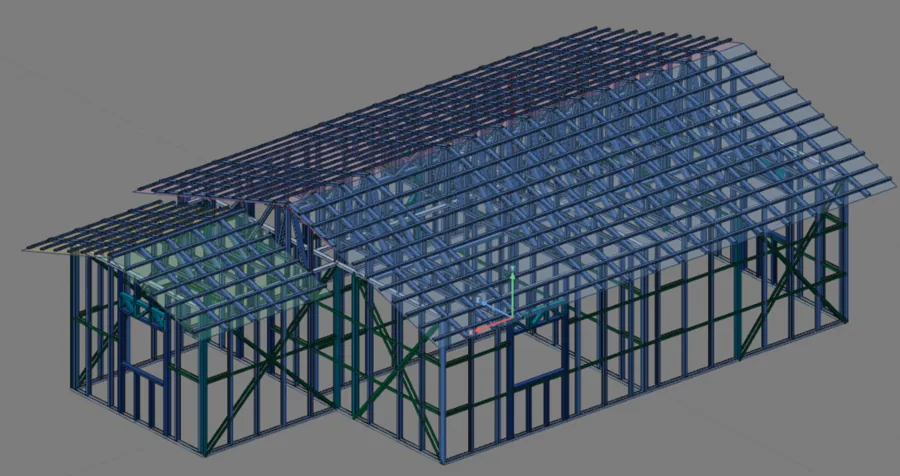
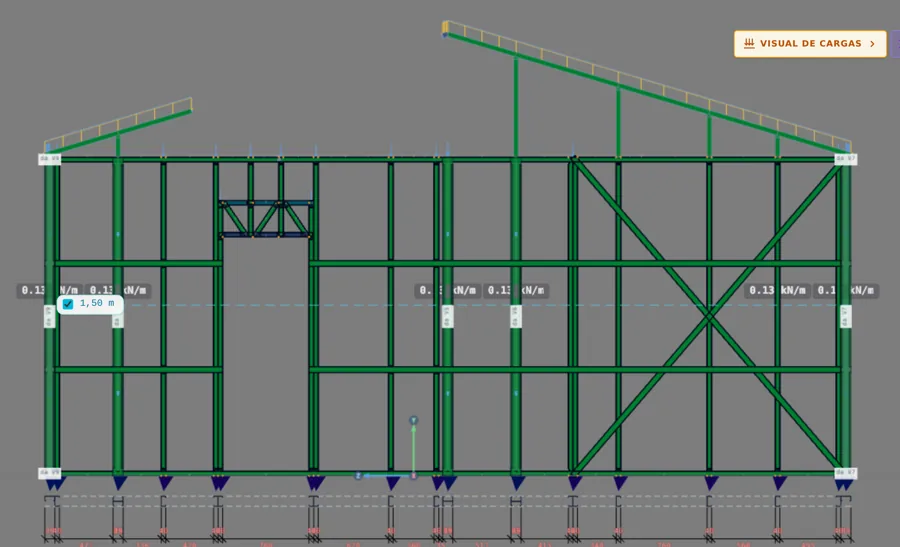
With the Roof open, click TL2 and use Delete. Click TL1: the box opens with the walls of the house. Click Walls 6, 3 and 8, and the outline now goes around the suite, with 7 walls. In Sides, uncheck Wall 3 so it rises as a gable, and press Generate. The app carries the house ridge to a new gable truss, 0.60 m from Wall 2, bearing on Walls 6 and 8, and from there to the back the suite continues with its own ridge, 0.52 m lower. On Wall 2 the house gable stays in two pieces, one on each side.
The warning is not a refusal
The box says that Wall 2 sits at an inner corner, that the roof rises 0.87 m there, and suggests marking it to join the roof planes. Marked, the end of the house becomes a roof plane: 6 planes, 4 hips and 2 valleys, and the gable that is already built would have to go. In an extension the gable stays, and the step between the house roof plane and the suite eave is closed with flashing.
Calculated this way, the house goes from 17 to 8 failures: the house's 5 and 3 new ones, all studs of Wall 2 in combined compression and bending. M12, at the corner, ends at 1.03 in CB10; the two doubles where the straps reach Wall 2, at 1.20 and 1.02 in CB7.
Three thicker studs, and no new failure
With a single roof, the model is right, and the three that remain are real members carrying more than the 0.95 mm profile can take. Now, yes, the path is the one in Studs: the same section, the next gauge.
8. Thicken the three through the profile card (Studs)
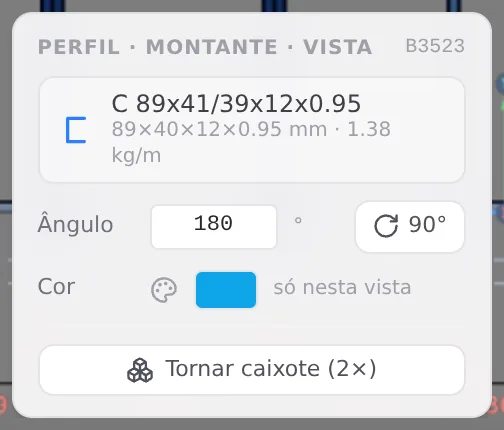
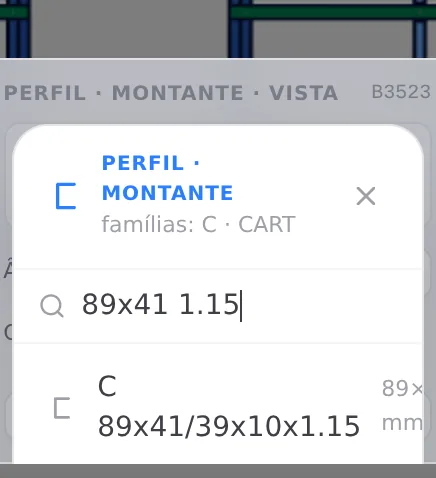
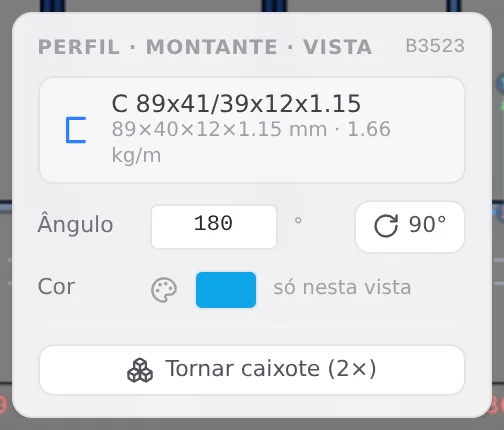
Open the view of Wall 2 and click M12. In the profile card, click the profile name to change it, search "89x41 1.15" and choose the row C 89x41/39x12x1.15, the same section as the one already there, with 1.15 mm. Repeat on the two double studs at the end of the straps: the card shows "2×" and changes the pair. The app's FRAMECAD catalog has the 89x41 in 0.75, 0.95 and 1.15 mm, and 1.15 is the next step, on the same machine.
| Member | 0.95 mm | 1.15 mm |
|---|---|---|
| M12, corner of Wall 2 | 1.03 | 0.82 |
| Strap double of Wall 6 | 1.20 | 0.99 |
| Strap double of Wall 8 | 1.02 | 0.84 |
Calculated again: 1,359 checks, 5 failures, the same as in the house before the suite, and no new one. The badge on screen says 5.
First the model, then the profile. The 1.15 mm gauge took 18% to 20% off each of the three. On the 3.32 tracks it would not come close, and the two trusses in the same plane would stay in the project, covered in steel.
Shortcuts
- Ctrl+Enter
Calculate the project
Sends the project to the engine, like the Calculate button.
- T↵
Roof
Arms the roof: click the outer ring of walls and Enter. When armed, disarms.
in plan view
- AV↵
Wall view
Opens the elevation of the selected wall, seen from outside. Again, goes back.
with one wall selected
The outputs
The outputs come from the extended project, with nothing on the side
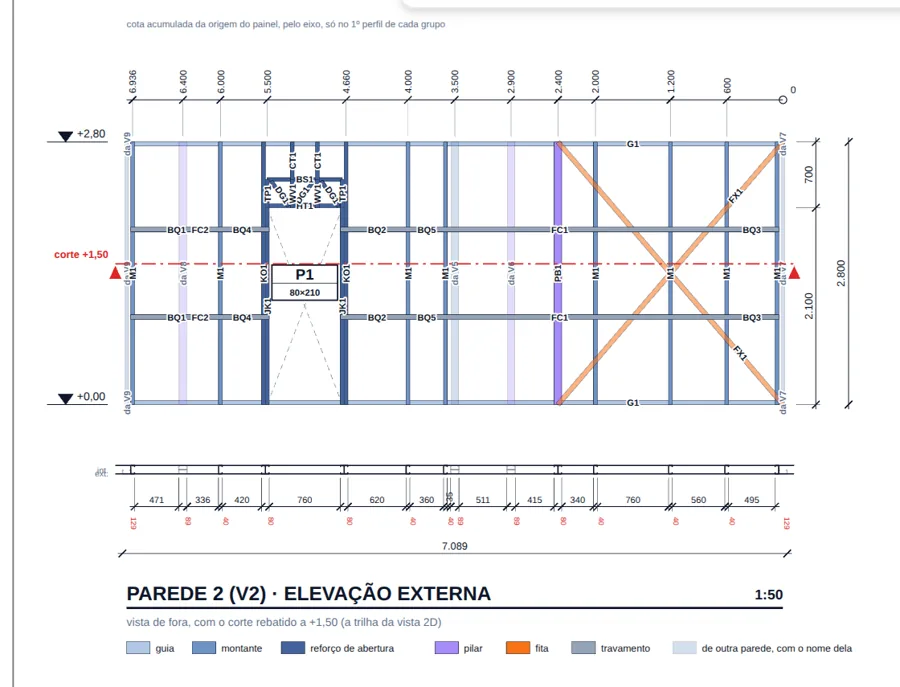
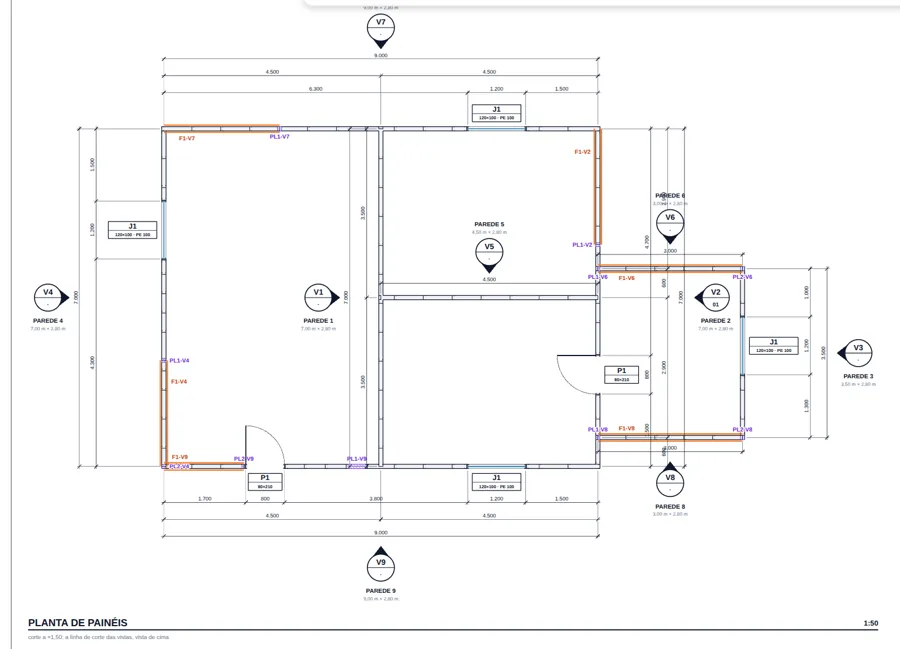
Sheet, cut list, takeoff and report read the project that is open. There is no separate "suite project": Wall 2 comes out with the new door and the two joints, the cut list already counts the new walls and the report describes the whole house, extended and fixed.
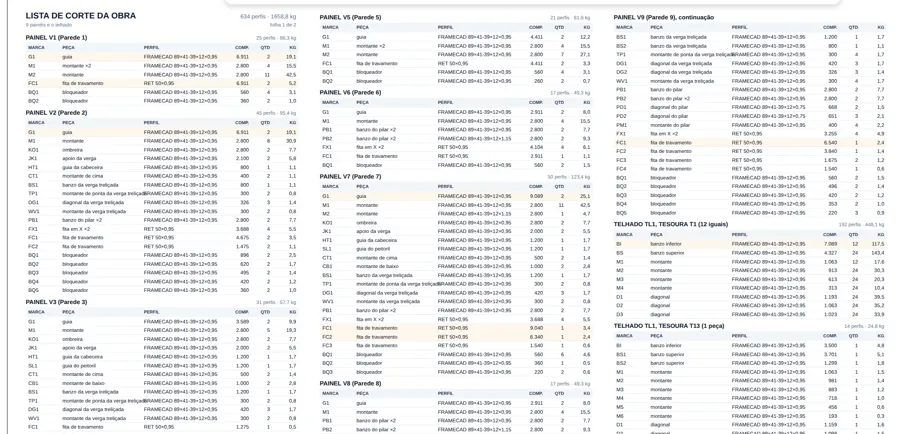
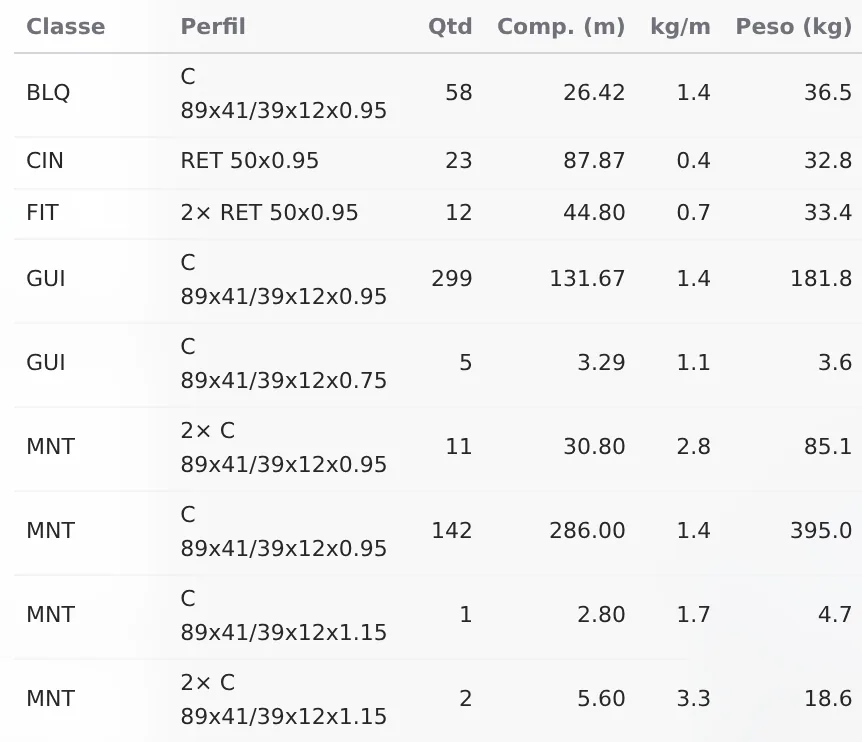
The report of the extended house
The report (Calculation report) describes the 1,359 checked bars: 1,354 passed and 5 failed, the tracks the house already had in the control, from M132 (1.44) to M128 (1.04), in CB2. The first member of the extension in the index is the strap double of Wall 6, in 1.15 mm: 0.99 in CB7.
The three sheets come from the footer buttons of the LSF tab, with the wall selected: Sheet, Panel plan and Project cut list. The takeoff opens from the diagrams card, after the calculation (Cut list, takeoff, DXF and IFC); the breakdown by class shows the three thicker studs without searching the plan.
Nothing was redone by hand: changing the roof and the profile in the open project changed the four outputs together.
Shortcuts
- PN↵
Panel sheet
Creates the panel sheet of the selected walls, or opens the existing one.
with walls selected
- PP↵
Panel plan
Creates a panel plan of the wall's storey, a new one each time.
with walls selected
- LO↵
Project cut list
Creates the missing cut list sheets of the project and opens the first.
with walls selected
The numbers
The house before and after, in numbers
The numbers come from the status bar and the calculation badge, in the four projects: the house as it was, the house with the suite and its own roof, the house with a single roof and the fixed house. The area is on the axes, 63.0 m² for the house and 10.5 m² for the suite.
- +244: bars, from 1,089 to 1,333 with the suite
- +286 kg: of steel, in 220.3 m of extra profile
- 27.3 kg/m²: the extension alone: 286 kg over 10.5 m²
- 0: new failures in the fixed house
| Number | Before | Extended | One roof | Fixed |
|---|---|---|---|---|
| Bars | 1,089 | 1,339 | 1,333 | 1,333 |
| Profile | 1,101.1 m | 1,342.7 m | 1,321.4 m | 1,321.4 m |
| Weight | 1,344.7 kg | 1,647.7 kg | 1,627.0 kg | 1,630.9 kg |
| Area | 63.0 m² | 73.5 m² | 73.5 m² | 73.5 m² |
| Steel rate | 21.3 kg/m² | 22.4 kg/m² | 22.1 kg/m² | 22.2 kg/m² |
| Checks | 1,113 | 1,369 | 1,359 | 1,359 |
| Failed | 8, the house's | 17: 5 of the house and 12 new | 8: 5 of the house and 3 new | 5, the house's |
| Worst member | 1.43, one of the house's 8 | 3.32, M186 | 1.44, of the house | 1.44, M132, of the house |
| Worst outside the house's | 0.97, M1 | 3.32, M186 | 1.20, strap double | 0.99, strap double |
The right roof came out lighter
Replacing TL2 with TL1 extended took out 6 bars, 21.3 m of profile and 20.7 kg. The three 1.15 mm studs put 3.9 kg back. The fixed house weighs less than the extended one, and it passes.
The 5 that remain are tracks of the house, the same as in the control before the suite (The build), and they stay with the house project, outside the extension. The worst is M132, at 1.44. The path for them is that of any failure, profile, steel or geometry, as Reading the results shows.
Checklist
Before delivering an extension
Each row is a step on this page, with the page that teaches it. The Roof, Profile and Calculation rows apply to any extension: a single roof, the profile after the model and no new failure.
| check | how to know it is right | where to learn it |
|---|---|---|
| Control | the house calculated before touching it: 1,113 checks, 8 failed on the badge, M1012 at 0.96, straps from 0.50 to 0.59 | Loads, Reading the results |
| Members written down | M12, strap and gable of Wall 2, tracks M186 and M177 and M1012, each with its ratio before, compared afterward by position, not by label | Reading the results |
| New walls | three exterior walls of 3.0 + 3.5 + 3.0 m, starting and ending on Wall 2; the footer says "12 joints, 6 L, 6 T" | Exterior walls, Wall joints |
| Door in the old wall | P1 0.80 x 2.10 in Wall 2, centered 5.10 m from its start, with a lattice header | Doors and windows, Headers |
| Window | J1 1.20 x 1.00, sill at 1.00 m, in Wall 3, centered 1.60 m from its start | Doors and windows |
| Strap | one X in each new 3.0 m wall, Walls 6 and 8, on both faces, with a double stud | Straps and blocking |
| Roof | a single one: TL1 extended over the suite, with Wall 3 as a gable; no pair of trusses in the plane of Wall 2 | Roof |
| Profile | only after the model is right: M12 and the two doubles at the end of the new straps in C 89x41/39x12x1.15, through the profile card | Studs |
| Calculation | 1,359 checks and no new failure; the 5 that remain are the control's | Reading the results |
| Outputs | sheet of Wall 2 with P1, panel plan with Walls 3, 6 and 8, project cut list, takeoff and report of the whole house | LSF sheets, Cut list, takeoff, DXF and IFC, Calculation report |