LSF (Light Steel Framing)
Cut list, takeoff, DXF and IFC
After the sheets, what leaves the app for purchasing, the shop and coordination: the piece-by-piece <strong>cut list</strong>, the steel <strong>takeoff</strong>, the <strong>DXF</strong> of the sheet and of the 3D, and the <strong>IFC</strong>. The numbers are those of the 9x7 house, checked by hand, and the differences between the outputs are spelled out.
Overview
Four outputs, one model
Everything this page shows comes from the same bars as the 3D. No output keeps a number of its own: the cut list is rebuilt every time the sheet opens, the takeoff adds up the bars on the spot, and the DXF and the IFC translate the drawing on the screen.
Each output has a different reader. The cut list belongs to the shop and the installer. The takeoff belongs to whoever buys and prices. The DXF belongs to whoever continues the drawing in CAD. The IFC belongs to whoever coordinates with architecture and services in a BIM program.
That is why each one counts in its own way, and knowing what each one counts is half the job.
- 188 members: in the cut list of the six walls, 524.3 kg, on one A3 sheet
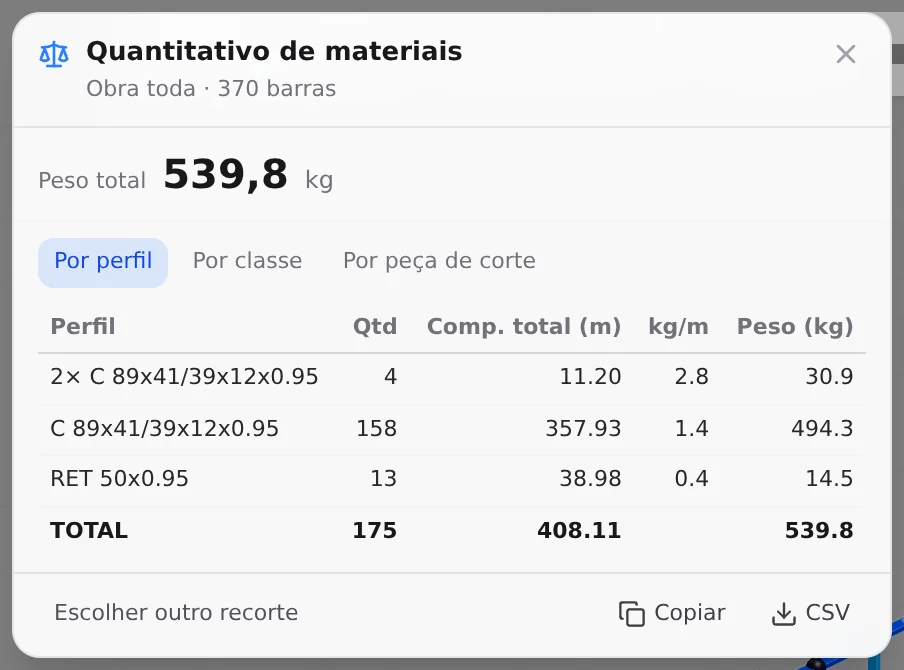
- 539.8 kg: in the takeoff of the same walls, which adds up the bars of each piece
- 1.4 t: in the takeoff after the gable roof (1,368.0 kg)
- 370 pieces: in the IFC 2x3 of the walls, one entity per model bar
The screenshots on this page are from the app, on the roll-formed 9x7 house (FRAMECAD F325iT, C 89x41 of 0.95), first with the walls only and then with the roof.
What it is for
Who reads each output, and where it lives
| Output | What it carries | Where it appears | File |
|---|---|---|---|
| Cut list | mark, piece, section, length, quantity and kg, panel by panel, the roof blocks and the summary by section | Project cut list button in the wall footer; A3 sheet in Prints. The sheet of each panel (LSF sheets) carries the list for that panel only | sheet PDF and DXF |
| Takeoff | bar steel by profile, by class or by cut piece: quantity, meters, kg/m and kg | "Material takeoff" card | CSV, or copy to the spreadsheet |
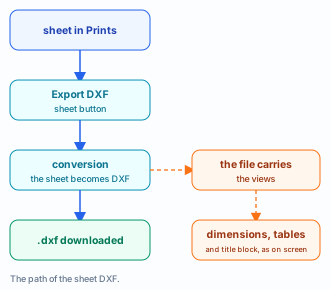
| Sheet DXF | the 2D sheet as it is on screen: views, dimensions, schedules and title block | Export DXF button on the sheet | .dxf |
| 3D DXF | the bars as extruded solids and meshes | Export button at the top | CalcSteel_Project.dxf |
| IFC | one entity per bar, with section, position, label and class | Export button at the top | <project>.ifc, IFC 2x3 |

The machine file is a different one
The CSV that goes to the roll former, with holes, swages and cutting order, is in Roll-former file. It is not repeated here: the list on this page is for reading, checking and buying, not for the machine.
What no output adds up
Boards (OSB, gypsum, fiber cement), screws, sealing tape and anchors. The takeoff is bar steel only, and the list carries the screw as a spacing note, without a count.
Standard
What the standard asks for, and what is practice
No Brazilian LSF standard asks for a cut list, a takeoff or an IFC by that name. What it asks for is the identification of the pieces, the same in every document, and the drawings the job needs. The list and the takeoff are the way to meet that in the factory and in purchasing. Here only the item numbers; read the text in the standard.
NBR 16970-2:2022 · 4.5.
The structural design includes the design, fabrication and erection drawings. The cut list is part of the fabrication drawing.
NBR 16970-2:2022 · 4.7 d).
The calculation report identifies the pieces. The mark on the list (G1, M2, BQ1) is that identification on paper.
NBR 16970-2:2022 · 4.8, caput.
The same identification on the drawings and in the report, with the steel grade highlighted. The list carries the steel in the first note (ZAR-230, fy and fu).
NBR 16970-2:2022 · 4.8 f).
Screwed connections: diameter, number and spacing. The app gives the gauge and the spacing; the number of screws is counted in the design.
NBR 14762:2010 · 3.1.1.
The definition of design that both LSF standards follow for the cold-formed section.
| Item | What the app delivers | Where |
|---|---|---|
| 16970-2, 4.5 | cut list panel by panel, with mark and length | Project cut list, Sheet |
| 16970-2, 4.7 d) | mark by code, section, length to the millimeter and doubling | list, sheet, detail |
| 16970-2, 4.8 caput | project steel in note 1 of the list | list |
| 16970-2, 4.8 f) | gauge and spacing by note; no count | list, typicals (Standard details) |
IFC is not ABNT. The format belongs to buildingSMART (ISO 16739). The Brazilian standard does not ask for the file; the contract does, when the job is coordinated in BIM.
Recommendation
Model closed, list first, files last
Every output reads the model as it is when opened. Generating early breaks nothing, but the number changes with every wall and every roof. The order that avoids checking twice:
1. Close walls, openings, bracing and roof
The project cut list counts the walls and the roof. King studs, lattice headers, straps and blocking come in when they are in the model; the floor stays out of the list.
2. Project cut list for the shop
Check each panel by mark and by length. It is the output that counts member by member, including the doubled piece.
3. Takeoff for purchasing
It is the only output that adds up the steel of the whole project, floor included. Export it as CSV and add the cutting waste in the spreadsheet.
4. IFC for coordination, DXF for CAD
The IFC goes to the BIM program of whoever runs the clash check. The sheet DXF goes to whoever continues the drawing; the 3D DXF, to whoever needs the volume in a CAD without IFC.
How much steel the house takes
- 524.3 kg: cut list, walls only
- 539.8 kg: takeoff, walls only
- 1,368.0 kg: takeoff with the roof
The house has 63 m² of plan. The walls come to about 8.6 kg of steel per m² and the project with the roof to about 22 kg/m², without cutting waste.
To buy, use the takeoff of the whole project. The cut list counts walls and roof piece by piece, without the floor and without cutting waste. It is the shop check, not the purchase order.
Step by step
The project cut list sheet
1. Select a wall and click Project cut list
Any wall will do: the list belongs to the project. The app creates the A3 sheet "Lista de corte da obra" (project cut list) and opens Prints with it.
2. Read panel by panel
Each wall is a panel (V1 to V6), with its total of members and kg in the title. With the roof in the model, the list gains one block per truss type ("TELHADO TL1, TESOURA ...", with chord TB, vertical TM and diagonal TD) and one block of purlins, rafters and bracing, and the top of the sheet reads "6 painéis e o telhado" (6 panels and the roof). If the project runs past one sheet, the list continues on the next, and a second click creates only the sheets that are missing.
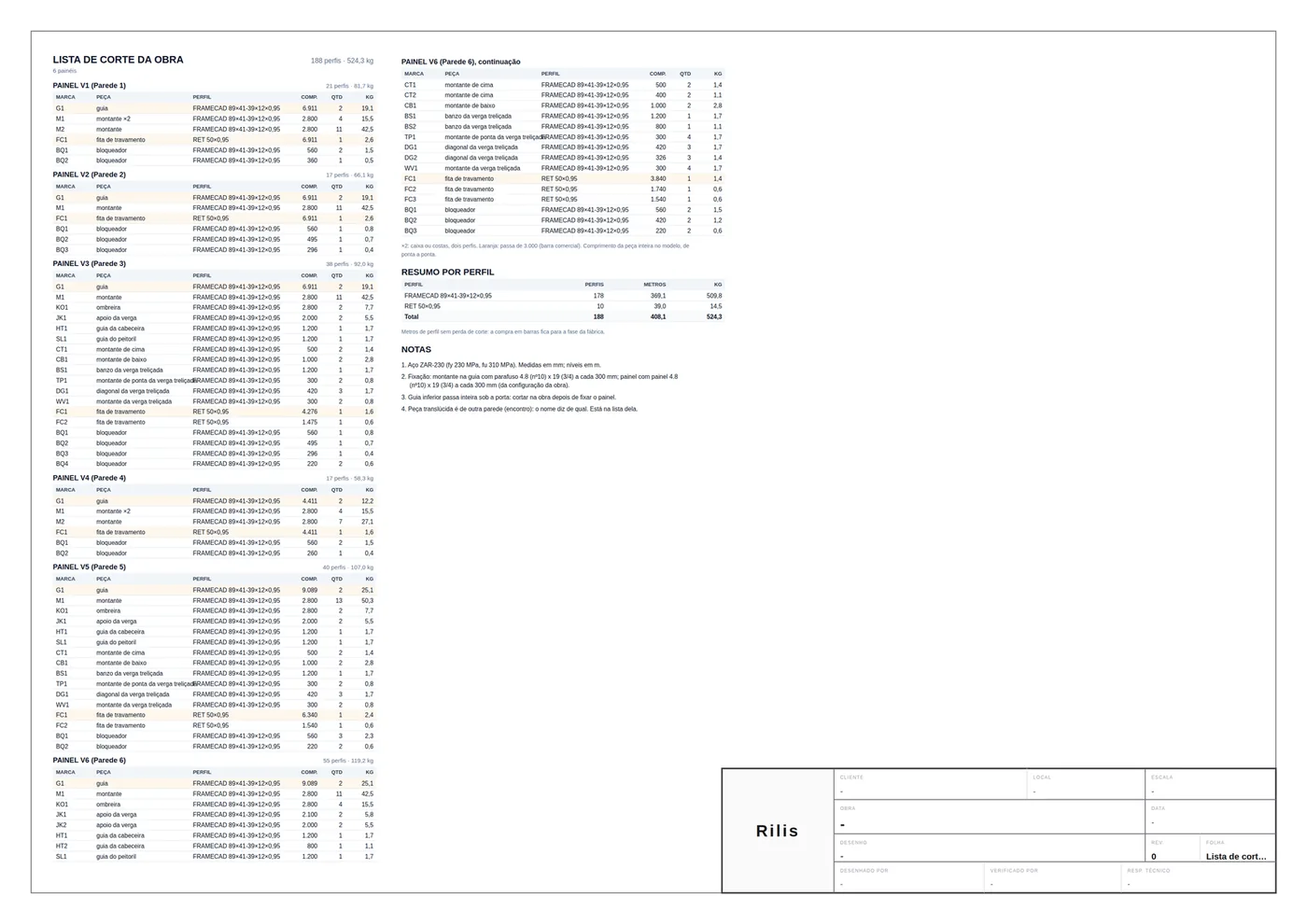
3. Export the sheet
The sheet buttons are those of LSF sheets: Export PDF (the browser print) and Export DXF.
Reading a line of the list
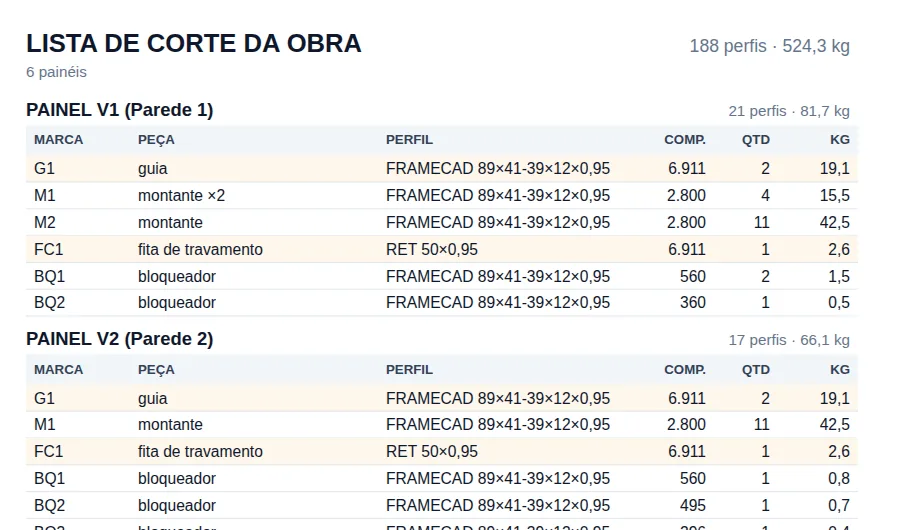
| Column | What it says |
|---|---|
| MARCA | mark: piece code and number: G track, M stud, KO king stud, JK jack stud, FC strap, BQ blocking |
| PEÇA | piece: the full name; "×2" when the piece is doubled (box or back to back) |
| COMP. | length of the whole piece in the model, end to end, in mm |
| QTD | quantity in members: the doubled piece counts 2, the quadruple 4 |
| KG | qty × length × catalog kg/m |
Two pieces share a mark when they have the same code, the same section, the same length to the millimeter and the same doubling. That is why V1 has two studs: M1 doubled and M2 single, both 2,800.
Orange is a piece longer than the commercial bar in the project configuration: 6,000 mm for track and stud by default. In the house, the 6,911 and 9,089 mm tracks run past it, and so does the strap that runs along them.
In a roll-formed project, orange is a transport warning, not a machine one. The roll former cuts from the coil; the real limit is the truck and the handling. Adjust the bar in the configuration if the supplier's transport has another limit.
The summary by section, checked by hand
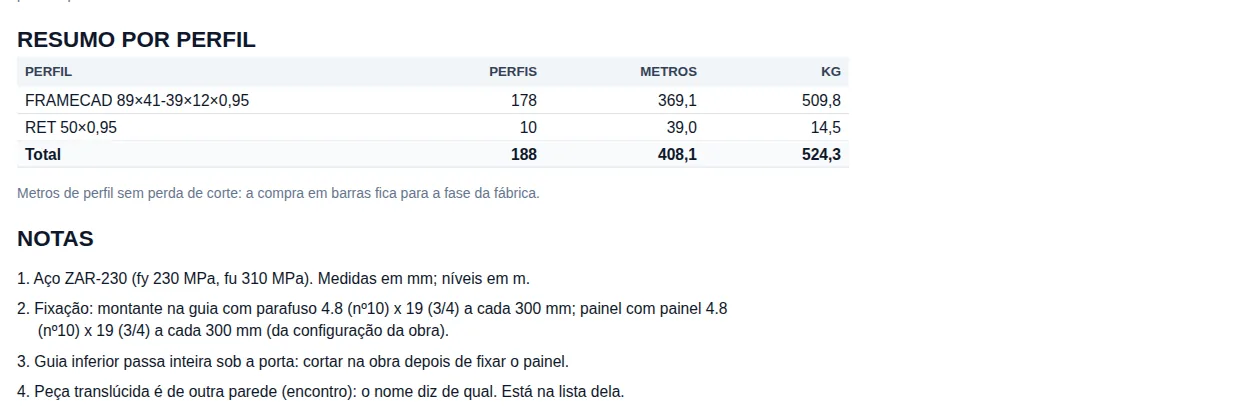
The summary adds up the lines of every panel by section, from heaviest to lightest. In the house with the walls only: C 89x41-39x12x0.95, 178 members, 369.1 m, 509.8 kg and RET 50x0.95, 10, 39.0 m, 14.5 kg. The note below warns: these are meters without cutting waste.
Check 1: the studs of Wall 1
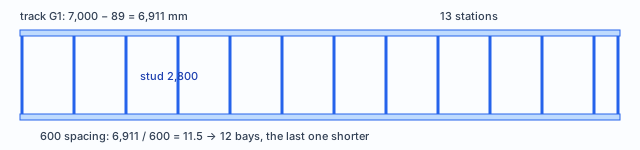
| Step | Calculation | List |
|---|---|---|
| stations | 12 bays + 1 = 13 | M2 × 11 + M1 doubled × 2 = 13 |
| members | 11 + 2 × 2 = 15 | 11 + 4 = 15 |
| meters | 15 × 2.800 = 42.0 m | (11 + 4) × 2,800 mm |
| weight | 42.0 × 1.381 = 58.0 kg | 42.53 + 15.47 = 58.00 kg |
Check 2: the kg/m of the C 89x41-39x12x0.95
By the outer developed strip, 89 + 41 + 39 + 2 × 12 = 193 mm; × 0.95 = 183.4 mm²; × 7.85 = 1.44 kg/m. By the centerline, 189.2 mm, 1.41 kg/m; discounting the four bent corners, about 1.39. The catalog uses 1.381 kg/m, less than 1% below the finest calculation. With no weight in the catalog, the app does the outer calculation.
The material takeoff
1. Open the card after the analysis
In LSF, the "Material takeoff" card opens from the diagrams card, which only appears with a result. The sum does not depend on the analysis; the button does.
2. Whole model or selection
"Whole model" adds up every bar; "Selection" adds up only the selected ones, handy for one panel or just the roof.

3. Pick the view
| View | One line per | In the house |
|---|---|---|
| By profile | profile, without class: the purchase material | three lines: 2× C, C and RET |
| By class | class and profile, with the model bar | BLQ 25 · CIN 10 · GUI 217 · MNT 4 + 114 |
| By cut piece | class, profile and cut length | the purchase list by size |
"By profile" and "By cut piece" join collinear bars into one shop piece; "By class" counts the model bar, which is why the track shows up in 217 pieces.
In a stick-built project, a shop piece longer than the configured bar is split into bars for purchasing. In a roll-formed one, the roll former cuts the whole piece from the coil, and the takeoff counts it whole, like the list and the machine file.
Cut piece, roof and CSV
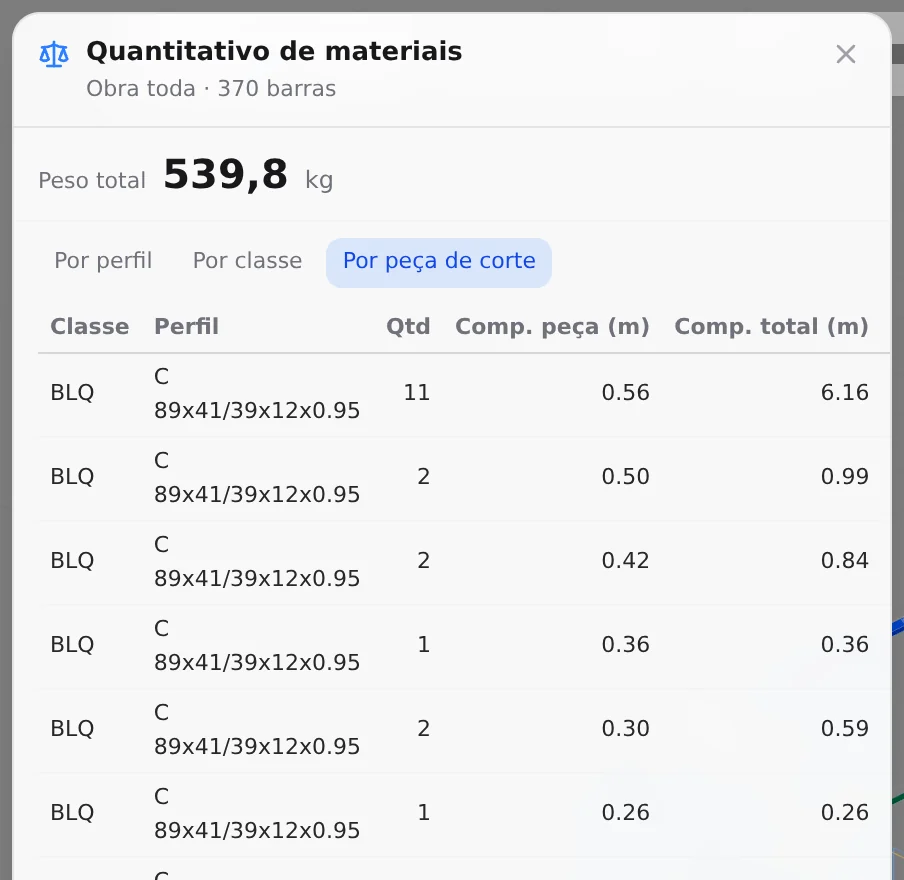
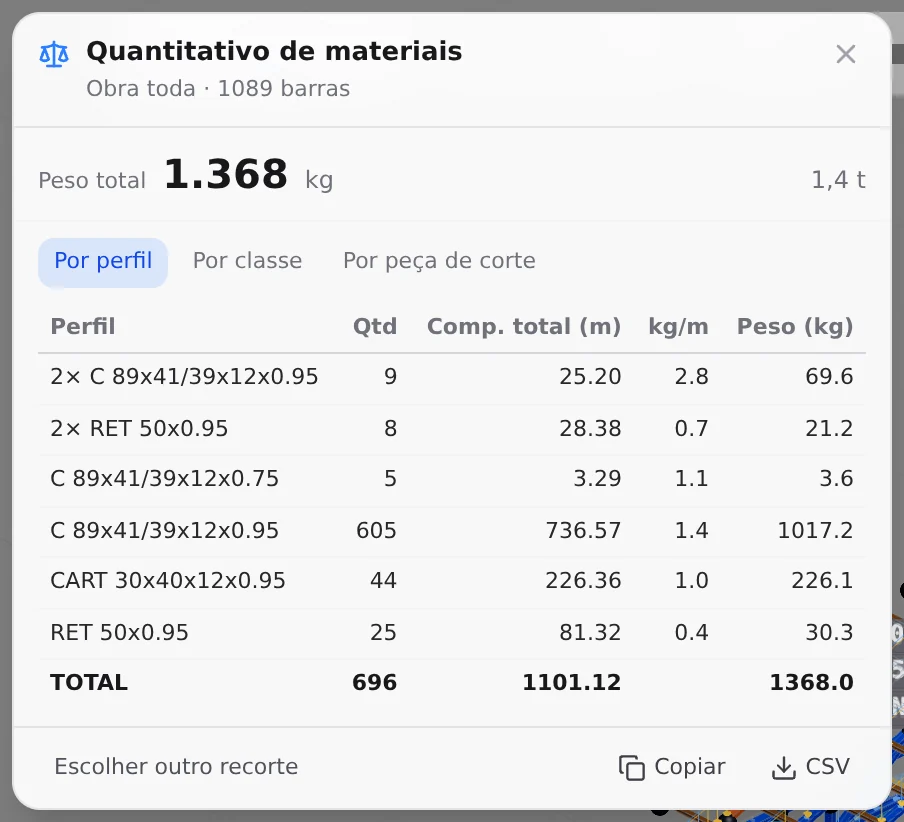
4. Copy or download the CSV
"Copy" puts the table on the clipboard, tab-separated, ready to paste into Excel. "CSV" downloads quantitativo_obra.csv (or quantitativo_selecao.csv), with semicolons and decimal commas, which Excel opens directly when set to a comma-decimal locale.
The list and the takeoff, side by side
| In the house | Cut list | Takeoff |
|---|---|---|
| unit | cut member, with mark | model piece, in bars |
| doubled stud | 8 members, 22.4 m | 4 pieces, 11.2 m at 2.762 kg/m |
| roof | in | in |
| floor | out | in |
| cutting waste | out | out: add it in the spreadsheet |
DXF: the 2D sheet and the 3D model
These are two different files, in two places. The sheet one carries the sheet drawing; the top one carries the volume of the bars.

Sheet DXF
Click Export DXF. The app converts the sheet as it is on screen, with views, dimensions, schedules and title block, and the .dxf file downloads.
3D DXF from the top
In the Export button at the top, DXF 3D (extruded) translates the meshes of the Structure 3D: every straight bar becomes a solid extruded along its section, and the others become meshes. The file downloads as CalcSteel_Project.dxf and counts toward the plan's export limit.
The sheet PDF is the browser print dialog. Pick A3 and "Save as PDF", as in LSF sheets.
IFC: the model for BIM
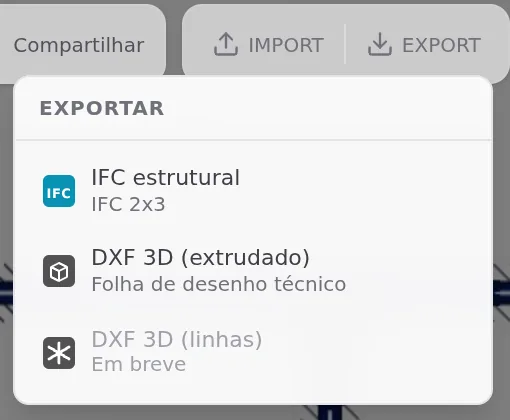
1. Export, Structural IFC
It belongs to the paid plans: for those who do not pay, the line reads "Pro" instead of "IFC 2x3". The app checks the plan, builds the file in the browser and downloads <project>.ifc.
2. Open it in a BIM program
The schema is IFC 2x3, which Revit, Archicad, Tekla, BIMcollab Zoom and BIMvision open. In Revit, through "Open IFC" or linked to the architecture model.
3. Filter by entity and by description
Stud, track, strap, blocking, diagonal, chord, purlin and rafter come out as IfcMember; the column chord, as IfcColumn; the header, as IfcBeam. Each bar carries its label as name (M1042) and its class as description (MNT, GUI, BLQ, CIN): that is how you separate stud from track in the viewer.
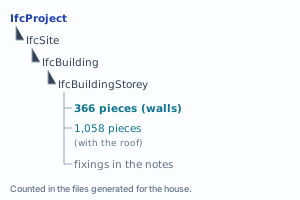
| In the IFC of the house | Value |
|---|---|
| pieces | 370 (walls) · 1,089 (with the roof) |
| geometry | extruded solid on the straight bar, faceted solid on the cut or inclined piece |
| fixing | in an LSF project, the fixing is the market rule, written in the notes of the details (Standard details); it is not a 3D piece and does not go into the file |
Shortcuts
- LO↵
Project cut list
Creates the missing cut list sheets of the project and opens the first.
with walls selected
- QT↵
Material takeoff
Opens the steel takeoff of the project.
after analysis
- X
Export DXF
Generates the DXF of the open sheet.
- Ctrl+P
Export PDF
Generates the PDF of the open sheet.
Parameters
What changes the numbers
| Parameter | Where it changes | Effect | In the house |
|---|---|---|---|
| track and stud bar | LSF configuration | orange line in the list | 6,000 / 6,000 (default) |
| section and thickness | piece class | kg/m in every output | 1.381 kg/m |
| steel | LSF configuration | note 1 of the list | ZAR-230, fy 230, fu 310 |
| fixing | connections configuration | note 2 of the list | 4.8 (#10) x 19 every 300 mm |
| doubling (box, back to back) | piece in the 3D | "×2" and doubled QTD | M1 of V1 and V4 |
| stud spacing | wall | number of stations | 600 mm |
| takeoff scope | Whole model or Selection | what it adds up | 370 or 1,089 bars |
| takeoff view | card tabs | grouping | profile, class, cut piece |
| IFC schema | fixed | compatibility | IFC 2x3 |
The numbers of the house, by panel
| Panel | Wall | Members | kg | Track |
|---|---|---|---|---|
| V1 | Wall 1 | 21 | 81.7 | 6,911 |
| V2 | Wall 2 | 17 | 66.1 | 6,911 |
| V3 | Wall 3, one window | 38 | 92.0 | 6,911 |
| V4 | Wall 4 | 17 | 58.3 | 4,411 |
| V5 | Wall 5, one window | 40 | 107.0 | 9,089 |
| V6 | Wall 6, door and window | 55 | 119.2 | 9,089 |
| Total | 188 | 524.3 |
Errors and refusals
When the output does not come out, or comes out different
- "The project has no LSF wall." The project cut list needs at least one wall: roof and floor alone do not open the sheet.
- folha 1 de 2: crie as outras em "Lista da obra" (sheet 1 of 2: create the others from the project cut list). In red at the top, when the project grew and the list ran past the sheets that exist. Click again: the app creates only the missing ones.
- There is no takeoff button. In LSF it sits in the diagrams card, which only appears after the analysis. Run the analysis, or use the project cut list until then.
- IFC needs a paid plan. The menu line reads "Pro", and the app checks the plan before generating. The sheet DXF and the 3D DXF count toward the plan's export limit.
- Buying from the list left material short. The list covers the walls and the roof: the floor and the cutting waste stay out. Buy from the takeoff of the whole model and add the waste.
What the engine checks
One source, four readers
The cut list reads the pieces the same way as the panel elevation: what lies in the plane of the wall, with the piece from another wall shown translucent and left out of its count. The takeoff adds up the bars. The IFC and the 3D DXF translate the drawing. The four outputs are geometry and weight calculations; the strength of each bar is the one the engine verifies in the analysis (Reading the results).
| Output | What it checks |
|---|---|
| cut list | the pieces of each wall, member by member, with the shop mark, plus one block per truss type and one for the roof framing; the floor stays out |
| takeoff | every bar of the project, with roof and floor; the "2× C" piece comes in once, with the kg/m doubled |
| sheet DXF | the sheet drawing, with the annotations, for whoever continues in CAD |
| 3D DXF and IFC | the volume of the model bars, for CAD and the BIM program |
What stays with the designer
- Cutting waste and buying in bars. No output adds waste; it goes into the CSV spreadsheet, with the bar the supplier sells.
- The screw count. The list gives the gauge and the spacing by note. The number of screws that item 4.8 f) of NBR 16970-2 asks for is counted in the design.
- Boards, sealing tape and anchors. They stay out of the takeoff, which is bar steel only, and are taken off from the cladding and foundation designs.
- The fixing in the BIM model. LSF screws and anchors are not 3D pieces and do not go into the IFC or the 3D DXF. The clash check with architecture and services belongs to whoever coordinates.
For the shop, the fabrication reference is the machine file (Roll-former file), with holes, swages and cutting order.
Summary
The path, in one line
Close walls and roof, generate the Project cut list for the shop, buy from the Material takeoff of the whole model with the waste added in the spreadsheet, and send the IFC to coordination and the DXF to CAD.
Quick check: add up the kg in the title of each panel. The total has to match the one at the top of the sheet and the one in the summary by section. In the house with the walls only, all three give 188 members and 524.3 kg.