LSF (Light Steel Framing)
Loads
Before saying whether a stud passes, the engine needs to know what weighs on the house and what the wind does to it. This page shows where each action of an LSF project comes from, where it appears on screen and what you can change.
Overview
Three cases in the project, eight for wind, twenty-six combinations
The example house, the 9x7 one from Exterior walls, already has walls, openings, straps, bracing and a roof. Now it goes to the engine, and the first question of the analysis is: what acts on it?
In an LSF project you do not apply loads member by member. The project wizard (see New project wizard) stores the loads per area and the wind data, and the load path (see Load path) says how they travel down. With that, the app builds the load cases and the combinations by itself.
In the example house, three cases stay in the project (PP Parede, the wall dead load; PP Telhado, the roof dead load; and SC Telhado, the roof live load), eight wind cases are created at calculation time, and the standard combines them into 26 combinations.
Everything this page shows came from the analysis of the whole house, on screen.
What it is for
Each action in its own case
An action is anything that produces force in the structure. The app separates the actions by origin because each one enters the combination with its own factor and reaches the members by its own path. In a single-story house with a roof there are four families:
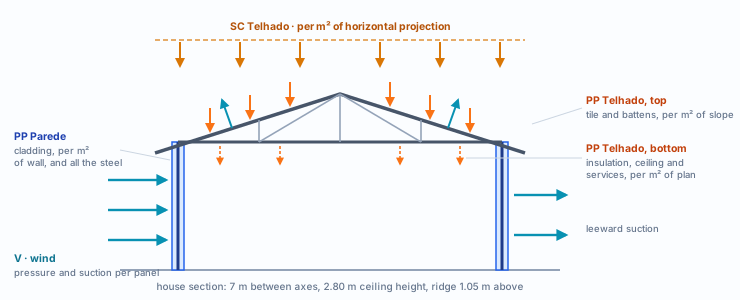
| Case | Nature | What it carries | Where it goes |
|---|---|---|---|
| PP Parede | Permanent | The wall cladding (boards and finishes, per m² of wall) and the weight of every profile in the project. | On the vertical members of each wall. |
| PP Telhado | Permanent | Tile and battens per m² of roof plane; insulation, ceiling and services per m² of plan. | Top chords and rafters; bottom chords. |
| SC Telhado | Variable | The roof live load, per m² of horizontal projection. | Top chords and rafters. |
| V1+ to V4− | Wind | Pressure and suction on each face: four directions, two Cpi each. | Vertical members of the exterior walls and the layer where the tile sits. |
The steel goes in only once. The weight of the profiles comes from the members of the model themselves and goes into a single case, the first permanent one: in this house, PP Parede. That is the one with the green PP badge in Load cases.
What the standard says
Permanent, variable and the combination
| Where | What it says | In the house |
|---|---|---|
| NBR 14762, 6.1.2 | Actions are classified as permanent, variable and exceptional, according to NBR 8681. | PP Parede and PP Telhado are permanent; SC Telhado and the wind, variable. |
| NBR 14762, 6.2.2 | Direct permanent actions are the weights of the building elements, with the values of NBR 6120. | The profiles, the boards, the finishes, the tile and the ceiling. |
| NBR 6120, item 5 | Unit weights and weights per area of building materials. | The basis of the market values on the Loads tab. |
| NBR 6120, 6.4 | On an ordinary roof, with no accumulation of material, a minimum live load of 0.25 kN/m², on horizontal projection. | SC Telhado, applied on projection. |
NBR 14762 · 6.7.2.1 · normal ultimate combination.
Fd = Σ γgi·FGi,k + γq1·FQ1,k + Σ γqj·ψ0j·FQj,k
All permanent actions go in. One variable action is the main one, with its full factor; the others come along, reduced by ψ0. Each variable action is the main one at least once.
| Factor | Value | Where |
|---|---|---|
| γg, grouped permanent actions | 1.40 | Table 2 |
| γg, favorable permanent action | 1.00 | Table 2 |
| γq, grouped variable actions | 1.40 | Table 2 |
| γq, wind | 1.40 | Table 2 |
| ψ0, wind | 0.6 | Table 3 |
Tables 2 and 3 of NBR 14762:2010. Wind as an accompanying action enters with 1.40 × 0.6 = 0.84.
The wind: from V0 to the pressure on each face
NBR 6123:2023 · 4.2 · Vk and q.
Vk = V0·S1·S2·S3 and q = 0.613·Vk², with Vk in m/s and q in N/m². V0 is the basic wind speed of the site, read from the isopleths (5.1, Figure 1), as in New project wizard.
5.2 and 5.4 · Table 4.
S1, the topographic factor (5.2): 1.0 on flat or gently rolling ground. S3, the statistical factor (5.4, Table 4): group 3, residences, is 1.00.
5.3.1 to 5.3.3 · Tables 1 to 3.
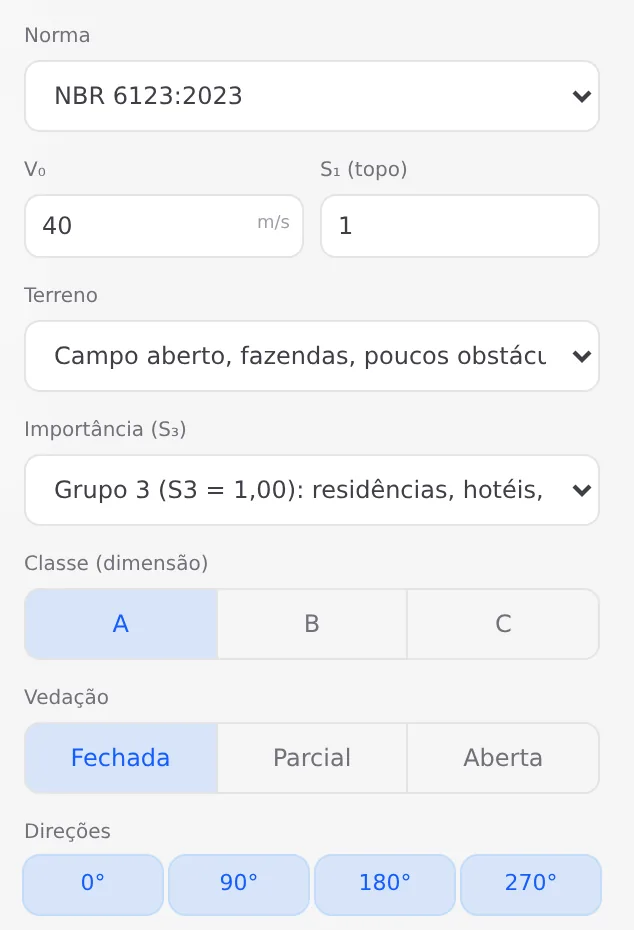
S2 = b·Fr·(z/10)p: terrain roughness (category), building size (class) and height z. The parameters b and p are in Table 1, Fr in Table 2, and below 5 m the S2 at 5 m applies (Table 3).
4.3.1 · Tables 6 and 7.
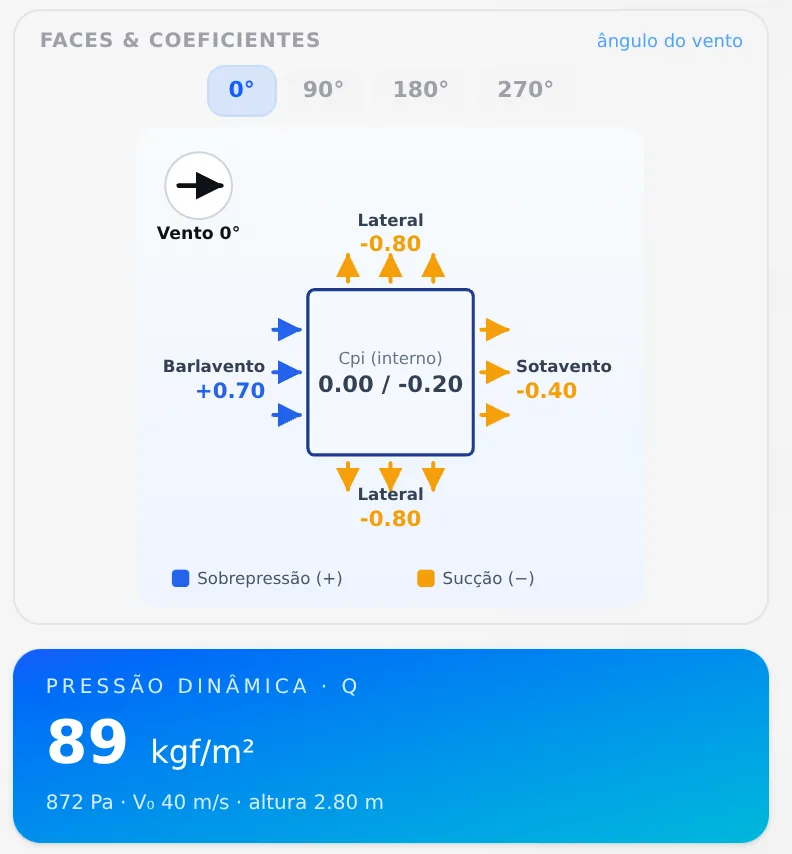
External pressure coefficients Cpe for the walls (Table 6) and for the gable roof (Table 7). The internal pressure enters through Cpi, from the enclosure, and each face takes Δp = (Cpe − Cpi)·q.
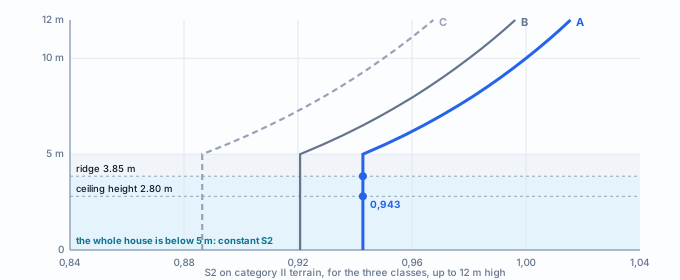
| Class | S2 up to 5 m | Vk | q |
|---|---|---|---|
A the house | 0.943 | 37.7 m/s | 872 Pa · 89 kgf/m² |
| B | 0.921 | 36.8 m/s | 831 Pa · 85 kgf/m² |
| C | 0.886 | 35.5 m/s | 771 Pa · 79 kgf/m² |
V0 40 m/s, S1 1.0, terrain II, group 3. The q is the one on the velocity pressure card of the wizard. The class comes from the largest dimension of the building: up to 20 m it is A, and the house is 9 m.
Design recommendations
What to enter for the example house
For the 9 × 7 m single-story house with ceramic tile, the Brazil market values work almost all as they are. Only the wind class and V0 call for your choice.
- 35 kgf/m²: wall cladding: boards and finishes
- 46 kgf/m²: ceramic tile, the one chosen in Roof
- 25 kgf/m²: roof live load, on projection
- 89 kgf/m²: wind velocity pressure, class A
Let the app generate the wind and the combinations. With a wind case entered by hand, the app does not generate the wind on the walls and the roof, so it is not counted twice; in a combination list edited by hand, the generated wind stays out of the combinations. The shortest way is to fill in the wizard and calculate.
Why the class matters.
The class enters S2. In the house, class A gives 872 Pa; if the project were entered as B, the pressure would drop to 831 Pa, about 5% less on every panel. For a building up to 20 m, the class is A, and a new project arrives with B: in the house, change it to A.
Step by step
1. Open the Loads tab of the project settings
It is the wizard window (see New project wizard): it opens on a new project and comes back when you reopen the settings. Each value is in kgf/m², and each group shows its sum in the corner (Σ).
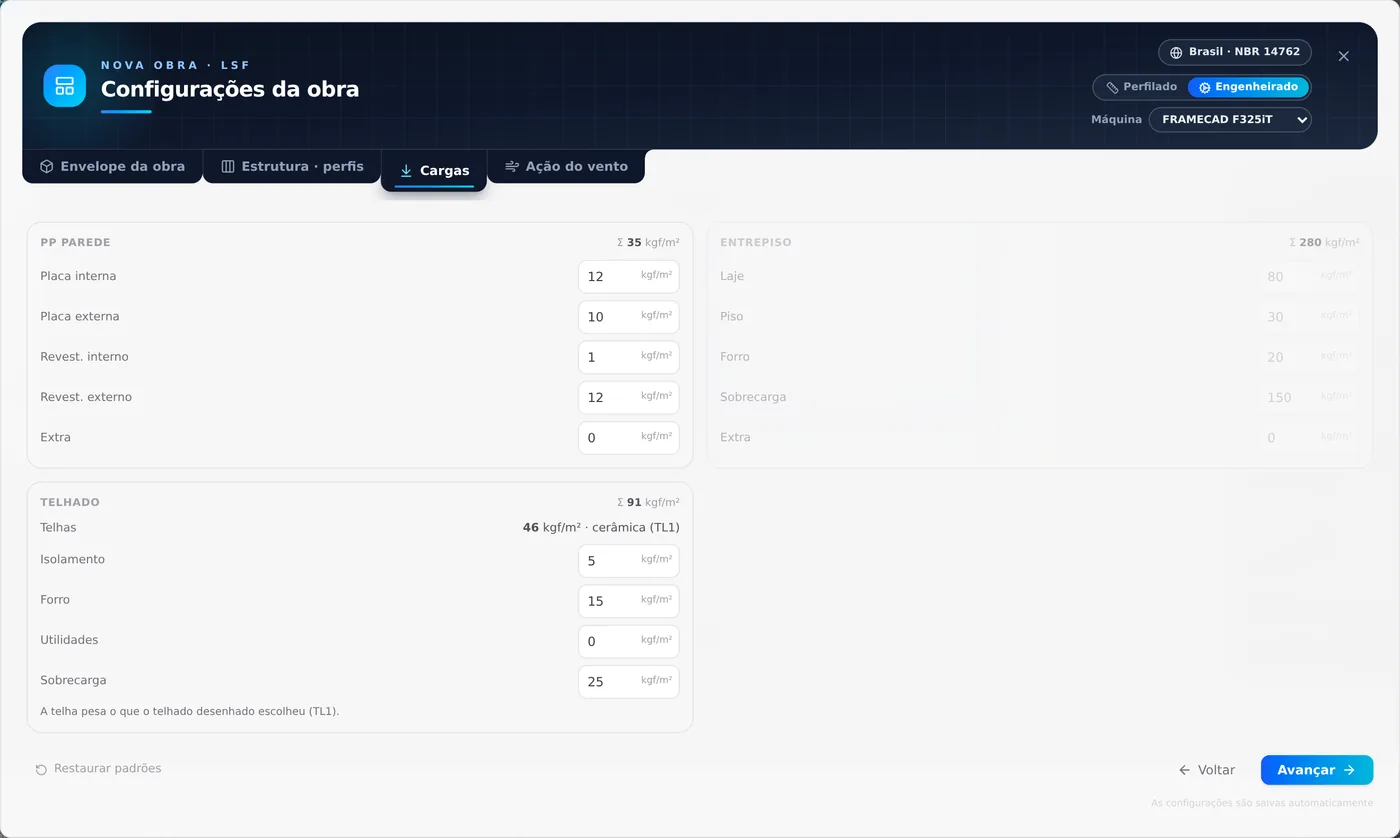
| Group | Fields and values (kgf/m²) | Goes to |
|---|---|---|
| PP Parede | Placa interna (inner board) 12 · Placa externa (outer board) 10 · Revest. interno (inner finish) 1 · Revest. externo (outer finish) 12 · Extra 0 · Σ 35 | Case PP Parede, per m² of wall |
| Telhado, top | Telhas (tiles) 46, from roof TL1 | Case PP Telhado, per m² of roof plane |
| Telhado, bottom | Isolamento (insulation) 5 · Forro (ceiling) 15 · Utilidades (services) 0 | Case PP Telhado, per m² of plan |
| Sobrecarga (live load) | Sobrecarga 25 | Case SC Telhado, per m² of projection |
| Entrepiso (floor) | Laje (slab) 80 · Piso (flooring) 30 · Forro 20 · Sobrecarga 150 · Extra 0 | Cases PP Entrepiso and SC Entrepiso, on the floor joists; only with a floor placed, and the house has none |
The Telhado Σ, 91 kgf/m², adds up the tile, the layers below and the live load, but each part goes to its own case and acts on its own area.
2. Check the Wind action tab
The standard comes from the market country. Choose the factors (see New project wizard) and check the velocity pressure in the panel on the right, which changes with each field.
3. Calculate
The Calculate button sends the project to the engine. The house, with 1,089 members, took just over a minute (72 s). The wind cases are created at that moment, from the walls and the roof drawn, and are not saved in the project.
- 72 s: the analysis of the whole house, with wind
- 8: wind cases: 4 directions × 2 Cpi
- 0: wind cases saved: the next calculation rebuilds them
Changed a wall, an opening or the roof? Calculate again. Since the wind comes from the geometry of the moment, it follows the project without you touching anything.
4. See the cases and what each one carries
On the Structure tab, two buttons of the left toolbar handle the loads:
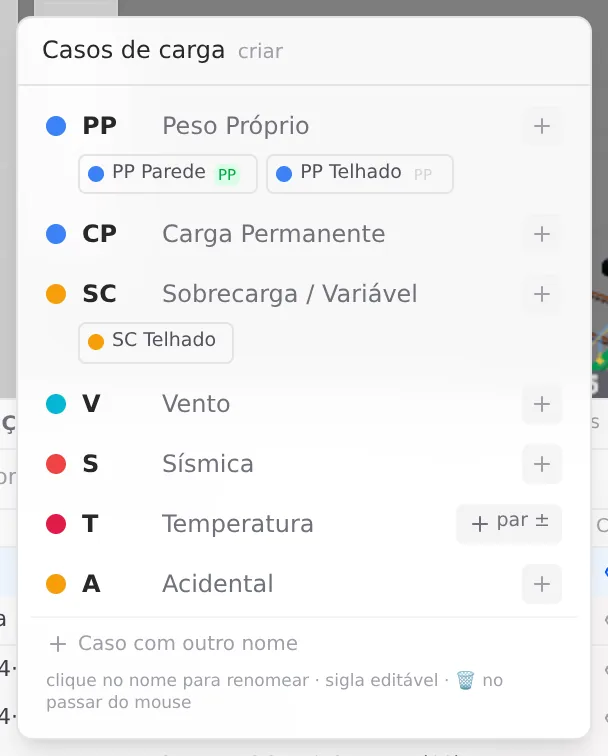
Load cases, the one that creates a case from the standard, lists the cases by nature (the first figure in Overview). The house has PP Parede and PP Telhado under Self-weight and SC Telhado under live load.
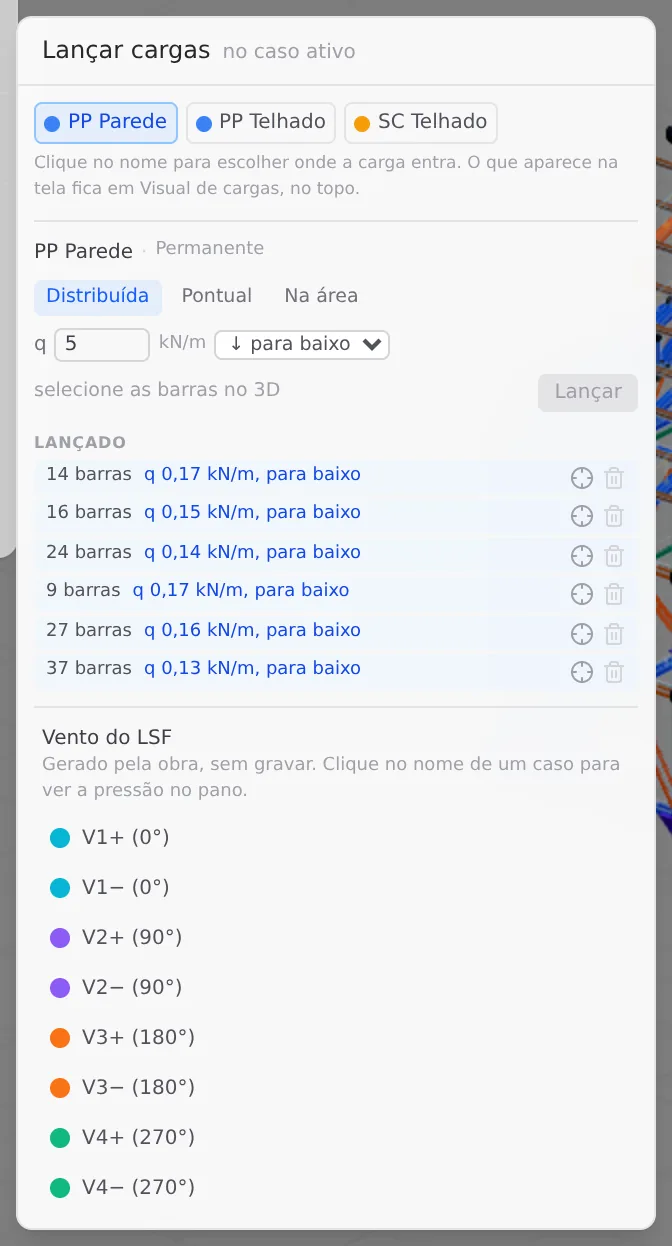
Apply loads, the one that applies a load to the active case, shows what is already in each case. Clicking the name of a chip picks the active case, where the next load goes.
With PP Parede active, the Applied list shows one row per wall: six walls, from 9 to 37 members, with 0.13 to 0.17 kN/m downward. Each wall spreads 35 kgf/m² × its area among its vertical members.
Below, the LSF wind block says "Generated from the building, not saved" and lists V1+ to V4−. Step 6 shows what they do.
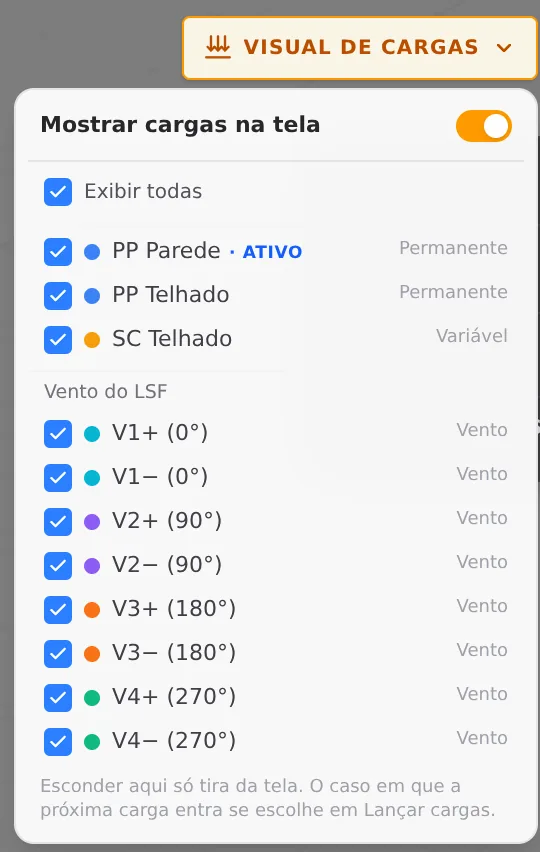
Load visuals, the wide button in the top right corner, picks what shows in 3D. The Show loads on screen switch turns all the arrows on or off, Show all checks or unchecks everything, and each case has its own checkbox, the eight wind cases in a group of their own. The row of the active case carries the active mark.
Hiding there only takes it off the screen: the case stays in the analysis. And picking a hidden case as active, in Apply loads, brings it back to the screen.
PP Parede, PP Telhado and SC Telhado belong to the project. The app rebuilds them from the wizard whenever the project changes. For a load of your own, create a new case in Load cases and apply it there.
5. Check the order of magnitude
After the analysis, the sum of the support reactions of each case says how much it weighs. Checking those totals with a quick hand calculation is the best way to know the loads went in as you intended.
- 52.0 kN: PP Parede: the steel of the project and the cladding
- 54.7 kN: PP Telhado: tile, battens, insulation and ceiling
- 20.9 kN: SC Telhado: the roof live load
| Case | Hand calculation | The engine |
|---|---|---|
| Steel | The status bar, at the bottom of the screen, shows 1,345 kg of profiles: 1,345 × 9.81 = 13.2 kN. | inside PP Parede |
| Cladding | The rest of PP Parede: 52.0 − 13.2 = 38.8 kN. It is the 35 kgf/m² times the gross area of each wall, doors and windows included, spread over the length of all its vertical members. | 52.0 kN |
| SC Telhado | The projection of the roof planes with the 0.60 m eave is about 85 m²: 85 × 25 = 2,125 kgf, about 20.8 kN. | 20.9 kN |
| Wind at 0° | It hits the 7 m wall: 7 × 2.80 m plus the gable, 23.3 m². 0.872 kN/m² × (0.70 + 0.40) × 23.3 = 22.3 kN. | 22.4 kN |
| Wind at 90° | It hits the 9 m wall: 9 × 2.80 = 25.2 m². 0.872 × (0.70 + 0.40) × 25.2 = 24.2 kN. | 24.2 kN |
Why 0.70 + 0.40.
The windward face pushes (+0.70) and the leeward face pulls (−0.40) toward the same side: they add up. The sides (−0.80) pull toward opposite sides and cancel out. Cpi acts equally on the inner faces, and also cancels out in the horizontal sum.
At 180° and 270° the total is the same, with the sign reversed: the house is symmetric. If a direction comes out very different from your calculation, check the fields of the Wind action tab before looking at the members.
6. Click the name of a wind case
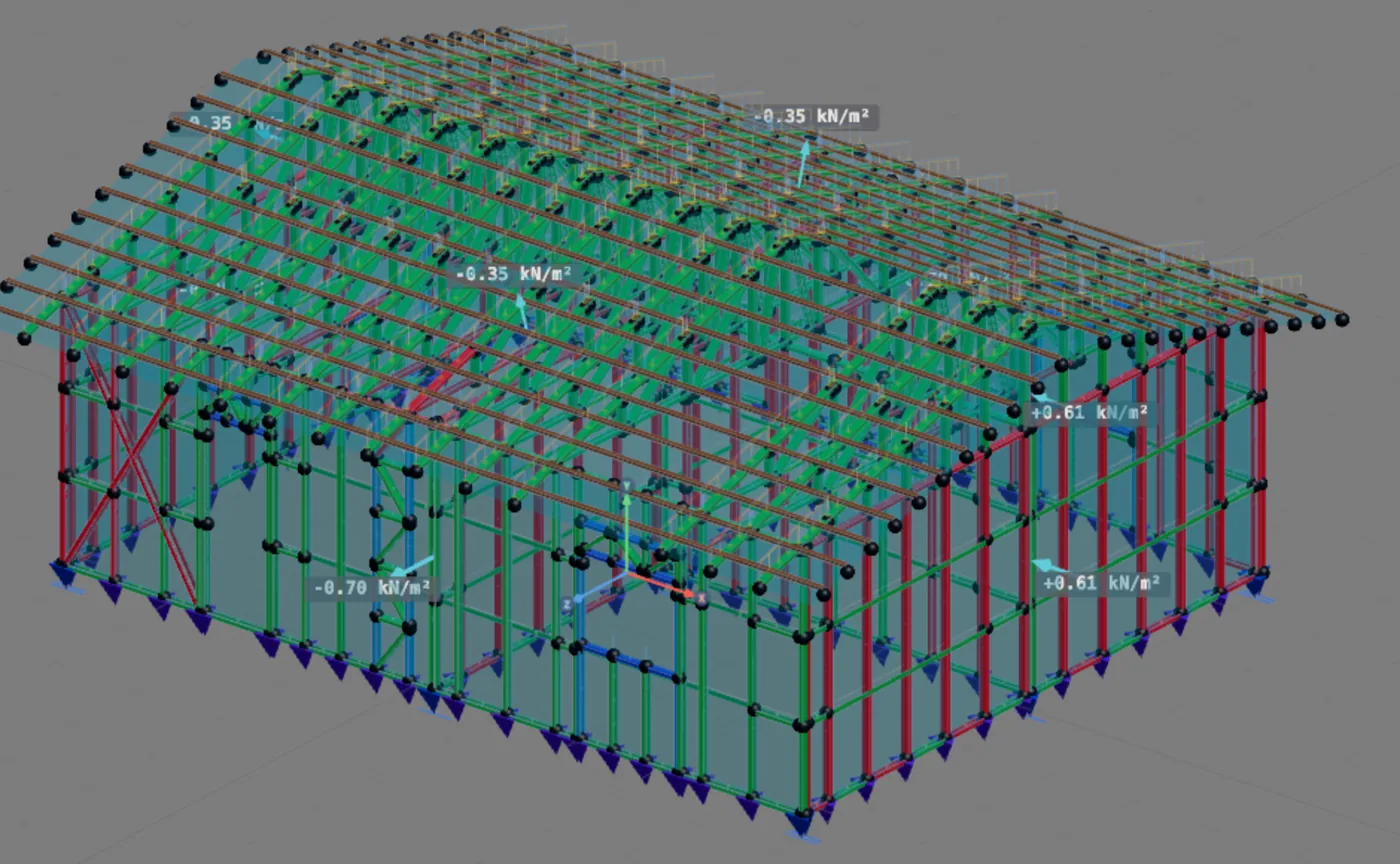
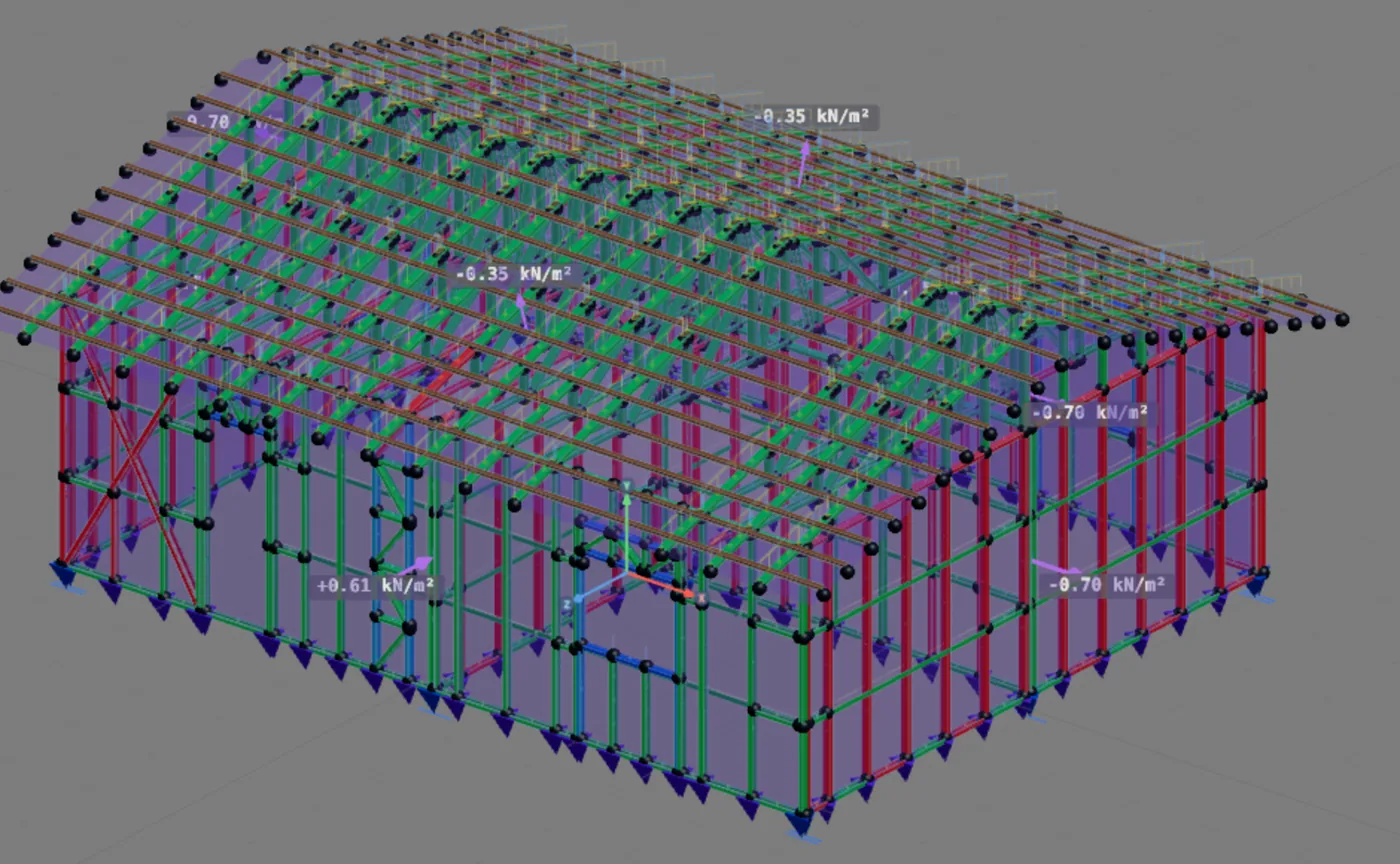
In the LSF wind block, in Apply loads, clicking the name of the case makes it the active one and shows in 3D the pressure on each panel, in kN/m². Showing or hiding the wind cases is done in Load visuals, like the others.
| Name | What it is |
|---|---|
| V1 to V4 | 0°, 90°, 180° and 270°, the directions checked |
| + | Cpi 0: the inside pressure does not add |
| − | Cpi −0.20: the inside pulls |
The + and − pair has the same horizontal resultant: Cpi changes the pressure on each face, not the total push. Both versions go into the combinations because each member feels the worse of the two.
7. Read the combinations card
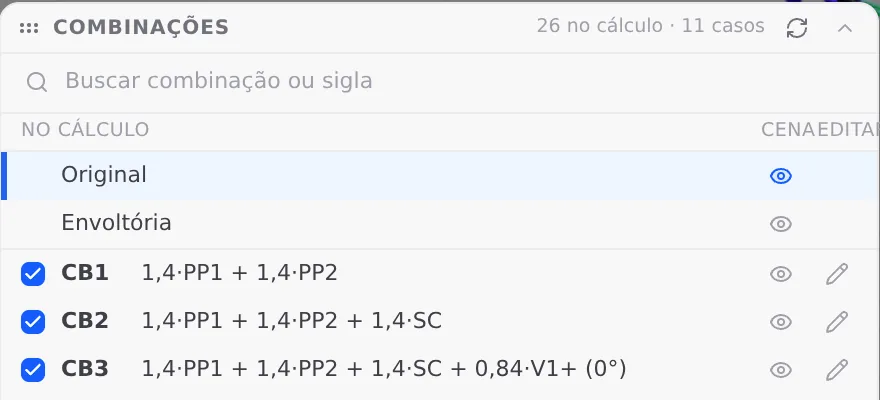
On the Structure tab the card sits at the bottom left. The header says how many combinations are in the analysis and from how many cases: 26 in the analysis, 11 cases (the three of the project and the eight for wind).
| On the card | What it is for |
|---|---|
| in analysis | The checkbox puts the combination in the analysis or takes it out. |
| scene | The eye shows the result of that combination in 3D. |
| edit | The pencil opens the formula of the combination. |
| ↻ | Fills in the combinations from the standard again. |
| Original | What the engine calculated, without combining. |
| Envelope | The worst value of each member among all of them. |
8. Open the overview to see them all
The Open overview button, at the foot of the card, shows all 26 with the full name, the filters and the same columns. The [ and ] keys change the combination on the scene.
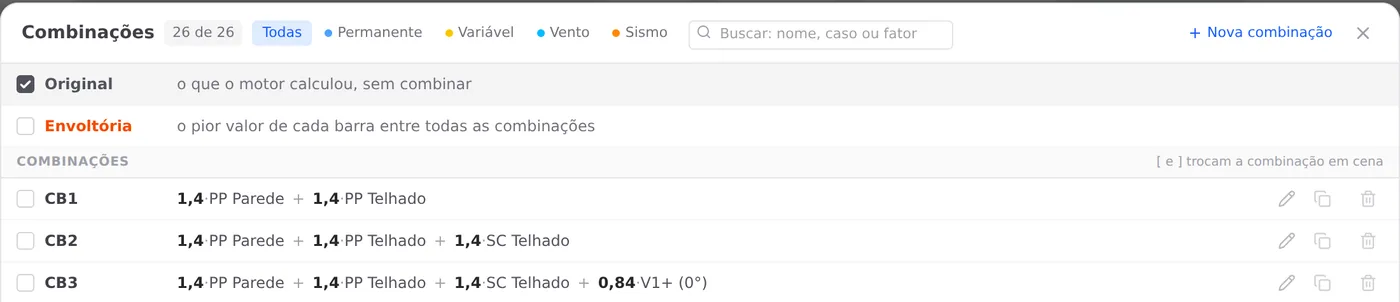
CB1 and CB2 are gravity only; the other 24 have wind. For each wind case there are three: live load as the main action, wind as the main action, and the suction one, with the weight at 1.0. How to read the one that governs each member is in Reading the results.
Parameters
What comes from the market, and what is yours
The load values come from the market sheet (see Market and catalog); the wind values, from the market country and the app default. All of them can be changed in the wizard, except the tile, which belongs to the roof.
| Field | Default | Who changes it | Effect |
|---|---|---|---|
| Placa interna | 12 kgf/m² | you, on the Loads tab | PP Parede, on every wall |
| Placa externa | 10 kgf/m² | you | PP Parede |
| Revest. interno | 1 kgf/m² | you | PP Parede |
| Revest. externo | 12 kgf/m² | you | PP Parede; heavy cladding goes here |
| Extra (wall) | 0 | you | PP Parede; never the steel |
| Telhas | the weight of the tile of the drawn roof: ceramic 46, concrete 49, fiber cement 18, metal 4.4, shingle 11 kgf/m²; with no roof drawn, the Telhas field, 15 kgf/m² | the roof (see Roof) | PP Telhado, per m² of roof plane |
| Isolamento · Forro · Utilidades | 5 · 15 · 0 | you | PP Telhado, per m² of plan |
| Sobrecarga (roof) | 25 kgf/m² | you | SC Telhado, per m² of projection |
| Laje · Piso · Forro · Sobrecarga · Extra (floor) | 80 · 30 · 20 · 150 · 0 kgf/m² | you | only with a floor placed: PP Entrepiso and SC Entrepiso, on the floor joists |
| Wind standard | NBR 6123:2023 | the market | tables of S2, S3, Cpe and Cpi |
| V0 | 40 m/s | you, by site | q grows with the square |
| S1 | 1.0 | you | topography: a slope or a hill increases it |
| Terrain | II, Campo aberto (open country) | you | roughness in S2 |
| Group | 3, residences | you | S3 = 1.00 |
| Class | B, as a new project arrives | you | A up to 20 m; enters S2 |
| Enclosure | Fechada (enclosed) | you | Cpi 0 and −0.20, one case for each |
| Directions | 0°, 90°, 180°, 270° | you | two wind cases per direction |
The combination has no field. The factors are those of the standard, and the card rebuilds the list with the fill-from-the-standard button. What you choose is only which ones go into the analysis.
Shortcuts
- 3
Loads tab
Goes straight to the Loads tab of the wizard.
in the project wizard
- 4
Wind tab
Goes straight to the Wind tab of the wizard.
in the project wizard
Common mistakes and refusals
When an action does not go in as you intended
The wind warnings appear after the analysis, on the combinations card, in the model discrepancies row: open the row to read them. They all start with "Light steel framing:". Load mistakes show up in the totals of step 5.
- "The project already has a manually entered wind load case". The automatic wind on the walls and the roof is not generated, so it is not counted twice. Delete the manual wind case and calculate again.
- "Wind was not generated": no standard or no direction. Choose the standard and check at least one direction on the Wind action tab.
- "The walls do not close a contour". Without a closed contour the app cannot find the outside, and the wind on those walls keeps the generator orientation. Close the perimeter by joining the walls (see Wall joints).
- Roof without trusses, gable or panel without a member. A roof with no truss or rafter gets no wind; a gable with no panel and a panel with no member to carry the pressure leave part of the wind out. The warning says which roof, wall or panel.
- "The combinations were edited by hand". The wind was generated, but it is in no combination. On the card, use the fill-from-the-standard button.
- "CBn governs N members. Leave it out of the analysis anyway?". Appears when you uncheck a combination that governs some member. Taking the combination out does not change the load: it hides the worst case of those members.
- Steel in Extra, or a PP case of your own. The steel already goes in through the weight of the profiles. In Extra, it counts twice. A permanent case of your own, with self-weight, starts carrying the steel in place of PP Parede: the green PP badge shows which one carries it.
- Load applied to the project cases. PP Parede, PP Telhado and SC Telhado are rebuilt from the wizard. A load applied to them does not stay: at the next sync the app rebuilds them. Apply it to a case of your own.
What the engine checks
From the m² to the member
You give the loads per area and the wind data; the engine takes them to the members and checks each piece with them, in each combination. What happens to each action:
| Action | How it reaches the members |
|---|---|
| Wall cladding | the PP Parede kgf/m² times the gross area of each wall, doors and windows included, spread over the length of all its vertical members |
| Steel | the weight of the profiles themselves, once, in the first permanent case |
| Roof | tile and battens per m² of roof plane, on the top chords and the rafters; insulation, ceiling and services per m² of plan, on the bottom chords; the live load per m² of projection, on the top chords and the rafters. With no roof drawn, the roof load goes to the top tracks of the eave walls |
| Floor | with a floor placed, the load per area times the area of the room, spread over the floor joists by the tributary width of each one |
| Wind | one panel per exterior wall, the gross rectangle from base to top, with the window included; one per roof plane with structure and one per gable. The pressure goes to the vertical members (stud, king stud, jack stud, cripple, lattice truss stud, lattice column chord) and, on the roof, to the layer where the tile sits. Track, X strap, horizontal strap, blocking, floor joist and diagonal stay out, and the interior wall has no panel |
| Wind cases | four directions × two Cpi, rebuilt at every calculation from the geometry of the moment, without saving them in the project |
| Combinations | by NBR 14762, 6.7.2.1, with the factors of Tables 2 and 3. The standard list takes the wind at every calculation; a list edited by hand stays as it is, with a warning |
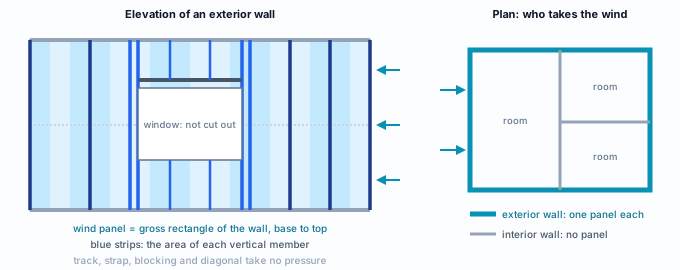
To see what the engine did, three places are enough. Apply loads shows what each project case carries, member by member; the name of a wind case shows the pressure on each panel; and the sum of the reactions of each case gives the total, for the hand calculation of step 5.
What stays with the designer
- The values per area. The market ones are the starting point: check boards, finishes, ceiling, services and tile against the real project and NBR 6120, on the Loads tab.
- The wind data of the site. V0 from the isopleths, S1 from the topography, terrain, class and group, on the Wind action tab.
- The enclosure. Cpi comes from it: check that the one chosen represents the openings of the project.
- Loads that are not per area. A water tank, equipment or another concentrated load goes into a new case in Load cases, applied with Apply loads.
- The check of the totals. The hand calculation of step 5, case by case, before reading the members.
Shortcuts
- Ctrl+Enter
Calculate the project
Sends the project to the engine, like the Calculate button.
- LC↵
Apply loads
Opens the panel to apply loads to the active case.
Summary
The path, in one line
Loads tab with the market values → Wind action tab with V0, class A and the four directions → Calculate → check the cases in Apply loads, the totals and the pressure on each face → read the 26 combinations on the card and in the overview.
The example so far
- 11: cases: 3 from the project and 8 for wind
- 26: combinations in the analysis
- 52.0 kN: PP Parede, with the steel
- 872 Pa: velocity pressure, class A