LSF (Light Steel Framing)
Floors
The Floor tool places the horizontal plane on top of the walls: one floor per room, joists lined up with the studs and the rim joist in place of the top track. This page shows the rule that picks the joist direction and the governing wall, what changes in the walls below and what the engine checks on the joist.
Overview
One floor per room, on top of the walls
The Floor tool, on the LSF card, places floor joists in a closed room with one click. The joists are created on top of the walls, span from centerline to centerline of the supporting walls, and each end bears on a stud. When there is no stud below, the tool shifts the wall grid until there is one.
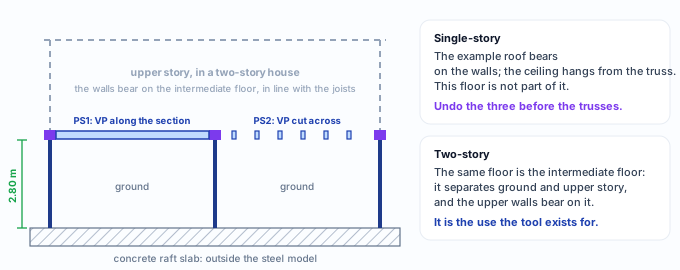
In the single-story example house, the ground floor is the raft slab, outside the steel model. What this tool places on top of the 2.80 m walls is the intermediate floor: the base of an upper story. What it is for explains why the example does this in a single-story house, and what to do with the floor before the roof.
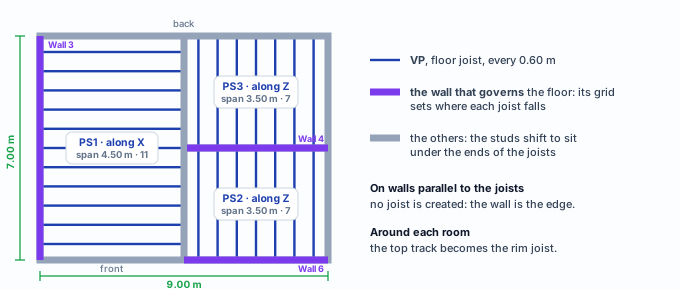
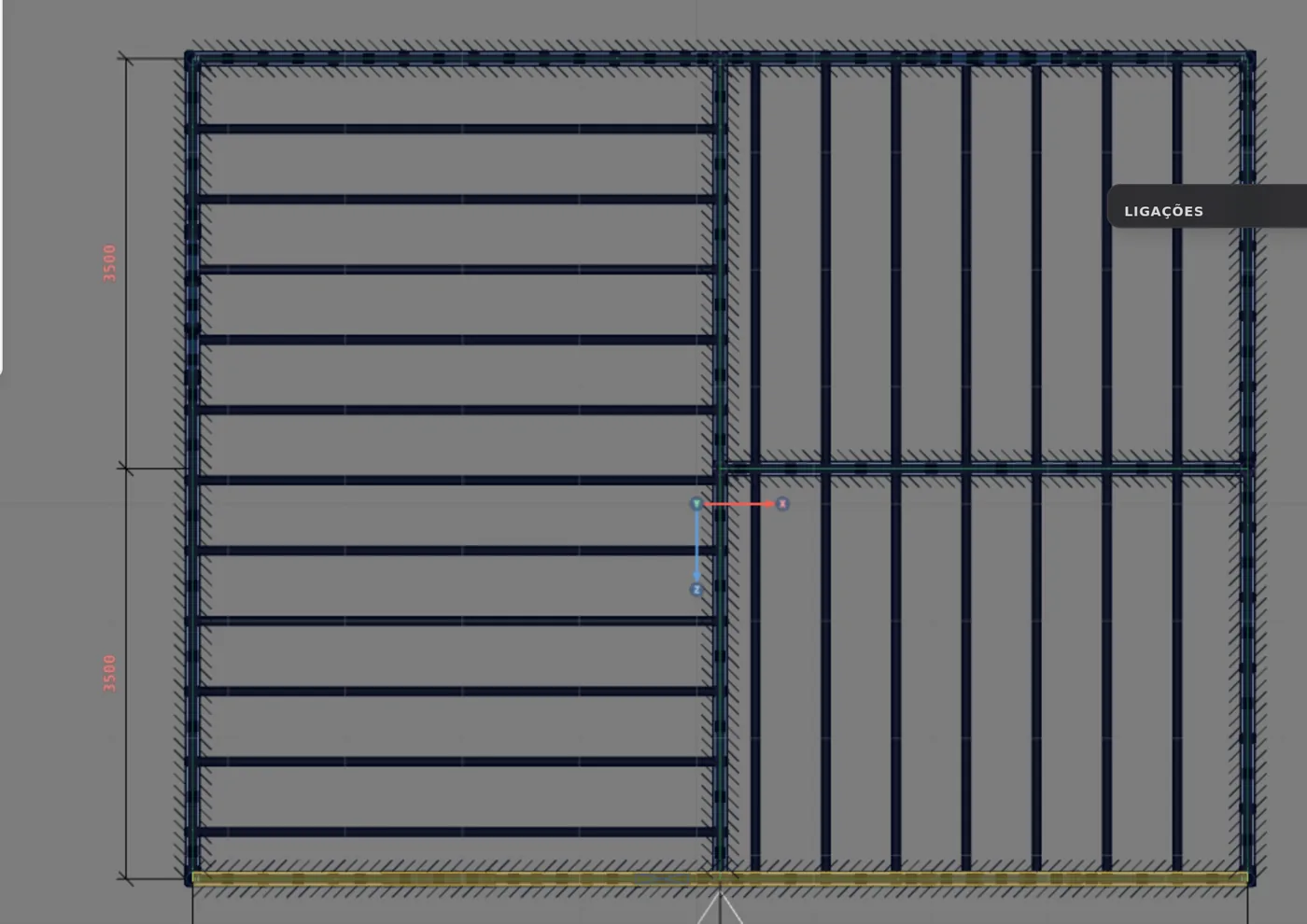
In the example house: three floors, one per room. PS1 in the left room, with a 4.50 m span; PS2 and PS3 in the two rooms on the right, with a 3.50 m span.
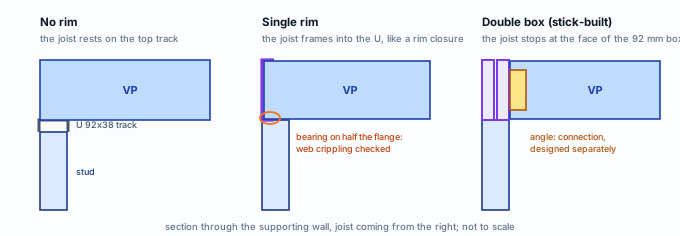
Stick-built or roll-formed. The screens on this page show a stick-built project, where the floor joist is a section, Ue 200x40x12x1.25, with a double boxed rim joist. In a roll-formed project, the default for a new project, the joist is a lattice joist, a 300 mm deep truss lying flat with the market truss model, and the rim joist exists but is created switched off: the joists rest on the top track. Room, direction, governing wall and placement are the same in both, and changing the project mode does not rebuild a floor already placed. The buckling lengths in What the engine does with it are those of the section joist; in the lattice joist, the floor load enters through the top chord and each piece of the truss enters the analysis as a member.

What it is for
Joists from wall to wall, and the track becomes a joist
The floor carries the weight of the slab, the finish and the people using the room down to the walls below. Each joist spans between two supporting walls and bears on a stud; the wall takes the load to the ground. The plan shows the three floors of the example house:
| Piece | Label | What it does | Section (Brazil market) |
|---|---|---|---|
| Floor joist | VP | Spans from centerline to centerline of the supporting walls, one at each spacing. The end that bears on a stud uses the same node as the top of the stud. | Floor joist role: Ue 200x40x12x1.25 in a stick-built project; in a roll-formed one, a 300 mm lattice joist |
| Rim joist | G | Takes the place of the top track of the walls around the room, on the same axis, with the same label and the track type. The studs get shorter; no new node is created. | In a stick-built project, the joist section, double, in a 92 mm box; in a roll-formed one, created switched off |
| Floor board | not a member | It does not enter the model, but the engine counts on it at the top flange of the joist (see What the engine does with it). | OSB 18 subfloor |
Why an intermediate floor in a single-story house
The tool has no elevation of its own: the floor always sits on top of the walls of the story where it was placed. The ground floor sits on the foundation, outside the steel model. In a single-story project, then, what the tool places is the plane at the top of the ground floor walls.
The example's choice
The example house is single-story and will get a truss roof (see Roof trusses and Roof). It does not need a floor on top of the walls. Even so, this page places the three floors in it, to show the tool on a plan already familiar: the same walls, the same openings, the same column. It is exactly what is done on the ground floor of a 9 x 7 m two-story house.
If your house will stay single-story, undo the three floors before placing the trusses (see Roof trusses): each placement is one Ctrl+Z step, which brings back the floor, the joists and the studs that moved. The Delete button also removes floor and joists, but the studs stay where the floor put them.
Do not use the floor as a ceiling. The floor joists receive the project's intermediate floor loads (slab, floor, ceiling and live load; see What the engine does with it). A single-story house ceiling, hanging from the truss, weighs a fraction of that.
What the standard says
Joist over stud, and L/350 deflection
| Where | What it says | What changes in the app floor |
|---|---|---|
| NBR 16970-2, 3.2 | Intermediate floor: the assembly between the ceiling level of one story and the floor of the story above. | It is what the tool places on top of the walls. |
| NBR 16970-2, 3.7 | Rim closure: the section that closes the ends of the floor joists. | The single U rim joist plays that role. |
| NBR 16970-2, 4.1 | Studs lined up with the floor joists (in-line framing). | The grid of the supporting walls shifts to sit under the joists. |
| NBR 16970-2, 4.2 | Tolerated eccentricity of up to 20 mm between the centerlines of the joist web and the stud web. | An end within 20 mm of a fixed piece bears on it. |
| NBR 16970-2, 7.1 | Unbraced length is the distance between restraints. | Ly and Lt of the joist, between blocking and straps that cross it. |
| NBR 16970-2, 8.2 | Table 3: maximum displacement of the floor system, L/350. | Fixed limit of the floor joist in the engine. |
| NBR 16970-2, 9.1 to 9.3 | Floor vibration: natural frequency of at least 3 Hz, with a simplified method and acceptance criteria. | Stays with the design (see What the engine does with it). |
| NBR 14762, 9.8 and Annex D | Cold-formed member in bending; concentrated force on an unstiffened web. | Bending and shear of the joist and the rim; web crippling. |
| NBR 6120 | Actions for the design of structures. | The intermediate floor live load, in the project wizard. |
NBR 16970-2 · 7.3.
Lateral restraint of a joist has its own minimum force and stiffness, Fbr = 0.008 · MSd · Cd / ho and Sbr = 4 · γr · MSd · Cd / (Lbb · ho). The engine uses the restraint to shorten the joist. The blocking between joists, and the check of that force and that stiffness, stay with the design.
What the standard does not say
These come from the product, not from ABNT: the 400 and 600 mm spacings (600 the default), the sections of each role and the default loads of the Brazil market, taken from mCalcLSF and from the CalcSteel product study; the double boxed rim joist as the stick-built default, and the 300 mm lattice joist with the rim switched off as the roll-formed default; and the floor board restraining the top flange every 0.30 m, a choice that follows AISI S100, I6.3, an American standard.
Design recommendations
Shortest span, joist over stud
- 0.60 m: between joists: the spacing of the governing wall
- 12.9 mm: L/350 on the 4.50 m span; 10.0 mm on the 3.50 m one
- 20 mm: of tolerated eccentricity between joist and stud
- 3 Hz: minimum natural frequency of the floor, by hand
- Joists on the shortest span. It is what the tool picks without you asking. In the left room it is 4.50 m along X against 7.00 m along Z: the Z direction is also accepted, and the choice is yours.
- Every end over a stud. Check the rings in the preview: orange bears on a header or truss, and the header then carries the joist; amber has no stud below. Both call for your decision.
- The joist to rim connection is yours. With the double rim, the joist reaches the box through an angle, designed separately. With the single rim, the engine checks the web crippling of the joist on the flange.
- Board screwed every 0.30 m. The engine counts on the board holding the top flange. Without the board screwed at that spacing, the computed lateral-torsional buckling is unconservative.
Step by step
1. Arm the tool in plan view
In the plan of the house, click Floor on the LSF card. The box opens asking for the room and shows the sections that apply to the next floor, the ones from the project settings. The bottom line sums up the keys: click a room, X or Z, G switches the governing wall, Enter places, Esc exits.
2. Move the cursor over the left room
The room must be closed by walls. Over it, the tool already draws the floor that would be created, without saving anything.
3. Click and read the draft
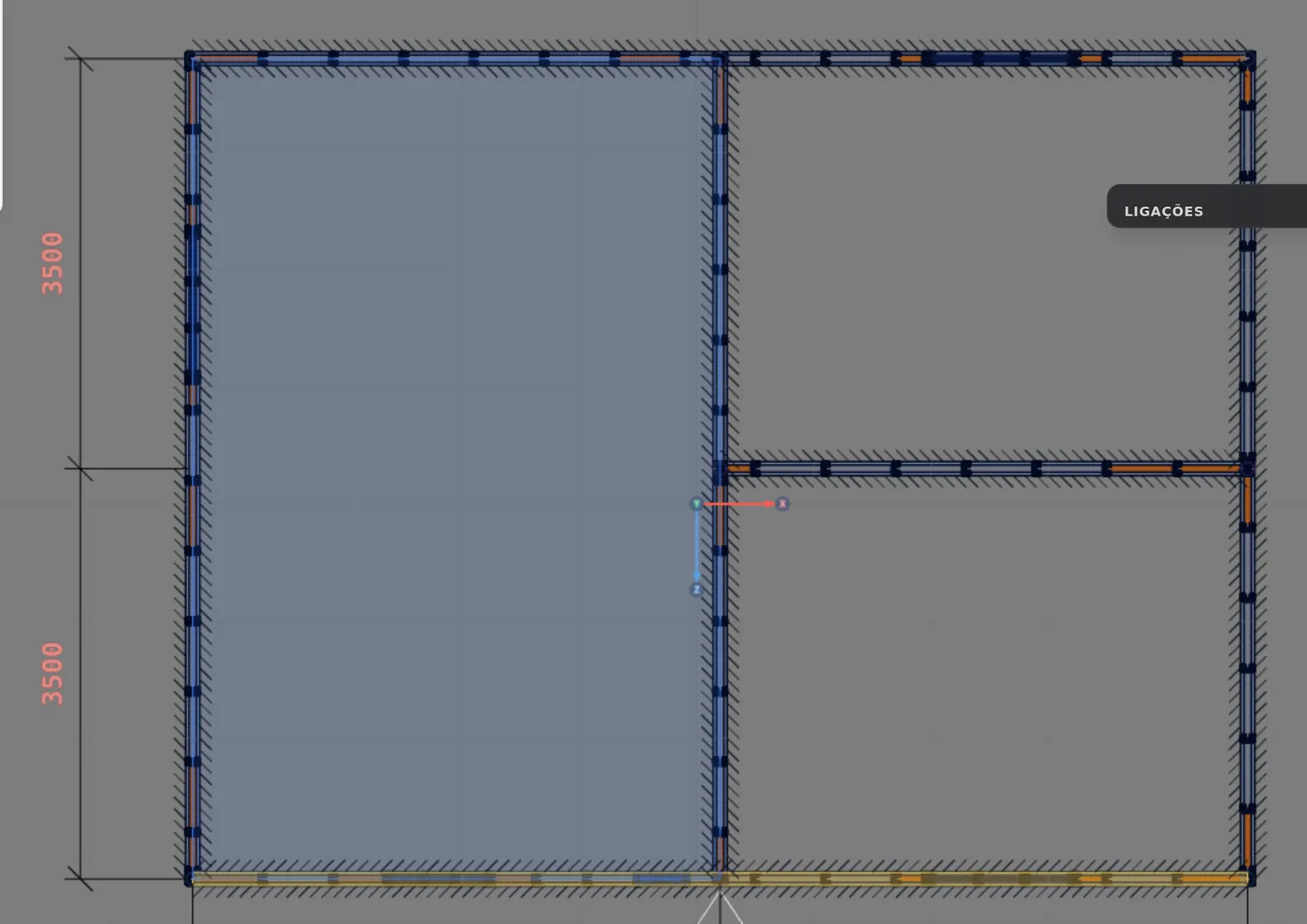
The click opens the new floor in the box and the preview on the plan. The tool chose by itself: joists along X, "the shortest span", a 4.50 m span; 11 joists at the 0.60 m spacing, "the project one". The governing wall is Wall 3, the left side wall, for being "the exterior one". The legend counts 2 ends that "bear on a header or truss": they fall on the header of the window in the left side wall, and appear on the plan as orange rings.

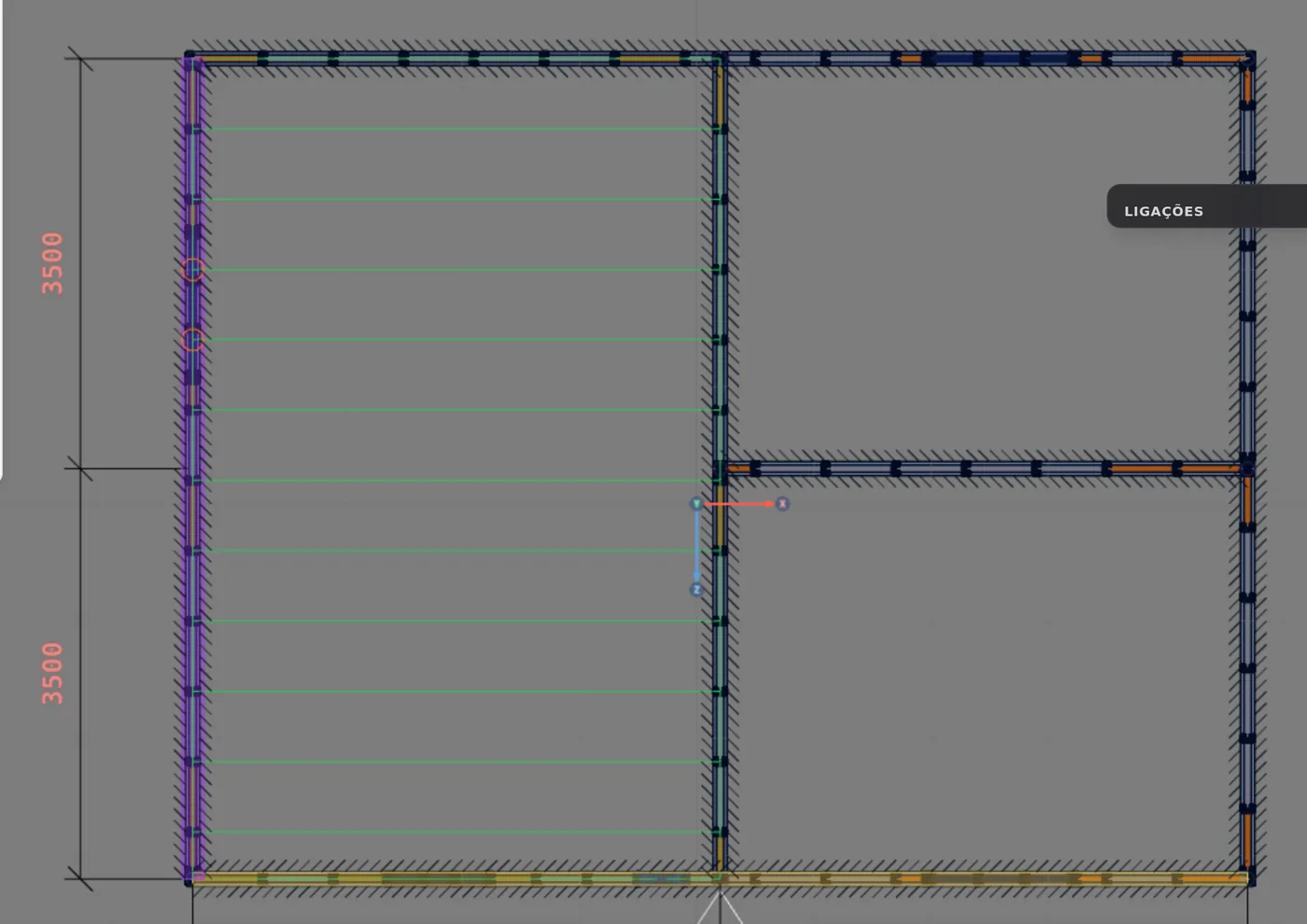
How the governing wall is chosen. A single wall sets the grid, in this order: the one that already belongs to another floor; the one with a column or truss; the longest (5 cm tolerance); the exterior one; the first one drawn. The other supporting walls follow: the studs shift to sit under the joists, without touching a door, window, column, corner or joint.
4. Switch the governing wall, if you want
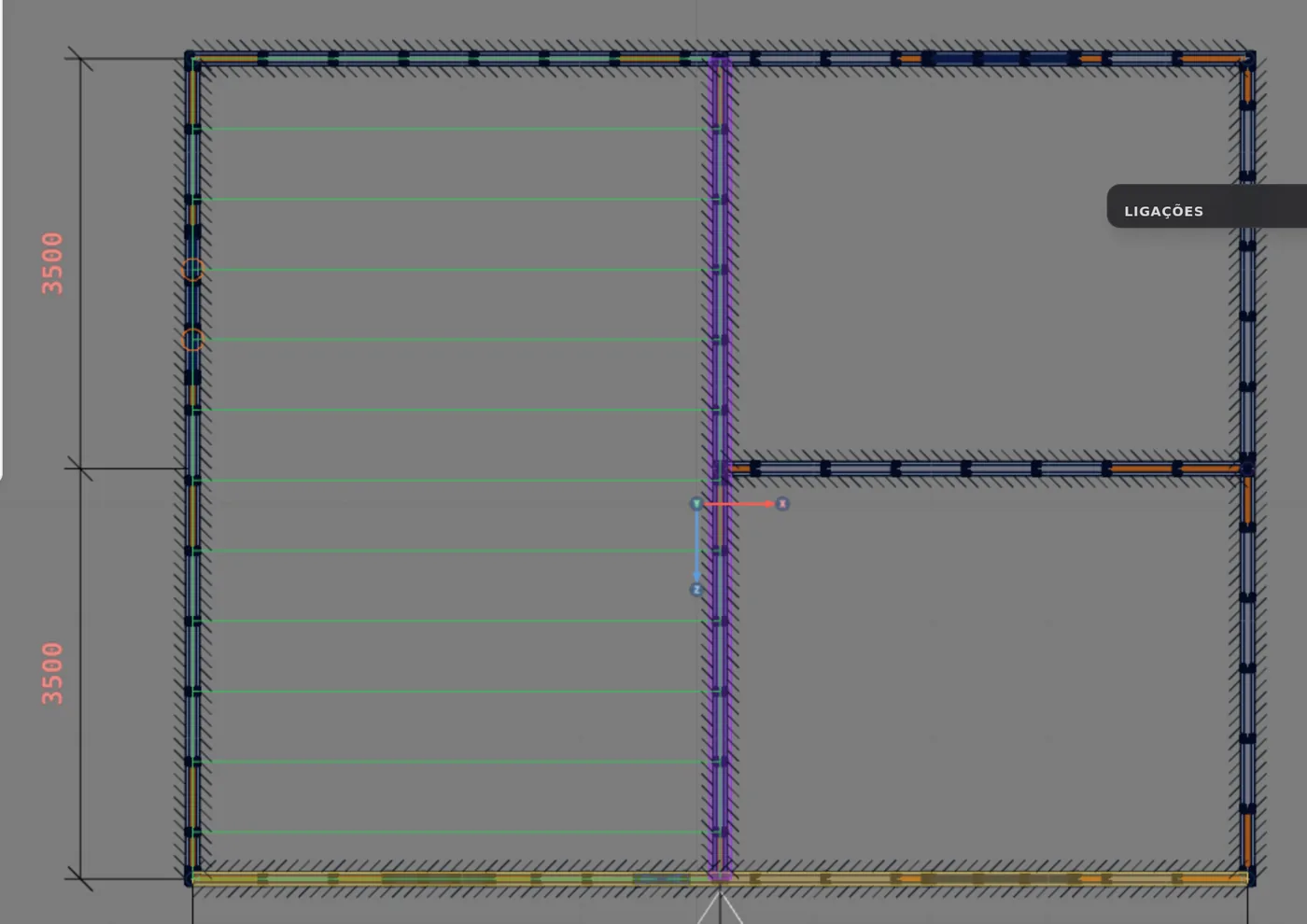
The G key, or the Switch button, hands the grid to the other supporting wall, here Wall 1, the interior wall between the rooms, and the box says "chosen by you". The joists move to fall on its grid, and the one that follows becomes Wall 3. In this example the rule's choice works: press G again to go back.
5. See the other direction, and go back
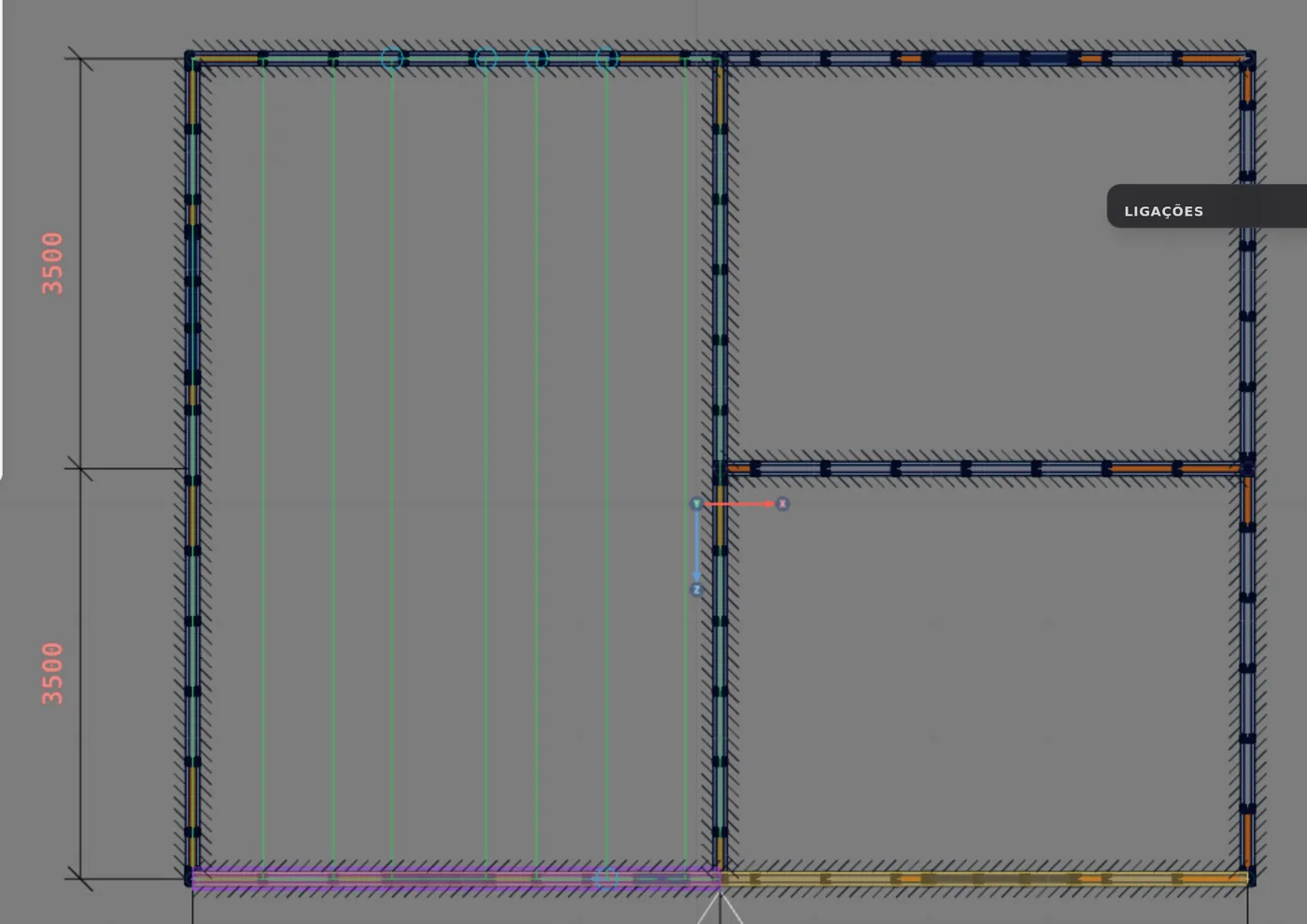
The Z key turns the joists: a 7.00 m span, 7 joists, and Wall 6, the front one, governs because it "has a column or truss" (PL1; see Columns). On the back wall the studs would shift for up to 5 joists, in cyan. The tool accepts that span, and the choice is yours: go back to X.
6. Place
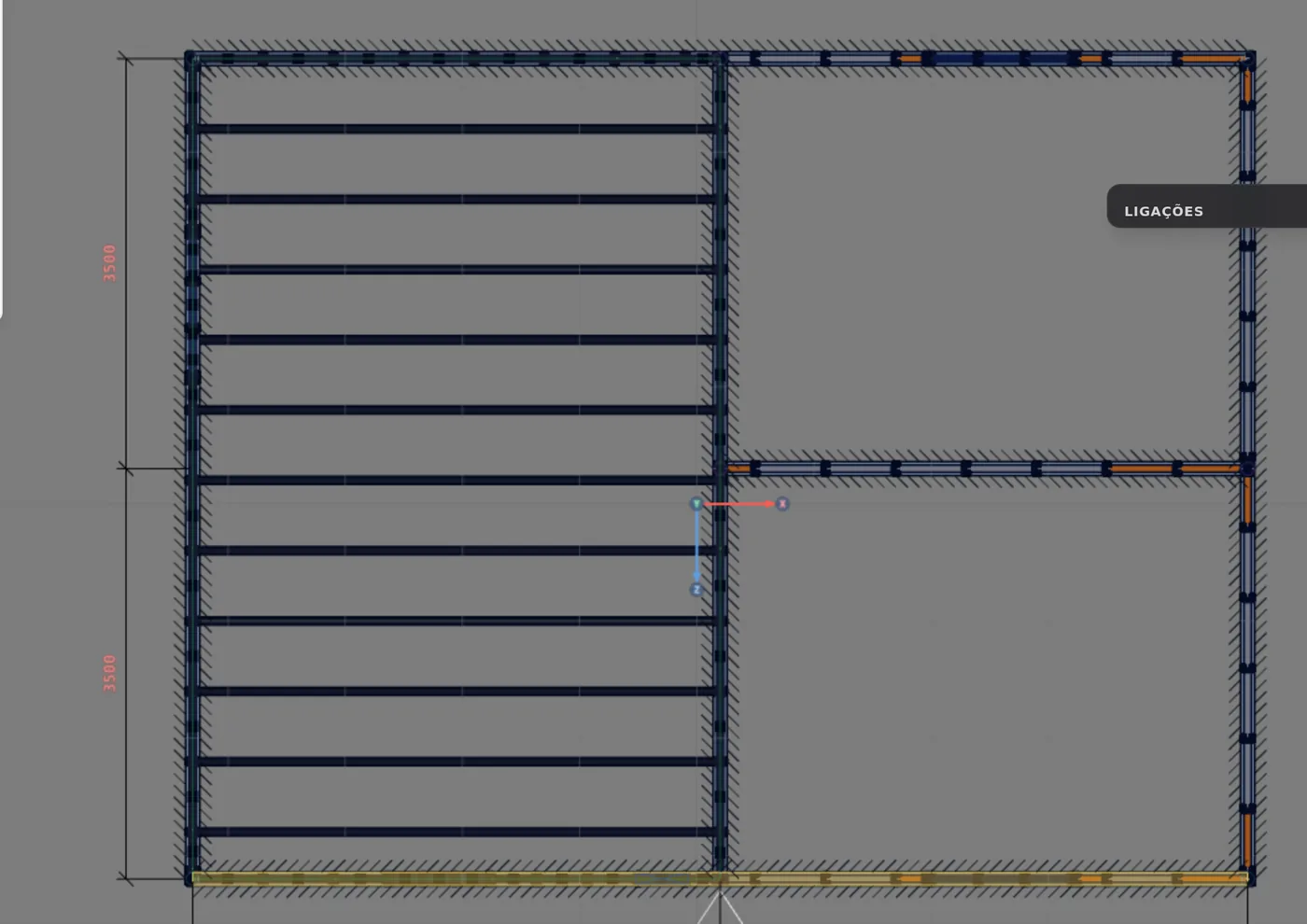
With the joists along X, Enter or Place. The box answers "Piso PS1: 11 vigas." (Floor PS1: 11 joists.) and the floor joins the Project floors list. Floor, joists and the studs that moved go in a single Ctrl+Z step.
7. The two rooms on the right
Click the front room on the right: joists along Z, 3.50 m span, 7 joists, Wall 6 governs, "the longest". Place it (PS2). Then the back room on the right: Wall 4, the interior wall between the two, governs because it is already "governed by another floor": the grid PS2 set on it applies to PS3, and the joists of the two rooms fall in line with each other. Place it (PS3).
8. Reopen a floor from a joist
With the tool armed, click a joist of PS1, or its name in the list. The box opens Floor PS1, with the 4.50 m span, the direction, the governing wall and the sections. Changed something? Apply (Enter). Delete removes the floor and the joists.

9. Check the wall view
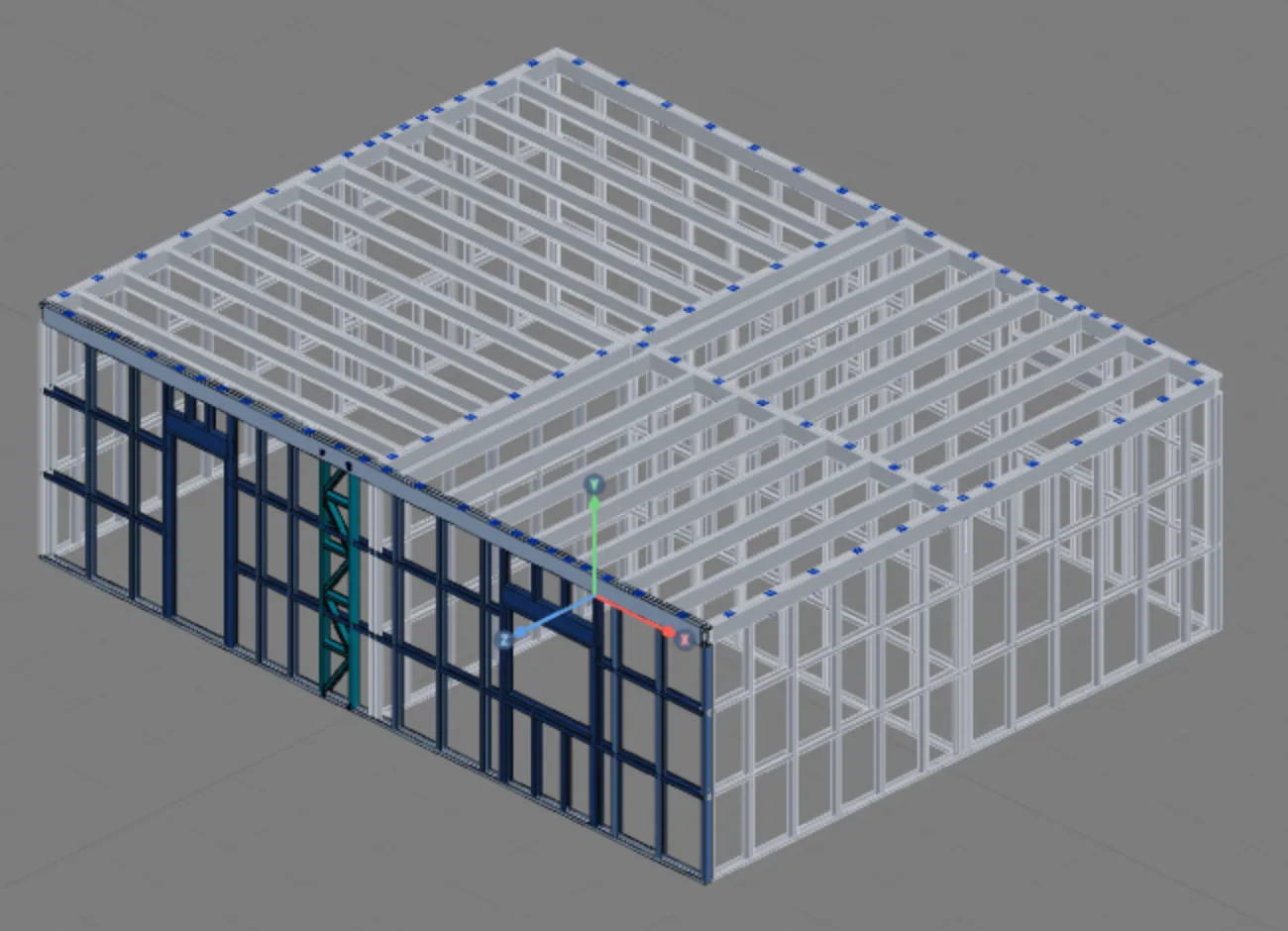
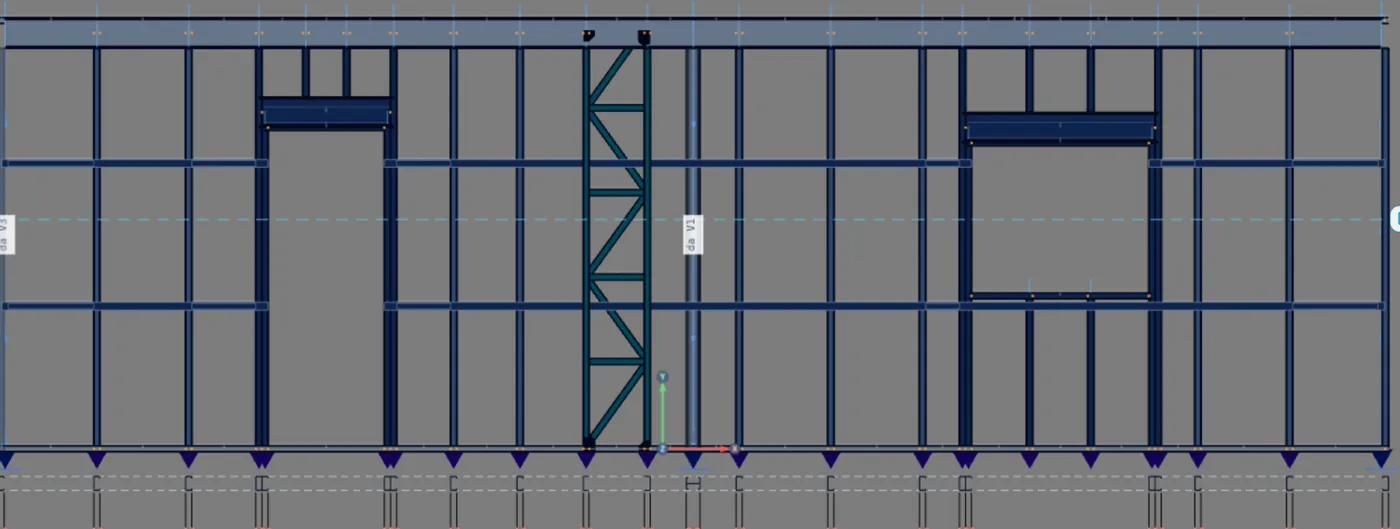
Open the front wall. At its top, the top track gave way to the rim joist, as deep as the floor joist, and the studs got shorter to fit under it. Label and type stay those of the track.
Shortcuts
- S↵
Floor
Arms the floor: click a closed room and Enter.
- X
Floor along X
Turns the floor joists along X.
with the floor tool armed
- Z
Floor along Z
Turns the floor joists along Z.
with the floor tool armed
- G
Switch governing side
Toggles the floor's governing side.
with the floor tool armed
- Enter
Place floor or roof
Places the floor or builds the roof from the draft.
floor or roof armed
- Del/⌫
Delete selection
Deletes the selected walls, pieces or members.
with a selection
- PL↵
Plan view
Goes to plan view. With the wall view open, closes it and keeps the wall selected.
- Home
3D view
Goes to 3D at the last camera pose. With the wall view open, closes it.
- AV↵
Wall view
Opens the elevation of the selected wall, seen from outside. Again, goes back.
with one wall selected
Parameters
The floor box
| Field | What it is | Default (BR) |
|---|---|---|
| Joists along X, Z | The joist direction. With no choice, the shortest span; the choice is saved in the floor. | the shortest span |
| Governs, Switch | The wall whose grid sets where the joists fall, with the reason below. Switch hands it to the other supporting wall. | by the rule (step 3) |
| Joists | How many, "and the track on both edges". Read only. | |
| Spacing | That of the governing wall, or the project one. Read only. | 0.60 m |
| Legend | Count of the ends that need attention: stud shifts to the joist (cyan), bears on a header or truss (orange), misaligned: no stud below (amber). | |
| Lattice | Each floor joist becomes a truss lying flat, 300 mm deep, with the market truss model. | checked in a roll-formed project; cleared in a stick-built one |
| Joist | The section of the joists of this floor: the families of the Floor joist role, only what the project market manufactures. | Ue 200x40x12x1.25 in a stick-built project |
| Rim | Turns on the rim joist. Off, "the joists rest on the top track". The list has U and Ue. | on, with the joist section, in a stick-built project; off in a roll-formed one |
| Double | Two pieces in a box the width of the wall track, spaced apart. Cleared, a single piece, and "the joists frame into it". | checked, 92 mm box (with the rim on) |
| Clips | Per track bay, between two studs, tying the two pieces of the box. From 0 to 5; only with the spaced box. | 1 per bay |
| Place, Apply | Saves the floor, the joists and the studs that move. One Ctrl+Z step. | Enter |
| Delete | Only on a reopened floor. Removes the floor and the joists; the studs stay. | Delete |
| Project floors | The list of floors, with the direction. Click to reopen. With more than one story, it gives the story of each one. |
Project section and floor section. With no draft open, the box shows the sections from the project settings, which apply to the next floor ("Change in project settings ›"). With the floor open, Joist, Rim, Double and Clips belong to this floor and apply on Place or Apply.
Shortcuts
- X
Floor along X
Turns the floor joists along X.
with the floor tool armed
- Z
Floor along Z
Turns the floor joists along Z.
with the floor tool armed
- G
Switch governing side
Toggles the floor's governing side.
with the floor tool armed
- Enter
Place floor or roof
Places the floor or builds the roof from the draft.
floor or roof armed
- CFG↵
Project settings
Opens the project wizard: envelope, structure, loads and wind.
Common mistakes
The refusals, and what to do
- "Nenhuma parede apoia as vigas nesta direção. Troque para X ou Z." (no wall supports the joists in this direction; switch to X or Z). In the requested direction there are not two supporting walls. Fix: the other key.
- "O cômodo é estreito demais para uma viga no passo da obra." (the room is too narrow for a joist at the project spacing). The room is narrower than the spacing: no joist fits between the edges.
- "Fora de cômodo fechado: o piso pede paredes fechando o contorno." (outside a closed room: the floor needs walls closing the outline). The floor is created from a closed room: outside one, the box keeps asking you to move the cursor over a closed room and click. Fix: close the outline by joining the walls (see Wall joints).
- Deleted the floor and waited for the studs to come back. Delete leaves the studs where the floor put them. To bring everything back, use the Ctrl+Z of the placement.
- End in orange or amber. Orange: the joist bears on the header or the truss, which then carries it; check the header (see Headers). Amber: the end falls between 20 and 80 mm from a fixed piece, or on a wall that already belongs to another floor, and no stud fits below; it calls for a header or column, or another governing wall.
What the engine does with it
The full-span joist, pinned
In the model. Each floor joist is a member, with the floor joist role given by the VP label. It is pinned at both ends: fixed, the end rotation twisted the track and tipped the upper wall out of plane. The node of an upper stud bearing on it splits the member into pieces, but the engine measures the joist over the full span.
| Buckling length | Value |
|---|---|
| Lx, strong axis | The full span, from support to support. |
| Ly and Lt | The stretch between restraints crossing the joist (bracing strap or blocking, lying at its height); with none, the full span. NBR 16970-2, 7.1. |
| Lb, lateral-torsional buckling | 0.30 m: the screw spacing of the board, which holds the top flange. |
| Distortional | Still checked: the board does not hold the rotation of the flange with the lip. |
Checks. Bending by NBR 14762, 9.8.2 (with lateral-torsional and distortional buckling), shear by 9.8.3 and combined forces by 9.8.4. Deflection is L/350, by NBR 16970-2, 8.2, Table 3, measured against the straight line between the two supports of the full span. The limit is fixed: a limit typed on the member only applies if it is stricter.
- 4.50 m: PS1: L/350 = 12.9 mm
- 3.50 m: PS2 and PS3: L/350 = 10.0 mm
- 7.00 m: PS1 along Z, if placed: L/350 = 20.0 mm
Rim joist. Checked as a beam: its web works in bending, and the slenderness limit that applies is that of a beam web; the one for a compressed track web becomes a warning. Deflection is also L/350, measured over the span between the studs that support it.
Load by strip, and web bearing
Loads. The dead and live loads of the intermediate floor, from the project wizard, times the room area, go to the joists by the tributary width of each one: half the distance to the neighbor on each side, and at the edge up to the wall. The sum is always the load per area times the area. There are two load cases, dead load and intermediate floor live load.
| Intermediate floor group | Default (BR) | Enters as |
|---|---|---|
| Slab, floor, ceiling, extra | 80 + 30 + 20 + 0 = 130 kgf/m² | dead |
| Live load | 150 kgf/m² | variable, occupancy |
With joists at 0.60 m and the first at 0.60 m from the wall, the middle one takes a 0.60 m strip and the edge one takes 0.90 m. Web crippling (NBR 14762, Annex D, γ = 1.35): the web of the rim joist is checked over each stud; in the double box both webs count. The web of the floor joist is only checked with the single rim, with half the flange as bearing.
What is left to you
| Stays with the design | What to do |
|---|---|
| Floor vibration | NBR 16970-2, 9.1 to 9.3: natural frequency of at least 3 Hz, by hand. |
| Diaphragm and board | The engine ties the nodes of the level with fictitious members, only to give stiffness, with the assumed diaphragm warning. The board, the screws and the straps of the plane are yours. |
| Joist to rim connection | The angle of the double box and its screws. |
| Joist on track, no rim | Web crippling at the end. |
| Joist restraint | Blocking between joists and the force of item 7.3. |
Reading the result: if the joist fails in deflection, shorten the span (the other direction, a wall in the middle) or move up a section. If it fails in distortional buckling, a web stiffener or a thicker section help. If the rim fails in web crippling, prefer the double box.
Shortcuts
- Ctrl+Enter
Calculate the project
Sends the project to the engine, like the Calculate button.
Summary
The path, in one line
Plan → LSF card → Floor → cursor over the room → click (draft) → check direction, governing wall and rings → X, Z or G if needed → Enter → repeat in the other rooms → check the wall view and the 3D.
The example so far
- 3: floors, one per room
- 25: floor joists: 11 + 7 + 7
- 4.50 m: the largest span, in PS1
- 92 mm: the rim joist box, in a stick-built project