LSF (Light Steel Framing)
The standards
The map of the standards in an LSF project in Brazil and the order in which each one hands its number to the next, from load to connection. The page also shows the standards of the other countries CalcSteel serves, how the app picks the standard from the project market, and who answers for what: the standard, the engine and the ART.
Overview
One project, a dozen standards, one order
Nobody designs an LSF house with a single standard. The load comes from one, the wind from another, the way to add the two from a third, and the stud resistance from a fourth, which in turn refers to others for the steel and the connection. What confuses a newcomer is not the content of each standard: it is the order in which they come in.
This page is the map. It says what each standard governs, where the number comes from and where it goes, and at which point of CalcSteel each one shows up: as data you type, as a check the engine runs, or as a responsibility that stays with whoever signs.
The detail of each check, with the math, is in the Design pages, starting at Loads. The goal here is different: when you read an engine warning or a line of the design report, you should know which standard it came from and why it is there.
- 3: parts of NBR 16970, the system standard, published in 2022
- 2010: edition of NBR 14762, the cold-formed section standard
- 4: markets with their own conditions in the app: BR, US, AU and NZ
How we cite standards. Only by the standard number and clause, never reproducing ABNT text or figures. Every drawing on this page is ours. To apply a standard, have it at hand.
Three roles, three colors.
In the diagrams on this page, blue is input data you type into the app, cyan is what the engine checks and amber is what stays with the engineer. In the tables, the same roles appear by name: input, engine and engineer.
The map
From load to connection, each standard hands off to the next
Read the project as an assembly line of numbers. The loads say how much it weighs and how hard the wind blows. The combination says how to add them, with which factors, to reach the design effect. The analysis carries those loads through the structure and returns the force in each member. The resistance says how much the section can take. The connection says whether the screw delivers that force to the next piece. And around all of it, performance asks whether the house, besides standing, is livable.
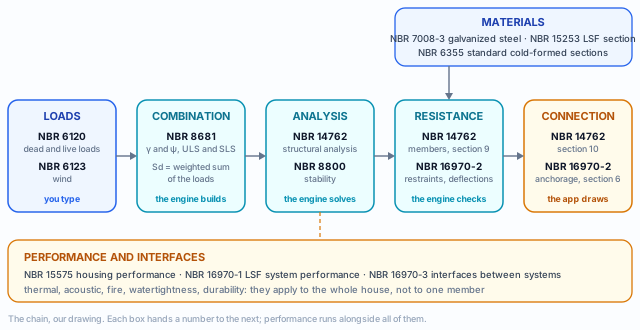
The system standard refers to the others
NBR 16970-2, the structural part of the LSF standard, does not redo section design: its scope (clause 1) says the design follows the limit states method of NBR 14762, and clause 4.9 requires analysis and design by NBR 14762 and NBR 8800. What it adds is what belongs to the system: restraints, displacements, floor vibration, anchorage.
And the section standard refers to the load standards
NBR 14762, in turn, does not say how much a dry floor weighs or how hard the wind blows in Florianópolis. It sends you to NBR 6120 and NBR 6123 for the loads, and to the safety criteria of NBR 8681 to combine them (sections 5 and 6). That is why the map has an order, and CalcSteel organizes the project in that order.
Standard by standard: what it governs and where it enters the app
The table is the map as a list. The edition column gives the year only when it was checked in the text of the standard or in a standards catalog; where we did not check, only the number appears. The last column gives the role of each standard in the app: input, engine or engineer.
| Standard | Edition | What it governs | In CalcSteel |
|---|---|---|---|
| NBR 16970-1 | 2022 | Performance of the LSF system: components and requirements of the house | engineer: outside the structural design |
| NBR 16970-2 | 2022 | Structural design of LSF: principles, materials, anchorage, restraints, displacements, vibration | engine: restraints (7.2) and deflections (8.2); engineer: anchorage and vibration |
| NBR 16970-3 | 2022 | Interfaces between systems: wall and floor, window frame, services | engineer: design details |
| NBR 14762 | 2010 | Design of steel structures with cold-formed sections: members, connections, concentrated forces | engine: members and web crippling (Annex D); engineer: screws (section 10) |
| NBR 8800 | Steel and composite structures; NBR 16970-2 calls on it for analysis and stability | engine: the project's hot-rolled standard, which defines the combinations | |
| NBR 8681 | 2003 | Actions and safety: classification of actions, γ, ψ, combinations | engine: generates the combinations; you can edit them |
| NBR 6120 | 2019 | Loads for the design of buildings: self-weights and live loads | input: loads per m² in the Loads tab |
| NBR 6123 | 2023 | Wind forces on buildings | input: V₀, S₁, terrain, group, enclosure; the app generates the cases |
| NBR 15253 | Metallic-coated cold-formed sections for framed panels | input: catalog of sections and steels for the BR market | |
| NBR 7008-3 | Hot-dip galvanized sheet and coil, structural steels | input: fy and fu of the chosen steel | |
| NBR 6355 | Standardization of structural cold-formed sections | engineer: check with the supplier | |
| NBR 15575 | Performance of residential buildings, in parts | engineer: outside the structural design |
Why NBR 8800 is here.
LSF has almost no hot-rolled sections, but NBR 16970-2 (4.9 and 8.3) uses NBR 8800 for the analysis and for classifying lateral stability. In the app, the project's hot-rolled standard is also the one that decides which family of combinations the engine generates.
The year matters. A revised standard changes numbers. That is why CalcSteel versions the calculation, and an old project's result does not change on its own: the project keeps the version it was created in, and a new project starts on the current version.
Limit states: the common language of all of them
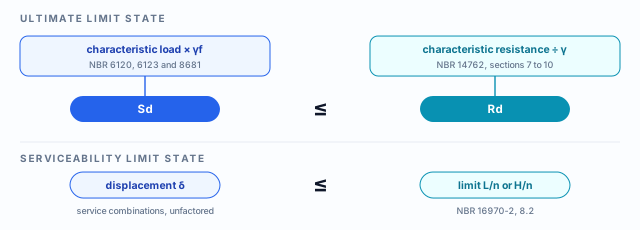
Every standard on the map speaks the same language, that of the limit states method. A limit state is the condition beyond which the structure stops serving. There are two kinds. At the ultimate limit state (ULS) it stops being safe: it yields, buckles, tears, overturns. At the serviceability limit state (SLS) it still stands but stops being usable: the deflection cracks the drywall, the floor vibrates, the wall sways in the wind.
ULS in LSF
- yielding and rupture of the tension member (strap, flat strap)
- local, distortional and global buckling of the stud
- bending and shear of header, floor joist and chord
- web crippling under concentrated load
- force and stiffness of the restraints (strap, blocking)
- screw and anchorage
SLS in LSF
- deflection of header, floor joist and truss
- deflection of the stud under wind, measured against the chord
- top displacement and interstory drift
- floor vibration under walking (16970-2, section 9)
The detail of each one, and which ones the engine checks, is in the Design pages. Here it is enough to recognize the kind of warning.
Loads and combinations
NBR 6120: how much it weighs and how much it is used
NBR 6120 gives the self-weights of materials and the live loads by type of room. In LSF it weighs less than in masonry, literally: the cladding is board, the floor is a dry floor, and the whole house is light. That is exactly why wind, which does not depend on weight, gains importance in LSF and can govern the stud and the anchorage.
What is input
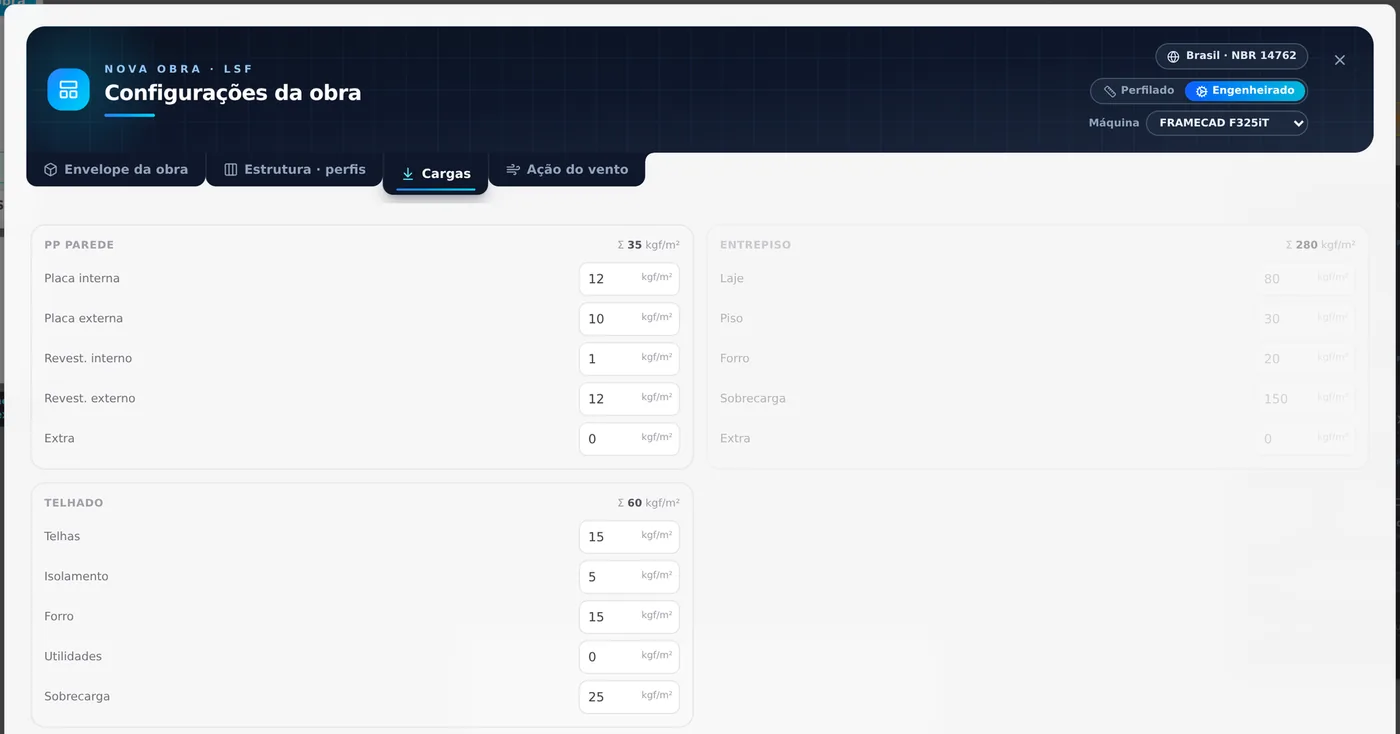
The loads per m² are your data. The app starts with the default values of the project market (in Brazil: boards, finishes, roofing, ceiling, dry floor, a live load of 150 kgf/m² on the floor and 25 kgf/m² on the roof) and you replace them with what the architectural design specifies. The classification, permanent or variable, is already done: board weight is permanent, live load is variable.
What stays with the engineer
Checking the values against NBR 6120 for the real use of each room and for the actual material. A bathroom with heavy ceramic tile, a water tank over the ceiling, a storage mezzanine: each calls for the right line of the standard. The default value is a starting point, and the number that goes into the report is yours.
1 kgf/m² ≈ 0.01 kN/m². The floor live load of 150 kgf/m² is 1.5 kN/m².
NBR 8681: how to add what does not happen together
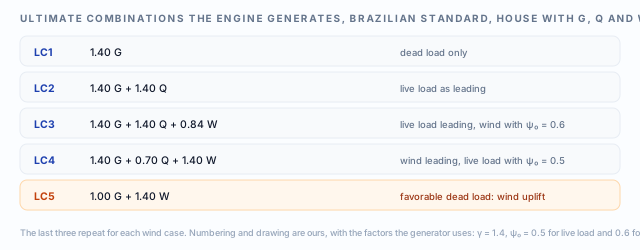
The house does not get the maximum live load and the maximum wind at the same instant, and the self-weight sometimes helps (when the wind tries to lift the roof). NBR 8681 organizes this. Each action enters with a load factor γ, which increases it at the ULS, and the variable actions that accompany the leading one enter reduced by a combination factor ψ₀. One combination is created for each variable action that can be the leading one.
Input
The load cases: self-weight, live load and one wind case per direction. The app builds them from the Loads and Wind action tabs.
Engine
Without a combination of yours, the engine generates the family from the project's hot-rolled standard: in Brazil, NBR 8800, with the γ and ψ₀ of NBR 8681. A combination you wrote is respected as it is.
Engineer
Deciding whether actions are missing (earthquake, temperature, construction, impact) and checking the ψ for the use of the building. The service combinations and the vibration combination follow the factors of each check.
Shortcuts
- CFG↵
Project settings
Opens the project wizard: envelope, structure, loads and wind.
- 3
Loads tab
Goes straight to the Loads tab of the wizard.
in the project wizard
The cold-formed section
NBR 14762: thin sheet has rules of its own
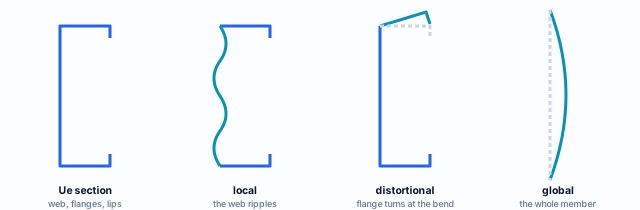
A hot-rolled section is thick enough to yield before it wrinkles. The LSF section is not: with less than 2 mm of sheet, the wall of the C loses stability before the steel reaches yield. NBR 14762 exists for that reason. It treats the section as a set of thin plates, each of which can buckle on its own (local), the flange and lip together can rotate about the bend (distortional), and the whole member can buckle in flexure, torsion or both (global).
| Part of NBR 14762 | What it covers | In LSF |
|---|---|---|
| Sections 5 and 6 | Safety and actions, referring to NBR 8681, 6120 and 6123 | the link to the rest of the map |
| Section 9 | Members: tension, compression, bending, shear, combined bending | stud, track, header, chord, strap |
| Section 10 | Connections: welded, bolted and with self-drilling screws (10.5) | every joint between sections |
| Annex A | Maximum displacements | NBR 16970-2 gives those of the system |
| Annex D | Unstiffened web under concentrated force | truss bearing on the track, floor joist at the support |
NBR 15253 and NBR 6355: the section before the math.
NBR 15253 covers the galvanized section for LSF framed panels (requirements and tests, coating, web openings). NBR 6355 standardizes structural cold-formed sections and their designation. Both say what the section is; NBR 14762 says how much it can take. Steel and sections opens up the steel and the sections.
NBR 16970-2: what the system adds to the section
An isolated stud and a stud inside an LSF wall are not the same member. Inside the wall it has strapping and blocking holding it at mid-height, a track receiving it at the bottom and top, board cladding it, and a deflection that cracks the finish if it goes past the limit. NBR 16970-2 is the part of the standard that deals with these relationships. The CalcSteel engine reads the role of each piece in the project (stud, track, header, chord, floor joist) and applies the clause that fits it.
| Clause | Subject | What the engine does |
|---|---|---|
| NBR 14762, section 9 | Resistance of each member | checks tension, compression, bending, shear and combined effects on every member of the project |
| NBR 14762, Annex D | Web crippling | checks at the web bearings the project provides, with the reaction of each combination |
| NBR 16970-2, 7.2 | Force and stiffness of restraints | checks strap in tension and blocking in compression, adding up along the line |
| NBR 16970-2, 8.2 | Maximum displacements | checks the limit by the role of the piece, and reports top displacement and interstory drift |
| NBR 16970-2, 3.5 | Track | warns about the width to thickness ratio of the track web |
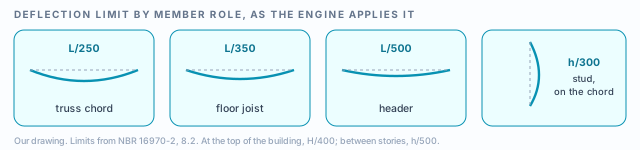
Deflection against the chord. The stud under wind is measured at the middle of the panel relative to its own ends, and not by total displacement: what the top moved is already lateral displacement, checked separately. That way a good stud does not fail because the whole wall leaned.
Wind
NBR 6123: the action that governs the light house
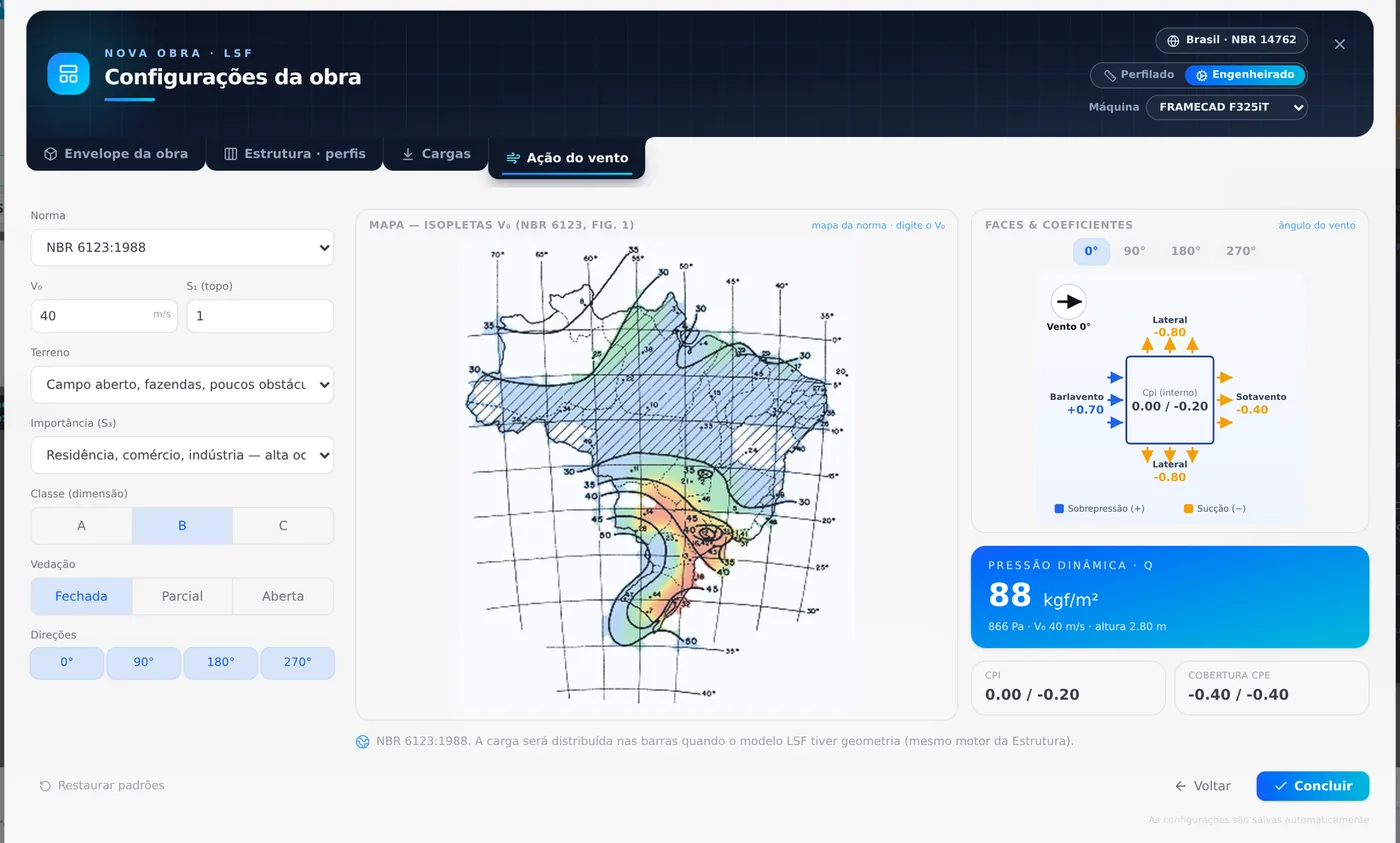
NBR 6123 turns the site into a pressure. It starts from the basic wind speed V₀, read on the isopleth map, and corrects it by three factors: S₁ (topography), S₂ (terrain roughness, building class and height) and S₃ (use group, tied to the return period). From that comes the dynamic pressure q, which the external pressure coefficients (Cpe, per face) and the internal one (Cpi, from the enclosure) distribute over the house.
Input and engine
You choose V₀ (clicking the map or typing it), S₁, the terrain category, the group, the class, the enclosure and the directions. The app computes q and the coefficients, and in the analysis it generates one wind case per direction, with a pressure panel on each exterior wall, each roof slope and each gable. The wind reaches the studs, including those at openings (king, jack and cripple), which is the real path of the pressure.
The edition
ABNT published a new edition of NBR 6123 in 2023, and the selector shows the edition the wind calculation applies. A new project starts on NBR 6123:2023; a project calculated earlier stays on the edition it was calculated with, because CalcSteel versions the calculation, and an old project's result does not change on its own. The edition that applies to the project is the one the contract and the engineer adopt; before signing, check that it matches the selector.
With the engineer.
V₀ of the exact site, topography (S₁ other than 1 on hills and in valleys), surroundings and dominant openings.
Shortcuts
- CFG↵
Project settings
Opens the project wizard: envelope, structure, loads and wind.
- 4
Wind tab
Goes straight to the Wind tab of the wizard.
in the project wizard
Performance and interfaces
Standing is the minimum: the house has to work
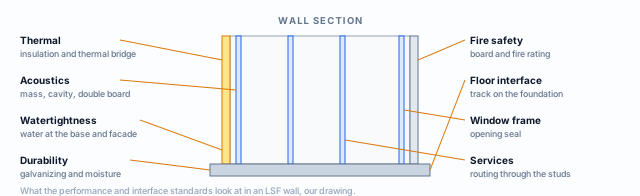
A structure that passes every limit state can still be a bad house: cold in winter, noisy, damp at the base of the wall, slow to resist fire. Three standards cover this, and none of them is about member design. NBR 15575, in parts, sets the performance of any residential building, whatever the system. NBR 16970-1 gives the component and performance requirements specific to LSF. NBR 16970-3 covers the interfaces: where the wall meets the floor, the window frame, the services.
In CalcSteel
These standards are not input to the structural design. What the app keeps that relates to them is the project's cladding (the boards, which also enter as weight in the Loads tab) and the standard details of the sheet, which draw the junctions. Standard details shows those details.
With the engineer and the architect
Choosing the wall assembly that meets NBR 15575 and NBR 16970-1 (thermal, acoustics, fire) and detailing the interfaces by NBR 16970-3. It is a separate design, which can change the board thickness and, with it, the weight that goes back to NBR 6120.
Other countries
The same map, with other names
Outside Brazil the chain is the same (load, combination, resistance, connection, performance), but each country has its own standard for each box. CalcSteel treats the standard as a variable of the project market. Four markets have their own conditions in the app, with sections, steels, spacings and standard; for them, the table below gives the section standard and the wind standard, with the edition the app shows.
| Country | Cold-formed section standard | Wind standard | Spacing |
|---|---|---|---|
| Brazil | NBR 14762:2010 | NBR 6123:2023 | 400 / 600 mm |
| United States | AISI S100-16 | ASCE 7-22 | 305 / 406 / 610 mm |
| Australia | AS/NZS 4600:2018 | AS/NZS 1170.2:2021 | 450 / 600 mm |
| New Zealand | AS/NZS 4600:2018 | AS/NZS 1170.2:2021 | 450 / 600 mm |
Also in the standards selector
| Region | Cold-formed section | Wind |
|---|---|---|
| Europe | EN 1993-1-3:2006 | EN 1991-1-4:2005 |
| India | IS 811:1987 | IS 875 Part 3:2015 |
| Indonesia | SNI 7971:2013 | chosen in the Wind action tab |
Not a translation
AISI S100 and AS/NZS 4600 are relatives of NBR 14762 (the same family of buckling curves), but the factors and the combinations change. The combinations follow the project's hot-rolled standard: in Brazil the NBR 8681 family, in the US that of AISC 360, in Australia that of AS 4100. That is why the same stud, in the same house, can have a different utilization in another country.
The system checks
Restraints, deflections by role and web crippling cite in the report the Brazilian clause they come from (NBR 16970-2 and Annex D of NBR 14762). Outside Brazil, the engineer checks those limits against the local standard the contract adopts, as with any design criterion.
How CalcSteel picks the standard for the project
Two choices go together. The project market, in the new project wizard, brings what belongs to the country: sections, steels, spacings, default loads and the wind standard, and shows in the header the chip with the country and the section standard (Brazil · NBR 14762). The project standards, in the settings, say which standard the engine designs with: one for hot-rolled and one for cold-formed. CalcSteel proposes both from the region of the user, and you can change them.
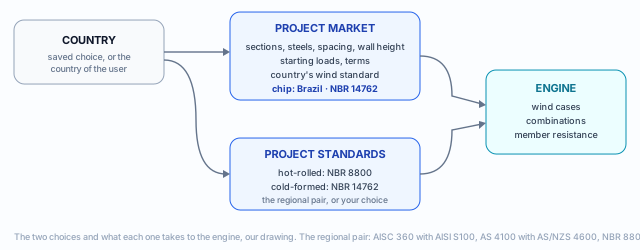
1. Choose the market when you open the project
The wizard asks for the market (Market and catalog). The choice is saved for the next project, and the new project starts from the market's default machine.
2. Check the project standards
In the standards settings, the cold-formed one should match the market chip. A user in Brazil starts with NBR 8800 and NBR 14762; in Australia, with AS 4100 and AS/NZS 4600; in the US, with AISC 360 and AISI S100.
3. Check the wind standard
The Wind action tab opens on the standard of the market country. The name and edition are in the selector, and the pressure comes from them.
Shortcuts
- CFG↵
Project settings
Opens the project wizard: envelope, structure, loads and wind.
- 4
Wind tab
Goes straight to the Wind tab of the wizard.
in the project wizard
Who answers for what
The standard says what, the engine does the math, the engineer signs
Design software is not the engineer of record. The standard sets the criteria, the engine applies the ones it implements to the data it received, and whoever answers for the building is the licensed professional who signs the ART (Anotação de Responsabilidade Técnica, the Brazilian technical responsibility record, Law 6.496/1977) with CREA. Each has a role the others do not replace.
The standard
Defines load, combination, resistance and limit. It does not know the project: it does not know whether the bathroom has a water tank above it or whether the lot is on a hill.
The engine
Builds the project model, generates wind and combinations, solves the structure and checks each member and each restraint by the clauses it implements, with the version stored in the project. It does the math for a thousand members without a slip.
The engineer
Chooses the assumptions, checks the input data, judges what the model does not see, designs connection and anchorage, and signs. The ART is theirs.
What NBR 16970-2 asks for in the report
Clause 4.7 lists the minimum content of the design report: the layout of the structure, the materials, the loads assumed, the analysis models, the analysis, the design of members and connections and, at the end, the software used and its version. In CalcSteel the version is the engine version stored in the project.
Clause 4.6 also provides for a conformity assessment of the design by an independent professional, when the client asks for it, before construction.
Before signing
- Market and project standards agree
- Loads per m² checked against NBR 6120
- V₀, S₁, terrain and group of the real site
- Combinations complete for the project
- Engine warnings read, one by one
- Screws and anchorage designed
- Performance and interfaces in the design
The warning is part of the result. When the engine cannot check something, it says so in a named warning. A project with every member passing and an open warning is not approved: it is waiting for your decision.
Summary
The map, in one line
NBR 6120 and NBR 6123 (loads) → NBR 8681 (combination) → analysis by NBR 14762 and NBR 8800 → NBR 14762 and NBR 16970-2 (resistance, restraints, displacements) → NBR 14762 section 10 (connection) → NBR 15575 and NBR 16970-1 and -3 (performance and interfaces).
Five ideas to keep
- NBR 16970-2 rests on NBR 14762, it does not replace it
- ULS asks whether it is safe; SLS, whether it is usable
- In a light house, wind weighs more than weight
- The standard is a market variable: check the chip and the settings
- The engine calculates; the ART belongs to the engineer
The example so far
- BR: project market
- 14762: section standard, 2010 edition
- 6123: wind standard, 2023 edition
Sources for this page.
ABNT NBR 16970-2:2022 (scope and normative references, clauses 1, 2, 4.5 to 4.9, 7, 8 and 9). ABNT NBR 14762:2010 (contents and normative references). Editions checked in standards catalogs (normas.com.br, target.com.br): NBR 16970-1 and -3 of 2022, NBR 6123 of 2023. NBR 6120:2019 and NBR 8681:2003 in public lists of design standards. Standards and editions in the app: CalcSteel standards and markets tables, October 2026.