LSF (Light Steel Framing)
Roof
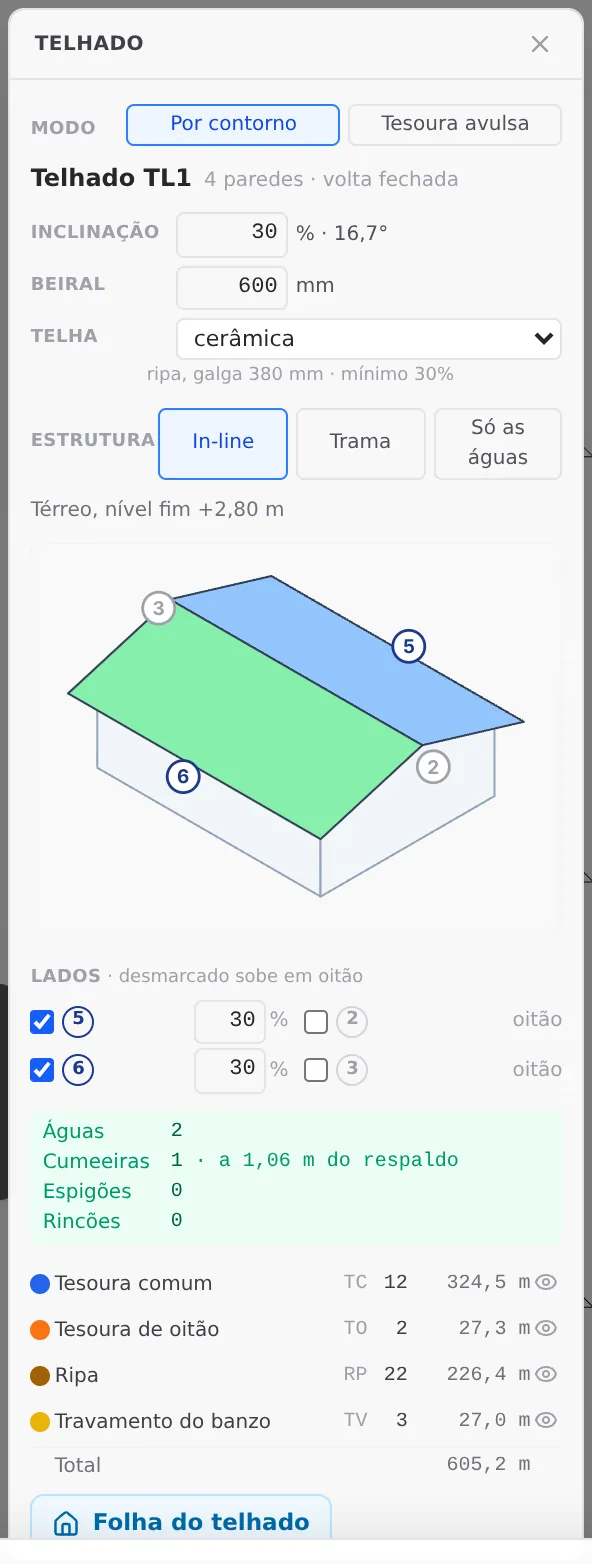
The By outline mode of the Roof tool covers the house in one go: you mark the walls of the outline, choose the sides that slope down, the pitch, the eave and the tile, and the roof TLn is born, with trusses, gables and battens. This page shows the box, the object it writes and what the engine checks on that roof.
Overview
The whole roof, starting from the walls
The Roof has its own button on the LSF card, and it only lights up in plan. Its box has two modes. Single truss places one truss between two walls, on its own (see Roof trusses). By outline is the one on this page: you mark the walls of the outer outline, and it covers the whole outline, with the roof planes, the ridge, the hips, the gables, the trusses and the tile support.
The result is an object, the roof TLn, and not a handful of loose bars. It opens again with one click, changes pitch, tile or eave, and its bars follow the walls when they change.
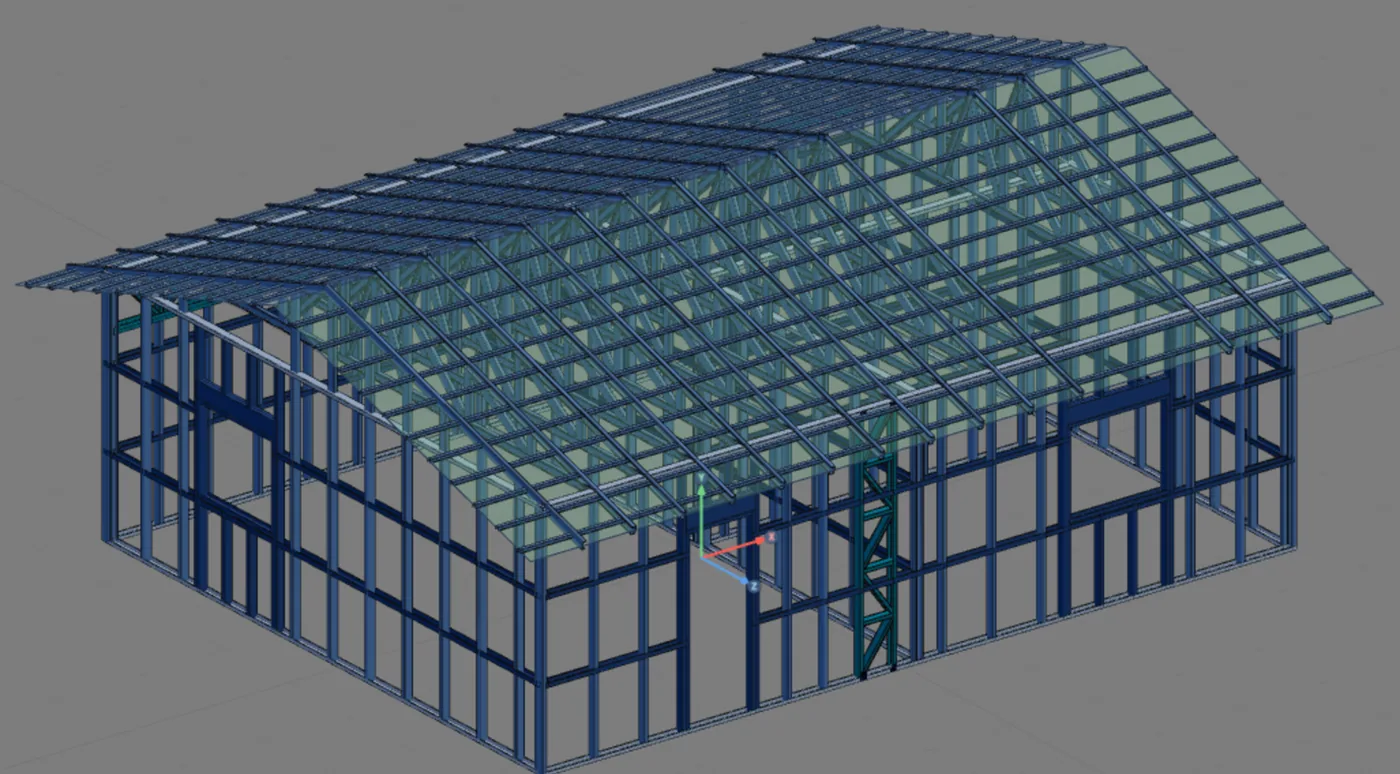
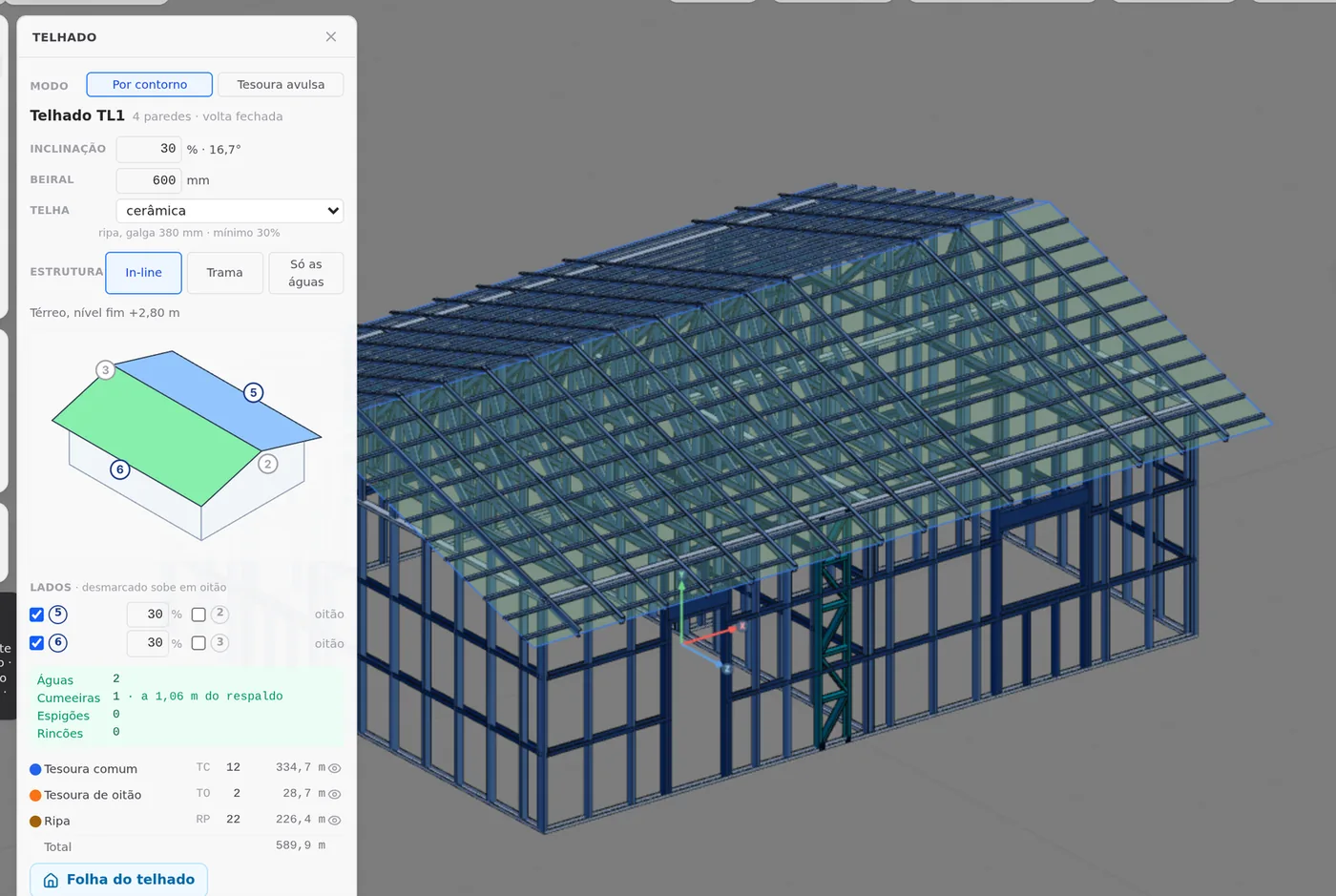
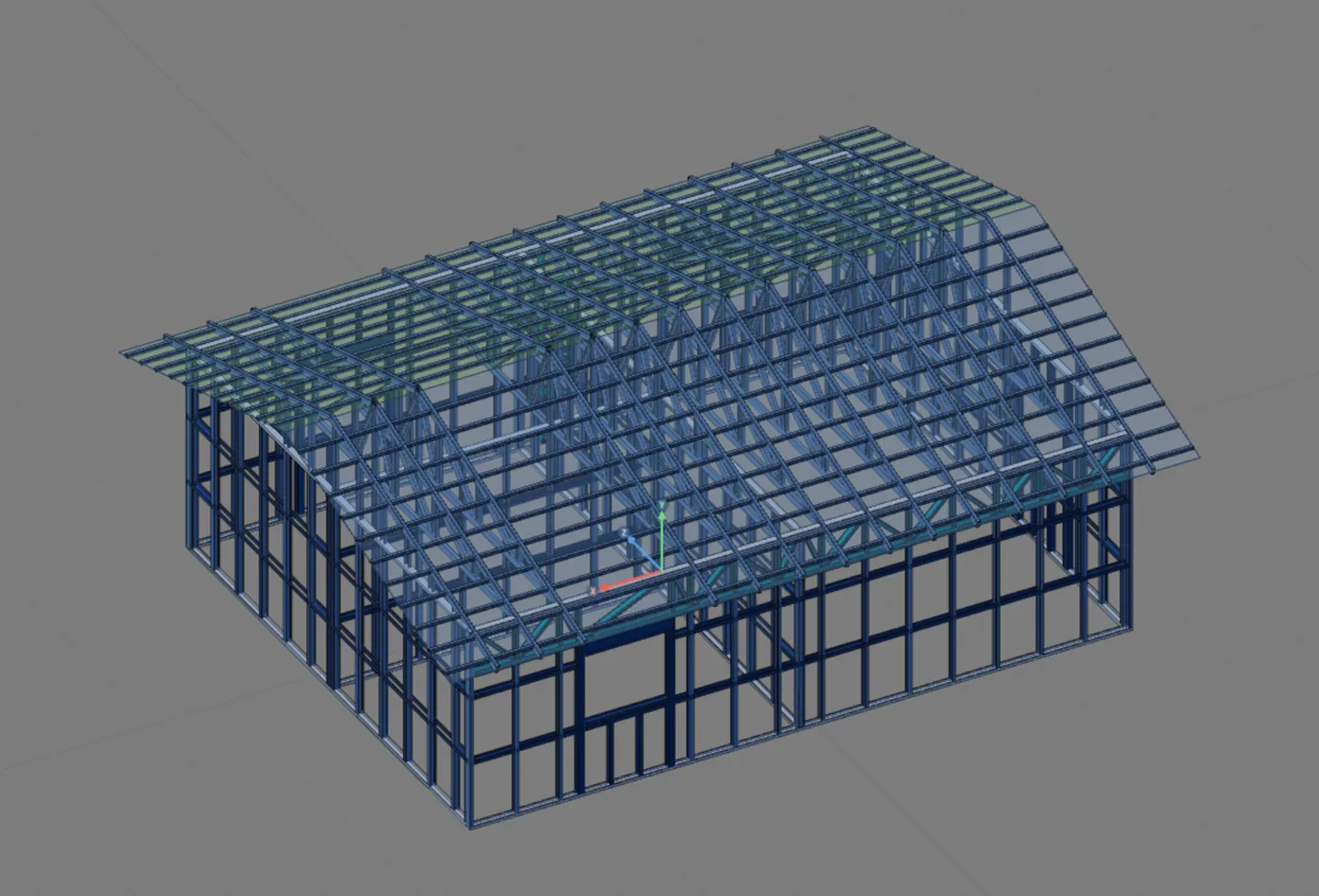
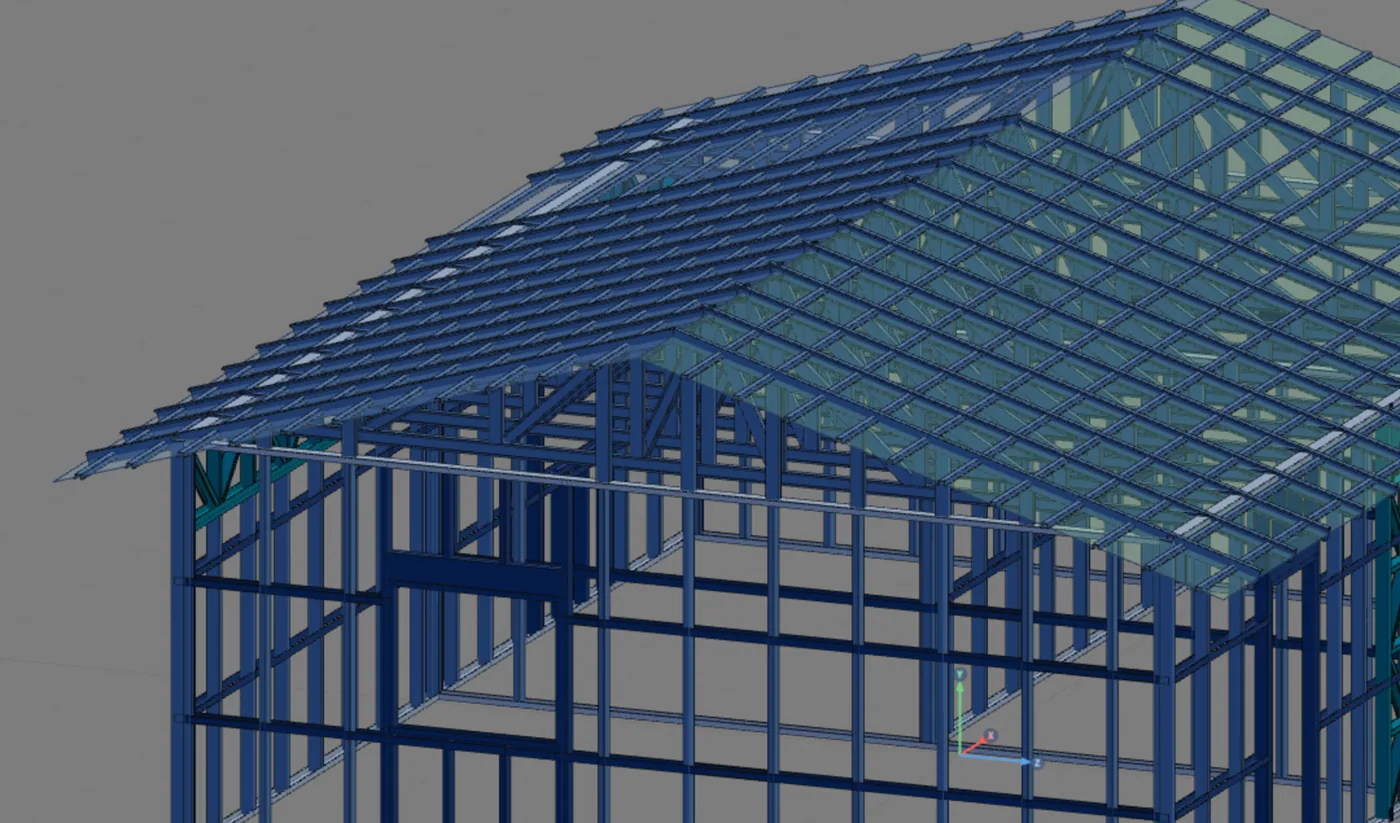
In the example house: TL1, 2 planes at 30%, ceramic tile, 0.60 m eave, in-line structure. The 7 m sides rise as gables. The result is 14 trusses, 12 common and 2 gable trusses, 22 batten lines and 3 bottom chord bracing lines: 605.2 m of section.
What it is for
Covering the outline, not a span
The single truss (see Roof trusses) spans a gap: it is born between two walls and stays there. By outline covers an outline. You mark the outer walls, and the tool closes their outline. The roof plane passes on the outer face of the walls, at the level of their top (the end level), and each side of the outline either slopes down or rises as a gable.
A side that slopes down becomes a roof plane and gets an eave. A side that rises stays upright up to the roof, as a gable wall, and gets a gable truss on the wall axis. From the combination come the ridges, the hips and the valleys: you draw none of them.
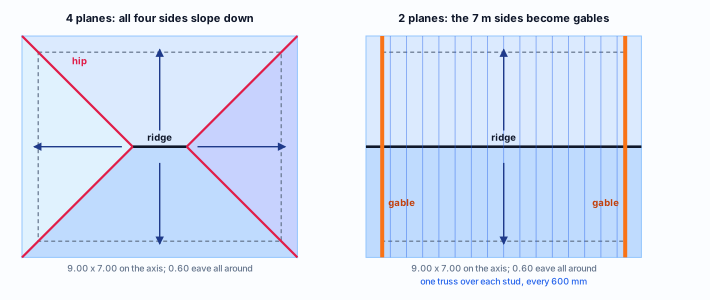
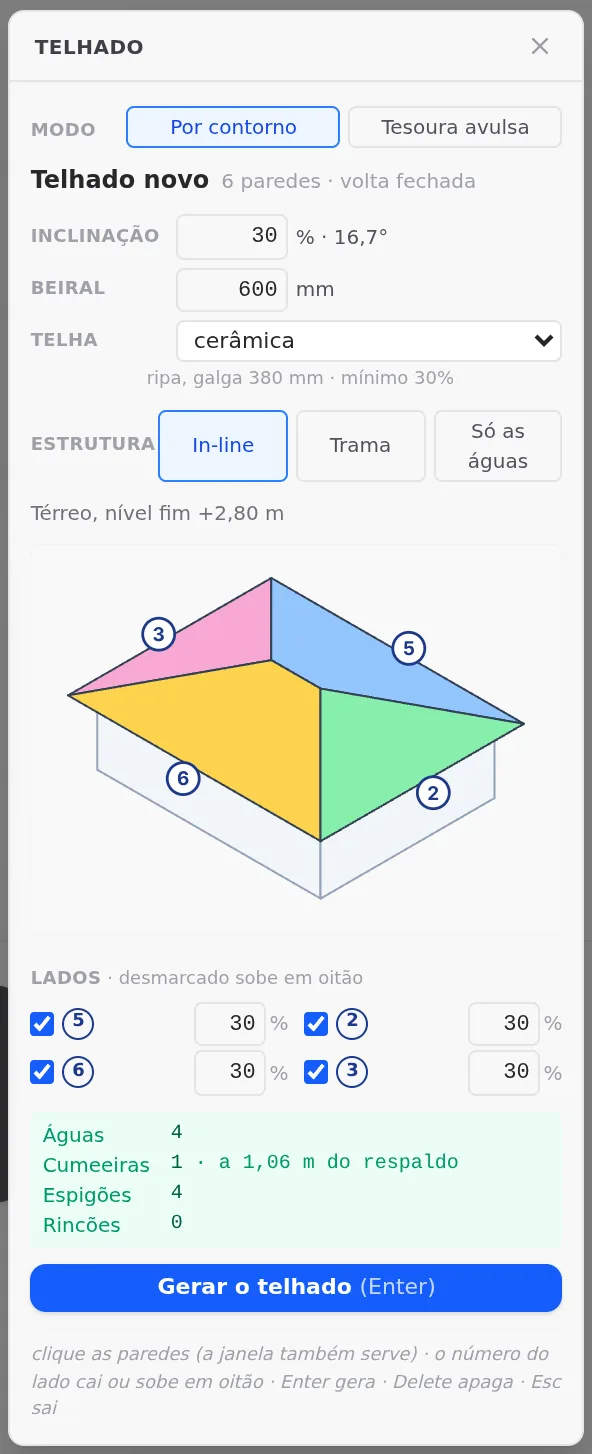
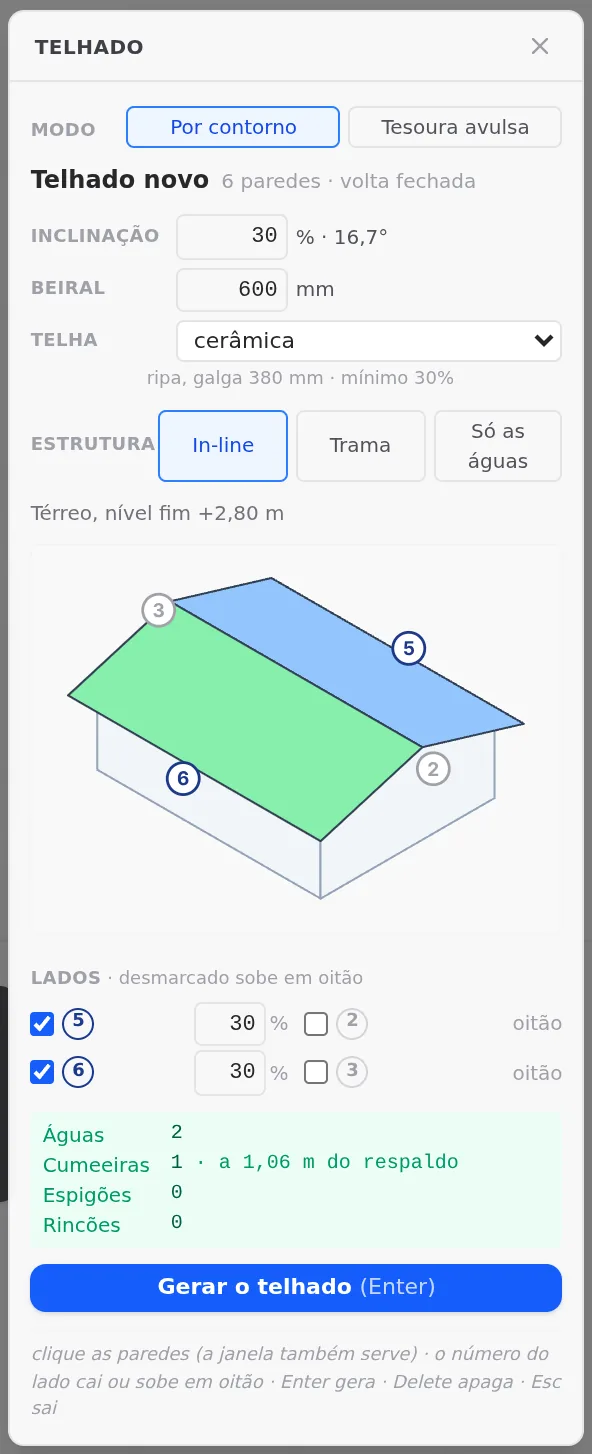
The same house, two roofs. On the left, all four sides slope down: 4 planes, one ridge and four hips. On the right, the 7 m sides rise as gables: 2 planes and one ridge, which is what the example house uses. Schematic drawing.
| By outline (this page) | Single truss (Roof trusses) | |
|---|---|---|
| What is born | the whole roof: trusses, gables, tile support, hips and valleys | one truss, between two walls |
| What it writes | the TLn object and its TL:… bars | loose bars, with no object |
| Tile, ceiling, live load | arrive through the roof bars | arrive at the truss through its roof strip, per m² of plan |
| Roof wind | on the roof planes and on the gables | on the top chord, through the strip |
| Top chord | braced by the battens in the calculation, deflection L/250 | braced by the battens, purlins or rafters that cross it (with none, the whole chord, with a warning), deflection L/250 |
| Walls change | the bars rebuild themselves | the bars stay as they were placed |
One object, TL1, and its bars
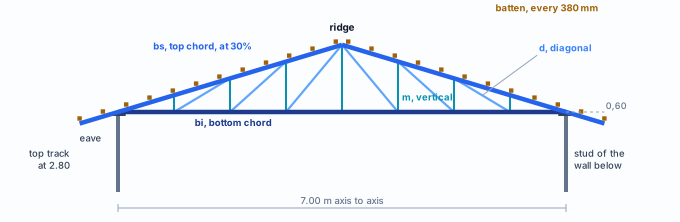
Section through a common truss of TL1 over the 7.00 m walls. The bottom chord rests on the top track, at 2.80 m; the top chord rises at 30% up to the ridge; verticals and diagonals between the two; the batten runs on top, at the tile gauge.
The roof classes
Nobody chooses the truss type: it comes from the section of the roof plane at that point. Each type gets a class, with a code and a color.
| Code | Where it is born |
|---|---|
| TC | common truss: triangular section, in the middle of a 2-plane roof |
| TT | truncated: near the end of a 4-plane roof, flat top chord |
| MT | half truss: on a single-pitch plane |
| TP / TM | bridge truss, hung from the girder truss (doubled) where the end has no wall |
| TO | gable truss: on the axis of the side that does not slope down |
| ES / RC | hip and valley: one boxed piece per line |
| TR / CB | purlin and rafter: in the grid, or under a tile that calls for purlins |
| RP | batten, at the tile gauge |
| TV | bottom chord bracing: lines under the bottom chords, at the spacing the market gives (2.40 m in Brazil) |
The label of a bar
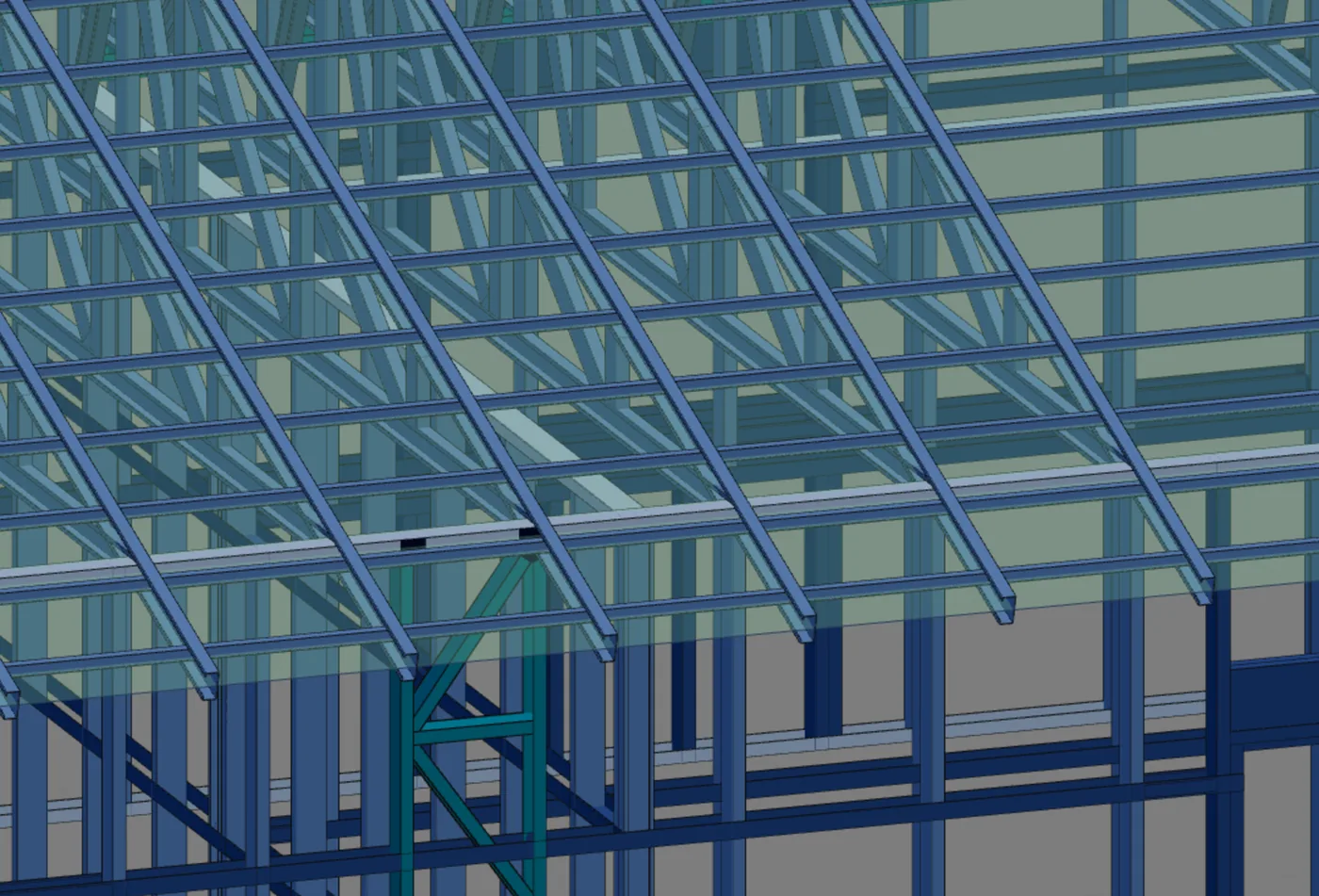
The bar clicked in step 9 is TL:TL1:T5:bs2:1: roof bar, of TL1, fifth truss, top chord 2, segment 1 counted from zero (the tooltip says "segment 2 of 5"). In the common truss: bi bottom chord, bs1 and bs2 the top chords, m1 to m7 verticals, d1 to d6 diagonals. The battens are R1 to R22.
Reactive, but not stubborn
The TL bars follow the walls: change a wall and the roof rebuilds itself, with no Ctrl+Z step of its own. A bar you edited by hand is never overwritten: the card lists it with Keep and Redo. Once kept, it no longer rebuilds on its own.
In the calculation, the batten leaves the model, because it crosses the chord with no node; its weight goes by area. The document stays whole.
What the standard says
In-line framing, names and limits
NBR 16970-2:2022 · 4.1.
In-line framing: the studs aligned with the floors and with the roof structure, so the load goes straight down. It is the In-line structure in the box: one truss over each stud.
NBR 16970-2 · 4.3 and 4.4 (Figures 14 to 16).
The names of the roof: ridge, hip, valley, eave, gable, gable wall, parapet, and the elements of its structure. The box and the card use the same names.
NBR 16970-2 · 4.8 c and g.
The design includes the top view of the roof with the main structure (trusses or beams) and the secondary structure (purlins and bracing), and the typical splices and nodes. CalcSteel draws the main structure and the tile support; the roof bracing and the nodes stay with the designer (see what the engine checks).
NBR 16970-2 · 4.9.
The structural analysis follows NBR 14762 and NBR 8800. It is the analysis the engine runs on the bars of TL1.
NBR 16970-2 · 8.2, Table 3.
Roof beams: L/250. Roof purlins: L/180, and L/120 under wind suction. Note g asks to avoid ponding, with attention to low-slope roofs.
NBR 14762:2010 · 9.7, 9.8 and Annex D.
Global buckling (9.7.2) and slenderness limit (9.7.4) in compression, bending moment (9.8.2), deflection calculation (9.8.5) and concentrated forces on the web (Annex D), for cold-formed sections.
NBR 6120.
The roof loads: dead loads (tile, ceiling, insulation) and the roof live load. The project keeps them in the wizard; the tile weight comes from the market.
NBR 6123:2023.
Wind: pressure on the roof planes and on the gables, through the roof and wall coefficients. The engine builds the panels from TL1.
Market rule, not ABNT. The minimum pitch of each tile, the batten gauge, the purlin span, the weight per m² and the 600 mm eave come from manufacturers (Top Telha, Brastelha, Brasilit, Regional), from AECweb and from SINAPI 92571, stored in the catalog of each market. The standard sets none of them, and the box shows each one as market data.
Recommendation
Tile, pitch and structure in the example house
The tile drives the rest. It sets the minimum pitch, what goes under it (batten, purlin or OSB), the spacing of that support and the weight that comes down through the roof. The Brazilian rule, as it is in the catalog:
| Tile | Minimum | Support | Spacing | Weight per m² of roof plane |
|---|---|---|---|---|
| ceramic | 30% | batten | 380 mm gauge (up to 400) | 46 kgf |
| concrete | 30% | batten | 400 mm gauge (up to 405) | 49 kgf |
| fiber cement | 9% | purlin | 1,690 mm span | 18 kgf |
| metal | 5% | purlin | 1,800 mm span (up to 2,500) | 4.4 kgf |
| shingle | 17% | OSB | the board | 11 kgf |
What the box starts with
It opens with 30%, a 600 mm eave, ceramic tile and In-line structure. Grid only shows up when the market has its spans; Brazil does: truss from 2.5 to 4.0 m, purlin from 1.5 to 2.5 m and rafter from 1.0 to 1.4 m.
Why In-line here
The house is already on the 600 mm module. In-line puts one truss over each stud, and the load goes down in line to the foundation, as item 4.1 asks. Grid spaces the trusses out and adds purlins and rafters: it makes sense on a large span, not on a 7 m house.
Why 2 planes with gables
With the 7 m sides as gables, all the middle trusses are the same (12 TC), and the gable wall closes over the whole wall, with the verticals of the gable truss on top of the wall studs. The 4-plane roof also closes on this outline, with four hips and truncated trusses near the ends: it is the choice when the facade calls for an eave on all four sides.
Ceramic calls for 30%. Below that the box warns in amber and still lets you generate. The warning is not a refusal: you decide, with the tile manufacturer.
Before generating, delete the single trusses. The single trusses T1 and T2 (see Roof trusses) stay outside TL1. Left there, the model would have two trusses on the same roof plane, and would calculate both.
Step by step
1. Delete the single trusses
Select the single trusses T1 and T2 (see Roof trusses) and delete them with Delete. The walls stay as they are.
2. Open the plan and the Roof
The Roof button on the LSF card only works in plan; outside it, the tooltip says "Open the plan: the roof is placed over the walls". With walls selected, the box opens with them. With no selection, it takes the walls of the rooms that have no roof. The mode is By outline.
3. Check the outline
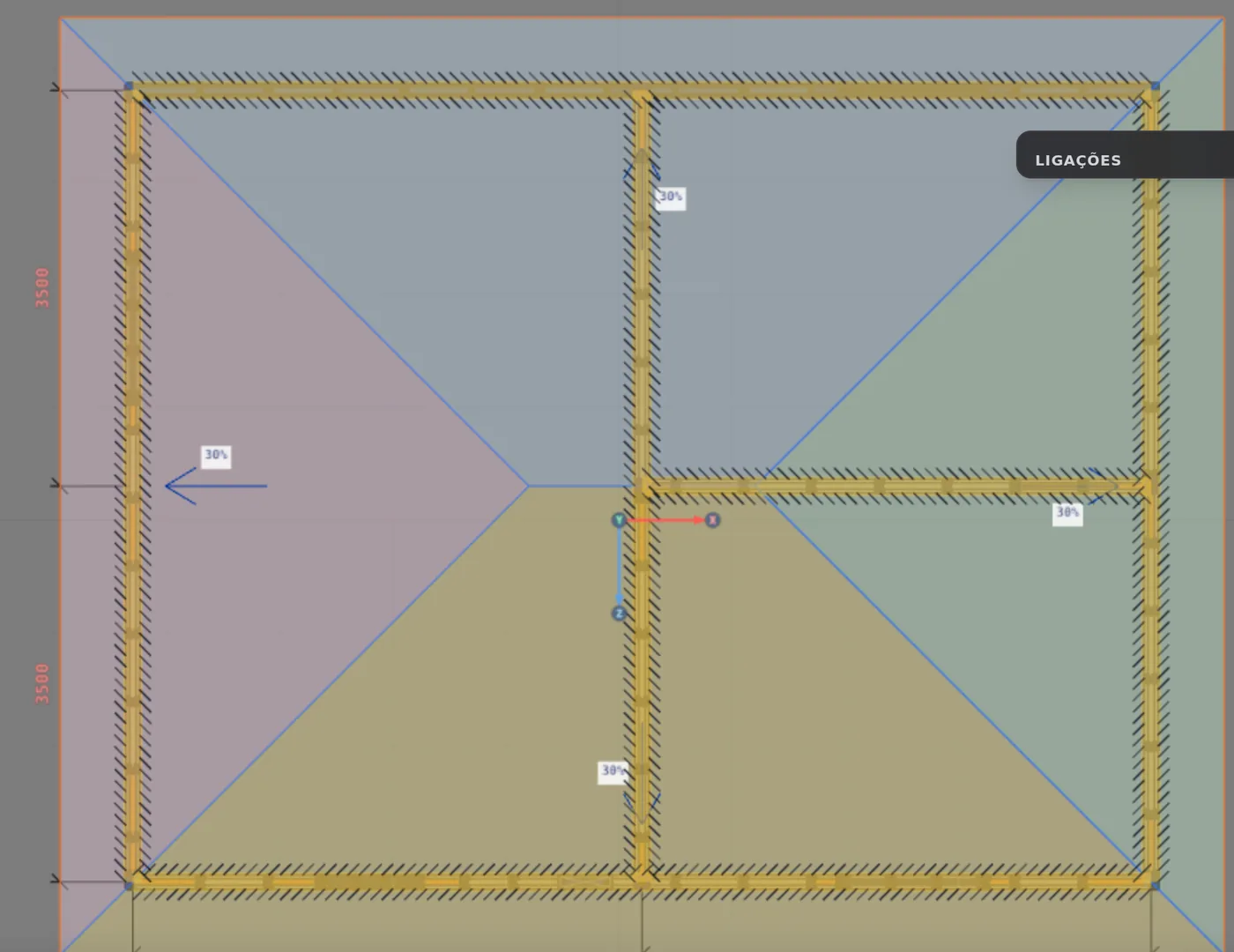
The marked walls turn amber, and the one under the cursor lights up. A click adds or removes a wall; the selection window adds several. The box says "6 walls · closed outline" and draws the model with all four sides sloping down: 4 planes, a ridge 1.06 m above the wall top and four hips. The six include the two inner walls, 1 and 4, which the automatic selection picked up.
4. Gables on the 7 m sides
Click the side number on the model, or in the Sides list ("slopes down; click to rise as a gable"). With 3 and 2 as gables: 2 planes, one ridge, no hips.
5. Pitch and tile
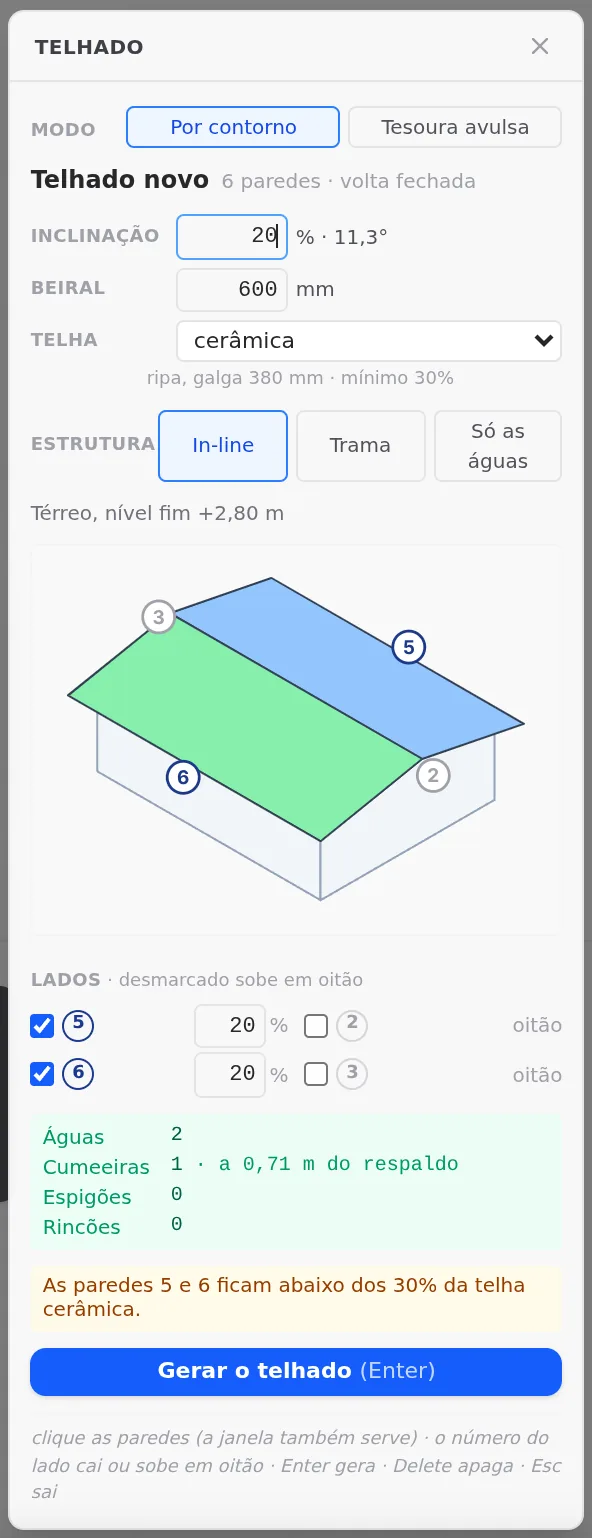
At 20% (11.3°) the ridge drops to 0.71 m, and the amber warning shows up: "Walls 5 and 6 are below the 30% of the ceramic tile." Generate stays lit. Go back to 30%.
6. The refusal
With all four sides as gables, nothing slopes down: "No side slopes down: mark at least one side for the roof to come down." Generate turns grey and the model, dashed. Set 5 and 6 back to slope down.
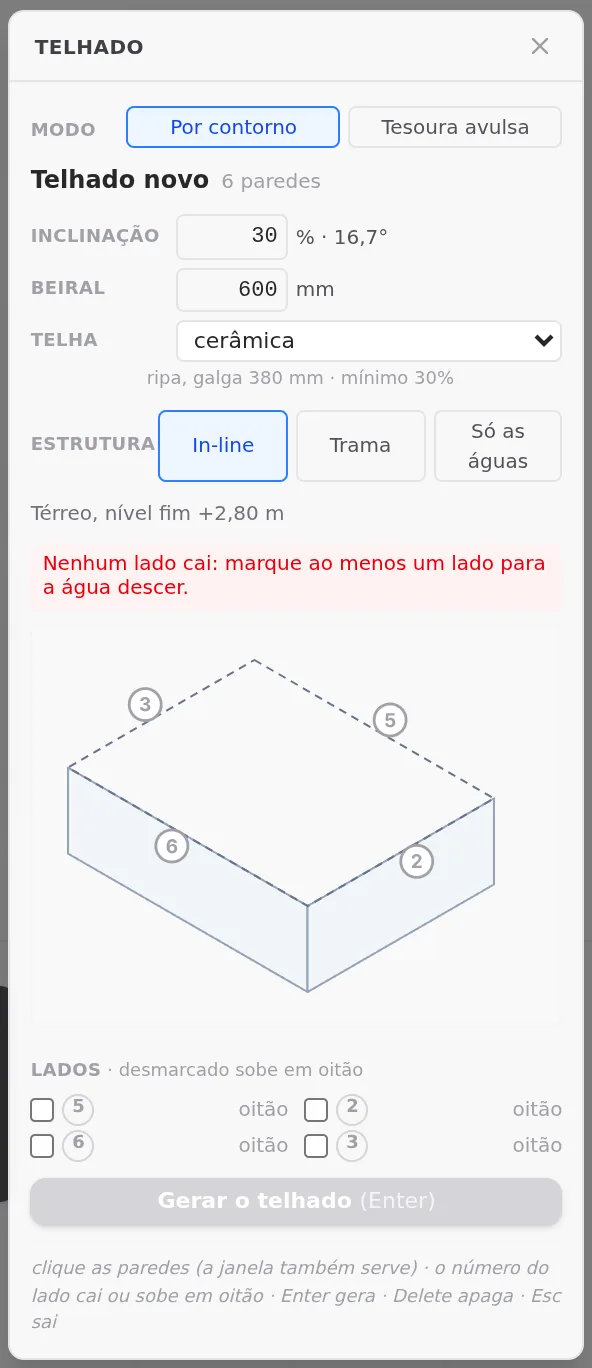
A side is a wall. The numbers on the model and in the list are those of the walls: 5 is the back, 6 the front, 3 and 2 the 7 m sides. Each side that slopes down has its own pitch in the list; the one at the top applies to all.
7. Enter, or Generate roof
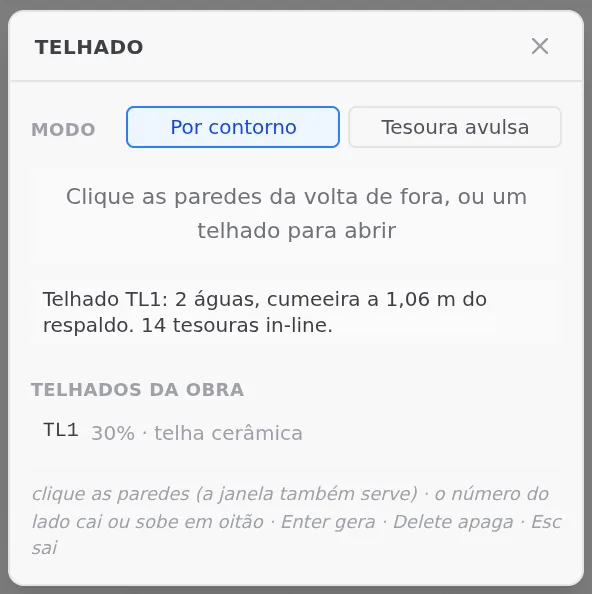
The message confirms: "Roof TL1: 2 planes, ridge 1.06 m above the wall top. 14 in-line trusses." TL1 joins the Project roofs list, with 30% and ceramic tile, and the plan shows the trusses and the battens over the walls.
One Ctrl+Z
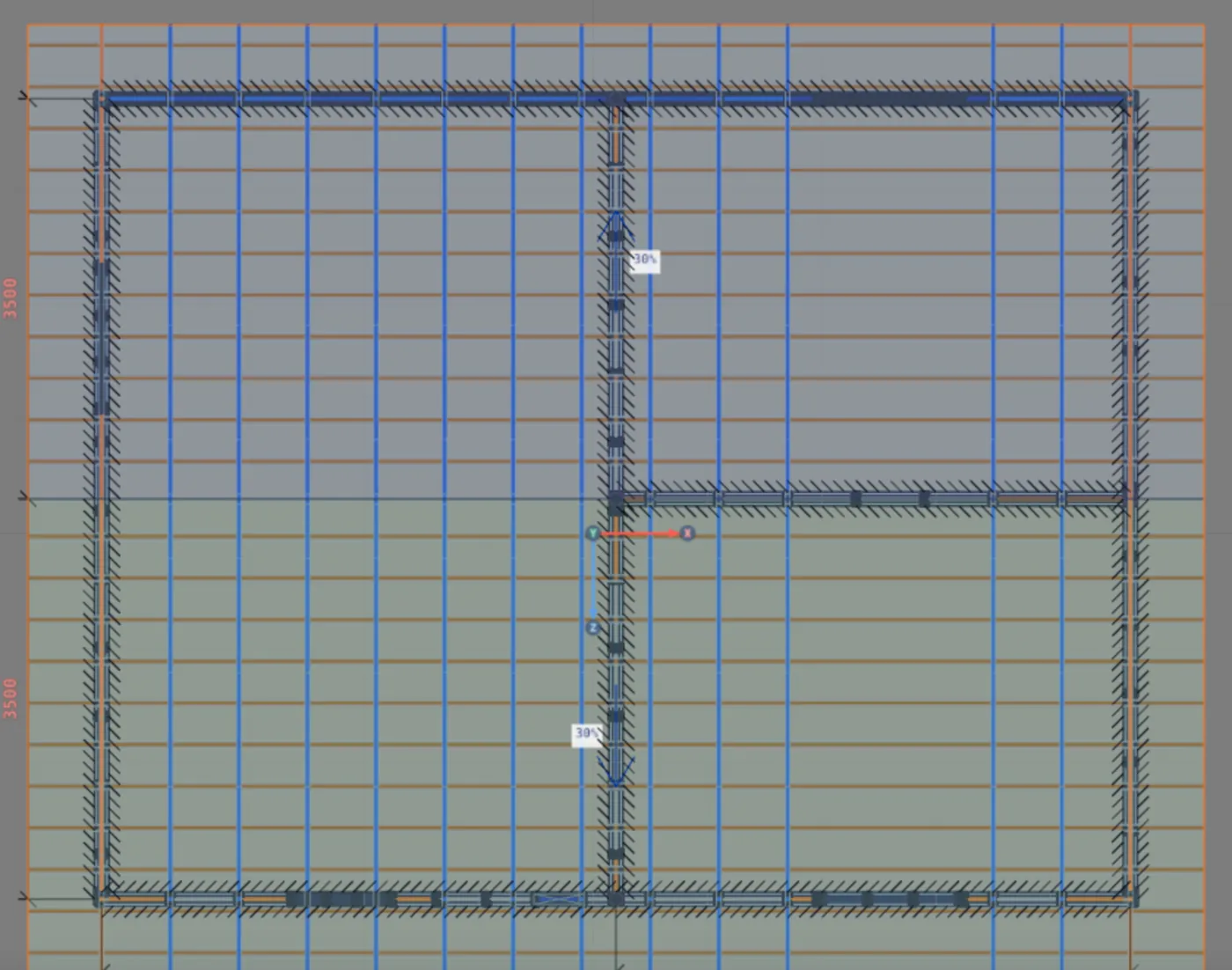
Generating is one Ctrl+Z step, with everything inside. If the grid of a wall does not match the trusses, the tool aligns its studs, and the message adds "studs aligned in N walls". Here it did not add it: the grids already matched.
The 14 trusses
The 12 common ones land every 0.6 m, over the studs. Between T10 and T11 the spacing is 1.8 m: there the walls have no regular stud, and In-line only places a truss where there is a stud. The 2 gable trusses run over walls 3 and 2.
The gable truss
Its verticals land on top of the wall studs, with no diagonal. It has no bottom chord between the ends: the top track of the wall is already there. That is where the gable wall cladding is fixed.
8. Reopen the roof
Click TL1 in the list, or one of its walls in plan. The box reopens as "Roof TL1", with Apply and Delete, and below it the class card: Tesoura comum (common truss), TC, 12 pieces, 324.5 m; Tesoura de oitão (gable truss), TO, 2, 27.3 m; Ripa (batten), RP, 22, 226.4 m; Travamento do banzo (bottom chord bracing), TV, 3 lines, 27.0 m. Total: 605.2 m.
- A click on a class selects all of its bars; the eye hides it.
- Roof sheet creates an A3 with the isometric of the project and each truss type highlighted, and takes you to the Sheets tab, in one Ctrl+Z step.
- Apply rewrites with what changed. Delete (or the Delete key) removes the roof: "Roof TL1 deleted. The walls stay as they are."
9. Tab in 3D
With the Select tool and no LSF tool armed, rest the cursor over a roof bar. The tooltip shows the level, and Tab steps down one at a time: Object, Assembly, Whole piece, Bar, and back to Object. The click selects at the tooltip level.
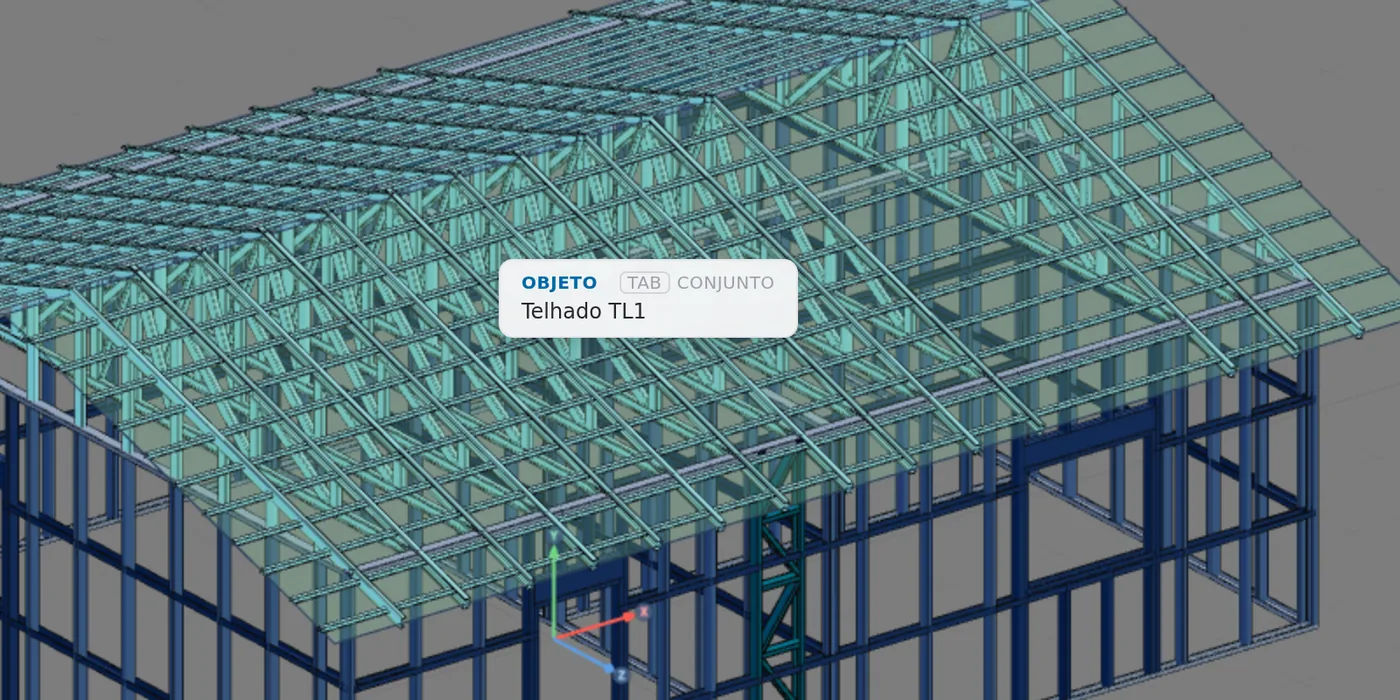
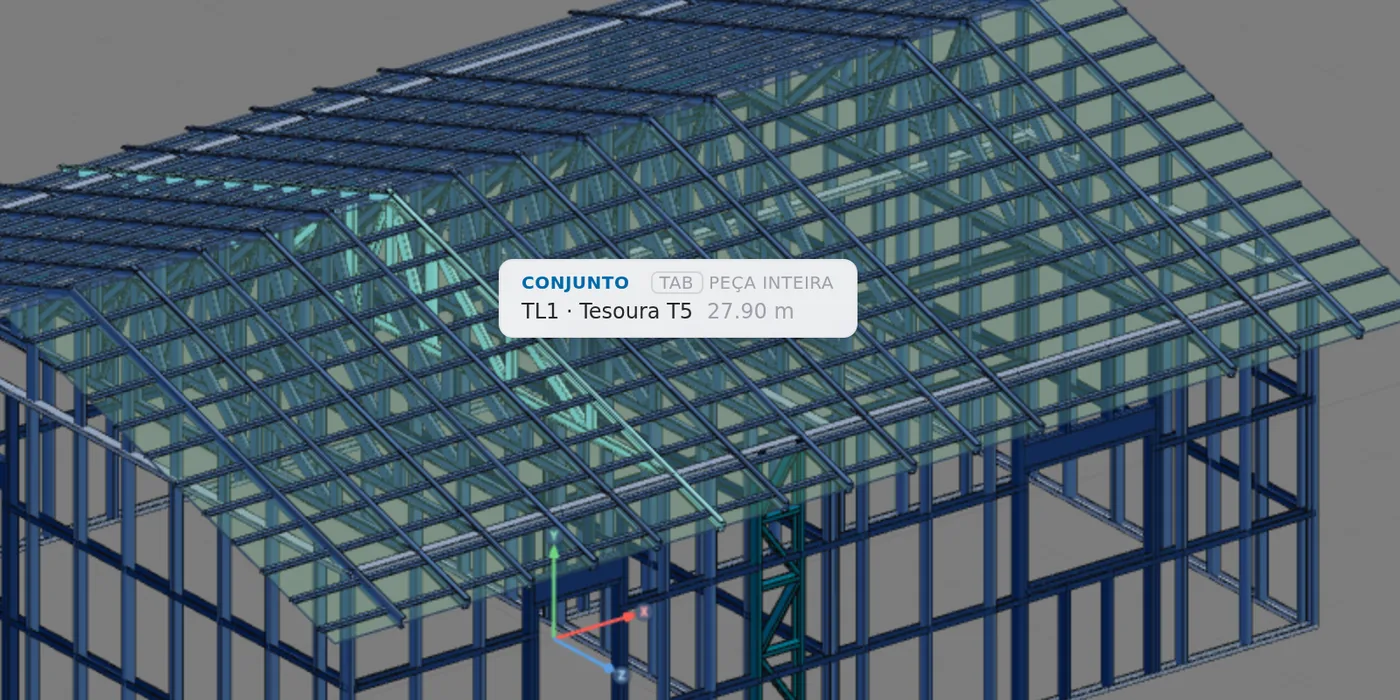
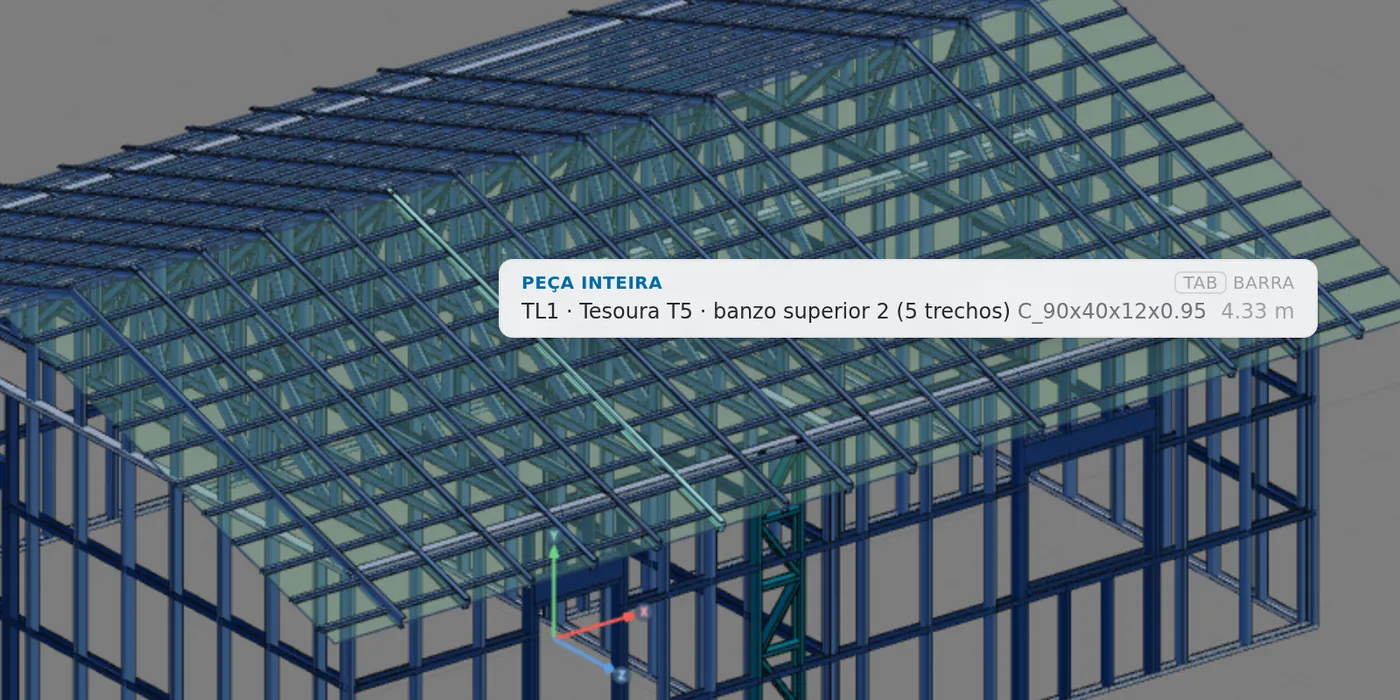
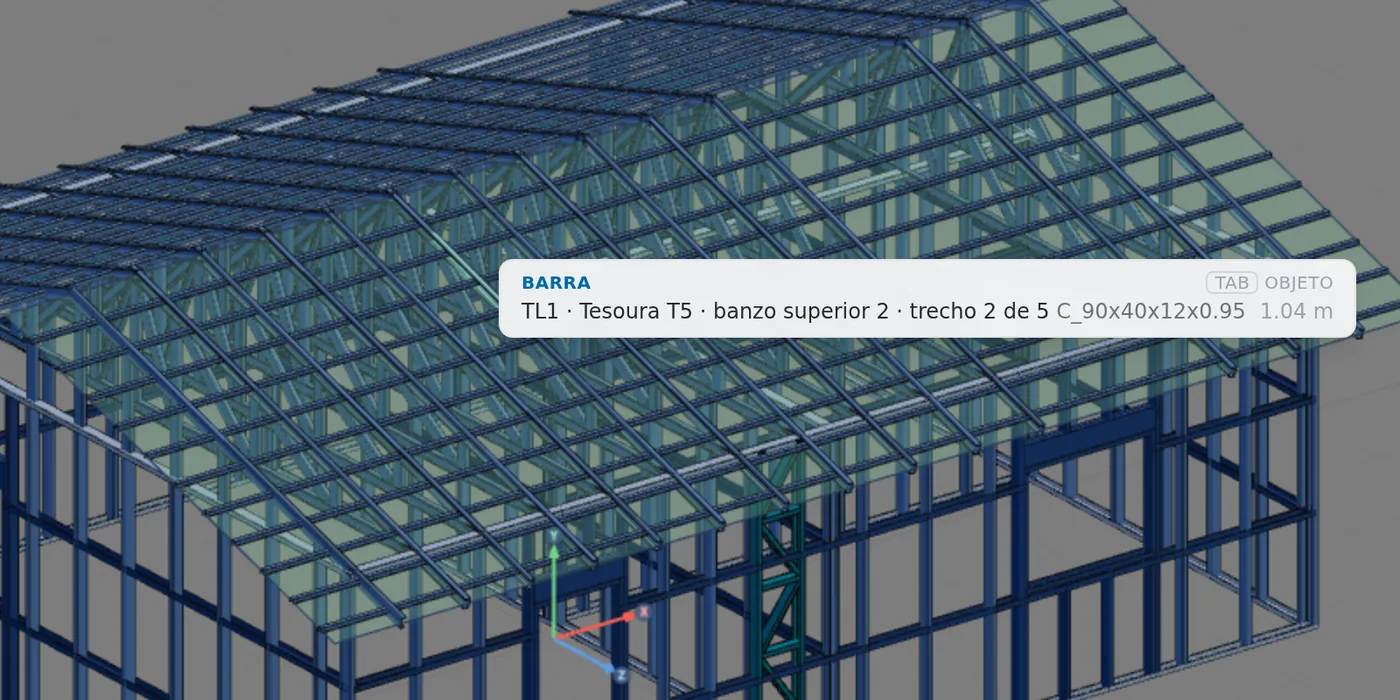
The outline is marked in plan. The Roof tool answers the click in plan; in 3D and in the wall view, the way to the roof is Tab, with the tool disarmed.
Check colors on: a click on a roof bar opens the bar, not the roof. Turn the colors off to open TL1 from 3D.
Shortcuts
- T↵
Roof
Arms the roof: click the outer ring of walls and Enter. When armed, disarms.
in plan view
- PL↵
Plan view
Goes to plan view. With the wall view open, closes it and keeps the wall selected.
- Del/⌫
Delete selection
Deletes the selected walls, pieces or members.
with a selection
- Home
3D view
Goes to 3D at the last camera pose. With the wall view open, closes it.
Parameters
The fields of the box
| Field | Range | Default | What it does |
|---|---|---|---|
| Mode | By outline, Single truss | By outline | the roof of the outline, or the loose truss (see Roof trusses) |
| Pitch | 5 to 100% | 30% | applies to all sides, and the box shows the angle (30% gives 16.7°). The field does not accept a value outside the range |
| Eave | 0 to 2,000 mm, in steps of 50 | 600 mm | from the outer face of the wall to the tip, on every side that slopes down, and on the gable |
| Tile | shingle, ceramic, concrete, metal, fiber cement | ceramic | the list comes from the market; below it, the support, the gauge or the span, and the minimum ("batten, gauge 380 mm · minimum 30%") |
| Structure | In-line, Grid, Planes only | In-line | one truss over each stud; spaced trusses with purlins and rafters (only with the spans in the market); or only the roof planes, with no bars |
| Level | read-only | "Ground floor, end level +2.80 m": the top of the walls, where the roof plane passes | |
| Sides | slopes down or gable, per wall | all slope down | on the model or in the list; each side that slopes down has its own pitch, from 5 to 100% |
| Summary | read-only | Planes, Ridges (with the height above the wall top), Hips, Valleys, and Steps when there are any | |
| Card | only on a saved roof | the classes with code, count and meters; pieces edited by hand with Keep and Redo; Roof sheet |
- Enter: generates the new roof, or applies to the open roof
- Delete: deletes the open roof; the walls stay
- Esc: leaves the tool
Planes only draws the roof with no bars at all. It is good for studying the shape, and the engine calculates the project with no roof: the walls go back to the point load at the top of the stud, and the roof has no wind, with a warning (see what the engine checks).
Shortcuts
- T↵
Roof
Arms the roof: click the outer ring of walls and Enter. When armed, disarms.
in plan view
- Del/⌫
Delete selection
Deletes the selected walls, pieces or members.
with a selection
Common errors and refusals
When Generate turns grey
The refusal shows up in red, turns off the button and says what to do. The wall numbers below are examples: the box shows those of your project.
| When | What the box says |
|---|---|
| nothing marked | Mark the walls of the outer outline: the roof sits on them. |
| open outline | The outline does not close: wall 3 has a loose end. Mark the missing wall. |
| two outlines | The marked walls close more than one outline. A roof covers one outline only: unmark those of the other. |
| different tops | Wall 2 ends at another height. The roof sits on a single level: fix the ceiling height. |
| nothing slopes down | No side slopes down: mark at least one side for the roof to come down. |
| piece with no plane | A piece is left with no roof plane next to wall 3, which does not slope down. Mark that wall to slope down. |
| same line | Walls 5 and 7 are on the same line with different pitches. Give both the same pitch. |
| math does not close | The roof math did not close on this outline. Check for a wall overlapping or crossing another. |
| out of square | Wall 4 is out of square. In-line structure needs a right-angled outline: fix the walls, or generate with no structure. |
| already covered | These walls cover a room that is already under roof TL1. Click it to change it. |
| deleted wall | A wall of this roof no longer exists. Mark the outline again. |
| no grid | The project market does not have the grid spans (truss, purlin and rafter): use In-line, or generate only the roof planes. |
| no rule | The project market does not have a roof rule with a source. |
Warnings: Generate stays lit
| below the tile | Walls 5 and 6 are below the 30% of the ceramic tile. |
| step | Wall 4 does not slope down and sits in an inner corner: the roof rises 0.80 m there, like an inner gable. Mark wall 4 to join the roof planes. The button becomes Generate anyway. |
| no eave | With different pitches on this outline, the roof planes come out with no eave. Give them all the same pitch for the eave to come back. |
What the engine checks
Loads, wind and diaphragm
The roof with structure carries the load through its own bars. Each share acts on its own area and is split among the bars that hold it:
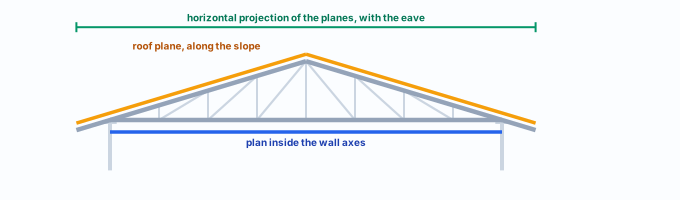
| Case | Per m² of | Where it goes |
|---|---|---|
| DL Roof, top | roof plane (sloped) | the tile, with the market weight, plus that of the battens, which leave the model: on the top chords and the rafters |
| DL Roof, bottom | plan, inside the axis | insulation, ceiling and utilities: on the bottom chords |
| LL Roof | horizontal projection | the roof live load: on the top chords and the rafters |
The steel of the trusses enters through the solver self-weight. The covered walls leave the point load at the top of the stud; a wall with no roof with structure keeps it. In the example house, by the app math with the default wizard values (without the battens weight):
- 40.2 kN: tile: 46 kgf/m² x 89.1 m² of roof plane
- 12.4 kN: ceiling and insulation: 20 kgf/m² x 63 m²
- 20.9 kN: live load: 25 kgf/m² x 85.3 m²
The Tiles field of the wizard (15 kgf/m²) does not weigh here. With the tile chosen in the box, its market weight applies: 46 for ceramic. And unchecking Roof in the wizard does not remove this load: that switch only applies to walls with no roof with structure.
Wind
Each roof plane becomes a roof panel, of an enclosed building, with the roof coefficients of NBR 6123:2023, and the pressure reaches the layer where the tile rests. Each gable becomes a panel, taken by the verticals of the gable truss. With no truss and no rafter: "Light steel framing: roof TL1 has no truss or rafter drawn, and was left with no wind."
Diaphragm
With a gable truss and no bracing drawn on the roof plane, the calculation adds fictitious bars, rigid and pinned, in the plane of each roof plane, and warns: "...The calculation assumed the roof plane as a rigid diaphragm... Check that the board, the battens and the connections ensure this." A strap drawn in the roof plane takes their place.
Assumptions, buckling and deflection
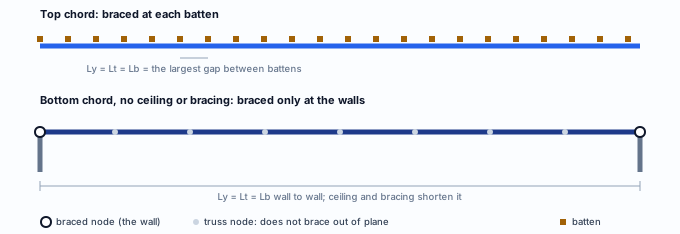
| Bar | Assumption in the model | Buckling | Deflection |
|---|---|---|---|
| Top chord | continuous; rests pinned on the track, with torsion restrained | Ly, Lt and Lb: the largest gap between the battens, purlins or rafters that cross it. Lx: the panel | L/250 of the element, on the chord line |
| Bottom chord | continuous; rests pinned on the track | Ly and Lb: with a market ceiling, the board fixing spacing (300 mm on Brazilian gypsum board); with no ceiling, the largest gap between the bracing lines (TV) and the braced nodes. Lt: between the bracing lines and the braced nodes. Lx: the panel | L/250 of the element, on the chord line |
| Vertical, diagonal | truss web member, pinned at both ends | like a regular bar | no limit of its own: the truss deflection is read on the chords |
| Batten | outside the model; its weight goes by area | does not enter | does not enter |
The element of the chord is the stretch between panel nodes and supports, where a web member, vertical or track arrives. Its deflection is measured relative to the straight line between its ends, with its own L.
Purlin, rafter, hip, valley and eave
In the Grid structure and under a tile that calls for purlins, the purlin has its deflection checked at L/180, and at L/120 under wind alone; the rafter, the hip and the valley at L/250, as roof beams. Both are measured on the span between supports (NBR 16970-2, Table 3). At the eave, the cantilever stretch leaves the element: the tip deflection is checked against twice the cantilever length, minus how much the node it springs from moves along with it.
The assumptions in this section are those of a new project: CalcSteel versions the calculation, and the result of an older project does not change on its own.
What stays with the designer
- The deflection of the whole truss as a beam: L/250 of the span, 28 mm over the 7.00 m of the example house. The engine checks the chord segment by segment.
- The ceiling installed with the fixing the calculation assumes: with a market ceiling, the bottom chord counts as braced at the board screw spacing.
- Web crippling (NBR 14762, Annex D) of the chord over the track and at the truss nodes.
- The edge and corner wind zones, the underside of the eave and the anchorage against suction. The model uses one coefficient per roof plane.
- The batten and its span between trusses, where the spacing opens up (1.8 m between T10 and T11, in the example house).
- The connections: the screws at the nodes and the truss heel on the track (see Connections panel).
Shortcuts
- Ctrl+Enter
Calculate the project
Sends the project to the engine, like the Calculate button.
Summary
The path, in one line
Delete the single trusses → plan → LSF card → Roof → By outline → check the outline → sides: slope down or gable → pitch, eave and tile → In-line → Enter → TL1 card → 3D.
The example so far
- TL1: 2 planes at 30%, ceramic
- 14: trusses: 12 TC and 2 TO
- 22: batten lines, 380 mm gauge
- 605.2 m: of section on the roof