LSF (Light Steel Framing)
Reading the results
The page for each member reads one bar at a time. This one reads the whole house: what the ratio of each bar means, what the 3D colors tell and what they do not, where the list of all checks is, which combination governs each bar and where deflection lives. At the end, a trial that changes the overall picture, read from the badge to the report and undone without saving anything.
Overview
The whole house, after a calculation
In Studs, Headers, jambs and cripples, Trusses as plane frames and Lateral system and diaphragm, the report opens one member at a time: the stud, the header, the truss, the strap. All those pages start from the same point, the button on the top bar turning green on Calculated. This page stays at that point and reads the whole project at once.
The calculation of the example house, done on screen, took a little over a minute and returned 1,113 checks in 26 combinations. The list badge shows 8 failed. Two of the failed bars are pieces of the lattice column of the front wall (see Columns), in flexo-compression, and step 3 reads them up close.
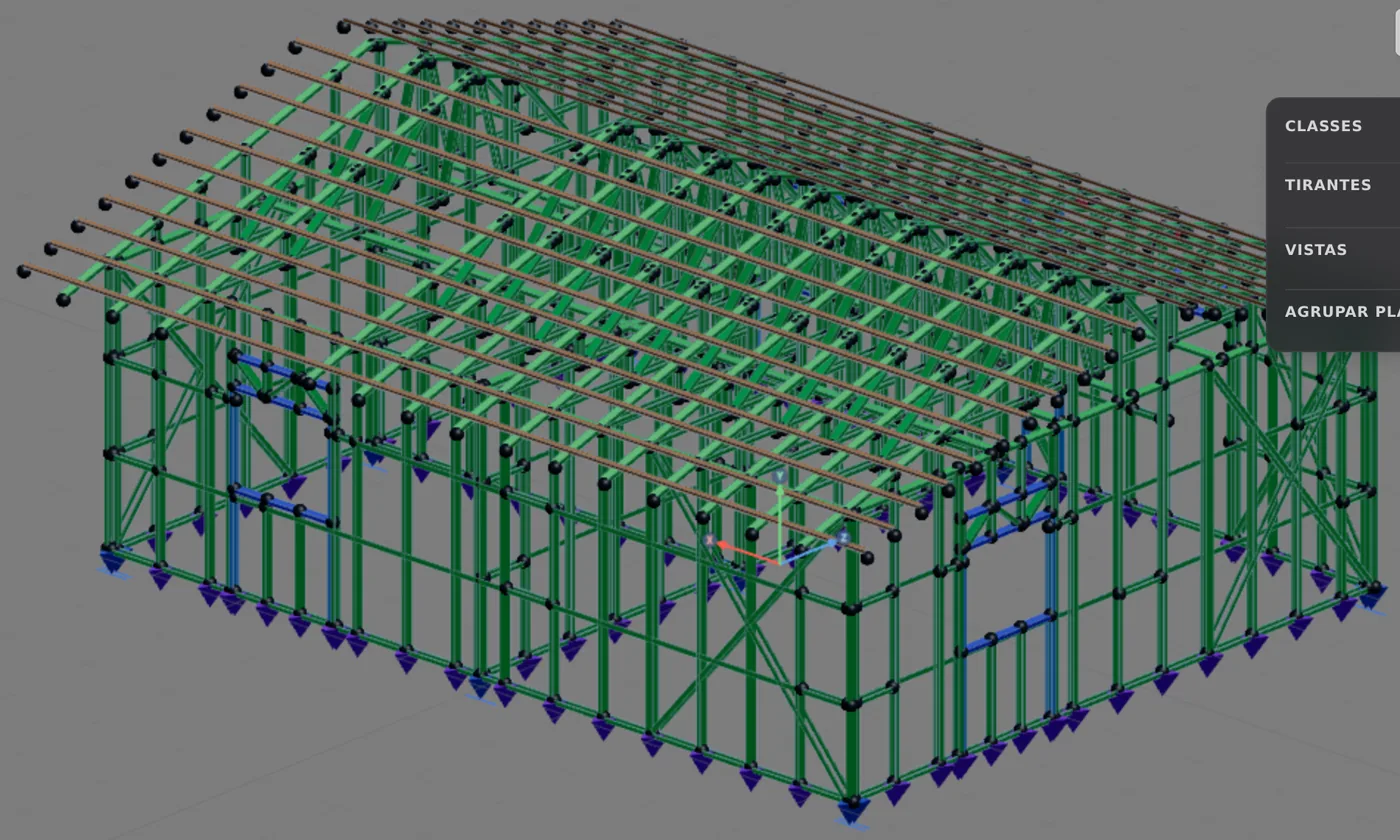
- 1,113: checks, one row of the list each
- 26: combinations in the analysis
- 8: failed, on the badge
- 1,105: passed, green in the list
What it is for
One ratio per bar, and 1.00 is the limit
Each check compares two quantities. The design demand, Sd, comes from the combined loads. The design resistance, Rd, comes from the profile, the steel and the standard. The ratio is Sd divided by Rd: up to 1.00 the bar meets that limit state, above 1.00 it does not.
A bar has several checks (compression, bending about both axes, shear, flexo-compression, web crippling, slenderness) and the engine runs all of them in each combination marked on the card. In the example house there are 26 combinations. The ratio the list shows is a single one: that of the worst check, in the combination where it is worst.
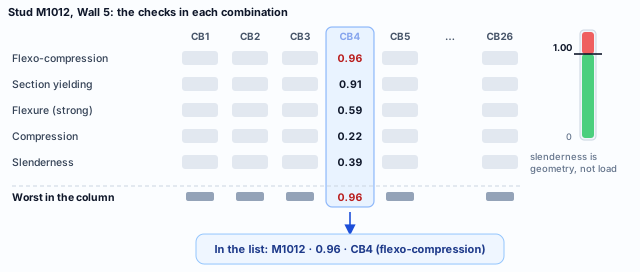
Diagram. The numbers in the CB4 column are those of the report of stud M1012 (step 5). The other columns are left without numbers on purpose: what matters is the rule, the worst check in the worst combination.
Each row of the list therefore carries three things: the ratio (0.96), the combination that produced it (CB4) and the color of the status, green up to 1.00. The governing check shows when you open the row (step 3) or the bar report (step 5).
Slenderness is the exception: it compares the slenderness ratio with the limit of 200 for a compression member (14762, 9.7.4) and does not grow with the load. Step 6 shows why that matters.
1.00 is not failure. Sd already carries the load factors and Rd the resistance factors. A ratio of 0.96 says the bar uses 96% of what the standard allows. For the same reason, 1.02 fails: the limit is the standard, not an estimate of when the member gives way.
What the standard says
Two limit states, and every combination
Everything the screen shows after the calculation answers two inequalities of ABNT NBR 14762:2010. One is about strength, checked in the ultimate combinations. The other is about serviceability, checked in the service combinations against the displacement limits. The table ties each thing you will read to the clause that asks for it.
| On screen | Clause | What the standard asks |
|---|---|---|
| Ratio of each check | 14762, 5.3.2 | Rd ≥ Sd, action effect by action effect. The ratio is Sd / Rd: it passes up to 1.00. |
| The CB combinations on the card | 14762, 6.7.2 | Sd comes from the ultimate load combinations. How the app builds them is in Loads. |
| Bar status | 14762, 5.2.2 | No applicable limit state may be exceeded in any of the appropriate combinations. |
| Deflection, on the bar card | 14762, 5.4 and 6.7.3 | Sser ≤ Slim, with Sser from the service combinations. |
| Deflection limit by role | 16970-2, 8.2, Table 3 | The maximum displacement of each type of LSF member. |
NBR 14762:2010 · 5.2.2 and 5.3.2.
The limit state method requires that no applicable limit state be exceeded when the structure is subjected to all appropriate load combinations. Checking each action effect on its own, the safety condition becomes Rd ≥ Sd.
NBR 14762:2010 · 5.4.
In the serviceability limit state, Sser ≤ Slim: Sser is the effect obtained from the service combinations of 6.7.3, and Slim is the limit value, given in Annex A for displacements. In LSF, the values come from NBR 16970-2.
The deflection limits the engine uses in LSF
| Member role | Limit | Row of Table 3 (NBR 16970-2:2022, 8.2) |
|---|---|---|
| Top and bottom chord of the truss | L/250 | roof beams |
| Floor joist | L/350 | floor system |
| Header | L/500 | beams supporting columns or wall panels |
| Stud and king stud | h/300, on the chord | displacement at mid-panel relative to the ends |
Two separate questions. The ratio answers whether the member holds; deflection answers whether it deforms too much. A bar can pass one and not the other, which is why the app shows them in different places, as step 7 shows. In the stud, deflection is measured relative to the chord between the ends: how far the top of the wall moved sideways is another calculation.
Design recommendations
1. Read only after calculating
Badge, list, colors, report and deflection show the last calculation. Change a member, profile, load or combination and the button on the top bar turns into Recalculate: until you press it, what is on screen is the project as it was.
2. Start from the overall picture and go down
First the list badge, which says whether anything fails. Then the list, which says who and by how much. Then the bar in 3D, which says where. Last the report, which says why. Opening the report of any bar before knowing what fails is reading at random.
3. Color is a map; the number is the list
The colors show where to look. The ratio decides, and it is in the list and in the report. A member that the analysis splits into pieces has one row per piece in the list, and a single color in 3D. Always finish the reading with the list.
4. Read the check and the combination together
The ratio of a bar is that of its worst check, in the combination that made it worst. Knowing that the stud is governed by flexo-compression in CB4 says what to do: it is the wind from one side, added to the self-weight, that asks for more profile.
5. Deflection is checked separately
Neither the badge, nor the colors, nor the list speak of deflection. It is on the bar card, against the limit for the role of the member. Check the members that work in bending: chords, floor joists, headers and the studs that take wind.
6. Never leave out a combination to pass
Unchecking a combination on the card takes its action out of the analysis, and the bar it governed can turn green without getting any stronger. Use this only to understand what asks for what, as in the trial in step 8, and put the combination back before delivering.
7. Compare before and after each change
Note the badge and the ratio of the bars that matter, change one thing only and recalculate. Changing two at once hides which of them moved the result.
Green is not a finished design. The engine checks the bars that are drawn, with the loads and combinations that are on the card. Connections, anchor bolts, plates and diaphragm are designed separately, as Studs, Headers, jambs and cripples, Trusses as plane frames and Lateral system and diaphragm show.
Step by step
1. Calculate and look at the badge
Calculate the project with the button on the top bar, with the loads and the wind described in Loads. In the example house the calculation takes a little over a minute; when it ends, the button turns green on Calculated.
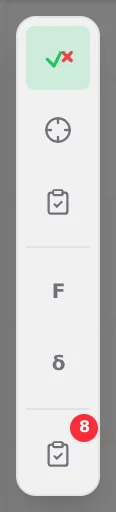
In the tool column, on the left of the screen, the last button is Bar Verification. Its red badge counts the failed bars: 8 in the example house. When none fails, the badge turns green, with a ✓.
The first button of the same column, Verification Colors, paints the bars in 3D (step 4). The third opens the Report menu (step 5).
2. Open the list
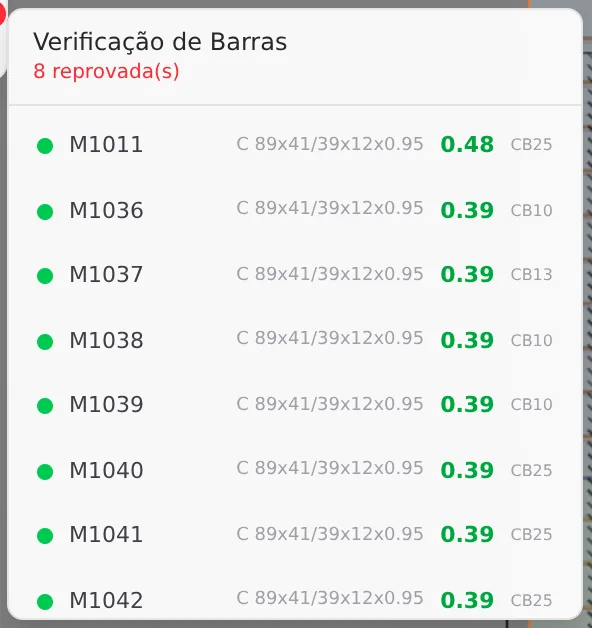
Click the badge button. The Bar Verification list opens: in the header, the total of failed bars; below, one row per check. The house has 1,113 rows.
Each row carries, from left to right, the status dot, the bar name, the profile, the ratio and the governing combination. The dot and the ratio turn green when the bar passes and red when it does not.
The list comes in calculation order, not by ratio. To find the red ones, scroll and look for the red dot: in the house, the two that step 3 reads are near row 1,000.
3. Find the red ones and open the row
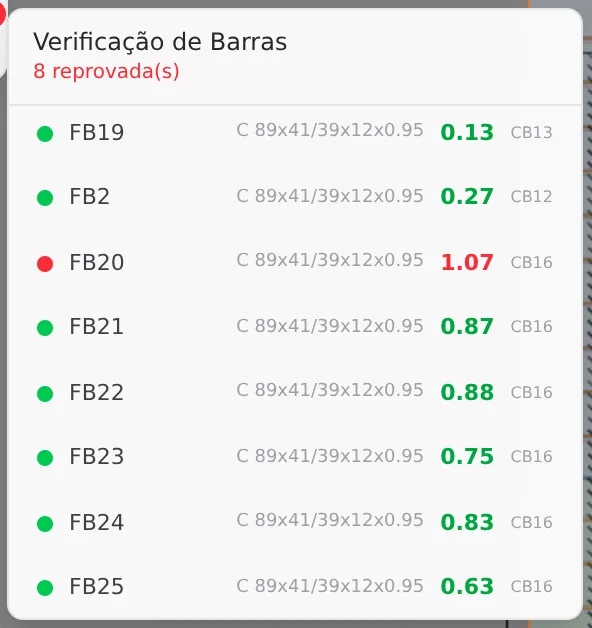
Scrolling the list, the two failed bars this page reads appear: FB20, with 1.07 in CB16, and FB30, with 1.02 in CB4. The neighbors of FB20, from FB19 to FB25, have the same profile and pass, with ratios from 0.13 to 0.88.
Why FB, and not the name of a member? The lattice column of the front wall (see Columns) has chords that receive the diagonals at intermediate nodes. For the analysis, each chord is split at those nodes, and each piece enters the list with its own code, FB and a number. The pieces of the jack studs next to the king stud enter as JB. Each piece is checked with its own forces.
Click the row to open it. All the checks of the bar appear, each with demand over resistance, the ratio and the combination. In FB20, compression alone gives 0.72, strong-axis flexure 0.19 and weak-axis flexure 0.09. Flexo-compression joins the three in a single calculation, with the moments amplified by the compression, and goes past 1.00: 1.07. That is what fails.
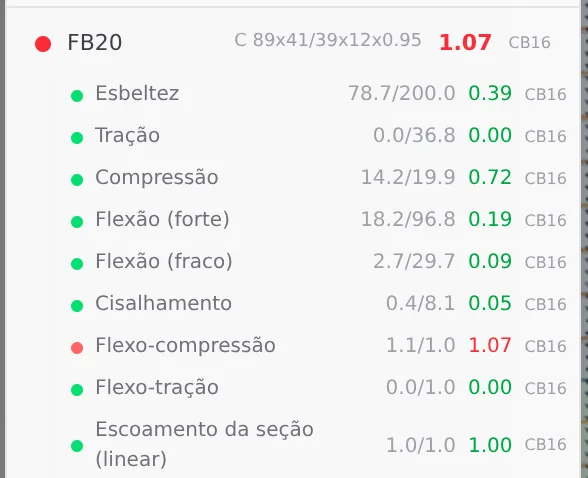
The row gives the what; the report gives the why. The open row shows the ratios. The calculation of each one, with its terms and the clause of the standard, is in the bar report (step 5).
In 3D the member appears whole. The chord of the lattice column is a single bar in the drawing, with the color of its class (step 4). The piece-by-piece reading is that of the list: the ratio of the chord is that of its worst piece.
The trial in step 8 comes back to FB20.
4. Turn on the colors and read the map
The first button of the column, Verification Colors, paints each bar of the drawing by the status it received in the last calculation. In the house, after the calculation, it was already on. There are four possible colors, and only two speak of the result:
| Color | Means |
|---|---|
green | Status OK: the bar passes every check, in every combination marked on the card. |
red | Any other status. In practice, the failed bar. |
gray | The strap diagonal that the analysis removed from every case, because in it the strap would only be in compression (the mechanism is in Lateral system and diaphragm). It is not a failure. In this calculation of the house, none ended up like that. |
class color | The bar of the drawing has no row of its own in the list. These are the battens, which do not enter the analysis model, and the members the analysis splits or renames: the chords of the lattice column (the FB pieces of step 3), the jack studs next to the king stud and the members of the lattice header. |
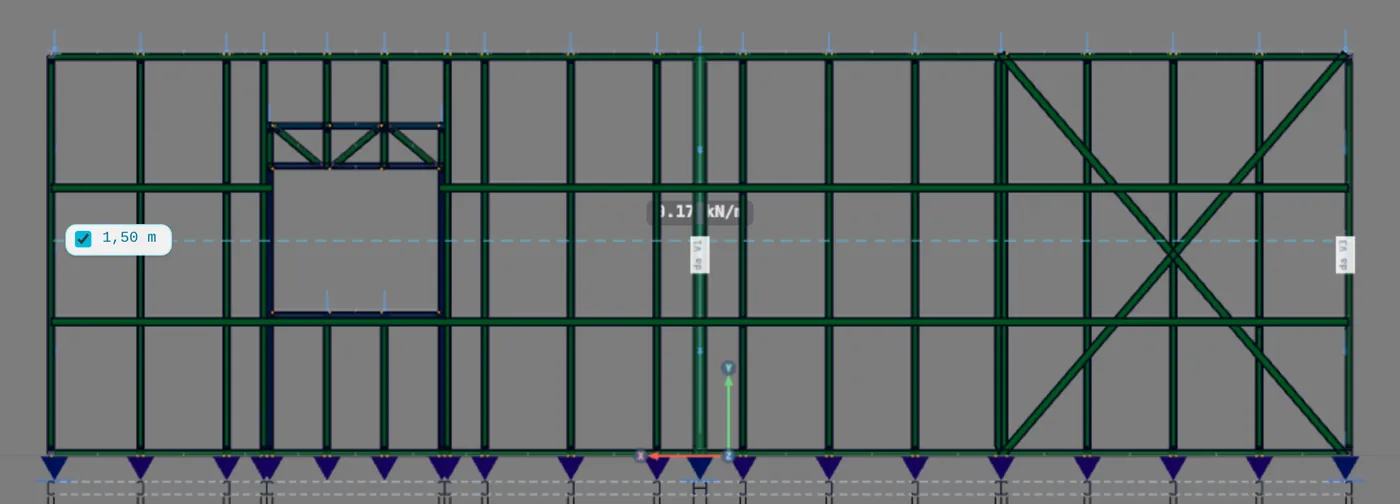
Green does not say how much. Stud M1012 is green with 0.96; M1036, with 0.39, is the same green. The color only answers whether it passes. The margin is in the ratio, in the list and in the report. In the report, the ratio gets a third color: orange between 0.80 and 1.00.
The click changes with the colors
With the colors on, clicking a bar opens its report (step 5). With the colors off, the click selects the bar and opens its card, where deflection lives (step 7).
To read a wall head-on, without the others in front, open the wall view as in Studs.
5. Open the bar report
Two paths lead to the calculation of a bar. From the 3D. With the colors on, click the bar. The Bar Diagnostic Report opens, with profile, length, standard, steel, status and the governing check in the header. That is how the list leads back to the bar: find the name in the list and click it in the wall view.
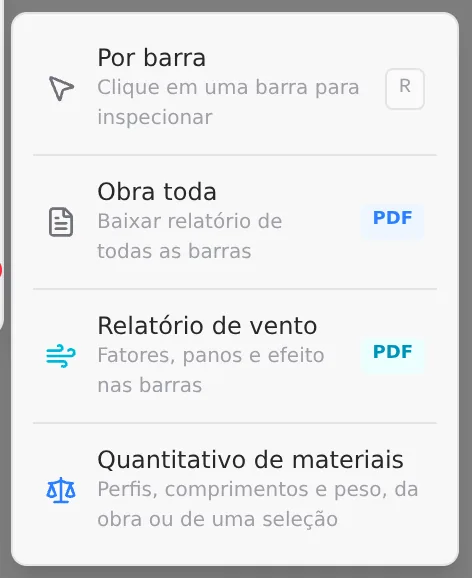
From the menu. Open Report › Per bar (key R) and click the bar: the report opens in a panel beside the 3D, and stays open while you click other bars.
The report covers the bars that have a row of their own in the list. For the FB and JB pieces, the reading is the open row of the list (step 3).

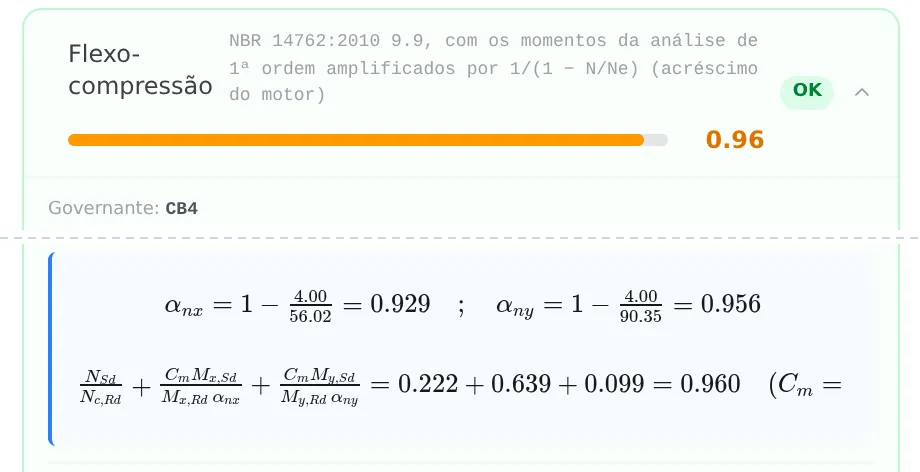
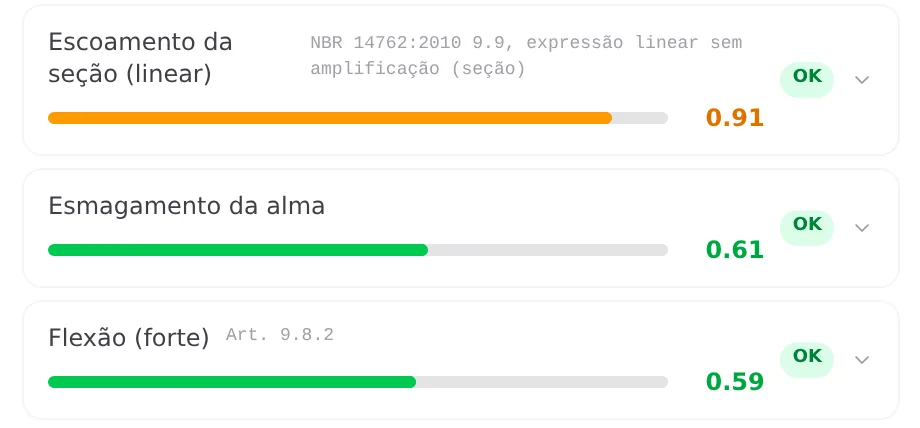
The governing check comes first, already open; the others follow from the highest ratio to the lowest. In the flexo-compression of M1012, compression enters with 0.222 (4.00 over 18.0). Strong-axis flexure, 0.59 on its own, is amplified by the compression: divided by αnx = 1 − 4.00/56.02 = 0.929, it enters with 0.639. The weak axis enters with 0.099. Added up, 0.960. Section yielding makes the same sum without the amplification, and gives 0.91.
The numbers are those of the governing combination. All the checks of the bar show the calculation in its combination, CB4 for M1012. The exception is web crippling, which keeps its own worst combination: in the open row of the list, it appears with CB25. Slenderness does not depend on the load.
6. Read the code on the Combinations card
The code beside the ratio, CB4 or CB16, is a row of the Combinations card. It appears over the 3D after the calculation, collapsed; the arrow in the corner opens it.
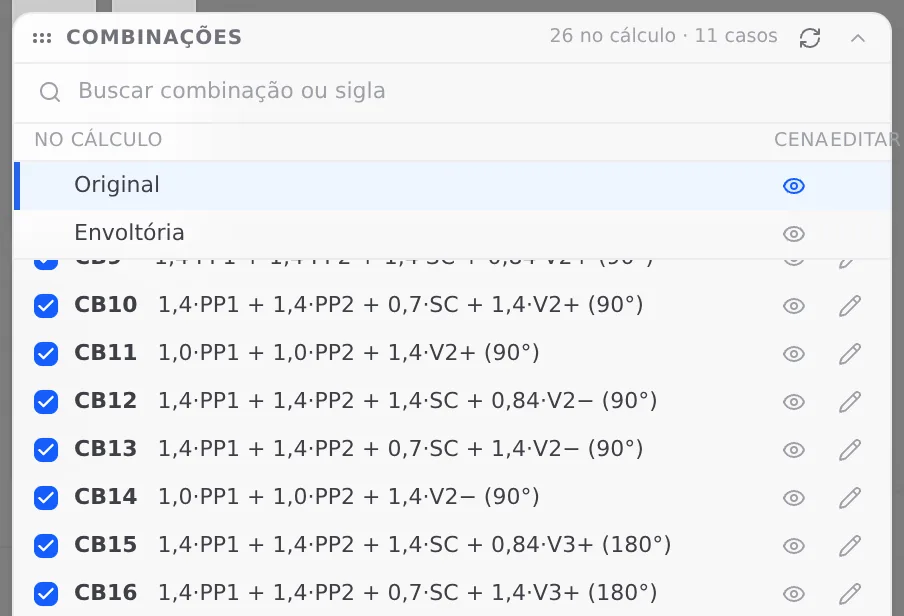
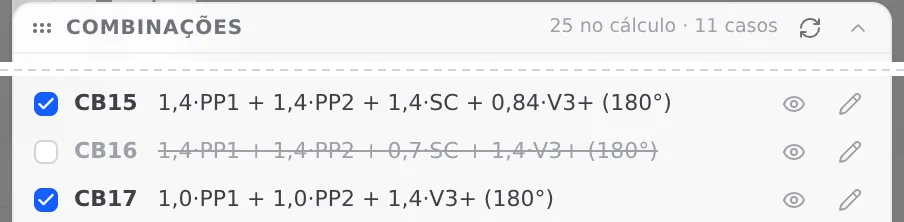
Read the formula of CB16, which governs FB20: 1.4·PP1 + 1.4·PP2 + 0.7·SC + 1.4·V3+ (180°). The self-weights of the walls and of the roof enter with 1.4, the roof live load follows with 0.7 and the wind V3+, at 180°, is the leading action, with 1.4. Codes and factors are those of Loads. CB4, which governs M1012 and FB30, has the same form with the wind V1+, at 0°: the two pieces of the lattice column fail with the wind in opposite directions.
When all combinations tie
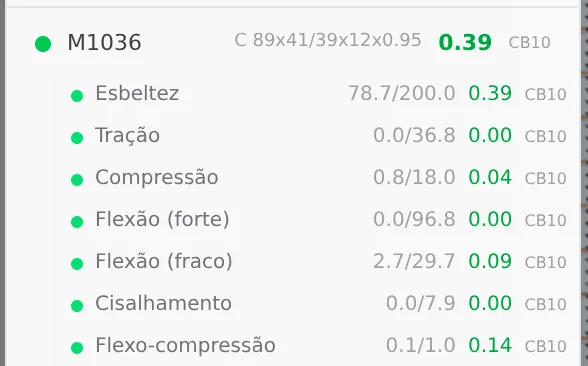
At the top of the list, M1036, M1037 and M1038 have 0.39, with CB10, CB13 and CB10. What governs the three is slenderness, 78.7 over 200: geometry, the same in all 26 combinations.
With the ratio tied, the engine picks the combination with the highest force-driven check. In M1036, that is flexo-compression at 0.14, in CB10. That way the report cites the most loaded combination for the bar, not the first in the list.
A different combination on neighboring studs, with the same ratio, is not an error: each one has its own most loaded combination.
7. Check deflection on the bar card
Turn off the colors and click the bar: its card opens. The Deflection limit section has the ready limits, from L/180 to L/500, Custom for a value of your own and Heuristic, which uses the limit for the role of the member. The badge in the corner says whether deflection passes. Below are three numbers: δmax, the limit and the ratio.

On the truss chord, Heuristic applies L/250 to the segment between two nodes: 1.88 m over 250 gives the 7.5 mm on screen. The ratio, 0.42, is the measured deflection over that limit, and it reads like the strength ratio: up to 1.00, it passes. The limits for the other roles are in the table in What the standard says. Deflection uses the service loads, without the 1.4 factor of the CB combinations, and so it does not come from the same combination that governs strength.
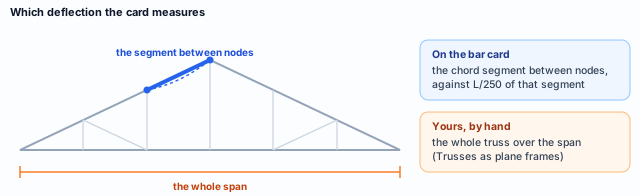
Which members to check. Those that work in bending: truss chords, floor joists, headers and the studs that take wind. A bar can pass strength and not deflection, or the other way round; that is why the two sit in different places.
8. Trial: uncheck CB16 and recalculate
The question of the trial: if CB16 leaves the analysis, does FB20 pass? On the Combinations card, click the box of CB16. Since it governs bars, the card asks before leaving it out:

Click Leave out. The row turns struck through and gray, and stays in the list; the header changes to 25 in analysis. The button on the top bar turns into Recalculate: until you press it, the screen keeps showing the calculation with all 26.
Recalculate. The badge stays at 8. Read why. Leaving out a combination never raises a ratio: each bar keeps the worst of those that remain. No bar can start failing, so the 8 now are among the 8 before, and they are the same ones. FB20 stays red: another combination also takes it above 1.00, and its row, opened again, shows which.
The picture changed in the 39 bars that CB16 governed: each one is now governed by another combination, with an equal or lower ratio. That is what the trial teaches: the governing combination says which action asks most of the member, and removing it does not fix the member.
Undo it
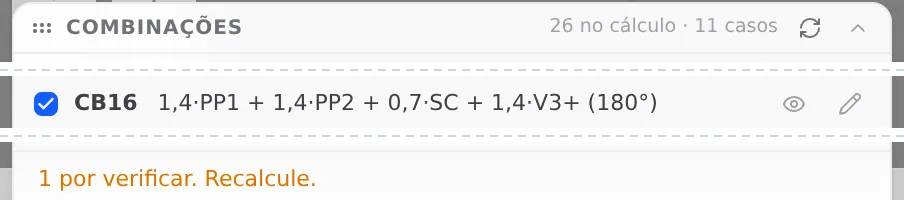
Check CB16 again. The card goes back to 26 and warns that it is pending a check. Recalculate, and the result returns to that of step 1. If you ran the trial only to understand, you can also close the project without saving.
A trial is not a design. An unchecked combination is an action taken out of the analysis. A bar that turns green that way did not get any stronger. Before delivering, every combination checked and the project recalculated.
Shortcuts
- Ctrl+Enter
Calculate the project
Sends the project to the engine, like the Calculate button.
- R↵
Bar report
Arms the report: click a bar to open its own.
- CB↵
Combinations card
Opens and closes the combinations card.
after analysis
- AV↵
Wall view
Opens the elevation of the selected wall, seen from outside. Again, goes back.
with one wall selected
Parameters
What changes what you read
Reading the results has no parameters of its own: everything the screen shows comes from the calculation. But some choices change what enters the calculation, or where and how the result appears. These are they:
| Choice | Where | What changes |
|---|---|---|
| Combinations in the analysis | Combinations card, box in the In analysis column | Which combinations the engine calculates. Unchecked, a combination governs no bar. The card asks before leaving out one that governs, and does not let you leave out the last one checked. |
| Combination on stage | the eye on the card, or [ ] | What the diagrams and the deformed shape show. It does not change ratio, badge or colors. |
| Deflection limit | bar card, Deflection limit section | The limit of the deflection ratio of that bar: a ready one, a Custom of your own, or Heuristic, which uses the one for the role of the member. |
| Member role | what the member is in the project: chord, floor joist, header, stud | Which limit Heuristic applies, and whether deflection is measured on the segment between nodes, over the span or relative to the chord. |
| Verification Colors | first button of the column | Whether the 3D shows the status, and what clicking the bar opens: the report, when on; the bar card, when off. |
| Report › Per bar | third button of the column, key R | The report sits in a panel beside the 3D, and switches bar with each click. |
| Wall view | the view of each wall (see Studs) | Only that wall, head-on: the colors read without the other walls in front. |
| Profile and steel | the class of the member | The resistance, and with it the ratio. Together with geometry, it is what actually changes a failed bar. |
The numbers of the reading
- 1.00: the ratio limit, in strength and in deflection
- 0.80: from here to 1.00, the ratio turns orange in the report
- 200: maximum slenderness of a compression member (14762, 9.7.4)
- 26: combinations of the house, built as in Loads
- L/250: truss chord, on the segment between nodes
- L/350: floor joist, over the span
- L/500: header
- h/300: stud, relative to the chord
Tie-break.
When two combinations give the same ratio, the one with the highest force-driven check governs; slenderness and the other geometry checks stay out of that comparison. Without a tie, the one with the highest ratio simply governs.
Shortcuts
- R↵
Bar report
Arms the report: click a bar to open its own.
- [
Previous combination
Shows the previous combination in the list.
after analysis
- ]
Next combination
Shows the next combination in the list.
after analysis
Common mistakes
Six readings that mislead
- Reading the color as a number. M1012, with 0.96, is the same green as M1036, with 0.39. The color only says whether it passes. To know how much is left, read the ratio in the list or in the report, where 0.96 already appears in orange.
- Expecting the failed bars at the top of the list. The list comes in calculation order. In the house, the top holds studs with 0.48 and 0.39, and FB20 is near row 1,000. Scroll looking for the red dot, checking against the number on the badge. The calculation report carries the same list in decreasing order of ratio (see Calculation report).
- Leaving out the combination that fails. In the trial in step 8, leaving out CB16 did not pass FB20: another combination also fails it. And even if it had passed, the action would still be on the project, only outside the calculation. What changes a failed bar is profile, steel or geometry.
- Looking for deflection on the badge. Badge, colors and list are about strength only. Deflection is on the bar card, with the limit for the role of the member. A project with a green badge can have a chord that deforms too much, and the reverse too.
- Reading in 3D the members the analysis splits. The chord of the lattice column appears in 3D in a single color, that of its class, but it is checked piece by piece. Its ratio is that of the worst piece, and it is in the list: FB20, with 1.07. The same goes for the jack studs next to the king stud and the members of the lattice header.
- Comparing before recalculating. After changing a profile, member, load or combination, the button on the top bar turns into Recalculate, and everything the screen shows is still the previous calculation. Note the badge and the ratios that matter, recalculate and only then compare.
The combination is read too. FB20 and FB30 fail with the wind in opposite directions, CB16 and CB4. Before changing the profile, see which action asks most of the member: two identical members can fail under different actions.
The other failed bars
This page read FB20 up close. The other seven failed bars of the house are read along the same path: the name in the list, the open row, the combination on the card and, for those with a bar of their own in the drawing, the report. The calculation report puts them at the top (see Calculation report).
What the engine checks
It checks every bar, in every marked combination
The engine checks every bar of the analysis model in all the checks that apply to it (tension, compression, bending about both axes, shear, flexo-compression, web crippling and slenderness) and in every combination marked on the card. The ratio in the list is that of the worst check, in the combination where it is worst; in a tie, the combination with the highest force-driven check governs. A member that the analysis splits into pieces is checked piece by piece. Deflection is checked separately, in the service combinations, against the limit for the role of the member.
Where to read each thing
| I want to know | Where |
|---|---|
| whether any bar fails | the badge on the Bar Verification button |
| which bars fail, and by how much | the Bar Verification list |
| the check and the combination of each bar | the open row of the list, or the Report per bar panel |
| where the bar is | the colors in 3D, in the wall view |
| the full calculation of a check | the Report › Per bar panel, or clicking the bar with the colors on |
| deflection and its limit | the bar card, deflection section |
| which combinations enter the analysis | the Combinations card |
| all of this in one document | the calculation report, Report › Full project (see Calculation report) |
What stays with the designer
- The loads. The ratio responds to the loads and wind entered in the project. Checking that they describe the real building is part of the design (see Loads).
- The combinations in the analysis. The engine calculates the ones marked on the card. Deliver with all of them marked and the project recalculated.
- The deflection limit. Heuristic uses the limit for the role of the member. A stricter limit, required by the finishes or by the client, goes in through Custom on the bar card.
- The answer to a failed bar. Profile, steel or geometry. The governing check and combination say which force and which action ask most of the member.
- What is not a bar. Connections, anchor bolts, plates and diaphragm are designed separately, with the forces the analysis delivers (see Calculation report).
Shortcuts
- Ctrl+Enter
Calculate the project
Sends the project to the engine, like the Calculate button.
Summary
The path, in one line
Calculate → read the Bar Verification badge → open the list and find the red dots → open the row and see the check that fails → find the bar with the colors on, in the wall view → open the report and read the calculation → read the combination on the card → turn off the colors and check deflection on the bar card.
The example so far
- 1,113: checks in 26 combinations
- 8: failed on the badge, before and after the trial
- 0.96: M1012, flexo-compression in CB4: passes
- 1.07: FB20, flexo-compression in CB16: fails