LSF (Light Steel Framing)
Market and catalog
In the new project wizard, the 9 x 7 m house gets sections, steel, spacing, loads and wind without anyone typing a number: what fills them in is the project market, the Brazil · NBR 14762 chip in the header. Here you see what the catalog brings for each country, what a country inherits from Brazil and why the Finish button sometimes reads N missing.
Overview
One country, one package of defaults
An LSF project does not start blank. Before the first wall, the project needs a section for each of the 14 roles (stud, track, header, floor joist, chord, purlin and the others), a steel, a stud spacing, the board loads and a wind standard. In CalcSteel all of this arrives together, in one package per country: the project market.
The package comes from the CalcSteel catalog. It also carries what comes later: the screws of each joint, the sheathing boards, the roll-forming machines and the files they read.
For the example house the answer is short: the market is Brazil, the only one with all 14 roles defined. This page shows the rest because the question comes up. A client with a project abroad, an IP that says somewhere else, a colleague who changed the chip by accident. Knowing what each country brings keeps you from calculating with a default that does not exist.
- 4: markets with their own package: Brazil, United States, Australia and New Zealand
- 14: section roles; only Brazil defines all 14
- 2: roles defined in the other three: stud and track
- 0: fields to fill in on the example house, in Brazil
| Question | Short answer |
|---|---|
| Where | in the chip at the top of Project settings; click it to see the markets |
| Who chooses | your last choice; otherwise the country of your internet connection; otherwise the one on your account |
| Country without a row | inherits the whole Brazil package |
| N missing | fields the market does not define and the project does not fill in by itself |
| In the calculation | sections, steel, loads and wind go in; the member check follows the project design standard |
What it is for
From the catalog to the project settings
The market answers a question the engineer asks without noticing: what is sold and built here? In Brazil, the 90 mm stud in ZAR steel, the 400 or 600 mm module, the 11.1 mm OSB board and the 4.2 x 19 mm pan head screw. In the United States, another family of sections, another steel, another spacing. CalcSteel keeps these answers in the catalog, one package per country, and hands each project the package of its country.
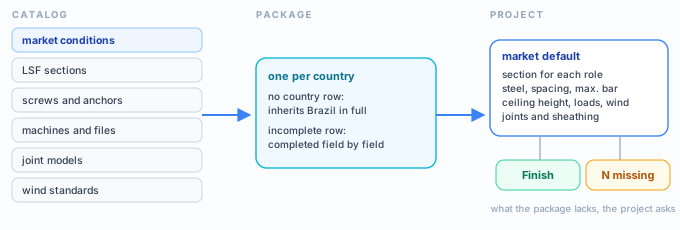
| Part of the catalog | What it gives the project |
|---|---|
| market conditions | the country row: section per role, steels, spacing, maximum bar, ceiling height, loads, pieces, joints, sheathing and standard details |
| sections | the sections with the LSF mark of the country standard, and the ones the row cites (the Brazilian hat section and strap) |
| screws and anchors | screws and anchors by country, each with its declared source |
| machines and files | the roll-formers, the sections they form and the file format they read |
| joint models | the drawing of the wall joint for each fabrication |
Price is not included. The catalog carries no price: the price of a section belongs to the company, and stays out of the package.
What the standard says
Steel, module and wind change from country to country
In the market, the standard is a variable like the section: each country has its own. The Brazil row declares NBR 14762, the Brazilian standard for cold-formed steel design; the United States row declares AISI S100; Australia and New Zealand, AS/NZS 4600. What changes with it, in practice, is the steel you can use, the module the market sells and the wind standard. The examples use only the Brazilian standards.
NBR 14762:2010 · 4.1.1.
Steel for cold-formed sections, to enter the calculation, needs an fu/fy ratio of at least 1.08 and an elongation of at least 10 % in 50 mm, or 7 % in 200 mm.
NBR 14762:2010 · 4.1.2, Table 1.
The table lists the steels with structural qualification, among them ZAR 250, 280, 320, 345 and 400. Steels with fy below 250 MPa do not appear in it.
NBR 14762:2010 · 4.1.3.
Steel outside Table 1 may be used as long as it meets 4.1.1.
NBR 14762:2010 · 4.2.
Steel without structural qualification only enters with fy of at most 180 MPa and fu of at most 300 MPa.
The default ZAR-230
The default steel in Brazil is ZAR-230, with fy 230 and fu 310 MPa. It is not in Table 1: it enters through 4.1.3, because fu/fy = 310/230 = 1.35, above 1.08. The Brazil row declares NBR 15253, the Brazilian standard for galvanized LSF sections, as the source of its steel list.
The module
The 400 or 600 mm spacing in Brazil comes from a product study declared in the row itself, and matches the 1.20 m board. The United States uses 305, 406 and 610 mm, which are 12, 16 and 24 inches. Australia and New Zealand, 450 and 600 mm.
| Market | Declared standard | Wind | Default steel |
|---|---|---|---|
| Brazil | NBR 14762 | NBR 6123 | ZAR-230 · fy 230 / fu 310 MPa |
| United States | AISI S100 | ASCE 7-22 | A1003 Type H · fy 228 / fu 310 MPa |
The chip standard is the country's; the calculation standard is the project's. The market brings sections, steel, spacing, loads and wind. The member check follows the project design standard, and the LSF checks of their own follow NBR 16970-2, the Brazilian light steel framing standard, and NBR 14762 (see What the engine does).
The 9 x 7 m house
Brazil, and nothing to fill in
The 9 x 7 m single-story house, with a 2.80 m ceiling height, is in Brazil. The header chip reads Brazil · NBR 14762, the fabrication is Roll-formed on the FRAMECAD F325iT and the button at the end of the settings reads Finish: the market left no field empty.

What the Brazil row puts in the house, role by role. In a roll-formed project, the roles the machine forms get its section on top of the market: that is why the stud comes out as the 89 mm FRAMECAD section, and not the C 90 of the Brazilian catalog.
| Role | Brazil row | In the house (FRAMECAD) |
|---|---|---|
| Stud, track | C 90x40x12x0.95 · U 92x38x0.95 | C 89x41/39x12x0.95 |
| Header | C 200x40x12x1.25 | C 89x41/39x12x1.15 |
| Blocking, gable, ridge | U 92x38x0.95 | C 89x41/39x12x0.95 |
| Chord, hip | C 90 and C 140, 0.95 | C 89x41/39x12x0.95 |
| Truss web member | C 90x40x12x0.80 | C 89x41/39x12x0.75 |
| Bracing | RET 50x0.95 strap | RET 50x0.95 strap |
| Floor joist, floor track, rim closure | C 200 and U 202, 1.25 | same as the row |
| Purlin | hat section 30x40x12x0.95 | hat section 30x40x12x0.95 |
- 600 mm: default spacing
- 6000 mm: maximum bar for track and stud
- 2.80 m: default ceiling height
- 0: missing fields: Finish enabled
Step by step
1. See where the chip came from
In a new project the market arrives by itself, in this order: the last choice made in this browser; the country of your internet connection; the country on your account. The first answer that exists wins. The choice is stored in the browser, so whoever changed the chip once sees the same country in every new project from then on.
2. Click the chip
The Project market list opens. Each row shows the country, the declared standard, the accepted spacings and the steels. The list has only the countries with their own package: Australia, Brazil, New Zealand and the United States.

3. Choose another country, if needed
A project with no walls switches at once. A project with members asks for confirmation first: it says how many members change section and how many stay as they are because the new market has no section for their role, and warns that spacing, steel, loads and wind standard change too. One Ctrl+Z undoes the whole switch.
4. Switch to the United States and open Structure
The United States row defines only two roles: track and stud, in the SSMA family. The other twelve turn amber with no default for this market: choose, and the tab gets the orange dot with 12. The steel becomes A1003 Type H and the spacing, 406 mm.
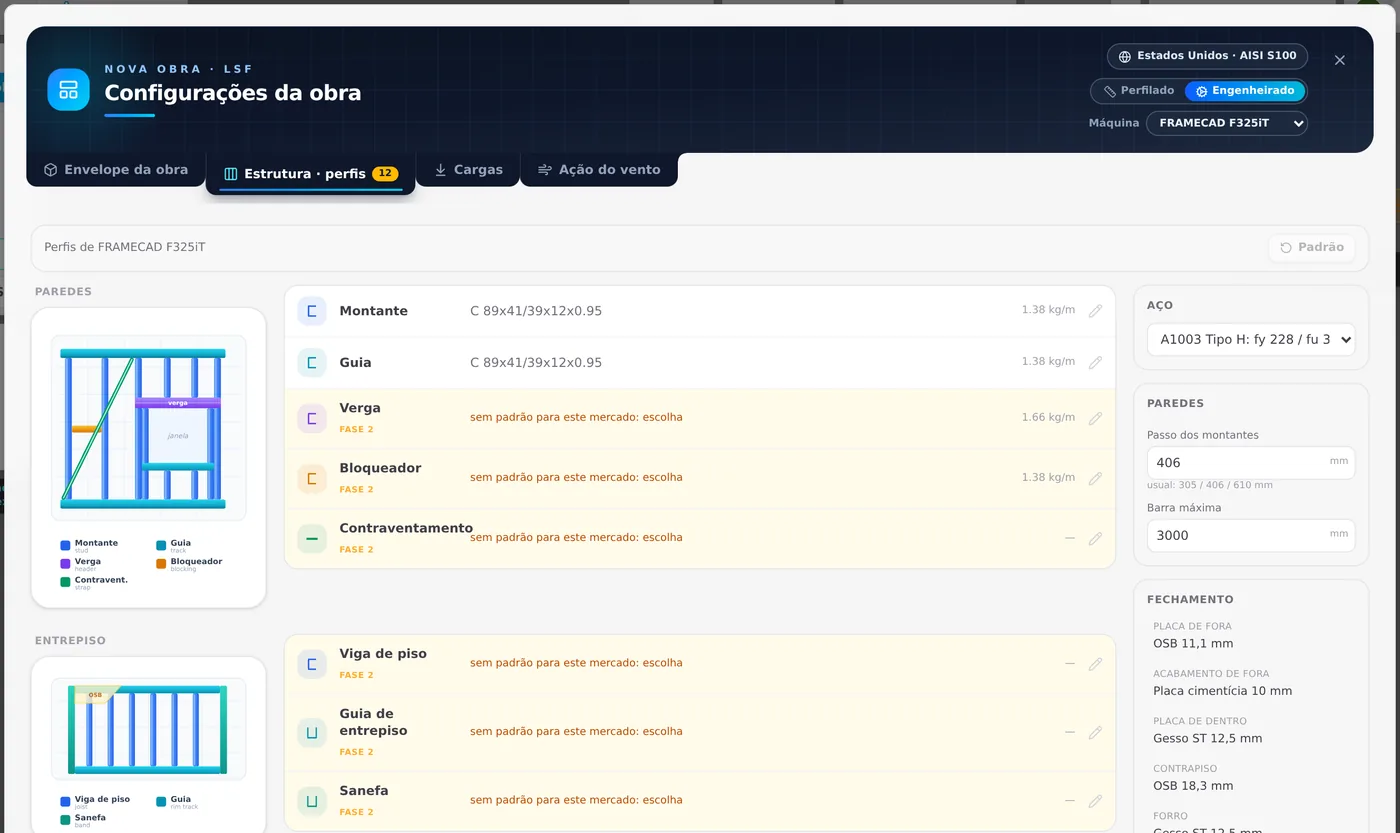
Look at the right side: the maximum bar and the whole sheathing (OSB 11.1 mm, fiber cement 10 mm, gypsum ST 12.5 mm) are the Brazilian ones. The United States row does not define these fields, and the project inherits them.
5. Change to Stick-built and go back to Structure
Without the machine on top, you see what the market really brings: 362S162-33 for the stud and 362T125-33 for the track, and nothing else. Changing the model sends the settings back to the Building envelope tab; go back to Structure to see the sections.
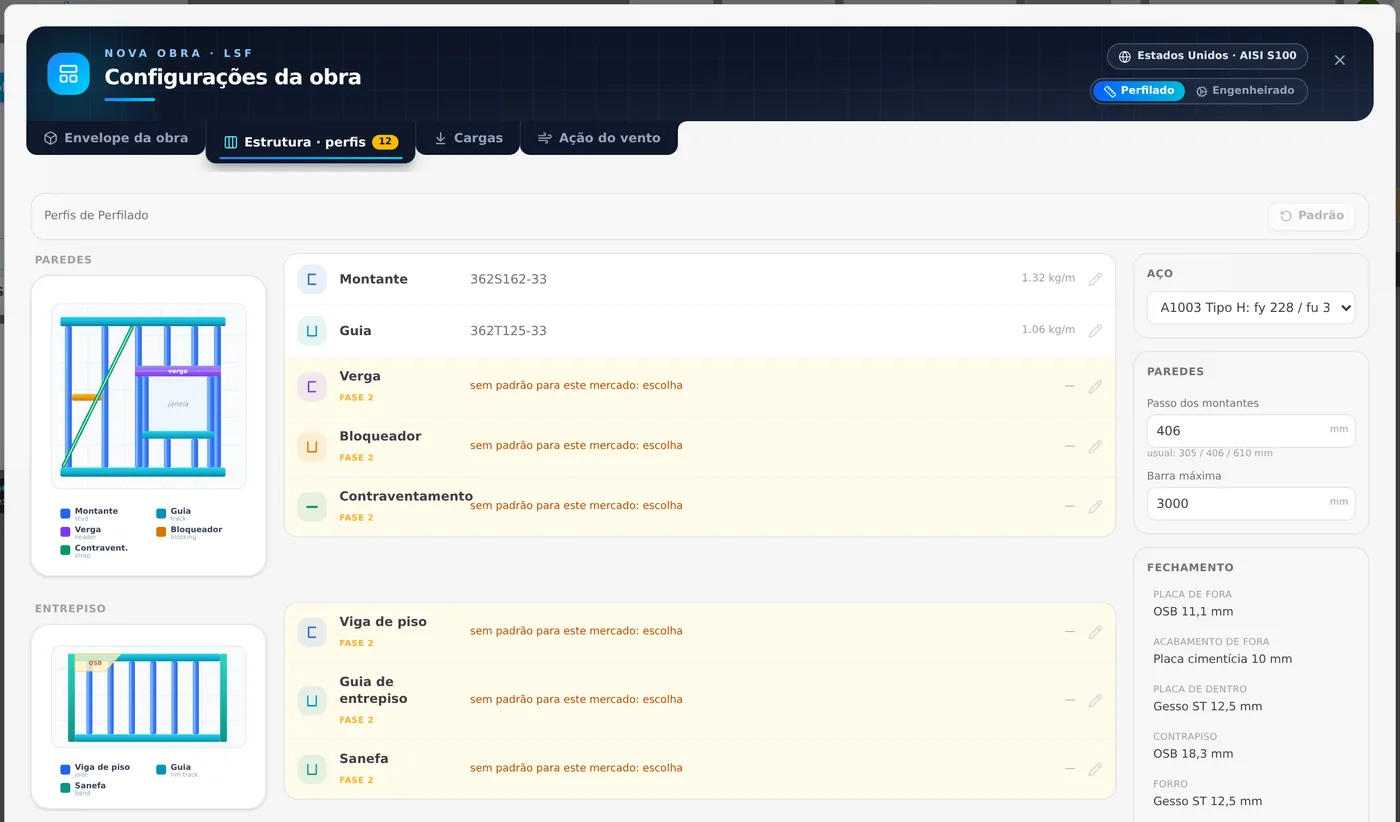
6. The button at the end reads 12 missing
On any tab, the Finish button turns gray and changes its text: 12 missing. Hover over it and the tip reads in full: "12 fields missing that the project market does not define". Changing the steel in the picker does not change the count, because the twelve missing fields are sections. The wind standard, here, came from the market: ASCE 7-22, with the United States map.
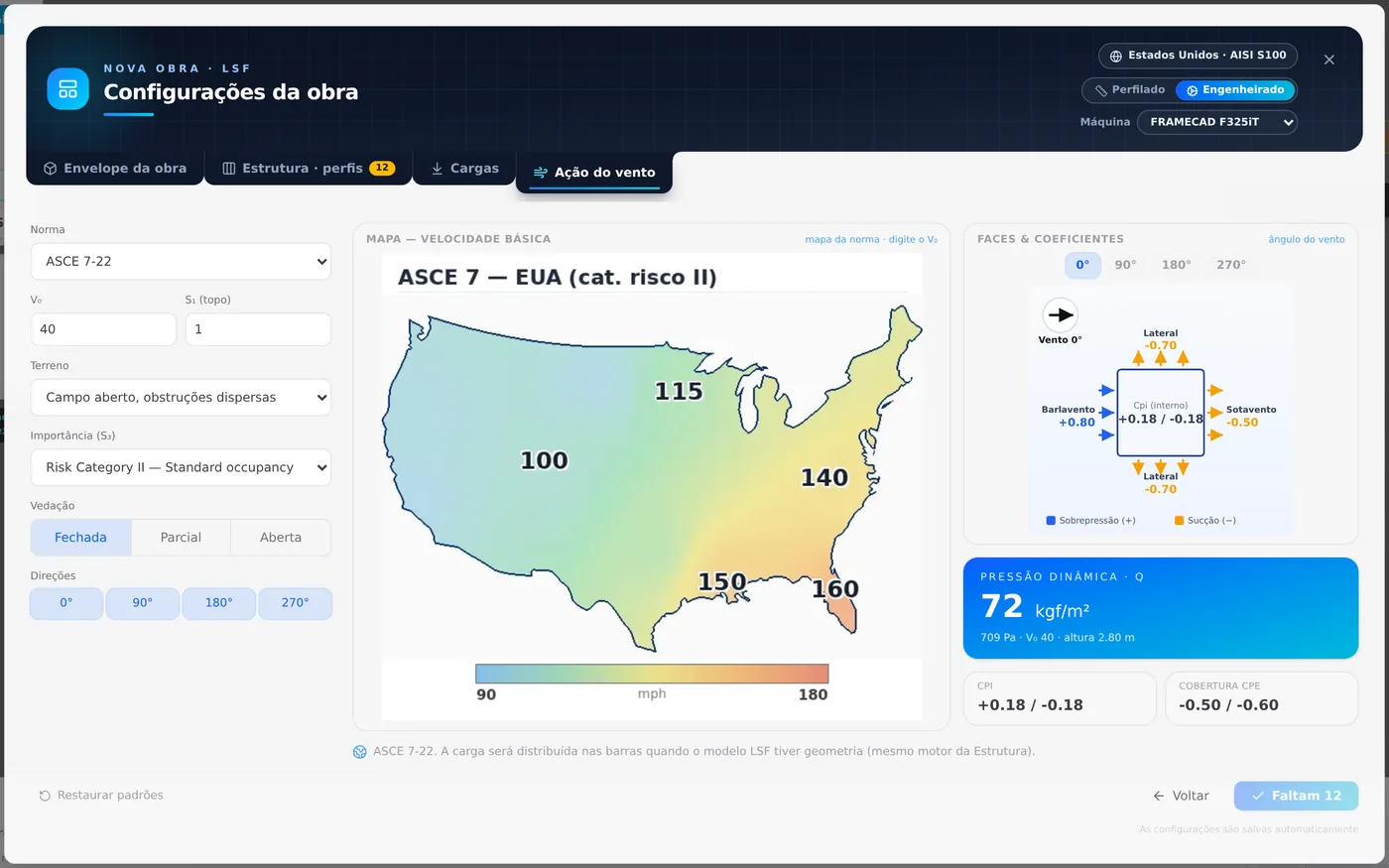
Country without a row: inherits Brazil, except the wind
The picker list has four countries, but the project can arrive with any other: through the internet connection of whoever opened it, or through the country on the account. Take Spain, which has no package of its own. It inherits the whole Brazil package: the 14 roles, the ZAR steels, the 600 mm spacing and the loads. Only one thing does not come along.
7. Open Wind action
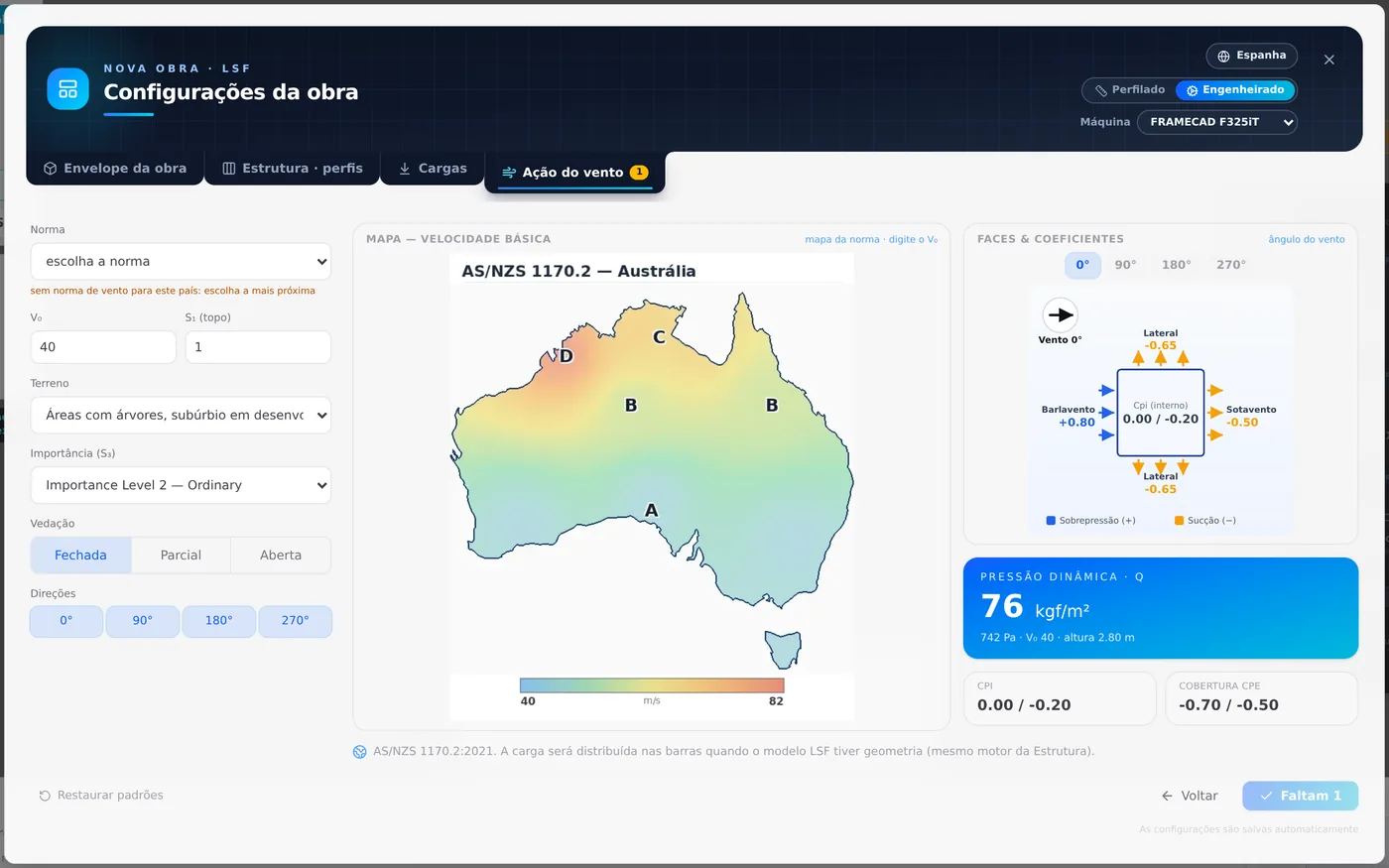
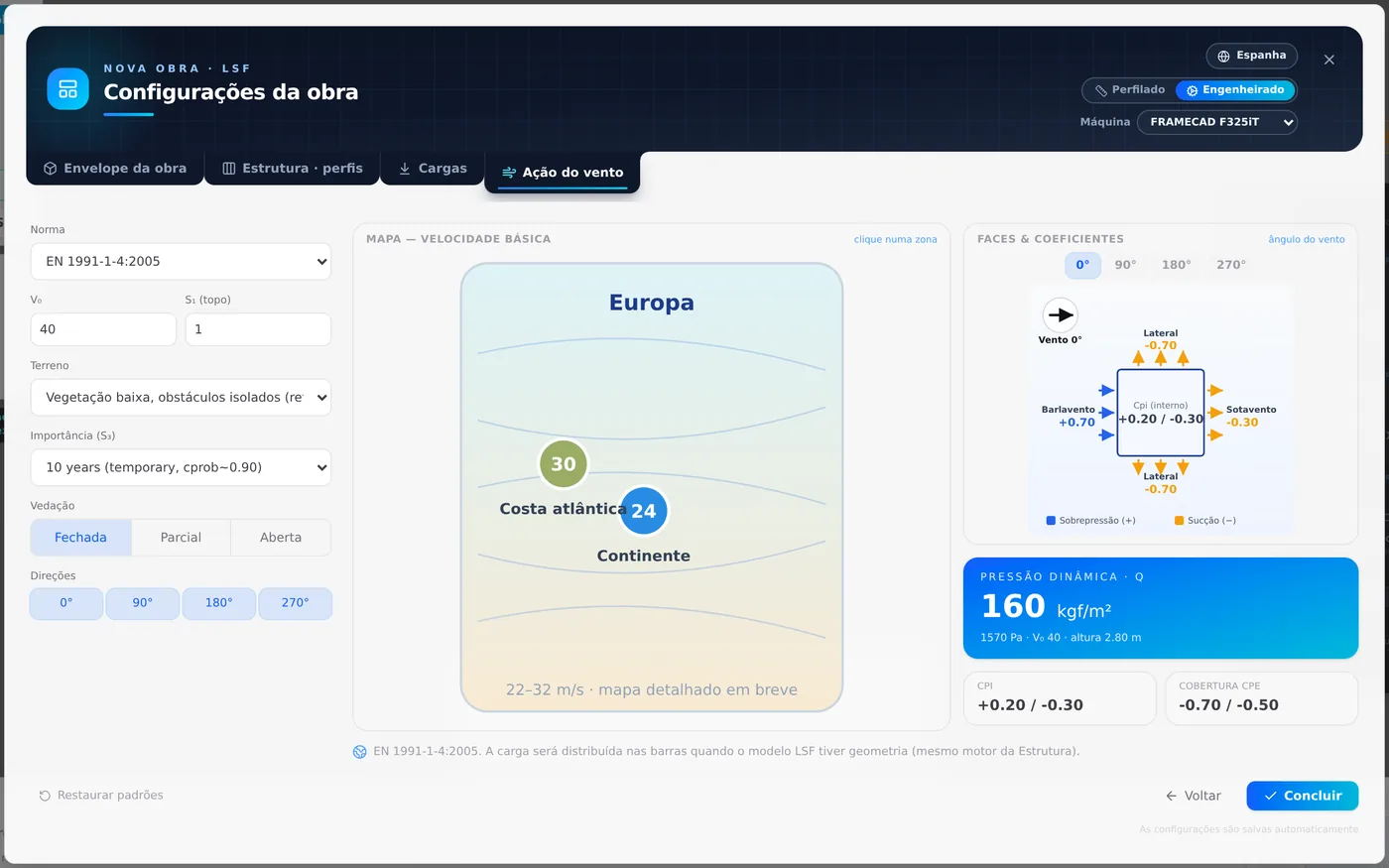
The wind standard is not inherited: it is the one of the project country, and EN 1991-1-4, which covers all of Europe, does not come in by itself. The Standard field turns amber, with choose the standard, and the button reads 1 missing.
8. Choose the standard, then check the V₀
Choosing the standard clears the missing field. Next, check the V₀ and enter the one for the project site: the EN map shows Europe between 22 and 32 m/s. The pressure in the blue box follows the chosen standard and V₀.
Standard and V₀ go together. Choose the standard first, then the V₀, and only then read the pressure in the blue box.
Shortcuts
- CFG↵
Project settings
Opens the project wizard: envelope, structure, loads and wind.
- 2
Structure tab
Goes straight to the Structure tab of the wizard.
in the project wizard
- 4
Wind tab
Goes straight to the Wind tab of the wizard.
in the project wizard
- Ctrl+Enter
Next or finish
Goes to the next step. On the last one, finishes.
in the project wizard
The catalog, table by table
Brazil and the United States side by side
Everything on this page was read from the CalcSteel catalog in October 2026. A field marked BR is inherited from Brazil.
| Field | Brazil | United States |
|---|---|---|
| Declared standard | NBR 14762 | AISI S100 |
| Roles with a section | 14 of 14 | 2 (SSMA) |
| Sections in the catalog | 32 | 283 |
| Steels | ZAR 230, 250, 280, 345 | A1003 H, A653 SS33, SS50 |
| Spacings (mm) | 400, 600 | 305, 406, 610 |
| Default spacing | 600 | 406 |
| Default ceiling height | 2.80 m | BR |
| Loads, maximum bar | defined | BR |
| Sheathing, standard details, pieces | defined | BR |
| Wind | NBR 6123 | ASCE 7-22 |
| Own screws | 6 | 2 |
Inheritance, the rule
A country without a row receives the whole Brazil row. A country with an incomplete row is completed field by field; pieces and joints, item by item. The section per role is not inherited: a role with no section from the country stays empty and counts as missing.
The catalog section
In Brazil, 15 C sections (90, 140 and 200 mm) and 15 U sections (92, 142 and 202 mm), from 0.80 to 2.00 mm, plus the hat section and the strap the row cites. In the FRAMECAD, Howick and SSMA sections, the catalog thickness is already the base steel, without the zinc.
Project units. In any market, the project works in millimeters: spacing, section and dimension.
Machines, files, details and screws
| Machine | Sections it forms | File | Note |
|---|---|---|---|
| FRAMECAD F325iT | C 89x41/39x12 in 0.55, 0.75, 0.95 and 1.15 mm | FRAMECAD Detailer CSV | machine of the new project; default sections per role |
| Howick FRAMA 3200 | 27 Howick sections, from 45 to 150 mm, in 0.75, 0.95 and 1.15 mm | Howick v1 | 13 and 34.1 mm holes |
The machine is the same in any market; its sections come in on top of the market in the roles it forms.
| Country | Screws and anchors in the catalog |
|---|---|
| Brazil | pan head 4.2 x 19 · hex head 4.8 x 19 · bugle head 3.5 x 25 and 4.2 x 32 · wing tip 4.2 x 32 · Glasroc 3.5 x 35, each with a manufacturer or course handout as source |
| United States | #8 pan head · 1/2" anchor |
| Australia, NZ | 10g hex head |
Brazilian joints, as they are in the catalog.
T, X and corner joints: 4.8 x 19 hex head screw in the web, staggered, every 200 mm. Track splice: 4.2 x 19 pan head, 4 per side, 150 mm lap. Stud in track: pan head, in the flange, 2 per end. The declared source is a course handout. In a roll-formed project, the wall joint follows the machine model (FRAMECAD default).
Common mistakes and refusals
When the button reads N missing
"N missing" counts the fields the market did not define and you have not filled in yet. Each missing field lives on a tab, which gets the orange dot with the number. Filling in the field clears it at once. On a new roll-formed project on the FRAMECAD:
| Project market | Missing | What, and where to fill it in |
|---|---|---|
| Brazil | 0 | nothing |
| India (no row) | 0 | inherits Brazil, and IS 875-3 lists India |
| United States | 12 | section for 12 roles · Structure |
| Australia, New Zealand | 12 | section for 12 roles · Structure |
| Spain, Portugal, Argentina, Mexico, Chile | 1 | wind standard · Wind action |
- I changed the steel and the number did not drop. The steel only clears a missing steel. Missing sections go away one by one, role by role, on the Structure tab.
- Every new project opens in another country. The last choice in the picker is stored in the browser and wins over the internet country and the account country. Change the chip back once: the new choice takes over.
- I switched countries and want to go back. A market switch is a single Ctrl+Z step: it brings back sections, steel, spacing, loads and wind as they were. After switching, read the Structure tab again.
The countries that are not on the list
Only four countries appear in the picker. A fifth country only reaches the project through the internet connection of whoever opened it or through the account country, and then it inherits Brazil. That has two readings, and both matter to the engineer:
What inheritance guarantees
The project is never left without sections, steel, loads or joint rules. Every country receives a complete package, and the project opens ready to draw.
What to check
That this package is sold in the country. A project in Portugal opens with Brazilian sections, ZAR steel and screws, and Finish only asks for the wind standard. Check section, steel and screw with the local supplier.
Project outside Brazil: check the package with the local supplier. The picker brings four markets; in the ones outside Brazil, stud and track are the country's, and the rest of the row comes from the Brazilian package. Replace whatever the local supplier does not sell.
| Message on screen | When it appears |
|---|---|
| Detecting the market… | new project, while the catalog arrives |
| Market not set | amber chip: the project has no country yet |
| We could not tell your country | no saved choice, no country from the internet connection and no country on the account; choose from the list |
| Could not read the catalog | the connection failed; try again |
An old project, saved before the market existed, opens as Brazil and with nothing missing. The market is not recalculated on opening: the project keeps the country and the missing fields it had.
What the engine does
The market fills in; the calculation reads the settings
The market acts once, when the project receives the package or switches country. It writes numbers into the project settings. From then on, the calculation reads the settings as they are, and does not ask which country they came from.
| From the market | Does it reach the calculation? |
|---|---|
| Section of each role | yes it is the section of the drawn members |
| Steel | yes fy and fu of the members |
| Spacing, maximum bar, ceiling height | yes through the geometry the drawing generates |
| Board loads | yes loading of the walls and the ceiling |
| Wind standard | yes the wind pressure |
| Joints, sheathing, standard details | yes in the tools that draw the pieces |
| Declared standard on the chip | label identifies the country; the calculation follows the project design standard |
NBR 16970-2:2022 · 7.2.
It is the reference that the restraint checks of the LSF engine declare, in any market.
NBR 14762:2010 · Annex D, Table D.2.
Web crippling by D.2. The only row that comes from outside is the one for the plain U with the flange connected, which D.2 does not have: the engine uses the equivalent AISI S100 table, and the coefficients match those of D.2.
Shortcuts
- Ctrl+Enter
Calculate the project
Sends the project to the engine, like the Calculate button.
Summary
The path, in one line
Project settings → header chip → check the country → if it is another, choose it from the list → Structure: choose the section for each amber row → Wind action: choose the standard and the V₀ of the site → Finish.
The example so far
- BR: project market
- 14: roles with a section
- 230 MPa: fy of ZAR-230
- 0: missing fields