LSF (Light Steel Framing)
Steel and sections
What a stud is made of: each market's galvanized steel, the thickness that goes into the calculation, the members with the app's names and the roll-former section. The page also teaches how to read a section name and shows the three ways a thin section can lose stability.
Overview
A meter of stud weighs less than a kilo and a half
The default stud of a new CalcSteel project is a C with an 89 mm web and 0.95 mm sheet, weighing 1.38 kg per meter. A 2.80 m stud comes in under 4 kg. Pieces like this put up a two-story house, and the secret is not an exotic steel: it is the combination of three things that this page opens one by one.
The first is the steel, with a known strength guaranteed by the product standard. The second is the shape: bends and lips give stiffness to a sheet that, flat, would be a leaf. The third is the protection: the zinc that lets the thin sheet last as long as the house.
The standards showed which standard each check comes from. Here the subject is the material that reaches the site: what is written in the section name, which number the engine uses for it, and why the same wall can have different sections in Brazil and in Australia.
- 230 MPa: minimum yield of the ZAR steel used for LSF in Brazil
- 0.95 mm: the most common wall thickness
- 6 m: the commercial bar length the app uses in Brazil
- 600 mm: default stud spacing in BR, AU and NZ
Where the numbers come from. The steel, section, spacing and bar values on this page come from the CalcSteel catalog as of October 2026, the same one the project wizard reads. The coating and market-practice values cite their source at the end.
Two families of sections.
The app catalog holds the Brazilian stick-built series (Ue 90, 140 and 200, U 92, 142 and 202), bought in bars, and the sections of the roll formers (FRAMECAD, Howick), formed at the factory from the coil. A new project starts roll-formed, on the FRAMECAD.
LSF steel
Two numbers define the steel: fy and fu
Pull a strip of steel and it stretches in proportion to the force, up to a point where it starts to yield: it stretches without the force rising. The stress at that point is the yield strength, fy. Keep pulling and, after yielding, the steel still gains some strength until it breaks; the highest stress reached is the tensile strength, fu. The first number tells when the piece no longer returns to what it was; the second, when it breaks apart.
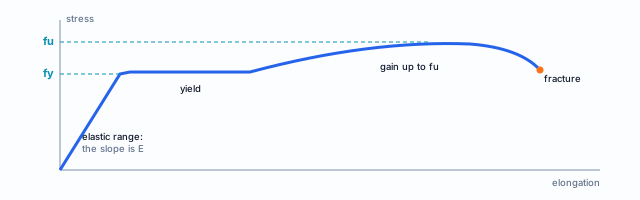
Where each number comes in
Almost every member check starts from fy: stud compression, header bending, buckling. fu appears where the piece can break without yielding first: in the net section under tension and in connections, where the sheet is torn or crushed by the screw. The fu/fy ratio shows how much the steel still holds after it yields.
The steel of Brazilian LSF is ZAR, high-strength zinc-coated sheet, and the number after the letters is fy in MPa. The market practice recorded by CBCA (the Brazilian Steel Construction Center) is not to go below 230 MPa, ZAR 230.
| Steel in the app | fy | fu | Market |
|---|---|---|---|
| ZAR-230 | 230 | 310 | BR |
| ZAR-250 | 250 | 330 | BR |
| ZAR-280 | 280 | 360 | BR |
| ZAR-345 | 345 | 430 | BR |
| G300 Z275 | 300 | 340 | AU, NZ |
| G550 AZ150 | 550 | 550 | AU, NZ |
| A1003 H | 228 | 310 | USA |
| A653 SS33 | 230 | 310 | USA |
| A653 SS50 | 345 | 448 | USA |
Values in MPa, from the engine's materials catalog. The wizard shows each steel as "ZAR-230: fy 230 / fu 310 MPa".
Each market has its steel, and the project starts with it
The steel is not a loose choice: it comes with the country. When you create an LSF project, its market sets the list of steels on offer and the one already selected. In Brazil, the four ZAR grades, with ZAR-230 selected. In Australia and New Zealand, the two AS 1397 steels, with G300 selected and G550 on the list. In the USA, the ASTM steels, with A1003 selected.
G300 and G550, the AS 1397 steels
The "G" stands for grade and the number is the minimum fy in MPa. G550 is a cold-rolled high-strength steel: the BlueScope data sheet for TRUECORE, an LSF steel sold in Australia, guarantees a minimum yield of 550 MPa, with an AZ150 coating.
In the app catalog G550 has fu equal to fy, that is, almost no reserve after yielding. That is why AS/NZS 4600 gives these steels their own rule, in clause 1.5.1, and the engine applies the standard of the project's market.
Markets without their own steel
Not every country has its own row in the markets catalog. When it is missing, the project starts from the Brazil definition, with its default steel. You change the steel later, in the Structure tab, if the project calls for another.
When the country has its own row but leaves one key blank, only that key comes from Brazil. That is the case of the commercial bar length in Australia, New Zealand and the USA, shown in Commercial bar and spacing by market.
1. Where to see and change the steel
In the project wizard, Structure tab, the Steel block lists the market's steels with fy and fu in MPa. The selected one is the market default.
2. Change it only for a reason
A grade above ZAR-230 is only worth it if the section supplier guarantees it in writing. The engine designs with the fy you chose, not with what arrived on site.
3. Check it against the supplier
In the app's materials catalog, each steel carries the name and standard of the product, such as "ZAR-230 (NBR 6355)" or "G550 AZ150 (AS 1397)". That is what the engineer checks against the mill certificate and the invoice for the sections.
The product standard, not the design standard.
NBR 7008 (zinc-coated sheet), NBR 15253 (LSF sections) and NBR 6355 (cold-formed sections) say what the steel and the section are. AS 1397 plays the same role in Australia and New Zealand, ASTM A653 and A1003 in the USA. The design comes from NBR 14762, AS/NZS 4600 and AISI S100, as in The standards.
Shortcuts
- CFG↵
Project settings
Opens the project wizard: envelope, structure, loads and wind.
- 2
Structure tab
Goes straight to the Structure tab of the wizard.
in the project wizard
Zinc and durability
The sheet is thin because the zinc protects it
A sheet under one millimeter has no thickness to lose to rust. What makes it last is the metallic coating applied at the mill, by hot dipping, on both faces of the coil before it becomes a section. Zinc keeps air and moisture away from the steel and, where the coating is scratched, corrodes in place of the steel.
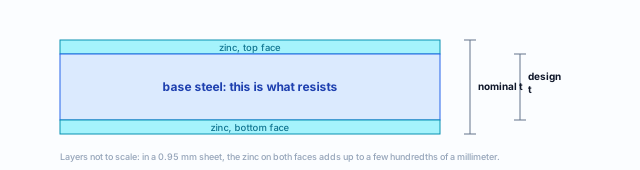
How to read the coating class
The class gives the coating mass per m² of sheet, both faces added. In Z275, the Z stands for zinc and 275 is grams per m²: about 137 g per face, close to 19 µm of zinc on each side. In AZ150, the coating is an aluminum and zinc alloy, 150 g/m² on both faces.
In Brazil, CBCA records a minimum of 180 g/m² of zinc under the NBR, and 275 or 350 g/m² under SINAT guideline no. 003, depending on how aggressive the environment is.
| Class | What it is | Where it appears |
|---|---|---|
| 180 g/m² | zinc, NBR minimum | LSF in Brazil |
| Z275 | zinc, 275 g/m² | SINAT; G300 in the app |
| 350 g/m² | zinc, higher class | SINAT, aggressive environment |
| AZ150 | aluminum and zinc, 150 g/m² | G550 in the app |
Holes and cuts remove the zinc. A cut edge and a hole drilled on site are left uncoated. CBCA records the site rule: the section may be cut or drilled, as long as the corrosion protection is restored. On the roll former, the holes come out of the machine, planned in the design.
Thickness
0.95 in the name, 0.914 in the calculation
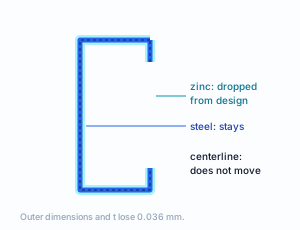
Zinc protects, but it carries nothing. That is why NBR 14762 (clause 3.1.12) defines the design thickness as that of the steel sheet without the coating. NBR 15253 sets how much to deduct: 0.036 mm, both faces added. The CBCA Steel Framing engineering manual works it out for the most common section: 0.95 minus 0.036 gives 0.914 mm.
| Ue 90x40x12x0.95 | nominal | design |
|---|---|---|
| thickness t | 0.95 | 0.914 |
| web | 90 | 89.964 |
| flange | 40 | 39.964 |
| lip | 12 | 11.964 |
| self-weight | 1.426 kg/m, always the nominal |
This is the CBCA manual's convention, which the engine follows: the outer dimension loses the coating of both faces and the centerline stays where it was. Area, inertia and strength come from the design section; the self-weight comes from the catalog, with the zinc, because zinc has weight.
Machine catalogs: already base steel
The FRAMECAD and Howick sections and the American SSMA catalog record the base steel thickness, without coating. The 0.95 of the FRAMECAD C is already 0.95 mm of steel, and the engine deducts nothing from it. The catalog states this section by section, and that is the data the engine decides by.
Why so thin
Strength comes from fy and from the shape: the web keeps the flanges apart, the lips hold the flange edges. Thickening the sheet costs steel along the whole length. CBCA records 0.80, 0.95 and 1.25 mm as the usual thicknesses: 0.95 in walls, 1.25 in beams and columns.
Members and roles
A section does not know what it is; the role tells it
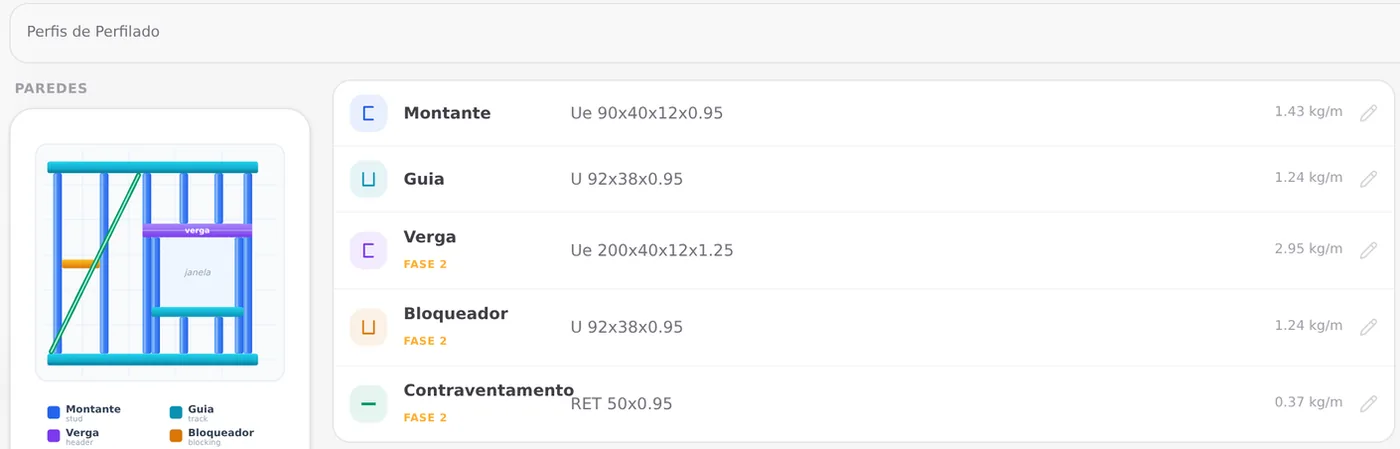
The same C can be a stud, a track or a truss chord. What changes is the role of the piece in the structure, and the app picks the section, the deflection limit and the check by role. The table uses the names of the Structure tab and, for those who work with overseas suppliers, the terms each market's catalog records.
| Role in the app | What it does | Family | AU / NZ | USA |
|---|---|---|---|---|
| Stud | upright piece of the wall; takes the load to the ground | C, CART | stud | stud |
| Track | holds the studs at top and bottom | U, C | plate | track |
| Header | bridge over doors and windows | C | lintel | header |
| Blocking | lateral bracing between studs | U, C | nogging | blocking |
| Bracing | strap in tension, in an X or a diagonal | RET | flat strap | |
| Floor joist | the floor of the upper level, from support to support | C | ||
| Floor track | receives the floor joists at the edge | U | ||
| Rim closure | closes the edge of the floor | U | ||
| Chord | top and bottom member of the truss | C | ||
| Web member | diagonal inside the truss | C | ||
| Purlin | carries the roofing over the trusses | CART, U | ||
| Ridge, hip / valley, gable | where the roof planes meet, and the gable end | U, C |
Market terms as each country's catalog records them; an empty cell is a role with no term of its own recorded. Each piece of the wall in detail in Anatomy of a wall.
Track: U in bars, C on the machine.
In the Brazilian stick-built series the track is a U, without lips, slightly wider than the stud: U 92 for the Ue 90. On the roll former the track is the same C as the stud, with the lip cut where the stud arrives.
Member label.
In the 3D view and the cut list, the label prefix tells the role: KO and JK are the opening studs (king and jack), CT and CB the cripple studs, VG the header, HT the head track, SL the sill. Anatomy of a wall shows each one in the wall.
The sections a new project starts with
A new LSF project starts roll-formed, on the FRAMECAD F325iT roll former. The sections for each role come in two layers: first those of the project's market, then, on top, those the machine defines. Roles the machine does not form, such as the strap, the hat-section purlin and the floor, keep the market's section.
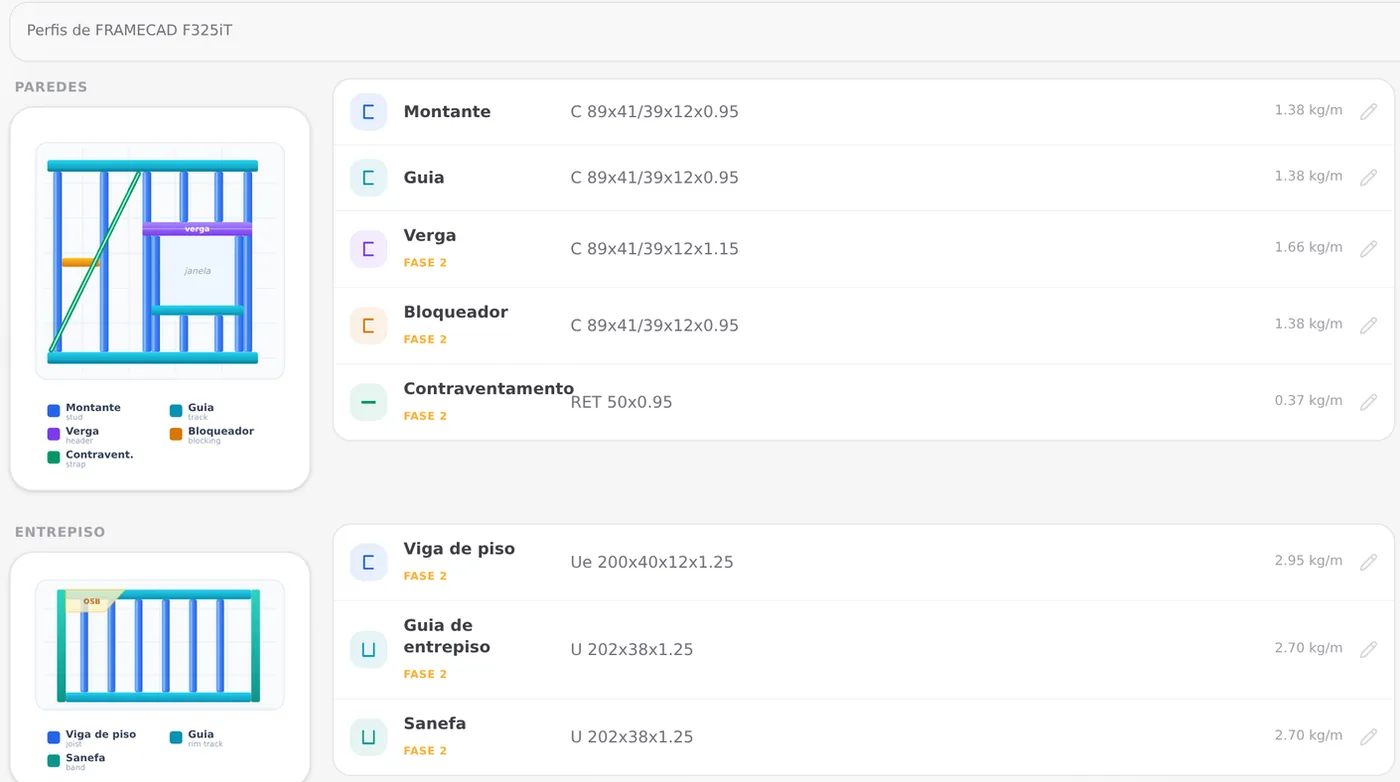
| Role | Section in a new project (BR, FRAMECAD) | Set by |
|---|---|---|
| Stud, track, blocking, chord | C 89x41/39x12x0.95 | the machine |
| Header | C 89x41/39x12x1.15 | the machine |
| Truss web member | C 89x41/39x12x0.75 | the machine |
| Gable, ridge, hip | C 89x41/39x12x0.95 | the machine |
| Bracing | RET 50x0.95 | the market |
| Purlin | CART 30x40x12x0.95 | the market |
| Floor joist | Ue 200x40x12x1.25 | the market |
| Floor track, rim closure | U 202x38x1.25 | the market |
Switching model keeps what you edited. If you switch the project from roll-formed to stick-built, the app stores the machine's sections and puts in the market's; when you switch back, it restores the ones you had. The Default button in the Structure tab clears only the current model.
Shortcuts
- CFG↵
Project settings
Opens the project wizard: envelope, structure, loads and wind.
- 2
Structure tab
Goes straight to the Structure tab of the wizard.
in the project wizard
The FRAMECAD section
One C, four thicknesses
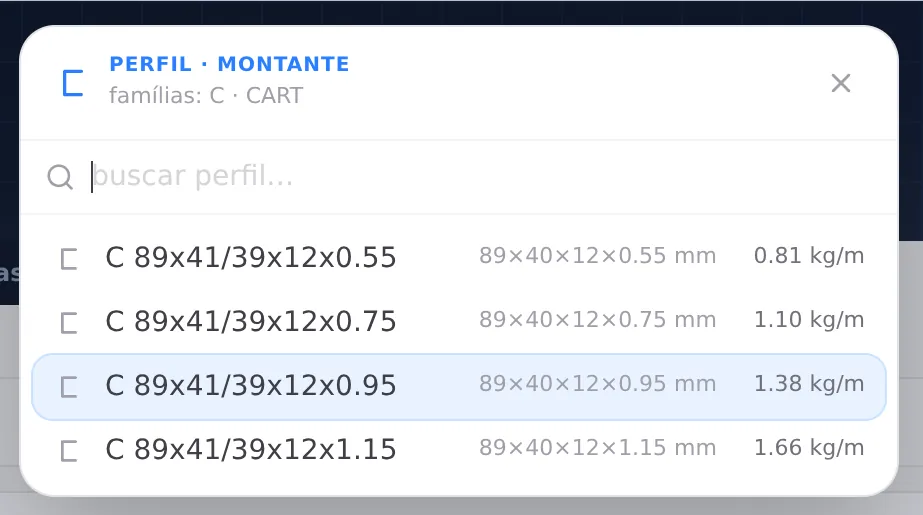
The roll former forms a fixed section: the F325iT makes the C with an 89 mm web and a 12 mm lip. What varies is the coil fed in, and with it the thickness. The app catalog has four, from 0.55 to 1.15 mm, and the machine accepts sheet from 0.55 to 1.2 mm. In a roll-formed project, the section picker for the roles the machine makes lists only these four.
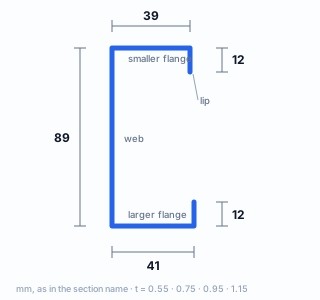
| C 89x41/39x12 | t (mm) | kg/m |
|---|---|---|
| web member | 0.75 | 1.096 |
| wall, chord | 0.95 | 1.381 |
| header | 1.15 | 1.662 |
| in the catalog | 0.55 | 0.808 |
Flanges of 41 and 39
The two flanges are not the same width. With one 2 mm narrower than the other, one C fits inside the other: F325iT literature calls the section boxable. That is what lets two pieces close into a box with the same section.
One section for everything simplifies the factory: every C piece comes off the same machine profile, and only the coil changes thickness.
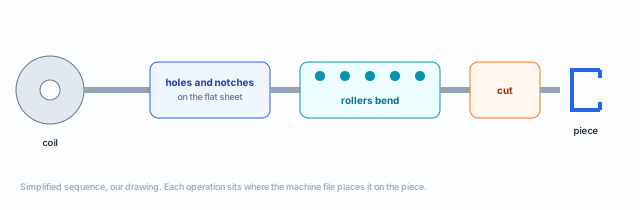
From coil to finished piece, with holes and cuts
The roll former takes the strip from the coil, punches and notches the sheet while it is still flat, bends the strip little by little through rollers until it becomes a C, and cuts it to length. Each piece comes out with a name, a length and the operations at the points the design called for. That is why the machine file is part of the design: what is not in it is not made.
| Operation | Name on the machine | What for |
|---|---|---|
| Swage | SWAGE | presses the end of the C slightly smaller, so it slides inside another C |
| Dimpled hole | DIMPLE | screw hole with a recess, so the screw head does not lift the board |
| Lip cut | LIP NOTCH | removes the lip where another piece arrives or crosses |
| Web notch | WEB NOTCH | cuts away the web so two pieces can overlap |
| Service hole | SERVICE HOLE | large hole in the web for pipe and wire |
| Bolt hole | BOLT HOLE | hole for a through bolt or an anchor |
| Chamfer | CHAMFER | cuts the end at an angle, on the truss web member |
Four ways for two pieces to meet.
With a single section, every connection is C to C, and every meeting is one of these: socket (the swaged end slides into the other C, which loses its lip there), overlap (notched web and cut lip), bearing and crossing. Whatever does not fit is swaged, and the piece runs through. Connections are covered in Connections panel and the machine file in Roll-former file.
How to read a section name
Shape letter, dimensions in mm, thickness at the end
The section name in the app follows the logic of cold-formed section designations: first the letter for the shape of the section, then the outer dimensions in millimeters, from largest to smallest, and finally the thickness. The thickness uses a decimal point, as in the catalog.
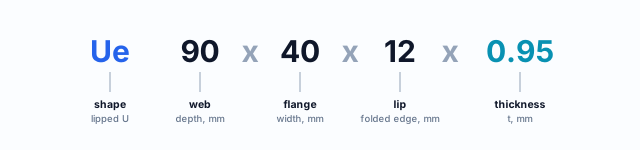
| Name in the app | Shape | How to read it | kg/m |
|---|---|---|---|
| Ue 90x40x12x0.95 | lipped U | web 90, flange 40, lip 12, sheet 0.95 nominal | 1.426 |
| U 92x38x0.95 | plain U | web 92, flange 38, no lip: the track for the Ue 90 | 1.239 |
| C 89x41/39x12x0.95 | machine C | web 89, flanges 41 and 39, lip 12, base steel 0.95 | 1.381 |
| C 89x41/39x10x0.75 | machine C | the Howick section of the AU market: lip 10, base steel 0.75 | 1.075 |
| RET 50x0.95 | flat strip | strap 50 mm wide, sheet 0.95 | 0.373 |
| CART 30x40x12x0.95 | hat section | depth 30, flange 40, lip 12, sheet 0.95 | 0.999 |
| 362S162-33 | SSMA (USA) | the American catalog code, recorded as it comes | 1.325 |
Commercial bar and spacing by market
The bar length and the distance between studs
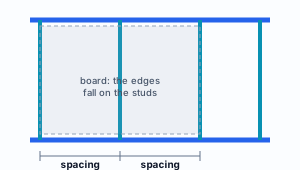
Two market numbers change the wall without changing the standard. The maximum bar is the longest length of section that can be bought or formed in one piece: a track longer than that is spliced. The spacing is the distance between stud centerlines, which usually matches the width of the sheathing board so that every joint falls on a stud.
| Market | Default steel | Steels offered | Default spacing | Usual spacings | Max. bar | Market stud |
|---|---|---|---|---|---|---|
| Brazil | ZAR-230 | ZAR-230, 250, 280, 345 | 600 | 400, 600 | 6,000 | Ue 90x40x12x0.95 |
| Australia | G300 | G550, G300 | 600 | 450, 600 | 6,000* | C 89x41/39x10x0.75 |
| New Zealand | G300 | G550, G300 | 600 | 450, 600 | 6,000* | C 89x41/39x10x0.75 |
| USA | A1003 H | A1003 H, A653 SS33, SS50 | 406 | 305, 406, 610 | 6,000* | 362S162-33 |
Dimensions in mm, from the app's markets catalog as of 22 Oct 2026, for track and stud. * Value inherited from the Brazil definition. In the USA, the three spacings are 12, 16 and 24 inches.
Where the spacings come from
In Brazil, 400 and 600 mm are the local practice, with 600 selected. In Australia, the TRUECORE data sheet limits spacing to 600 mm. In the USA, the spacings are those of construction in inches.
Spacing is the first number you adjust when the stud does not pass: a smaller spacing shares the wall load among more studs.
1. Where to adjust
Structure tab of the wizard: Stud spacing (200 to 1,200 mm, with the market's usual values in the hint) and Maximum bar (1,000 to 12,000 mm). The bar applies to track and stud.
Shortcuts
- CFG↵
Project settings
Opens the project wizard: envelope, structure, loads and wind.
- 2
Structure tab
Goes straight to the Structure tab of the wizard.
in the project wizard
Local, distortional and global
Three ways a thin section gives way before it yields
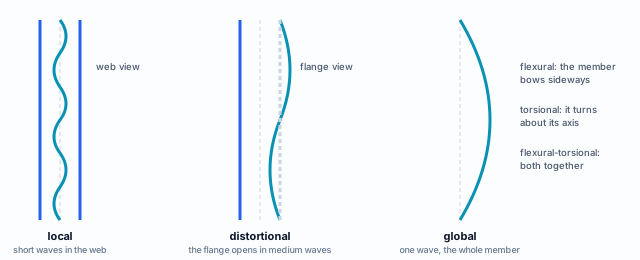
The standards showed the three modes on the cross-section. Here they appear along the member, because the most useful difference between them is the wavelength: the shape the section takes as it gives way repeats over short, medium or full-length stretches, and that tells you what restrains each one.
Local
One plate of the section, usually the web, wrinkles between the bends. The member does not fail: the bent edges keep carrying load and the wrinkled middle stops counting. The standard handles this through the effective width, which removes from the area the part that does not work.
Distortional
The flange and lip together rotate about the bend with the web, and the section changes shape. It is the typical mode of lipped sections: too short, the lip does not hold the flange. It depends on the proportions of the section, not on the member length.
Global
The whole member moves without the section changing shape: flexure, torsion or both. It depends on the length between braced points, and that is what blocking, strap and screwed sheathing shorten.
Where each mode enters the check
The engine checks all three modes on every cold-formed section, under the NBR 14762 clauses for a Brazilian project. The member strength is the lowest among the modes checked. The calculation, with the numbers of a real stud, is in the Design pages, in Studs; here is the map.
| Mode | In compression | In bending | How the engine handles it |
|---|---|---|---|
| Local | 9.7.2, with the effective area | 9.8.2.1, with the effective modulus | effective width of the section's plates (9.2.3) |
| Distortional | 9.7.3 | 9.8.2.3 | waived when the section meets Tables 11 and 14; otherwise, calculated by Schafer's closed form, without counting the stiffness the sheathing gives the flange, on the safe side |
| Global | 9.7.2: flexural, torsional, flexural-torsional | 9.8.2.2: lateral-torsional buckling | flexural, torsional and flexural-torsional buckling, and lateral-torsional buckling in bending |
What the designer controls
- Local: the thickness; a thicker sheet wrinkles later
- Distortional: the section and the lip; the mode is about proportions
- Global: the bracing; blocking, strap and board shorten the wave
- Global: the spacing; less load per stud
Why strong steel is not enough
In all three modes, the critical load depends on the modulus E and on the geometry, and E is the same for every LSF steel in the app. A higher fy only pays off if the member gets close to yielding before it gives way. In a slender stud, instability governs, and swapping ZAR-230 for ZAR-345 changes little.
Reading the result.
Read the check by the mode that governed. A stud failing by global buckling asks for bracing or a smaller spacing; by distortion, another section or a thicker sheet; by local buckling, a thicker sheet. That is the reasoning the Design pages work through with numbers.
Summary
The section, in one line
Steel with guaranteed fy (ZAR, G300, G550, A1003) → zinc on both faces, left out of the calculation → sheet bent into a C for shape, not thickness → a role in the structure → a name that gives shape, dimensions and thickness → three instability modes, checked under the market's standard.
Five ideas to keep
- fy governs the member; fu, the hole and the connection
- Zinc protects and carries nothing: 0.95 becomes 0.914
- Machine catalogs already record the base steel
- The role picks the section, and the machine goes on top of the market
- In a slender stud, instability matters more than the steel
The house so far
- ZAR-230: default steel in Brazil
- C 89: x41/39x12x0.95, the stud
- 600 mm: stud spacing
- 6 m: commercial bar
Sources for this page.
ABNT NBR 14762:2010 (3.1.12, 9.2.3, 9.7.2, 9.7.3, 9.8.2.2, 9.8.2.3, Tables 11 and 14) and NBR 15253:2014 (note to the tables: t_r = 0.036 mm), cited by clause. CBCA, "Componentes leves" (2015): ZAR 230, usual thicknesses, 180 g/m² coating and SINAT no. 003, restoring the protection. CBCA Steel Framing manual: Engenharia (2016): t = 0.914 mm. BlueScope, TRUECORE G550 data sheet (AS 1397, AZ150, 550 MPa). GalvInfo Center and SSAB: coating class by mass on both faces and thickness per face. FRAMECAD F325iT technical literature: machine operations and boxable section. AGA CAD: definition of swage, dimple and service hole. Steels, sections, spacings and bars: CalcSteel catalog, 22 Oct 2026.