LSF (Light Steel Framing)
Load path
Every load in an LSF house needs a path to the ground, and each member takes the load from another and hands it to the next. This page follows that path in the example house, from the weight of the roof tile to the wind that crosses the house sideways, with the CalcSteel numbers and what the engine checks along each stretch.
Overview
Every load needs a path to the ground
An LSF structure is a chain of light members. Each member receives load from one piece and hands it to another, and the chain only ends at the foundation. The weight of the roof tile passes through the batten, the truss, the top track, the stud, the bottom track and the anchor before it reaches the concrete. If a link is missing or out of place, the load does not disappear: it looks for another path, almost always through a member that was not designed to take it.
There are two families of load. The vertical one, the weight of things and the live load, goes down. The horizontal one, which in a single-story house is the wind, comes in sideways through the wall and the roof, crosses the house through another set of members and also ends at the foundation, pushing, pulling or lifting.
The example is the single-story house of the LSF articles, now with a roof: 9 x 7 m, 2.80 m ceiling height, FRAMECAD F325iT, a two-slope roof at 30%, a 600 mm eave and ceramic tile. CalcSteel placed 16 in-line trusses, each one on top of a stud of the two 9 m walls.
- 16: in-line trusses, one every 600 mm
- 0.31 kN/m: roof weight on the top chord of each truss
- 89 kgf/m²: wind velocity pressure on the example house
- 8: wind cases: 4 directions, 2 internal pressures
The question for this page. For each member, ask: who does it receive from, who does it hand to, and where does the load go if it is not there. Whoever answers all three for every member understands the structure.
The whole path
From the roof to the foundation, on a real house
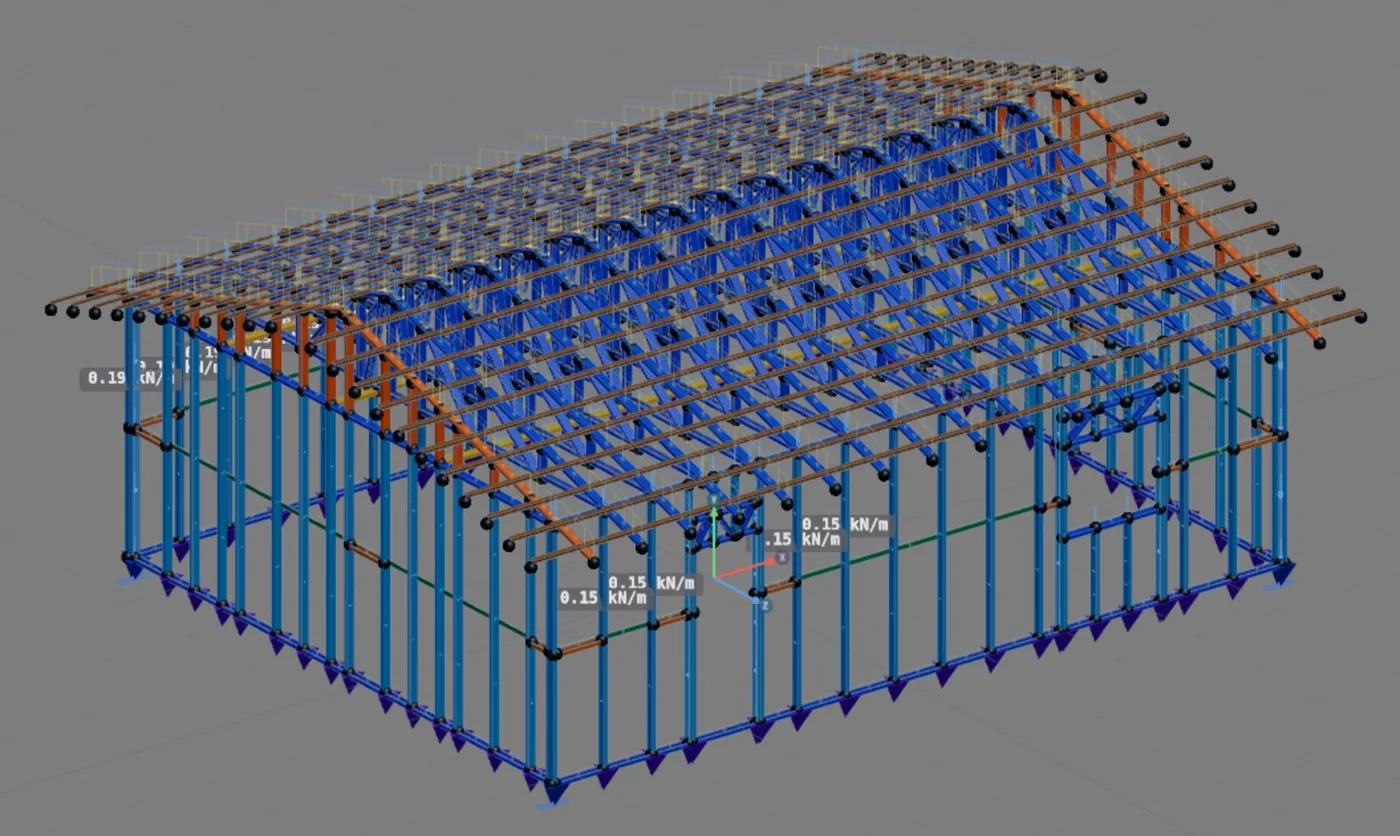
The figure below is the example house in the CalcSteel 3D view, after drawing the roof by its outline. The 7 m sides were left unchecked and went up as gables; the 9 m sides got the eave. On confirming, the app reported in one line what it did: "Roof TL1: 2 slopes, ridge 1.06 m above the wall top. 16 in-line trusses, studs aligned in 2 walls."
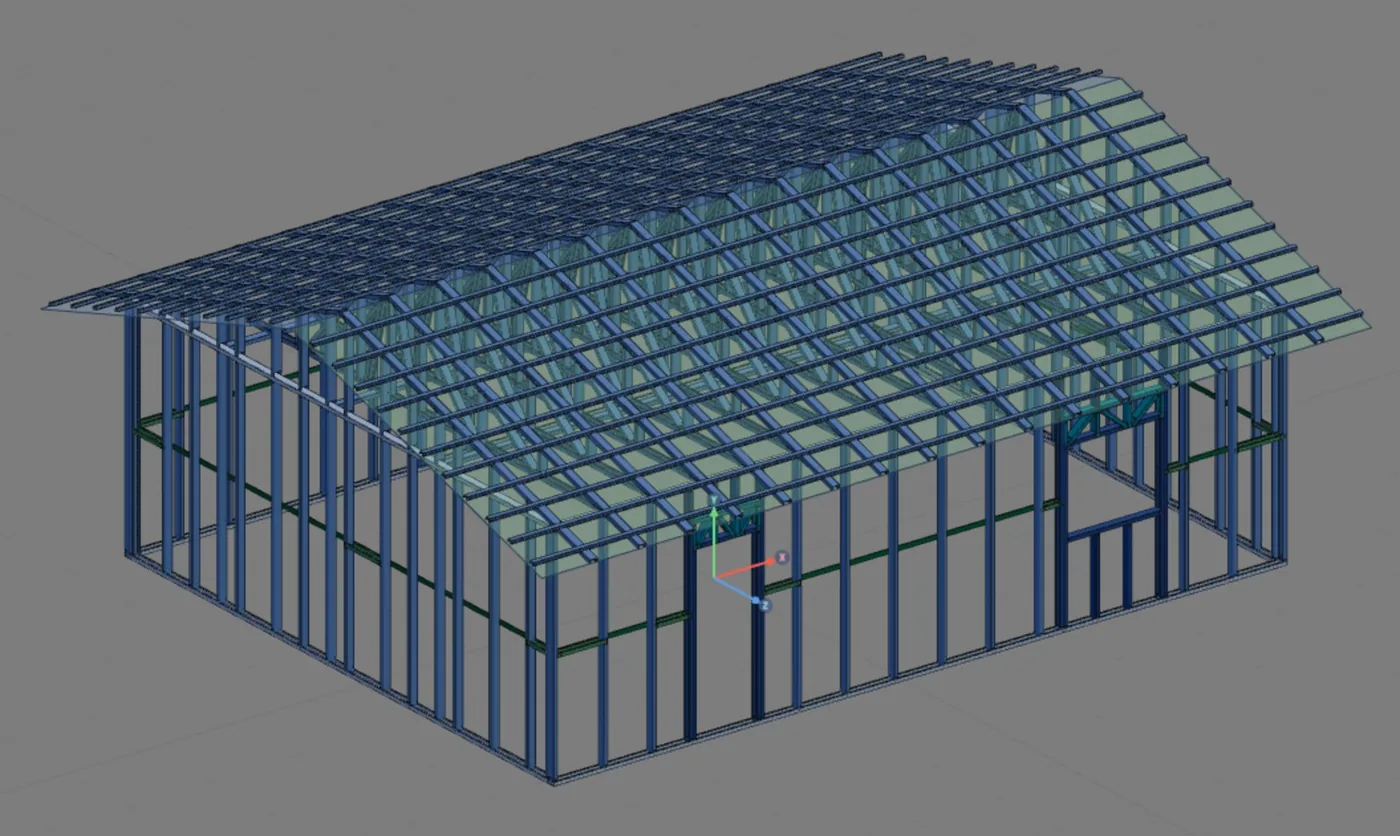
Two sentences the app said
"16 in-line trusses" means that each truss landed on a stud. "Studs aligned in 2 walls" means that, to get there, the app moved the grid of the two eave walls under each bearing. Both are the subject of Truss in line with the stud.
The wall top
The wall top is where the roof lands: here, the top track at 2.80 m. The ridge sits 1.06 m above it, which gives the 30% slope (16.7°) over a 7 m span. This is the line where the roof load enters the wall.
The chain, link by link
Cut the house through one of the eave walls, at a point where there is a truss, and the whole vertical load path shows up. There are eight links, and the load passes through all of them in order.
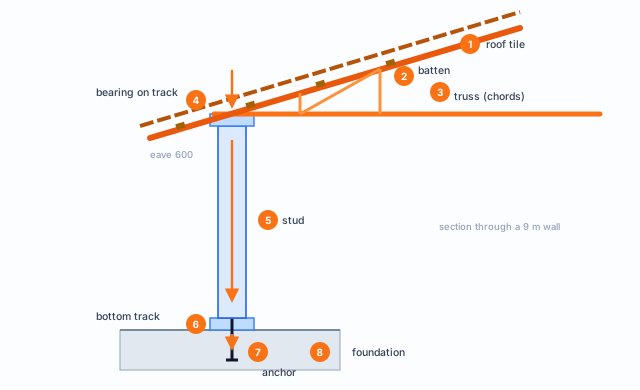
| Link | Receives | Hands to | How it works |
|---|---|---|---|
| 1 Roof tile | its own weight, the wind, whoever walks on it during construction | the batten, supported at each batten spacing | plate on supports |
| 2 Batten | the tile, over its batten spacing | the top chord of each truss | continuous beam from truss to truss |
| 3 Truss | battens above; ceiling and insulation below | the two bearings, on the eave walls | truss: chords and diagonals in axial force |
| 4 Bearing on the track | the truss reaction | the stud right below | local web crippling |
| 5 Stud | truss, wall weight, side wind | the bottom track | compression with bending |
| 6 Bottom track | the foot of the stud | the anchor and the foundation | supported along its whole length |
| 7 and 8 | the wall reaction | the soil | anchorage and foundation, separate designs |
What the standards say
Four standards, each on one stretch of the path
No Brazilian standard draws the LSF load path end to end. It shows up split among four ABNT standards: NBR 6120 says how much things weigh, NBR 6123 how hard the wind blows, NBR 14762 how a cold-formed steel member resists, and NBR 16970-2, the LSF one, how the members bear on each other. The table lists the items this page uses, cited by number.
| Item | What it covers |
|---|---|
| NBR 6120:2019, item 5 and Table 5 | dead loads: weight of materials, ceramic tile included |
| NBR 6120:2019, 6.4 | live load on an ordinary roof: 0.25 kN/m² on the horizontal projection, for slopes of 3% or more |
| NBR 6123:2023, 2.6 and 2.8 | overpressure and suction: the wind pushes and pulls |
| NBR 6123:2023, 4.2 and 4.3.1 | characteristic velocity and the pressure on each face: Δp = (cpe − cpi) q |
| NBR 6123:2023, 5 and 6 | factors S1, S2 and S3 and the shape coefficients of the walls and the roof |
| NBR 16970-2:2022, 4.1 and 4.2 | alignment of the members: the load comes down plumb, with a construction tolerance |
| NBR 16970-2:2022, 4.8 a) and f) | the design reports the support reactions for the foundation and details the calculated anchorage |
| NBR 16970-2:2022, 6.1 to 6.3 | chemical or mechanical anchors, resistance given by the manufacturer and proven by testing |
| NBR 16970-2:2022, 7.1, 7.2 and 8.2 | restraints, bracing and the displacement limits of Table 3 |
| NBR 14762:2010, 9.7, 9.8 and Annex D | compression, bending with compression and web crippling at the bearing |
| NBR 14762:2010, 10.5 | bolted connection with self-drilling screws |
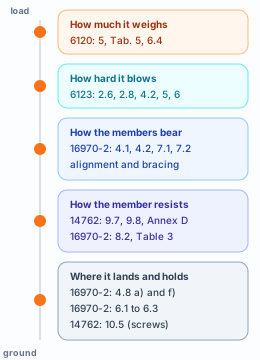
NBR 16970-2:2022, 4.2.
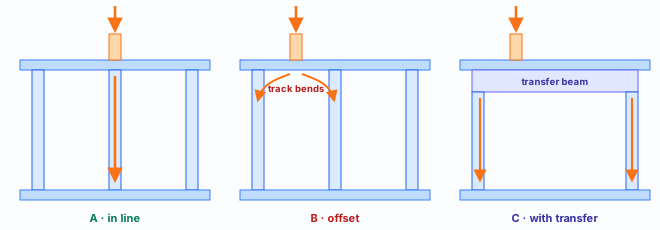
Members on the same vertical line cannot be offset unless there are transfer beams, and the sections face the same way. The construction eccentricity tolerated is 20 mm between the web axes. This is the rule that Truss in line with the stud puts into a drawing.
From the roof to the truss
The starting loads, on the Loads tab
The path starts with a number per square meter. In CalcSteel it lives on the Loads tab of the LSF project dialog, the third one, after Envelope and Structure. There are three blocks: the weight of the wall, of the floor and of the roof. The house is single-story, so the floor block is grayed out and goes into no bar.
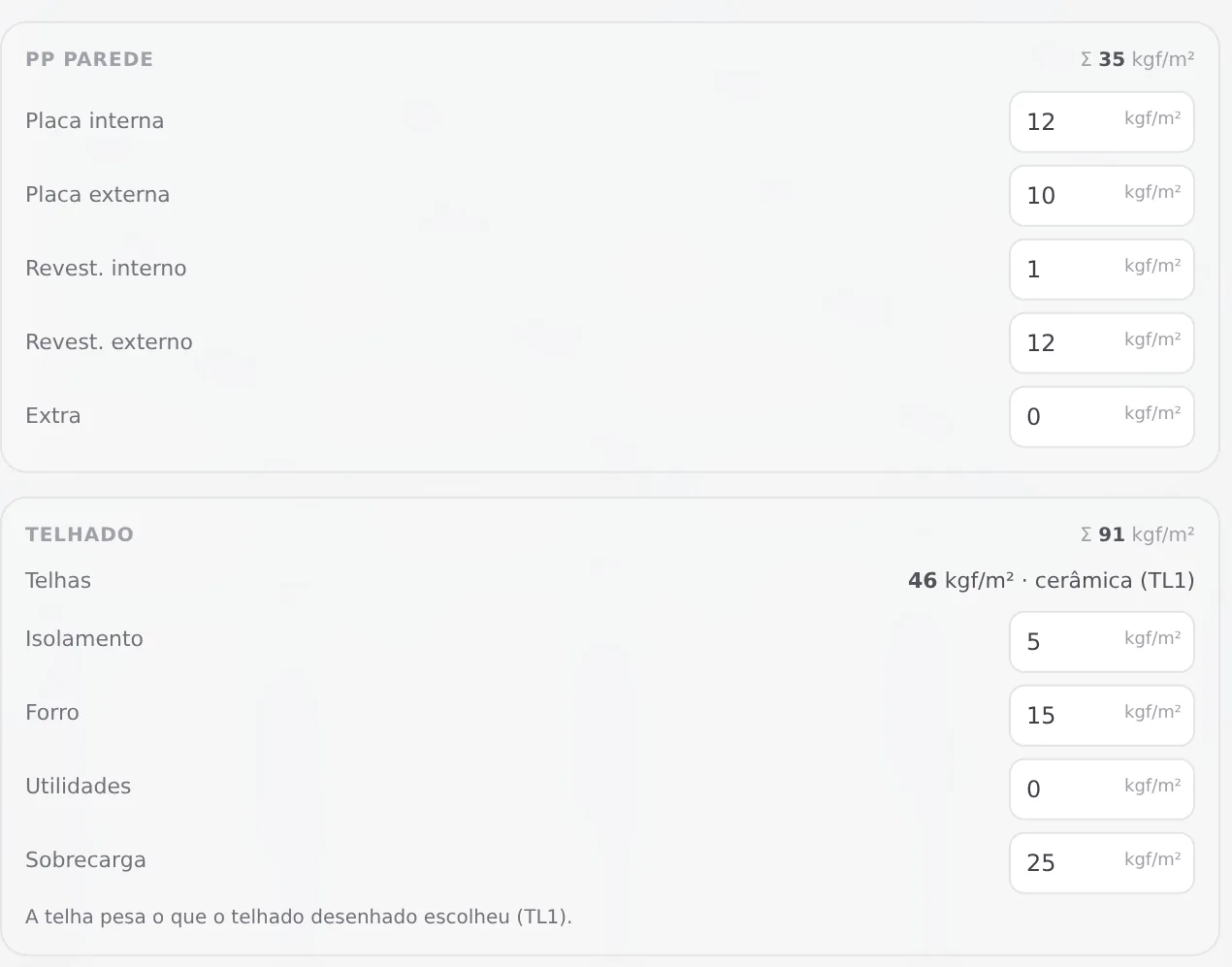
| Item | kgf/m² | Goes to |
|---|---|---|
| Boards and finishes | 35 | the upright members of the wall |
| Ceramic tile | 46 | top chord, per m² of slope |
| Insulation and ceiling | 5 + 15 | bottom chord, per m² of plan |
| Services | 0 | bottom chord |
| Live load | 25 | top chord, per m² of projection |
The tile comes from the drawn roof. The Telhas (tiles) row is not a field: the app reads the weight of the tile chosen on roof TL1, ceramic, 46 kgf/m², and says so under the block. Changing the tile on the roof changes the load here.
Three different areas. The tile weighs on the sloped area of the roof slope. The ceiling and the insulation weigh on the plan, inside the wall axes. The roof live load is counted on the horizontal projection, as NBR 6120, 6.4 requires. The app uses the right area for each item.
The weight of each tile in the Brazilian catalog
| Tile | kgf/m² | Support, spacing | Minimum slope |
|---|---|---|---|
| Ceramic | 46 | batten, every 380 mm | 30% |
| Concrete | 49 | batten, every 400 mm | 30% |
| Fiber cement | 18 | purlin, every 1,690 mm | 9% |
| Shingle | 11 | OSB board | 17% |
| Metal | 4.4 | purlin, every 1,800 mm | 5% |
CalcSteel catalog for Brazil, October 2026. The 46 kgf/m² of the ceramic tile are the 0.45 kN/m² that Table 5 of NBR 6120 gives for that tile. The tile weight will change the wind calculation (see The wind): a heavy tile holds the roof down, a light one does not.
From kilograms per square meter to kilonewtons per meter
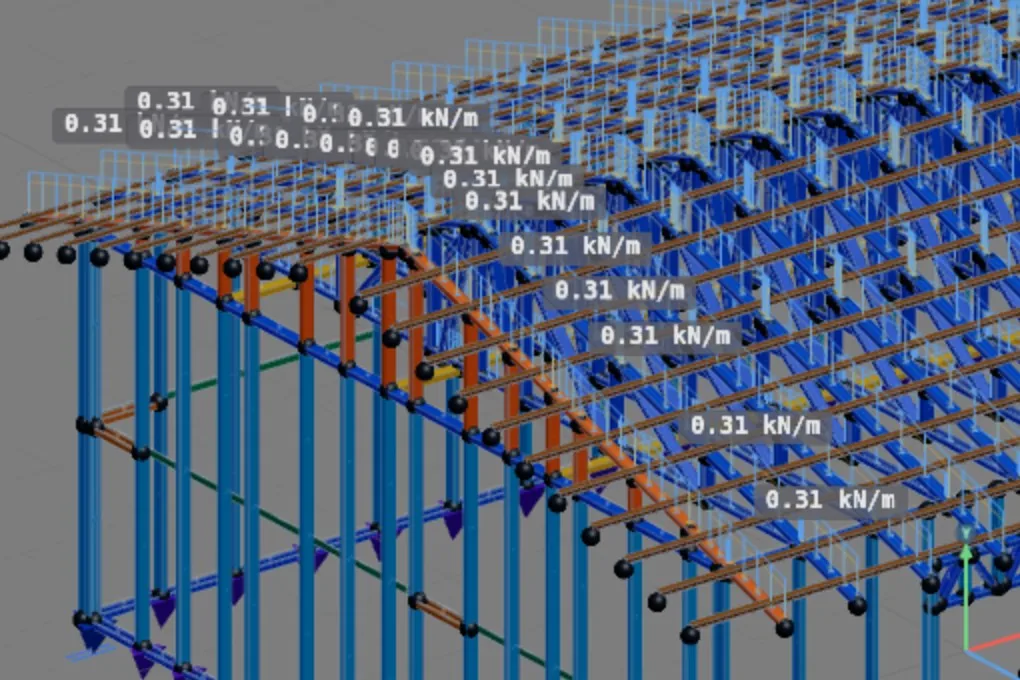
The truss is a bar, and the bar takes load per meter of length. The step from one unit to the other is the tributary width: each truss carries the roof up to half the distance to its neighbors. With 16 trusses along 9 m of wall plus 0.60 m of eave at each gable, the width is 10.20 m ÷ 16 = 0.64 m.
The calculation the app made
| Case, bar | Calculation | kN/m |
|---|---|---|
| PP (dead), top chord | 0.45 kN/m² × 0.64 m, plus the batten | 0.31 |
| PP (dead), bottom chord | 0.20 kN/m² × 0.64 m | 0.12 |
| SC (live), top chord | 0.25 kN/m² × 0.64 m × cos 16.7° | 0.15 |
The cosine appears because the live load is given on the horizontal projection and the bar is sloped: the same total spreads over a longer length. The steel of the truss itself is not here; it comes in through the self-weight of the bars, which the calculation counts on its own.
Hand calculation: how much reaches each bearing
Top chord with 4.10 m per slope horizontally (3.50 m to the ridge plus 0.60 m of eave), or 8.56 m sloped over both slopes. Bottom chord with 7 m.
- 1.7 kN: dead load per bearing: (0.31 × 8.56 + 0.12 × 7) ÷ 2, without the steel
- 0.65 kN: live load per bearing: 0.15 × 8.56 ÷ 2
Characteristic values, without load factors, only to give the order of magnitude. The engine is what combines and factors.
What about the batten? It is drawn and goes into the bill of materials, but it is not a bar in the calculation: its weight goes with the tile's to the top chord. With a tile that needs purlins, fiber cement and metal, the purlins receive the tile, and the purlins hand it to the truss.
Shortcuts
- CFG↵
Project settings
Opens the project wizard: envelope, structure, loads and wind.
- 3
Loads tab
Goes straight to the Loads tab of the wizard.
in the project wizard
Truss in line with the stud
In-line: each truss on top of a stud
The top track is a U section lying flat, web up, 0.95 mm thick. It was made to tie the heads of the studs, not to span. That is why the golden rule of LSF is that the load comes down plumb: the truss lands exactly on top of a stud, and the track only passes the load from one piece to the other by contact. This is what is called an in-line, or aligned, structure.
In CalcSteel, the roof is born in-line
The framed roof picks the truss stations from the studs of the bearing walls and, when it is placed, moves the grid of the surrounding walls under each truss. That was the house's "studs aligned in 2 walls". All of this is a single Ctrl+Z step. If the walls change later, the app rebuilds the roof bars. The gable truss does the opposite: its studs are the ones that go on top of the wall studs.
When the load does not fall on a stud
In the CalcSteel model, the track is a bar that runs from stud to stud. If a load lands between two of them, it shows up as bending in that stretch, and the engine checks the track like any bar: compression, bending and shear. A truss out of place does not go unnoticed; it fails the track.
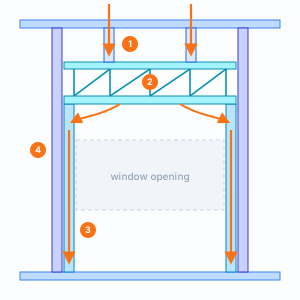
Over a window, the truss lands on a cripple stud, and the cripple lands on the header. From the track to the foundation follows that detour.
Shortcuts
- T↵
Roof
Arms the roof: click the outer ring of walls and Enter. When armed, disarms.
in plan view
From the track to the foundation
The stud takes everything down
Below the top track, the path is the stud. It receives the truss reaction at its head, the weight of the wall itself along its height and, as The wind shows, the side wind. It works in compression, with its buckling length cut in half by the bracing line of Anatomy of a wall, and hands everything to the bottom track.
Why each wall has its own number
The app multiplies the 35 kgf/m² by the gross area of the wall, door and window included, because the frame weighs about as much as the cladding it replaces. Then it spreads that total over the length of all the upright members of that wall: studs, king studs, jack studs and cripples. A wall with more members per meter puts less on each one: 0.13, 0.15 and 0.19 kN/m in the house.
The supports at the base
Each stud foot gets a support in the calculation. At the ends of the wall, it restrains all three directions, like the corner hold-down. In the middle, it restrains the vertical and the direction perpendicular to the wall. Rotations are free: the foot is pinned.
In a two-story house, the upper wall loses the vertical support at its base and lands on the structure below, and the load keeps going down through the bars to the ground floor.
The header diverts, the anchorage holds
Around the window
The window cuts the studs of the regular spacing. The load that would come down through them reaches the cripple studs above, which hand it to the header. The header spans the opening and returns the load sideways, to the studs that frame the opening: the jack stud under each end and the king stud against it. From there down the path is straight again.
In the calculation, the header is pinned at its ends and bears on the jack stud, and the engine checks web crippling at that point. The header deflection has its own limit, L/500, stricter than the truss limit, because it supports wall.
- 2.4 kN: hand calculation: what each truss that falls over window J1 puts on the header, 1.7 of dead load and 0.65 of live load, shared between the two sides of the opening
The anchorage: where the calculation hands over the path
The bottom track is fixed to the foundation by anchors. They hold the wall down when the wind tries to lift it, and sideways when it tries to push it. The CalcSteel calculation ends at the supports: the reactions at each stud foot, per load case, are what the foundation and anchorage design receive.
NBR 16970-2:2022, 4.8 a) and f).
The design locates the base supports with the actions for the foundation design, preferably separated by type of action, and details the calculated anchorage connections.
NBR 16970-2:2022, 6.1 to 6.3.
Chemical or mechanical anchor. The resistance is given by the manufacturer and proven by testing. In the app catalog: chemical or expansion anchor, spacing from the calculation.
The wind
Pressure on one side, suction on the other three
In a light house, the wind weighs as much as the roof. It does not act only on the face that takes the air: NBR 6123 calls the wind that pushes the surface inward overpressure (2.6) and the wind that pulls it outward suction (2.8). The face toward the wind, windward, is pushed. The back one, leeward, the two sides and the roof sloped at 30% are pulled.
From velocity to pressure
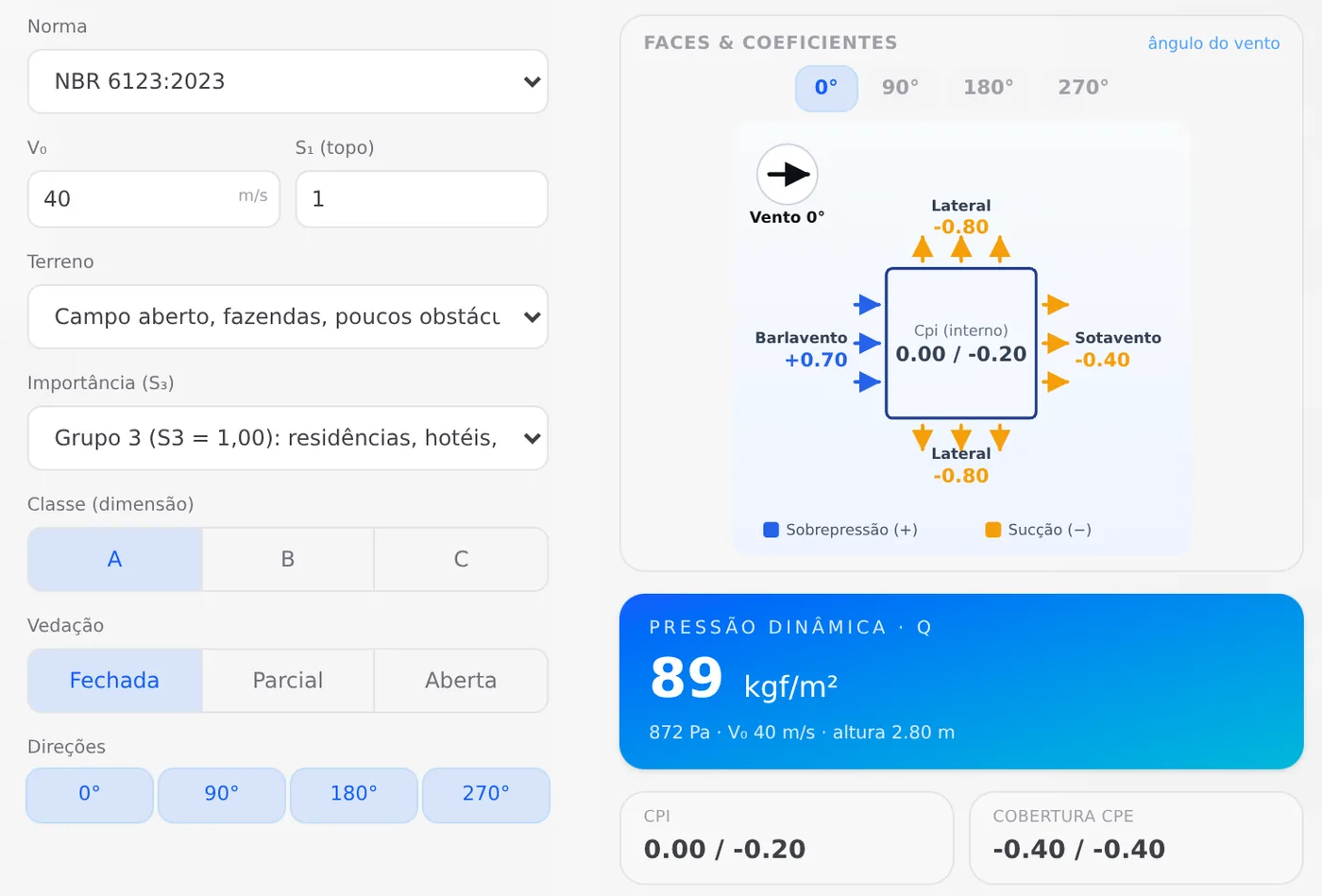
The basic wind speed of the region, V0, becomes the characteristic velocity through the terrain, height and use factors (4.2). From it comes the velocity pressure q. Each face gets q times the difference between the outside coefficient, cpe, and the inside one, cpi (4.3.1). For the enclosed house, the app considers cpi = 0 and cpi = −0.20; the four directions with the two cpi values give the eight wind cases, from V1+ to V4−.
| Face, wind at 0° | cpe | Δp with cpi = 0 |
|---|---|---|
| Windward | +0.70 | +0.61 kN/m², pushes |
| Leeward | −0.40 | −0.35 kN/m², pulls |
| Sides | −0.80 | −0.70 kN/m², pulls |
| Roof | −0.40 | −0.35 kN/m², pulls |
Values of case V1+ read from the scene: 0.872 kN/m² times the cpe of each face.
The stud is what takes the wind
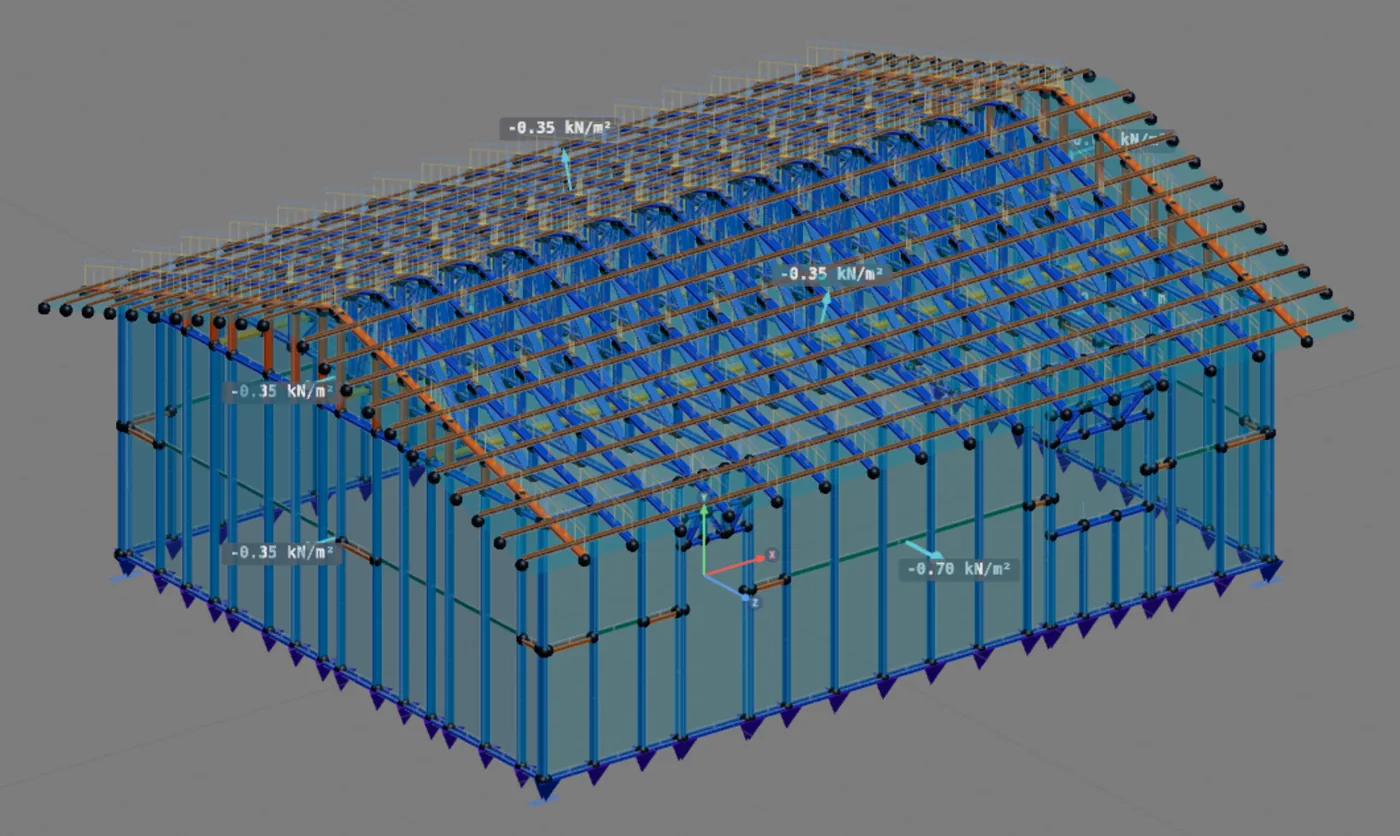
Where each arrow comes from
The app builds one wind panel per exterior wall, one per roof slope and one per gable. The window opening is not cut out: when closed, the frame takes the pressure and hands it to the opening framing. The panel pressure is shared among the upright members: stud, king stud, jack stud, cripple. The track, the strap, the horizontal strap and the blocking take no wind. On the roof, the layer the tile rests on is what takes it.
The cases show up in the scene as soon as the wall or the roof changes, without calculating. They are drawing: they are not saved in the project, and the calculation builds them again from the Wind action tab.
Hand calculation: a side wall stud
A 0.60 m strip at −0.70 kN/m²: the stud takes 0.42 kN/m along its 2.80 m, lying like a beam between the bottom and the top track.
- 0.41 kN·m: moment at mid-height, q·L²/8
- 0.59 kN: reaction at each end, q·L/2
In the calculation, the foot and the head of the stud are pinned in the direction the wind bends it, so the moment is the one in the calculation above: maximum at mid-height, zero at the ends. The bottom reaction goes to the anchorage. The top one goes to the top track, and from it to the ceiling plane, and that reaction is what the sideways path follows.
The sideways path: diaphragm, strap and base
The reaction at the top of the studs has to reach the ground somewhere, and the path is different from that of the vertical load. It enters a stiff horizontal plane, the diaphragm, which carries it to the walls parallel to the wind. These walls work in their own plane, and what keeps them from racking into a parallelogram is the X strap or a vertical truss. The strap carries the force diagonally down to the base, where the anchorage holds it.
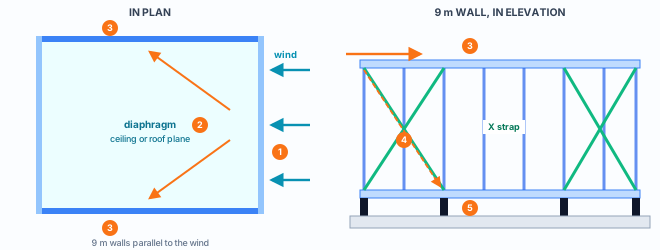
The diaphragm, drawn or assumed
With a horizontal strap drawn at ceiling level, or bracing in the roof plane, the diaphragm is made of those members. Without them, the calculation assumes the plane is rigid, with fictitious bars that only take the horizontal load and do not appear in the outputs, and says so in a warning, once per level and once per roof slope.
The wall that braces
The strap only works in tension, so it goes in an X: with the wind from one side, one diagonal pulls; from the other, the other one. Sheathing alone does not count as bracing in CalcSteel. With no strap or truss in a direction, the calculation comes out with an error for that direction, because the force has no way down.
When the wind beats the weight
The roof suction pulls up, and the weight pulls down. As long as the weight wins, the truss stays seated and the anchor stays in compression. When the wind wins, the path reverses: the truss tries to leave the track, the wall tries to leave the foundation, and what holds everything are the truss screws into the track and the anchor, now in tension.
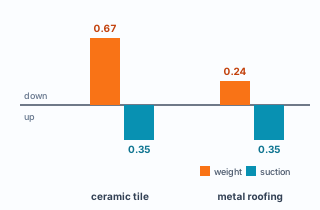
Hand calculation, per m² of plan
Ceramic tile weight, already on the plan, plus ceiling and insulation: about 0.67 kN/m². Roof suction in case V1+: 0.35 kN/m² upward. The weight wins comfortably.
Switch to metal roofing, 4.4 kgf/m², and the weight drops to about 0.24. Now the suction wins, and the difference goes entirely to the truss connection and the anchorage.
Characteristic values, without the truss steel. In the code combinations, the wind is still factored up and the weight that helps is not, which makes the light roof worse.
The warnings of the horizontal path, as the app writes them
These texts appear in the warning list after calculating. In brackets, what the app fills in with the project numbers.
- Diaphragm assumed. "Light steel framing: there is no horizontal strap drawn at level [level] m. The calculation assumed the floor (or ceiling) as a rigid diaphragm, with [n] fictitious bar(s) that do not appear in the outputs. Check that the sheathing and connections provide it."
- Roof diaphragm assumed. Same idea in the plane of each slope: with no roof bracing drawn, the roof plane becomes a rigid diaphragm, with fictitious bars that carry the wind from the gable to the walls.
- No bracing, classified as an error. "Light steel framing: no X strap or vertical truss braces the [X or Z] direction. Sheathing alone does not count as bracing: draw the strap or the truss on the walls in that direction."
Shortcuts
- 4
Wind tab
Goes straight to the Wind tab of the wizard.
in the project wizard
- BL↵
Strap and blocking
Places bracing strap and blocking between studs.
What the engine calculates
And what stays with the designer
The LSF engine carries the roof load through the bars of the structure, follows the load path story by story, applies the NBR 6123 wind on the walls, the roof slopes and the gables, and uses the support assumptions on this page. The rafter braces the top chord, and a standalone truss, one placed outside the roof, gets its buckling length from the restraints that exist and takes wind. CalcSteel versions the calculation, and the result of an older project does not change on its own.
Along the path, what the engine checks
| Stretch | Check | Reference |
|---|---|---|
| Truss chords | compression, tension and bending; deflection of each chord, L/250 | 14762: 9.7, 9.8; 16970-2: 8.2, Table 3 |
| Truss bearing on the track | pinned in the truss plane, on top of the stud; the reaction goes down through it | 16970-2: 4.2 |
| Top and bottom track | N, M and V in each stretch, from stud to stud | 14762: 9.7, 9.8 |
| Stud | compression with wind bending; deflection relative to the chord, h/300 | 14762: 9.8; 16970-2: 8.2 |
| Header | the header bars like any bar; web crippling at the end, over the jack stud; deflection L/500 | 14762: 9.7, 9.8, Annex D; 16970-2: 8.2 |
| Strap and blocking | bracing force and stiffness, accumulated along the line up to the anchorage | 16970-2: 7.2 |
| The whole house | top relative to base, H/400, and between stories, h/500 | 16970-2: 8.2 |
What stays with the designer
- The anchorage and the foundation. The calculation ends at the supports. It delivers the reactions at each stud foot, per case, and the design of the anchors and the foundation is a separate design, as NBR 16970-2 requires in 4.8 a) and f). In wind uplift, this is where the chain closes.
- The connection screws. The number of screws at each joint, the truss on the track with 2 hex-head 4.8x19 screws per flange, for example, comes from the market fastening rule: it is prescriptive, and the app counts and lists it. The shear and pull-out resistance of the screw is item 10.5 of NBR 14762 and is not part of the check.
- The assumed diaphragm. When there is no horizontal strap or roof bracing drawn, the calculation assumes the plane is rigid and warns. Making sure that the ceiling or floor board, and its connections, actually play that role is a design decision, and it is exactly what the warning asks you to check.
Shortcuts
- Ctrl+Enter
Calculate the project
Sends the project to the engine, like the Calculate button.
Summary
The path, in one line
Roof tile → batten → top chord → bearing on the track, on top of a stud → stud → bottom track → anchor → foundation. Over the window, cripple stud → header → jack stud and king stud. Sideways, wall face → stud → diaphragm → wall parallel to the wind → X strap → anchorage.
The example so far
- 16: in-line trusses
- 0.64 m: tributary width of each truss
- 2.4 kN: per bearing, dead and live load
- 0.59 kN: wind at the top of a stud
Sources for this page.
ABNT NBR 6120:2019 (item 5, 6.4 and Table 5). ABNT NBR 6123:2023 (2.6, 2.8, 4.2, 4.3.1, sections 5 and 6). ABNT NBR 16970-2:2022 (4.1, 4.2, 4.8 a) and f), 6.1 to 6.3, 7.1, 7.2, 8.2 and Table 3). ABNT NBR 14762:2010 (9.7, 9.8, 10.5 and Annex D). All cited by item, without reproducing figures. CalcSteel FRAMECAD connection model, October 2026: header and truss sit on the bearing. Loads, tiles, anchor and fastening: CalcSteel catalog for Brazil, October 2026. The screenshots are from the app; the diagrams are our own drawings. Hand calculations with characteristic values, only for order of magnitude.