LSF (Light Steel Framing)
60 m² house
A 6 x 10 m single-story house, with two bedrooms, a bathroom and a living room with kitchen, goes from the brief to the sheets: walls, openings, roof, loads, analysis and outputs, at the pace of a real project. Each step points to the page that teaches the tool, without teaching it again.
Overview
A project from start to finish
The other LSF pages teach one tool at a time. This one goes the other way: it starts from a client brief and uses the tools in the order of a real project, up to the calculation report and the sheets.
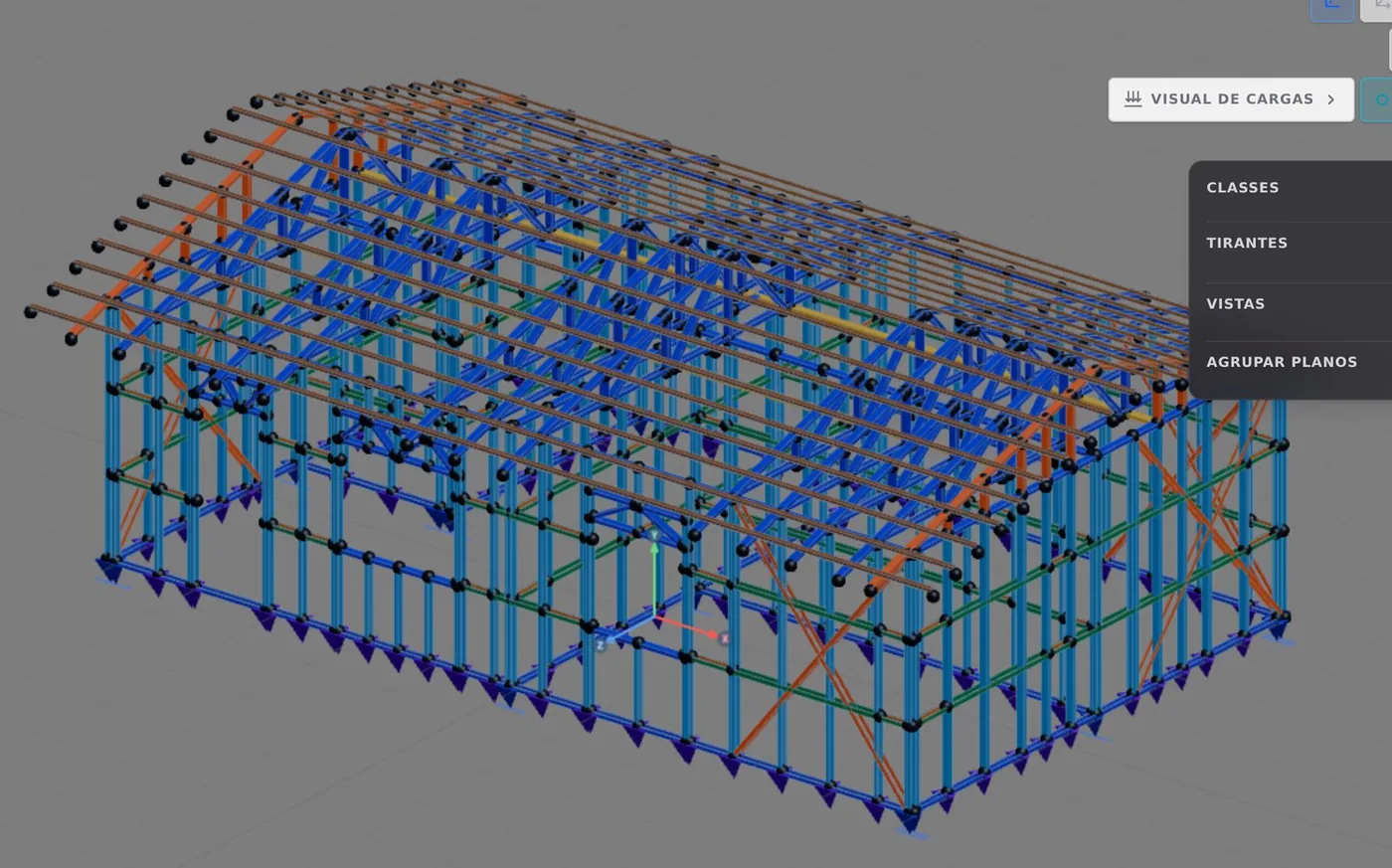
The example is a 60 m² single-story house: a 6.00 x 10.00 m rectangle, 2.80 m ceiling height, two bedrooms, a bathroom and a living room with kitchen. It is smaller and easier to read than the 9 x 7 m house on the other pages, so it works as a template for your first real project.
Nothing here is new. What changes is the pace: one step per tool, with the link to the page that explains it. If you want the detail, go there; if you already know it, keep going.
The brief
What the client asked for
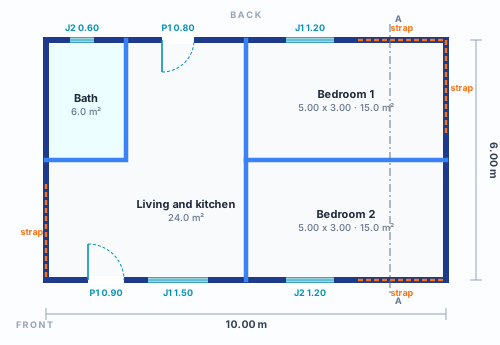
The brief fits in a 6.00 x 10.00 m rectangle. The interior T wall separates the bedrooms from the living area: one run crosses the house from back to front 5.00 m from the left, and the other splits the two bedrooms in half. The L wall closes the bathroom in the back corner. The living room with kitchen takes the rest, facing the entrance.
| item | value |
|---|---|
| Built area | 60.0 m² (6.00 x 10.00 m on the wall axes) |
| Ceiling height | 2.80 m, one story |
| Rooms | 2 bedrooms of 15.0 m², 6.0 m² bathroom, 24.0 m² living room and kitchen |
| Interior walls | one T (5.00 + 6.00 m) and one L (2.00 + 3.00 m) |
| Openings | 2 exterior doors and 4 windows |
| Roof | two planes, 30%, gables on the 6 m sides, 0.60 m eave |
What this example adds
No new tool. The example puts them all in a single sequence and shows the decisions that sit between one tool and the next: in what order to draw, where to put the strap when the walls have doors and windows, which members to look at first in the results and which outputs to take before sending the project to the factory.
Section and openings
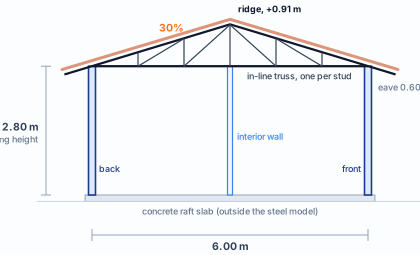
Section A-A, in the right bedroom. The truss spans the 6.00 m from back to front and bears on the 10 m walls; the 6 m sides rise as gables.
The house is single-story, and its floor is the concrete raft slab: it stays outside the steel model, as the page Floors explains, and the wizard starts with Entrepiso (intermediate floor) set to "Sem" (without).
| opening | size (m) | sill | where |
|---|---|---|---|
| P1 90X210 | 0.90 x 2.10 | on the floor | front, living room entrance (Parede 8) |
| J1 150X120 | 1.50 x 1.20 | 0.90 m | front, living room and kitchen (Parede 8) |
| J2 120X120 | 1.20 x 1.20 | 0.90 m | front, Bedroom 2 (Parede 8) |
| P1 80X210 | 0.80 x 2.10 | on the floor | back, kitchen (Parede 7) |
| J1 120X120 | 1.20 x 1.20 | 0.90 m | back, Bedroom 1 (Parede 7) |
| J2 60X60 | 0.60 x 0.60 | 1.50 m | back, bathroom (Parede 7) |
The names are the tool's. The Opening window (Doors and windows) numbers doors and windows per wall and writes the size in the label, so the front and the back each have their own P1. "Parede 8" is how the screen names wall 8. The positions along the wall are the ones the magnet proposed, centered between studs, except the living room J1: it sits 3.30 m from the corner, on the same axis as the back door, so that the trusses on both sides of the opening land on a stud (NBR 16970-2, item 4.1; see Roof). The sill is the one in the table.
The room doors are not part of this example: the brief only fixed the two exterior ones. When the architecture defines them, they are placed on the interior walls the same way (Doors and windows).
The decisions
Before the first click
Each decision below has its own page. The table only gathers them, with the value this house uses. Most are the defaults of the new project wizard with the Brazil market: the 60 m² house asks for nothing unusual, and that is a good thing.
| decision | value in this house | where it changes |
|---|---|---|
| Market and standards | Brazil, NBR 8800 and NBR 14762 for the cold-formed steel design | The standards, Market and catalog |
| Fabrication | new roll-formed project, FRAMECAD F325iT roll former | New project wizard, Roll-former file |
| Steel | ZAR-230, fy 230 and fu 310 MPa, the Brazil default | Steel and sections, Market and catalog |
| Wall section | C 89 x 41 x 12 mm, 0.95 mm sheet, for stud, track and blocking | Steel and sections, New project wizard |
| Module | studs every 600 mm | Anatomy of a wall, Exterior walls |
| Story | one, 2.80 m ceiling height, Entrepiso set to "Sem" | New project wizard, Floors |
| Floor | concrete raft slab, outside the steel model | Floors |
| T joints | Back to back ][ in four T joints and Box [] in the two T joints in the middle of the gable walls | Wall joints |
| Header | lattice, 300 mm deep, in every opening | Headers |
| Bracing | X strap in the corner panel of the four exterior walls, two in each direction, on both faces and with a double stud at the end | Straps and blocking |
| Blocking | Blocking type with the market rule: two lines at 0.93 and 1.87 m, strap on both faces, in every wall | Bracing |
| Roof | by outline, two planes, 30%, gables on the 6 m sides, in-line truss, 600 mm eave | Roof trusses, Roof |
| Roofing | ceramic tile, the load the roof carries into the loads | Roof, Loads |
| Wind | NBR 6123:2023 with the wizard defaults: V0 40 m/s, terrain II, class B, closed building, four directions; q = 85 kgf/m² (831 Pa) | Loads |
Why almost everything is default. The example does not touch steel, loads or wind, and only changes a section where the analysis asks for it (step 10): this way, anyone who repeats the steps reaches the same numbers as the end of the page. In a real project, each row of this table is a question for the design, and the right-hand column says where it changes.
Two decisions belong to this example and not to the wizard: where the straps go (only in panels without openings) and which roof sides rise as gables (the 6 m ones). Both show up in the assembly, in steps 5 and 8.
The assembly
From the wizard to the walls
One step per tool, in the order in which the house was built. Each step links to the page that teaches it; here it only appears with this house's dimensions.
1. New project with the wizard
Brazil market, roll-formed project on the FRAMECAD F325iT, one 2.80 m story, Entrepiso set to "Sem" and Cobertura (roof) set to "Com" (with). The rest stays at the defaults: sections, steel, finish loads and wind are the ones in the decisions table, and none of them needs to be touched (New project wizard).
2. The perimeter with Exterior wall
In Plan, start at the back right corner and draw one side at a time, typing the length: 10.00 m at the back, 6.00 m on the left, 10.00 m at the front, and the last side closes at the starting point. The four corners become L joints on their own, and the studs are created every 600 mm (Exterior walls).
3. The interior walls with Snap
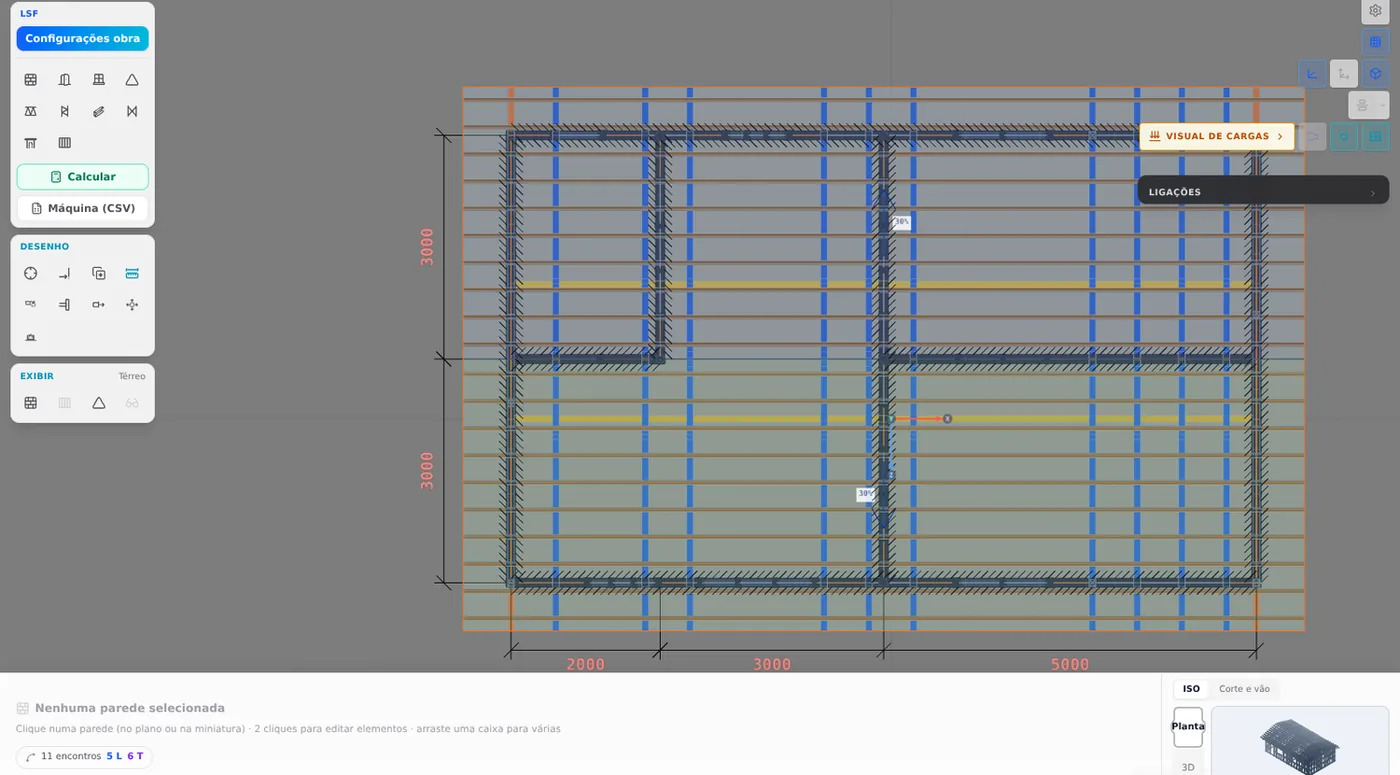
With the reference on the track, each click on a precise point records directly (Snap and interior walls). The T: from the middle of the back (5.00 m) to the middle of the front, and then from the middle of the right wall to that wall. The L: from the middle of the left wall, 2.00 m typed in the measurement box, and from there to the back. Where an end touches a wall, the meeting becomes a T joint, and the house ends up with eight walls and eleven joints. In the two T joints in the middle of the gable walls, where the arm of the T and the start of the L arrive, select the joint and, in the panel at the bottom of the screen, change Stud from Back to back ][ to Box [] (Wall joints): the stud of the gable wall becomes a closed section. The other four T joints stay back to back.
Openings and bracing
4. Doors and windows
One opening at a time, with the Opening window: type, width, height and sill typed in, and the opening placed on the wall axis near its spot in the plan. The magnet moves the opening to the center between studs, and the 300 mm lattice header is created with it, along with the jambs (Doors and windows, Headers). The six openings are on the front and the back; the 6 m walls stay solid, and that is where the roof will rise as a gable.
5. The strap on the four exterior walls
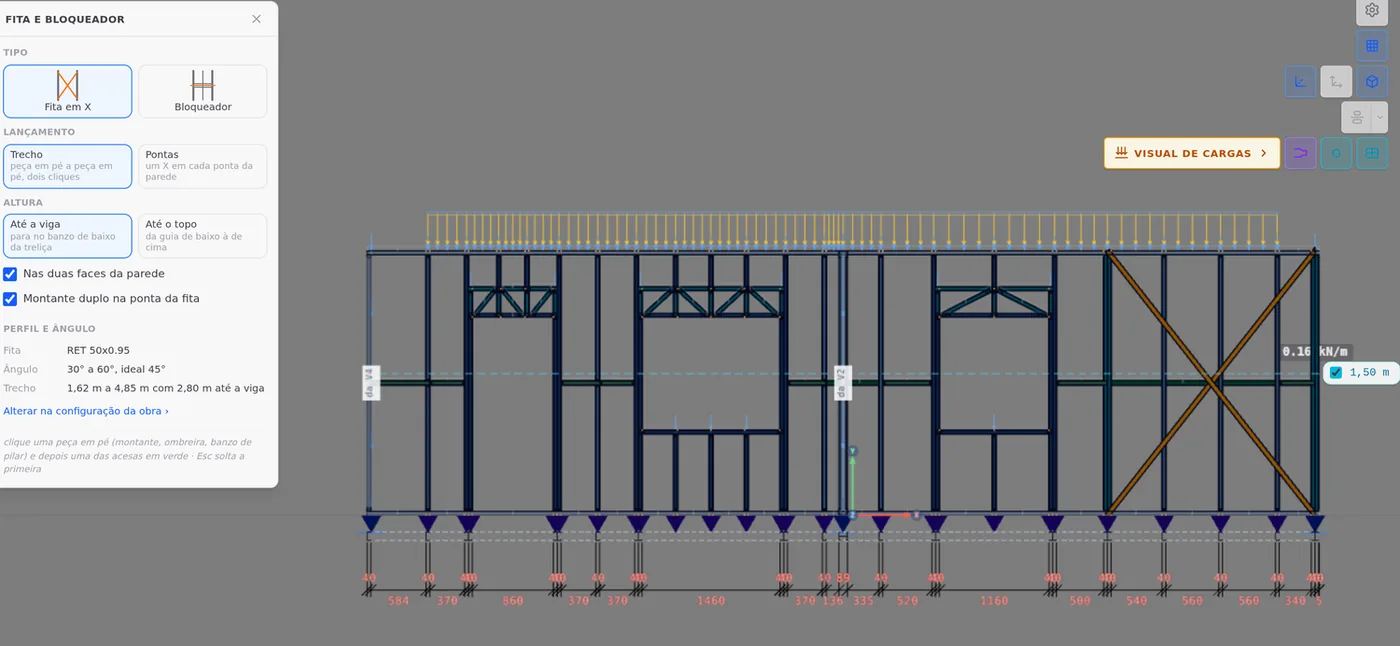
Select each exterior wall and click Open view on its card. In the view, use the Strap and blocking tool with type X strap and placement Span: one click on the corner stud and another on the stud that closes the panel, with "On both faces of the wall" and "Double stud at the strap end" turned on (Straps and blocking). Each X went in the corner panel that has no opening: on the front and back, from 7.80 to 10.00 m (2.20 m span, 52°); on the 6 m walls, the 2.40 m at the end (about 49°). That is two X in each direction of the house and eight straps in the project, one per face, all within the 30° to 60° range the box shows.

Blocking and floor
6. Blocking in every wall
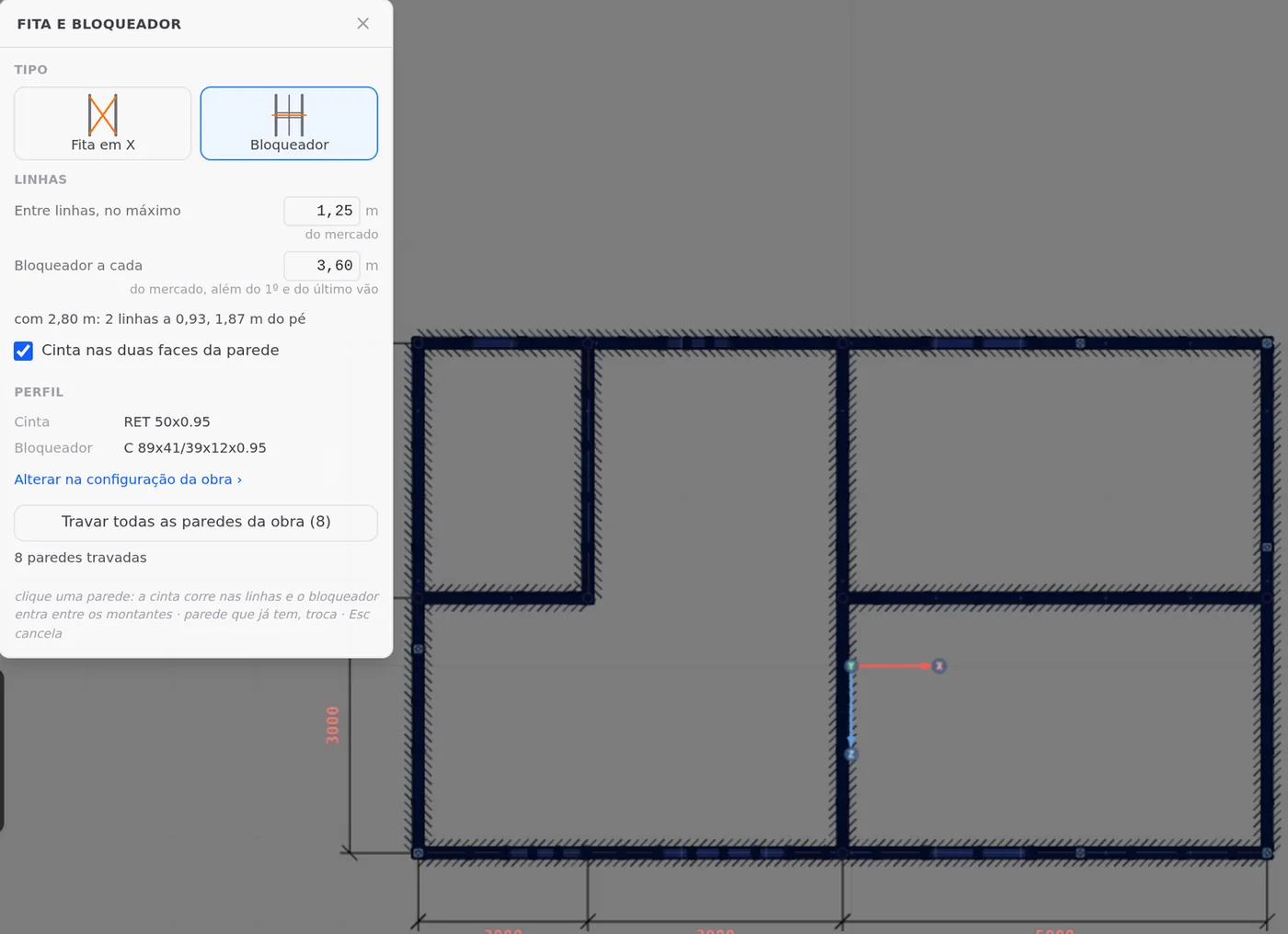
In the same Strap and blocking tool, switch the type to Blocking (Bracing). The box already comes with the Brazilian market rule: at most 1.25 m between lines and one blocking every 3.60 m, and it does the math for the ceiling height on its own, "with 2.80 m: 2 lines at 0.93, 1.87 m from the base". Check Strap on both faces and click Brace all walls in the project (8): the eight walls get the two lines in a single Ctrl+Z step, and the status bar goes from 423 to 462 members. In the model, the two faces of each strap run are a single member with a double section.
7. The floor is the raft slab
A single-story house has no intermediate floor: the walls stand on the concrete raft slab, which stays outside the steel model, and the Floor tool is not part of this example (Floors).
The roof
8. The roof by outline
In the Roof tool, By outline mode, the box recognizes the eight walls as a closed loop and lists the four outer sides (Roof). Clear sides 1 and 4, the 6 m ones: a cleared side rises as a gable. On sides 7 and 8, 30% pitch (the box shows 16.7°), 600 mm eave, ceramic tile (batten with a 380 mm gauge, 30% minimum) and In-line structure, one truss over each stud (Roof trusses). Before generating, the summary checks the shape: 2 planes, 1 ridge 0.91 m above the wall top, no hips and no valleys. "Gerar o telhado" (generate the roof) takes the project from 462 to more than 900 members.
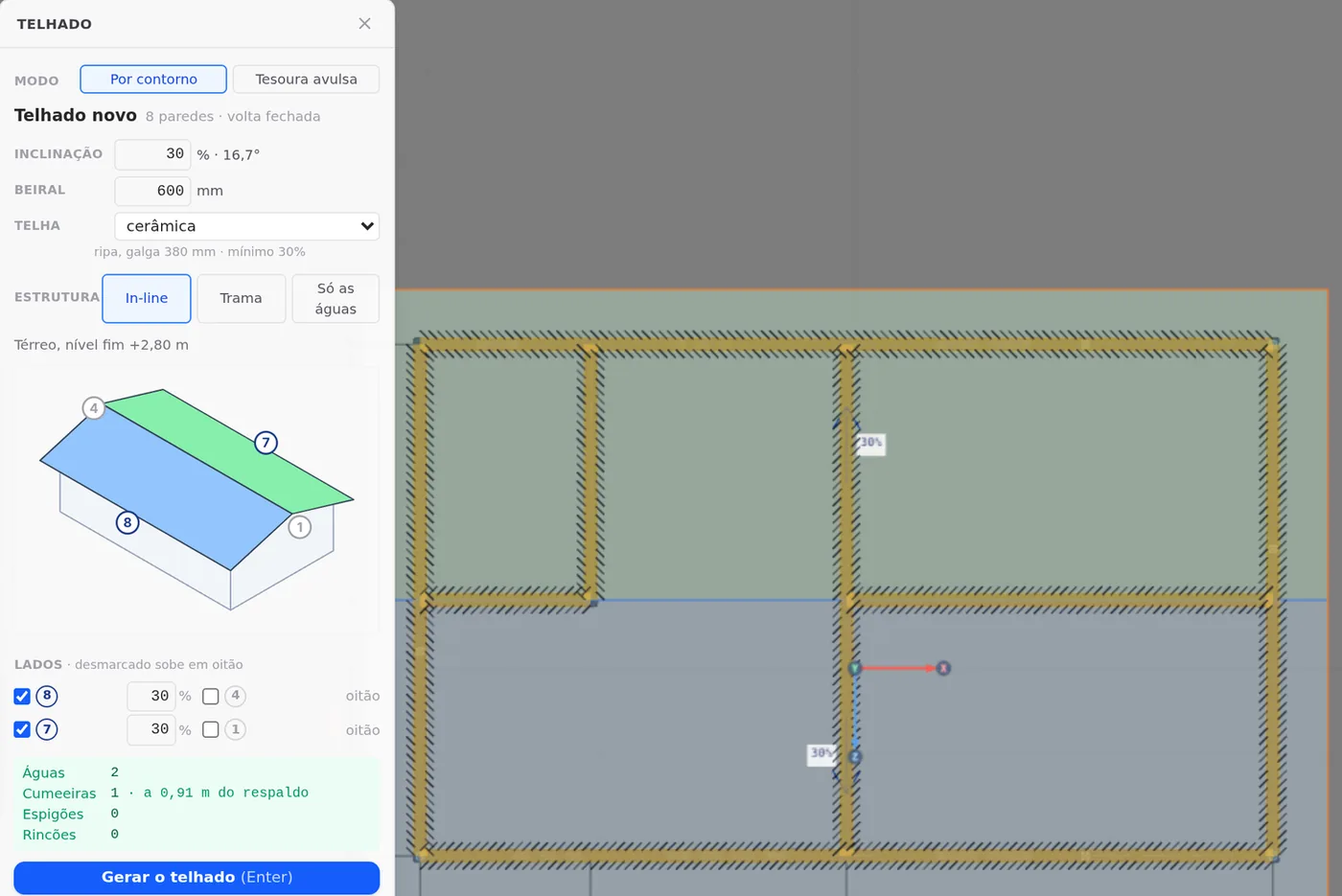
Why the gable goes on the 6 m sides. This way the ridge runs along the 10 m, and each truss spans only the 6.00 m from back to front, the shortest span in the house. That is what section A-A shows, in The brief, with an in-line truss over each stud of the 10 m walls.
Shortcuts
- W↵
Exterior wall
Draws the wall point by point. Type a distance and Enter.
- CA↵
Snap
Arms snapping and shows the reference: drawing, DXF or IFC mask.
- AB↵
Opening in the wall
Opens the door or window panel for the wall open in the view.
wall view open
- AV↵
Wall view
Opens the elevation of the selected wall, seen from outside. Again, goes back.
with one wall selected
- BL↵
Strap and blocking
Places bracing strap and blocking between studs.
- T↵
Roof
Arms the roof: click the outer ring of walls and Enter. When armed, disarms.
in plan view
- PL↵
Plan view
Goes to plan view. With the wall view open, closes it and keeps the wall selected.
- Home
3D view
Goes to 3D at the last camera pose. With the wall view open, closes it.
The analysis
Loads, analysis and the result on screen
9. The loads
Nothing is entered by hand (Loads). The project wizard stored the area loads and the wind data, and Load cases already shows three cases: PP Parede, dead, with the green PP badge (the steel weight comes from the members themselves), PP Telhado, dead, and SC Telhado, live. The eight wind cases, four directions with two Cpi each, are created at analysis time, and the standard combines everything into 26 combinations.
10. Calculate and read the badge
With everything drawn, Calculate on the LSF panel sends the house to the engine, which combines the cases into 26 combinations (Reading the results). On the first run, the badge flags the top chord of trusses T3 and T4 in combined compression and bending: the report for member TL:TL1:T4:bs1:1 shows 1.13 in CB2, with the 0.95 mm sheet (figure below). The design is fixed by class, not member by member (Trusses as plane frames): in the Classes panel, the Tesoura comum (common truss) class changes to C 89x41/39x12 in 1.15 mm sheet, and the 340 members of the class change together. Calculate again: the badge turns green, with 0 failures in 921 checks.
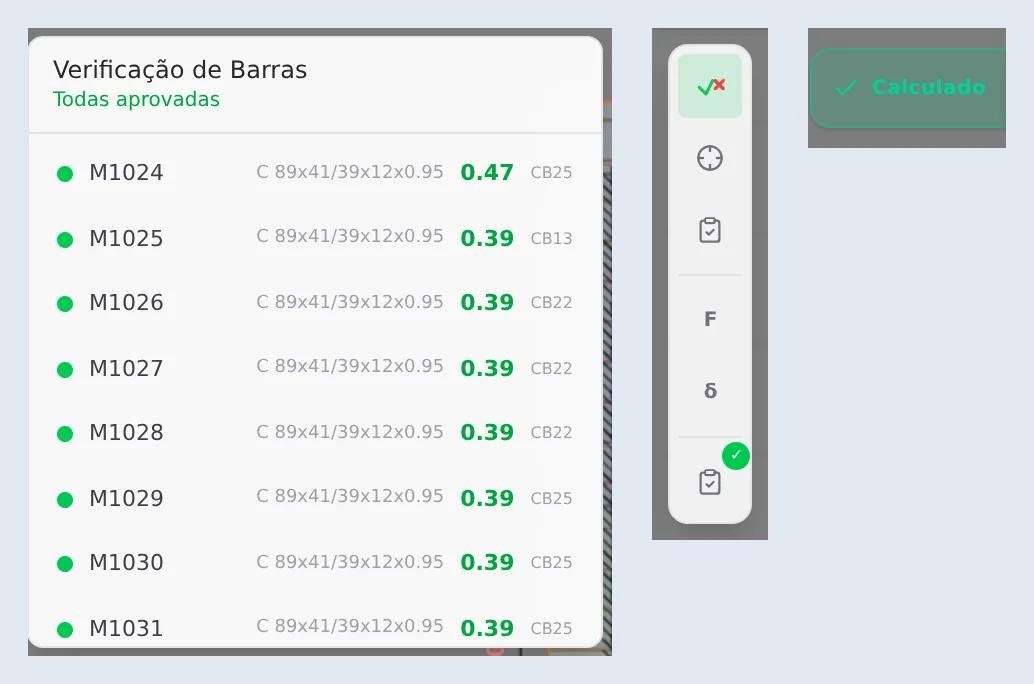
- 921: checks in the results card
- 0: failures, with the green badge
- 0.917: highest ratio, in the chord of truss T4
- 26: design combinations
The governing members
The results card lists each member with its ratio and the combination that governs it, and each member's report shows the full check. Below, three members of the calculated house, one from each family that works hardest: the truss that asked for the thicker sheet, a stud of the back wall and a bottom chord bracing member.
| member | section | ratio | governing check | combination |
|---|---|---|---|---|
| TL:TL1:T4:bs1:1, top chord of truss T4 | C 89x41/39x12, 1.15 mm sheet | 0.917 | combined compression and bending | CB2 |
| M7, stud of the back wall | C 89x41/39x12, 0.95 mm sheet | 0.840 | combined compression and bending | CB4 |
| TL:TL1:L1:l1:6, bottom chord bracing | C 89x41/39x12, 0.95 mm sheet | 0.797 | slenderness | CB6 |

The combination that governs most often is CB2, 1.4 PP Parede + 1.4 PP Telhado + 1.4 SC Telhado: it decides 378 of the 921 checks, including the truss ones. In stud M7, wind governs: CB4 adds to the two dead loads, at 1.4, the live load at 0.7 and wind V1+ at 0° at 1.4. The two box studs, M1005 and M1052, sit at 0.445 and 0.393, and the card of each one marks deflection OK.
Shortcuts
- Ctrl+Enter
Calculate the project
Sends the project to the engine, like the Calculate button.
The outputs
Sheets of the house
11. Sheet and panel plan
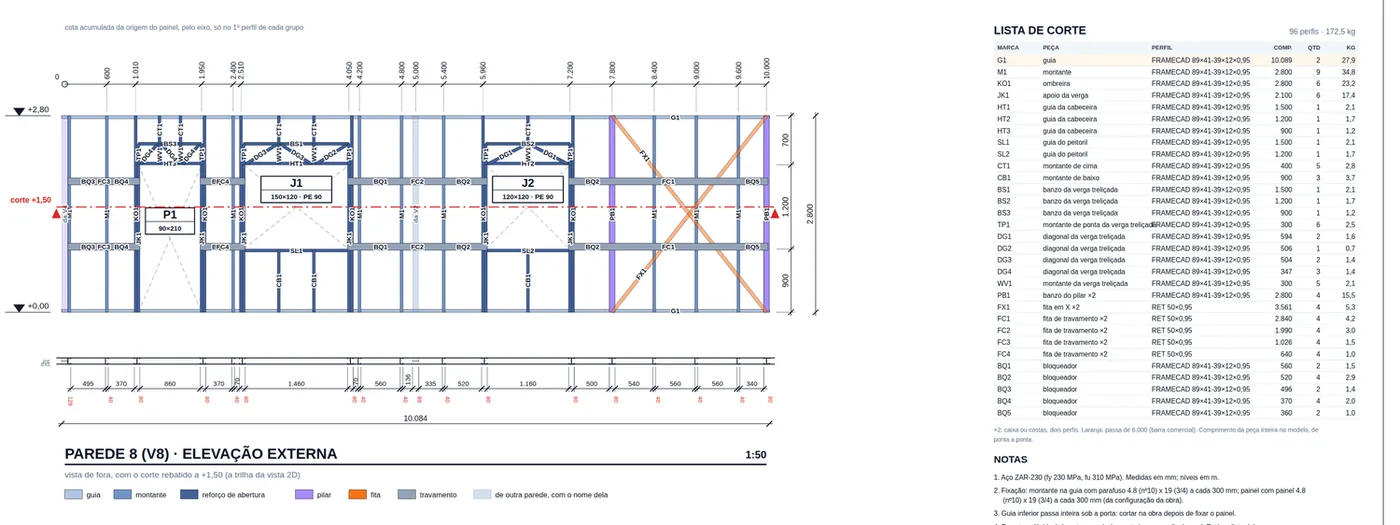
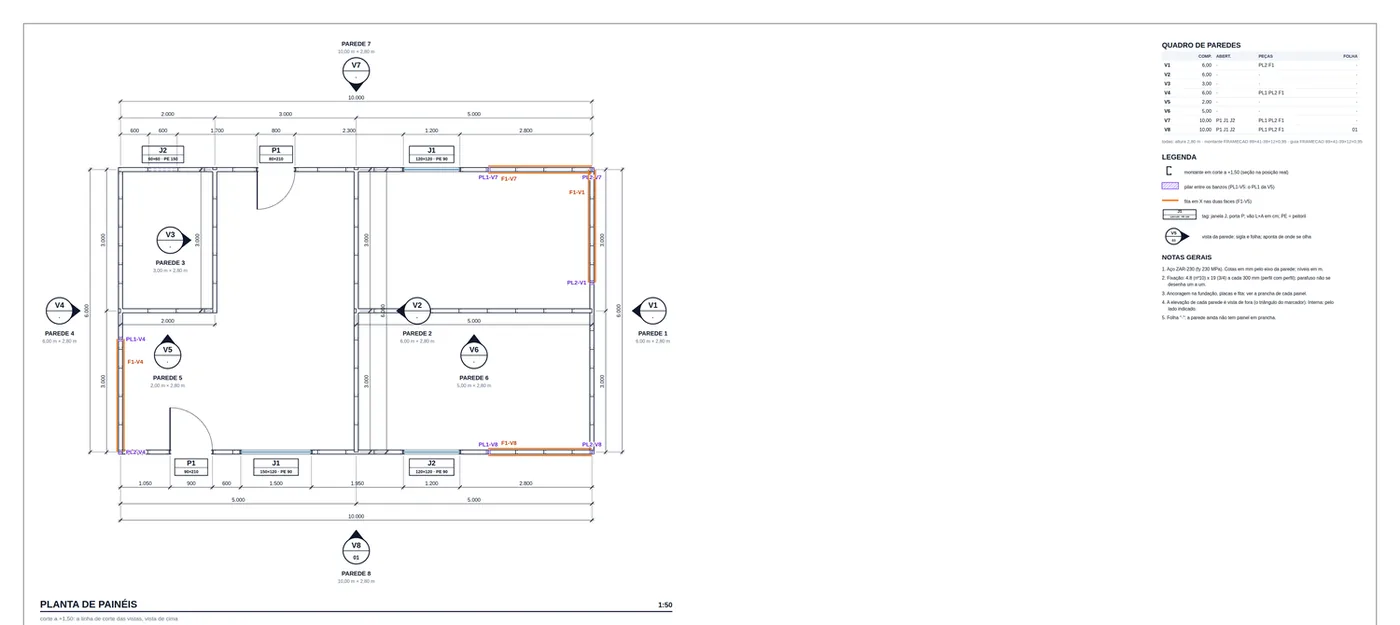
Click a wall and the bottom bar of the LSF tab shows its name, its length and the buttons for its outputs: Edit, Sheet, Panel plan, Details, Joints, Typicals, Project cut list and Open view. The Sheet of Parede 8, the front, has the exterior elevation with door P1 and windows J1 and J2, and next to it the panel cut list. The Panel plan numbers the eight walls V1 to V8, with a table of the walls. To download as PDF or DXF, see LSF sheets.

Cut list, takeoff and calculation report
12. Cut list and takeoff
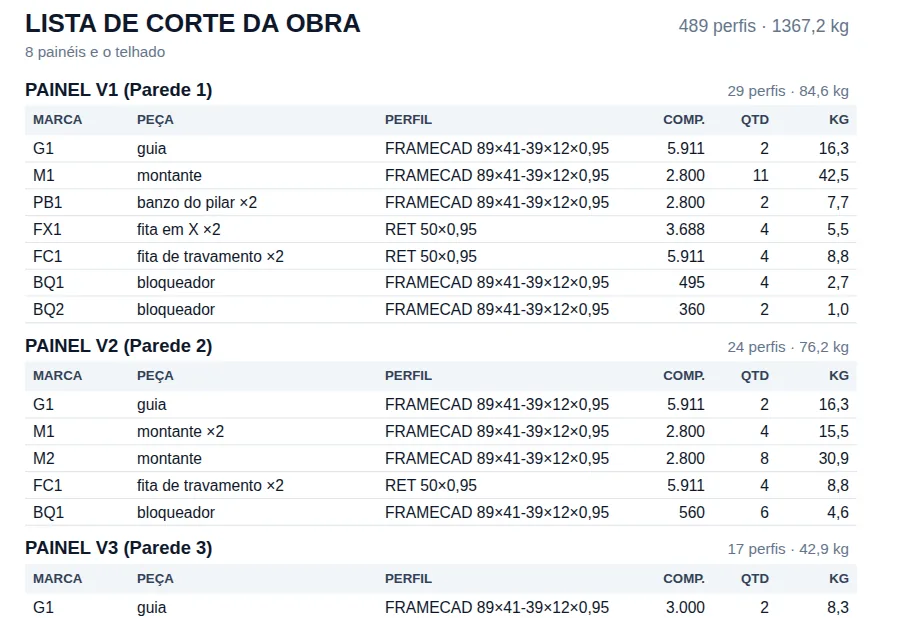
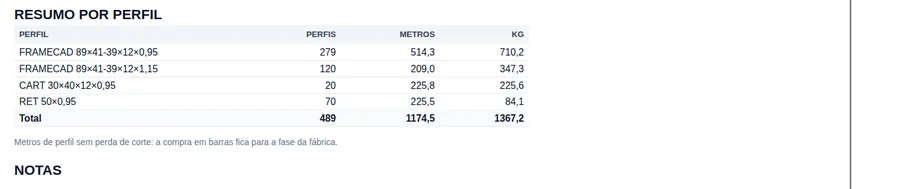
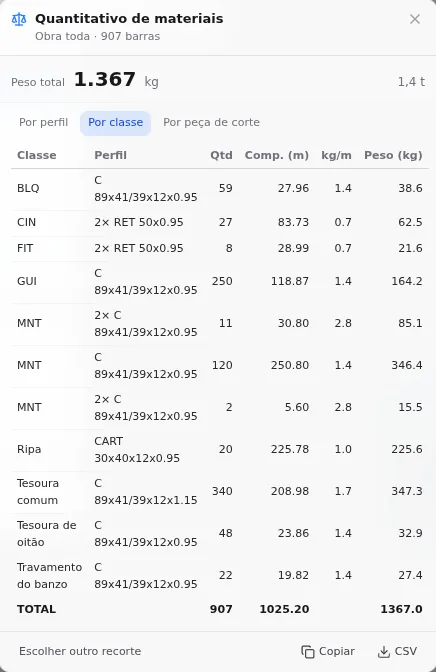
Project cut list, on the same bottom bar, gathers the cut list of the eight walls and the roof: 489 pieces and 1,367.2 kg, panel by panel, with the summary by section at the end (Cut list, takeoff, DXF and IFC). The Material takeoff card shows the same steel by class and reaches the same weight, 1,367 kg. The meters are counted differently: the list counts each cut piece, so the strap and the blocking strap on both faces and the double stud count twice; the takeoff counts the model member once and marks 2× on the section. That is why MNT takes three rows: the single studs, the double sections and, separately, the two box studs.
13. The calculation report
With more than 300 members, the calculation report is built on the server (Calculation report): from the report button on the results card, under Full project, the card Generating the calculation report… turns into Calculation report ready, with Download PDF. The parts are chosen on the Prints tab, Reports section.
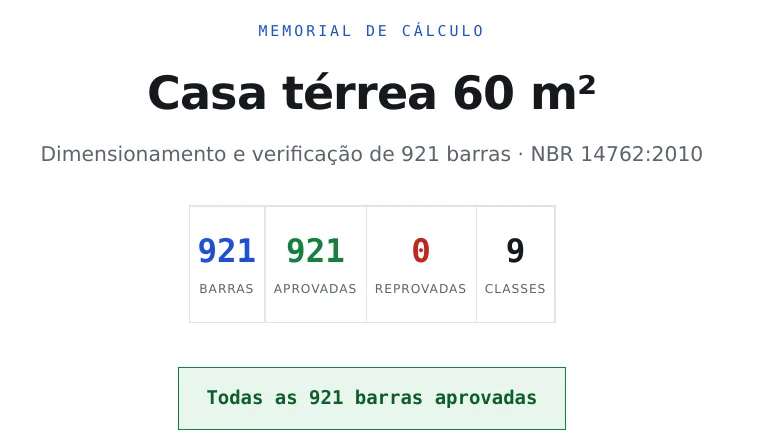
On the cover, under NBR 14762: 921 members, 921 passed, 0 failed. The analysis model splits some pieces, so it counts more members than the 907 of the drawn project. Section 4 of the report sorts the checks by η, with the two T4 chords at the top (0.917 and 0.913); section 5 has the member-by-member check, which you review before signing.
Shortcuts
- PN↵
Panel sheet
Creates the panel sheet of the selected walls, or opens the existing one.
with walls selected
- PP↵
Panel plan
Creates a panel plan of the wall's storey, a new one each time.
with walls selected
- LO↵
Project cut list
Creates the missing cut list sheets of the project and opens the first.
with walls selected
The numbers
The 60 m² house in numbers
The final numbers, all read on the app screens: members and meters on the status bar, below the 3D; the weight in the takeoff; checks, failures and the highest ratio in the results card.
- 907: members in the model
- 1,025.20 m: of section in the model
- 1,367 kg: of steel, from the takeoff
- 22.8 kg/m²: of steel per plan area
| number | value | where to read it |
|---|---|---|
| Model members | 907 | status bar |
| Section in the model | 1,025.20 m | status bar |
| Steel | 1,367 kg | material takeoff (Cut list, takeoff, DXF and IFC) |
| Steel per plan area | 22.8 kg/m² | 1,367 kg over the 60 m² measured on the axes |
| Cut pieces | 489 pieces, 1,174.5 m | project cut list |
| Combinations | 26 | results card |
| Checks | 921, none failed | results card |
| Highest ratio | 0.917, T4 chord, combined compression and bending, CB2 | member report |
The number to compare. From one house to another, compare the steel per plan area: 22.8 kg/m² here, with walls in 0.95 mm sheet, trusses in 1.15 and ceramic tile. Lighter tile and a shorter truss span pull the number down; the page Two-story house, 7 x 9 m does the same reading on a two-story house.
Checklist
The house project, end to end
Use the list on your first real project. Each row is a step of this page, with the page that teaches it; if one of them does not close, go back there before moving on.
| check | how to know it is right | where |
|---|---|---|
| Brief closed | dimensions on the axes, each opening with size, sill and wall | The brief |
| New project with the wizard | Brazil market, FRAMECAD F325iT, one story, Entrepiso set to "Sem" | New project wizard |
| Perimeter | four sides typed in, the last one closes at the starting point | Exterior walls |
| Interior walls | the counter at the bottom of the plan says 11 joints, 5 L and 6 T, and the two T joints in the middle of the gable walls are Box [] | Snap and interior walls, Wall joints |
| Openings | six openings with the name in the label, header and jambs created with them | Doors and windows, Headers |
| Strap | one X in each corner panel without an opening, on both faces, with the inspector angle between 30° and 60° | Straps and blocking |
| Blocking | two lines of strap and blocking in the eight walls, strap on both faces | Bracing |
| Floor | raft slab outside the model, one sentence in the calculation report | Floors |
| Roof | gable on the 6 m sides, 30%, 600 mm eave and In-line; the green summary says 2 planes, no hips and no valleys | Roof trusses, Roof |
| Analysis | green badge, 0 failures, and the highest ratio in the results card below 1 | Loads, Reading the results |
| Governing members | the three highest ratios read in the member report, with the combination | Studs, Trusses as plane frames |
| Outputs | sheets, cut list, takeoff and calculation report downloaded to your computer | Calculation report, LSF sheets, Cut list, takeoff, DXF and IFC |
Summary
The path, in one line
Wizard → perimeter → interior walls and joints → openings → strap → blocking → roof → Calculate → thicker sheet where the badge asks for it → sheets, cut list and calculation report.
The house at the end
- 907 members in the model, 8 walls, 6 openings and 11 joints
- 921 checks, 0 failures, highest ratio 0.917
- 1,367 kg of steel, 22.8 kg/m² of plan
- One design change: Tesoura comum from 0.95 to 1.15