Vectors and the Dot Product: Resolving Forces in a 3D Steel Connection
Vectors and the dot product resolve a 140 kN brace into a three-dimensional steel connection: 120, 40 and 60 kN, matched to the CalcSteel FEM engine. Try it free.
Key takeaways
- A force and a member's geometry are both vectors: a magnitude and a direction written by components (x, y, z); dividing the direction by its length gives the unit vector u_hat.
- The dot product does two jobs with one formula: F . u_hat projects a force onto a direction, and u . v over the magnitudes gives the cosine of the angle between two members.
- The dot product resolved the 140 kN brace into 120 kN along the beam, 40 kN transverse and 60 kN into the column, and those recombine to sqrt(120^2 + 40^2 + 60^2) = 140 kN.
- The same dot product gave the geometry: 31.00 degrees off the beam, 64.62 degrees from the column, and 72.11 kN perpendicular that the connection must turn.
- Every hand result matched the CalcSteel 3D FEM engine to the decimal, including the non-orthogonal node at OA = minus 73.125, OB = minus 53.676 and OC = minus 57.226 kN, all compression.
The dot product has a real job inside a steel connection
Vectors and the dot product, the pair you met in your first year of engineering, in the analytic geometry and vector algebra taught right beside Calculo I and II, are not just tools for abstract geometry. They are the everyday machinery that resolves the force a diagonal brace pushes into a three-dimensional steel connection. Every free-body diagram, every 3D connection detail, quietly rests on them.
Here is the promise of this article. We take one real 3D beam-to-column-with-brace joint and resolve its force with nothing but a dot product, and we do it twice: once to get the components the bolts and welds actually carry, and once to get the angle the brace makes with the beam and the column. Then we solve a whole non-orthogonal 3D node, where a single dot product is no longer enough and you need a vector equation. Every answer is matched to the CalcSteel FEM engine to the decimal.
This is written for three readers at once: the engineering student who wants to see where the math from the opening ementa lands in real steel, the practising calculista who resolves brace forces by hand every week, and the self-employed calculista who wants a free, browser-native way to check the geometry before sizing a single bolt. The free-body diagram is where the forces first appear as vectors; from there, the dot product does the rest.
CalcSteel runs a genuine 3D FEM engine in your browser, free, no login for the math. So we will not just claim these numbers. We will confirm them against the same solver that ships in the product.
Vectors, the 60-second refresher
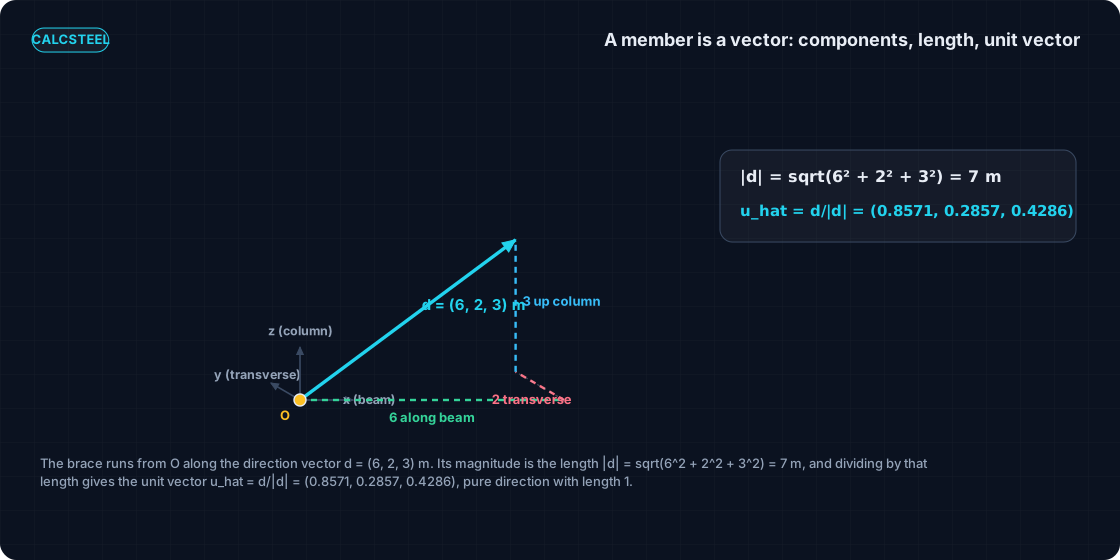
A vector is a quantity that has both a magnitude and a direction, written by its components (x, y, z). A force is a vector: it has a size in kN and a line it acts along. A member's geometry is a vector too: it has a length and a direction in space. Treating both as vectors is what lets us line them up with one operation.
Here is the pivot for structures. A member running from a work point O to a far end is the direction vector d = (dx, dy, dz), its three components being how far it travels along x, along y and along z. The magnitude of that vector, |d| = sqrt(dx^2 + dy^2 + dz^2), is simply the member's length. And dividing the vector by its own length strips out the size and leaves pure direction: the unit vector u_hat = d/|d|, a vector of length 1 that points the same way as the member.
Make it concrete with the brace we will carry through the whole article. Its direction vector from the joint is d = (6, 2, 3) m: 6 m along the beam line x, 2 m out of plane y, and 3 m up the column z. Its length is
- |d| = sqrt(6^2 + 2^2 + 3^2) = sqrt(49) = 7 m
so the unit direction vector is
- u_hat = d/|d| = (6/7, 2/7, 3/7) = (0.8571, 0.2857, 0.4286).
That is the whole toolkit from the opening engineering-math ementa: a vector, its magnitude, and the unit vector you get by dividing one by the other. Nothing here is beyond the analytic geometry and vector algebra taught in the first year, next to Calculo I and II. The rest of this article is just aiming that toolkit at a real connection.
The dot product: one operation, two jobs
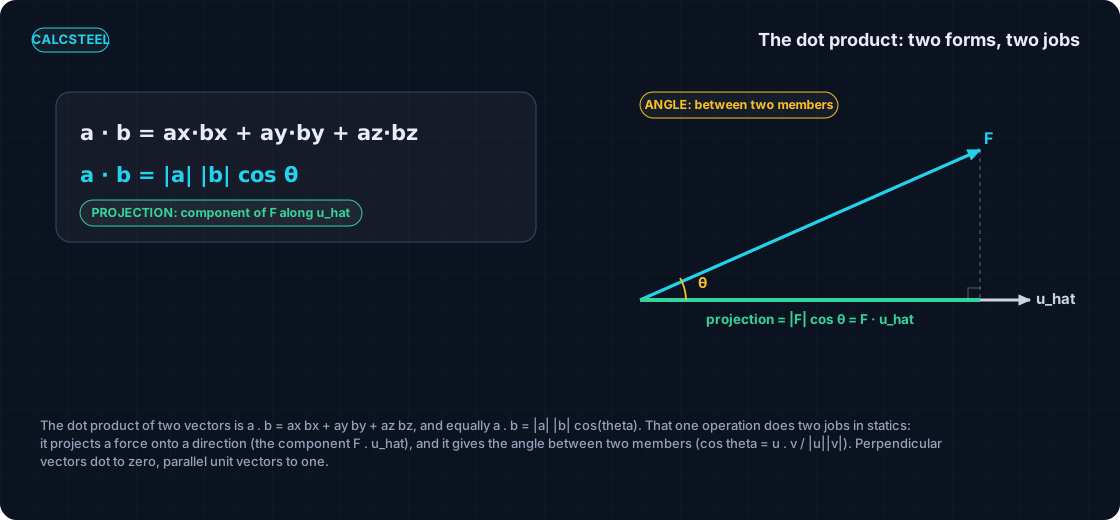
The dot product of two vectors is a . b = a_x b_x + a_y b_y + a_z b_z, the sum of the products of matching components; geometrically the same number is a . b = |a| |b| cos(theta), the two magnitudes times the cosine of the angle between them. One operation, computed two ways, and the fact that both ways give the same number is exactly what makes vectors and the dot product the workhorse of a three-dimensional steel connection.
For resolving forces in a three-dimensional steel connection, that single operation does two jobs.
- Projection. The component of a force along a direction is the dot product of the force with the unit vector of that direction: the component is F . u_hat. This is how much of the force runs along the beam, or into the column, or out of plane.
- Angle. The angle between two members comes from the same dot product, rearranged: cos(theta) = (u . v) / (|u| |v|). It tells you the bevel, the geometry the gusset has to accommodate, and how the force splits.
Two special cases are worth keeping in your pocket, because they double as sanity checks. Perpendicular vectors dot to zero: if a . b = 0, the two directions are at 90 degrees, so a stiffener that is truly normal to a flange must dot to zero against it. And parallel unit vectors dot to one: u_hat . u_hat = 1 for any unit vector, which is another way of saying its direction cosines square-sum to 1.
A brace force is a vector the connection must carry
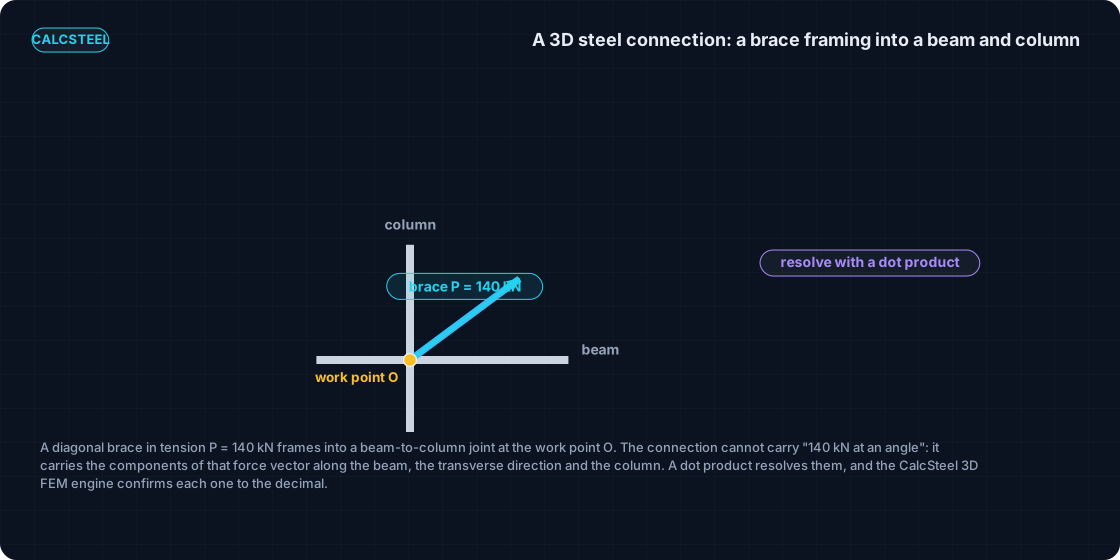
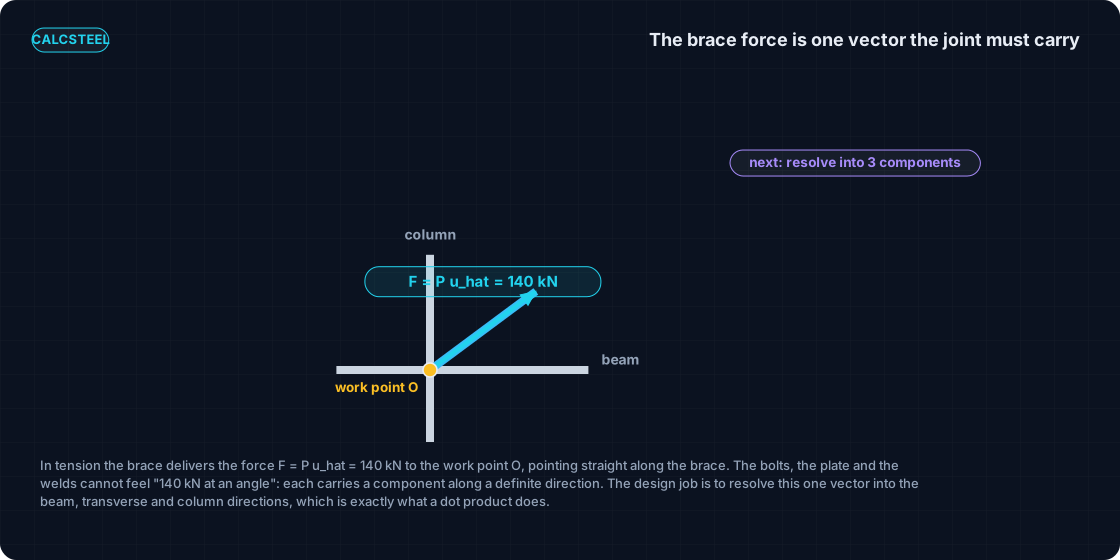
Now put a real load on the brace. It carries an axial tension of P = 140 kN, and because it is a two-force member that force acts straight along its own line. The force the brace delivers to the joint is therefore the vector F = P u_hat: a magnitude of 140 kN pointed along the unit direction u_hat we just built.
Here is the catch that makes the dot product necessary. The connection cannot feel "140 kN at an angle". The bolts have a shear plane, the plate has a face, the welds run along a line, and each of those carries a force along one definite direction. What the design needs is not the brace force as a single slanted number but its share along the beam axis x, along the transverse out-of-plane direction y, and into the column axis z. In other words, the design job is to resolve F into those three components.
Those directions are read straight off the free-body diagram of the joint: the beam axis x_hat = (1, 0, 0), the transverse direction y_hat = (0, 1, 0), and the column axis z_hat = (0, 0, 1). The vectors on that diagram, the brace direction and the three axes the connection reacts along, are all we need.
So the two ingredients are fixed: P = 140 kN and u_hat = (6/7, 2/7, 3/7). In the next sections we turn them into the actual components each part of the connection carries, and then into the angle the brace makes, doing the arithmetic in full and checking every figure against the CalcSteel FEM engine.
The recipe, five steps
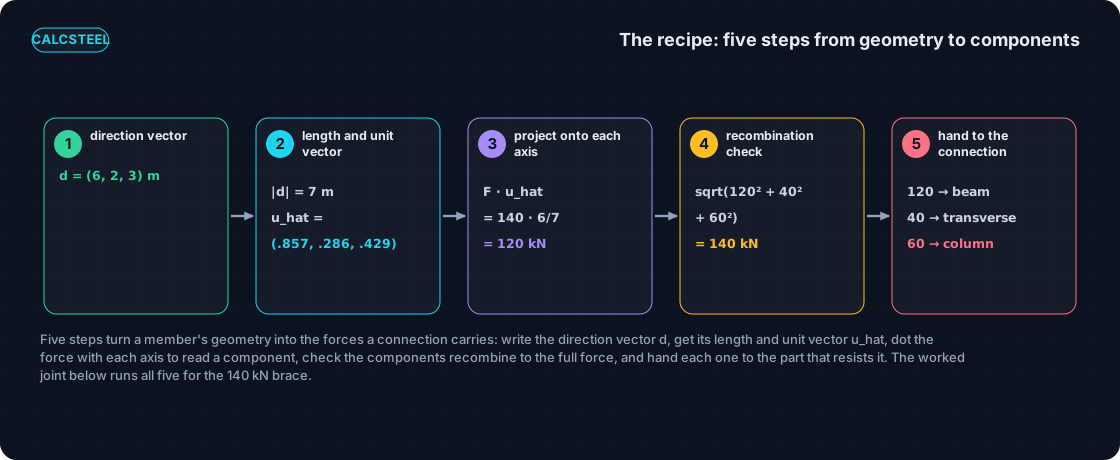
Every resolution of a force into a three-dimensional steel connection follows the same five steps. Nothing here goes beyond the vector algebra you met in your first year: a direction vector, its length, and a dot product. Learn the recipe once and it works for a single brace or a whole space-frame node.
- Write the direction vector. Read the member's geometry off the drawing and write it as a vector d = (dx, dy, dz) from the work point O to the far end.
- Get the length and the unit vector. The length is the magnitude |d| = sqrt(dx^2 + dy^2 + dz^2), and dividing through gives the unit vector u_hat = d / |d|, pure direction with length 1.
- Dot the force with each direction. The component of the force along any direction is the dot product F . u_hat, one clean number per load path.
- Check the recombination. The components must rebuild the force by the 3D Pythagoras, sqrt(sum of the squares), back to the original magnitude.
- Hand each component to its carrier. Give every resolved component to the part of the connection that actually carries it: the bolts, the plate, the welds, the column face.
Worked joint: resolving the 140 kN brace
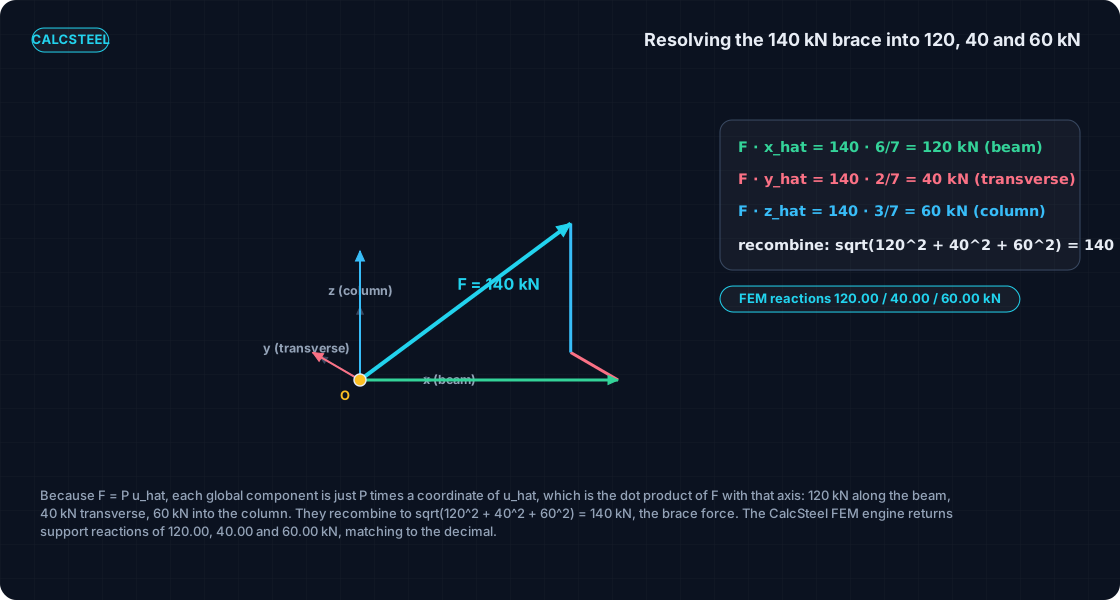
Now the arithmetic. The brace carries an axial tension of P = 140 kN, and its unit direction is u_hat = (6/7, 2/7, 3/7), which as decimals is (0.8571, 0.2857, 0.4286). The force delivered to the joint is the vector F = P u_hat, pointing straight along the brace.
Because F = P u_hat, each global component is simply P multiplied by one coordinate of the unit vector, and that product is exactly the dot product of F with that axis. Along the beam axis x_hat = (1, 0, 0):
F . x_hat = 140 * 6/7 = 120 kN, the demand along the beam.
Out of plane, along y_hat = (0, 1, 0):
F . y_hat = 140 * 2/7 = 40 kN, the transverse demand.
Into the column, along z_hat = (0, 0, 1):
F . z_hat = 140 * 3/7 = 60 kN, the demand into the column.
| Direction | Unit-vector component | Dot product = component (kN) | FEM reaction (kN) |
|---|---|---|---|
| Beam axis x_hat | 6/7 = 0.8571 | 140 * 6/7 = 120 | 120.00 |
| Transverse y_hat | 2/7 = 0.2857 | 140 * 2/7 = 40 | 40.00 |
| Column axis z_hat | 3/7 = 0.4286 | 140 * 3/7 = 60 | 60.00 |
Now the recombination check from step four. The three components must rebuild the brace force:
sqrt(120^2 + 40^2 + 60^2) = sqrt(14400 + 1600 + 3600) = sqrt(19600) = 140 kN, exactly P. The resolution loses nothing; it only redistributes the one axial force into three definite directions.
Here is the punchline. We reproduced this joint in the shipping CalcSteel FEM engine as three orthogonal load paths and loaded it with F = (120, 40, 60). The engine returned support reactions of 120.00 kN along x, 40.00 kN along y and 60.00 kN along z, and the three member axial forces the same, matching the dot-product resolution to the decimal. The hand vector algebra and the real 3D solver agree completely.
The same dot product gives the angle
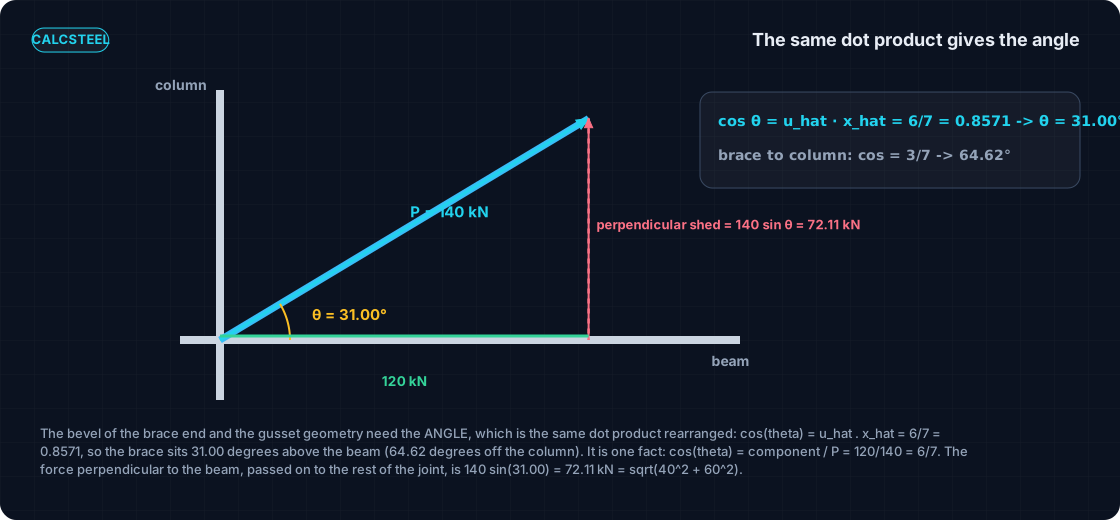
The bevel cut at the brace end, the length of weld available on the gusset, and the geometry of the connection plate all depend on the angle the brace makes with the beam. That angle is not a new calculation: it is the same dot product, rearranged.
For unit vectors the general formula cos(theta) = (u . v) / (|u| |v|) collapses to just the dot product, because both magnitudes are 1. So the angle between the brace and the beam is:
cos(theta) = u_hat . x_hat = 6/7 = 0.8571, giving theta = 31.00 degrees above the beam line.
And the angle between the brace and the column:
cos(theta) = u_hat . z_hat = 3/7 = 0.4286, giving theta = 64.62 degrees. For completeness the angle to the transverse direction is cos = 2/7 = 0.2857, or 73.40 degrees.
Look at how tightly this ties back to the worked resolution. The cosine of the brace-to-beam angle is the beam component divided by the brace force: cos(theta) = F_along_beam / P = 120 / 140 = 6/7. The resolution and the angle are not two facts, they are one fact seen from two sides. Projecting the force and measuring the geometry are the same dot product.
There is a built-in consistency check too. The three direction cosines square-sum to 1: (6^2 + 2^2 + 3^2) / 7^2 = 49 / 49 = 1. That identity is precisely why u_hat has length 1; it is a unit vector by construction.
Finally, the part of the brace force perpendicular to the beam, which a simple axial beam connection cannot carry and must shed to the column and the transverse direction, is P sin(theta) = 140 * sin(31.00 degrees) = 140 * sqrt(13)/7 = 72.11 kN. As a check on the whole picture, that perpendicular part also equals the resultant of the two off-axis components: sqrt(40^2 + 60^2) = sqrt(1600 + 3600) = sqrt(5200) = 72.11 kN. The geometry and the resolved components close on the same number.
Try it: a braced frame, live
Reading the resolution is one thing. Watching it move is another. The interactive calculator embedded right here lets you build a braced portal frame in the browser and see the diagonal brace force split into its components the instant you change the geometry.
Drag the brace to a shallower or steeper angle and watch the share that runs along the beam grow while the share that goes into the column shrinks, exactly as the dot product predicts. Every component you see is the force dotted with a direction, the same operation you just did by hand for the 140 kN brace, now recomputed live for whatever joint you draw.
It is genuinely free, there is no login for the math, and there is no limit on how many times you resolve a joint. Change the numbers, break your intuition, rebuild it.
Diagrams plotted on the deformed-free frame geometry. N, V, M recovered from the element end-forces of the direct-stiffness solve (12 elements / member). Moment drawn offset to each member's centreline.
First-order STRENGTH screening at the governing section of the NBR 8800 (BR) ULS envelope (governing CB2): N,d = 73.9 kN, M,d = 109 kN·m. Member buckling and lateral-torsional buckling are NOT included — see the stability flags below and run the full verification in the 3D editor. Click a card to make that resistance code govern the ranking.
ULS load combinations — NBR 8800 (BR)
G + W superposed · 3 combinations| Combination | Factors | Utilization |
|---|---|---|
| CB1 | 1.4 G | 69% |
| CB2governs | 1.4 G + 1.4 W | 76% |
| CB3 | 1 G + 1.4 W | 57% |
Combinations generated by the CalcSteel combinations engine (the same v4 engine the 3D editor uses, 6 codes). Gravity is treated as a single permanent action G; the wind action W is the eaves load. Each combination's γ factors are applied by superposition to the isolated gravity and wind solves, then every section is screened — the worst point of the worst combination governs.
Stability screening (buckling caveats)
not in the strength checkScreening indicators only — assumed sway effective length (K = 1.5) and the full member length as the unbraced length (no intermediate purlin/girt restraint). The strength check above deliberately excludes these; the real member verification (effective lengths from the alignment chart / notional loads, χ and Cb reduction factors, purlin bracing) runs in the 3D editor.
Lightest sections that pass (NBR)
screened 974 profiles| Profile | Mass | Frame steel | Utilization | |
|---|---|---|---|---|
| VS 400x32 | 31.9 kg/m | 723 kg | 82% | |
| VS 350x33 | 33.2 kg/m | 752 kg | 86% | |
| VS 400x34 | 34.4 kg/m | 779 kg | 75% | |
| VS 350x35 | 35.1 kg/m | 795 kg | 80% | |
| VS 400x35 | 35.1 kg/m | 795 kg | 73% |
When the members are not perpendicular: a 3D node
In the tidy worked joint the three reaction directions were mutually perpendicular, so each component was a single clean dot product: the force along the beam owed nothing to the column, and the force into the column owed nothing to the beam. That independence is what let us read the answer off three separate multiplications.
Real space-frame nodes are rarely so kind. When three struts meet at a work point and none of them is perpendicular to the others, one dot product no longer isolates one member, because pushing on one leg feeds all three global directions at once. You still use vectors and the dot product, but now they assemble a small system of equations instead of standing alone.
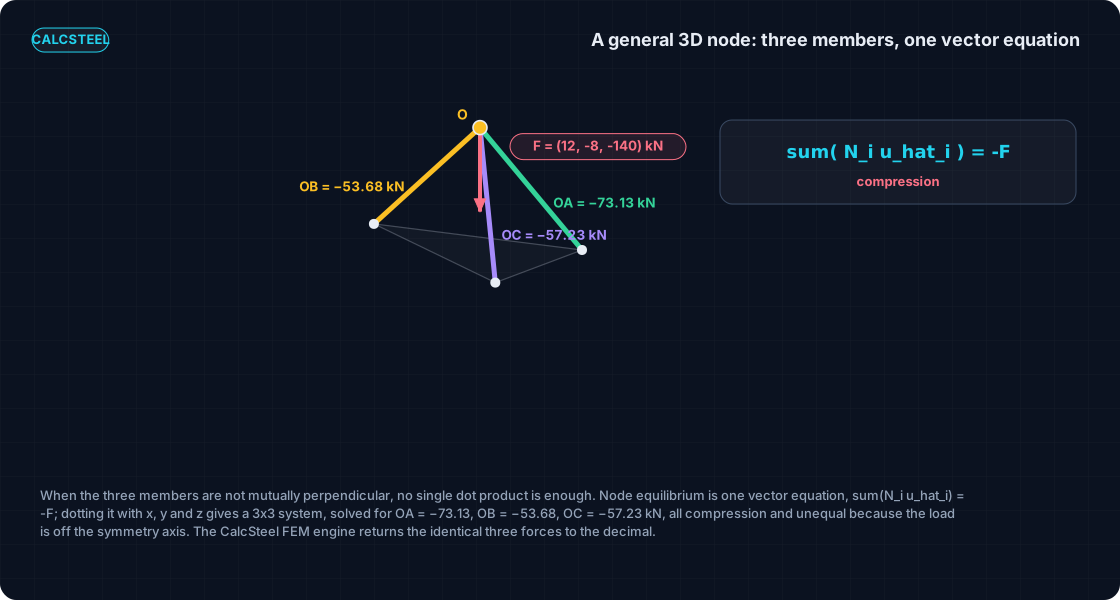
Take the corner of a space-frame hip or a pipe-rack: three struts meet at the loaded work point O = (0, 0, 3.6) m, with their far ends pinned to the ground at A = (3.0, 0, 0), B = (minus 1.8, 2.4, 0) and C = (minus 1.2, minus 3.0, 0), all in metres. A combined load F = (12, minus 8, minus 140) kN is applied at O, 140 kN of gravity pulling down with a small wind thrust of 12 and minus 8 kN across it.
The equilibrium of the node is one vector equation: the member forces must balance the applied load, so the sum over the members of (N_i u_hat_i) = minus F, where each u_hat_i is the unit vector pointing from O toward that member's base and N_i is its unknown axial force. That single vector statement holds in every direction at once.
To turn it into numbers you take its dot product with x_hat, y_hat and z_hat in turn. Each dot product collapses the vector equation into one scalar equation, and the three of them together form a 3x3 system in the three unknown forces. Solving that system gives the members directly.
The unit vectors and the solved forces, hand vector solve and FEM engine agreeing to the decimal, are:
| Member | Unit vector u_hat (from O) | Length (m) | Axial force N (kN) |
|---|---|---|---|
| OA | (0.6402, 0.0000, minus 0.7682) | 4.686 | minus 73.125 (compression) |
| OB | (minus 0.3841, 0.5121, minus 0.7682) | 4.686 | minus 53.676 (compression) |
| OC | (minus 0.2481, minus 0.6202, minus 0.7442) | 4.837 | minus 57.226 (compression) |
All three legs come back in compression: they prop the node up against the 140 kN gravity load. The three magnitudes are unequal because the applied load sits off the axis of symmetry, so no two legs share the demand evenly. The signs are the physics, not bookkeeping.
Building the true space truss on the shipping CalcSteel FEM engine returns the identical three forces, minus 73.125, minus 53.676 and minus 57.226 kN, with a maximum difference of 0.000 kN. The same vectors and the same dot product that resolved one brace now size a whole three-dimensional node, which is exactly how member forces fall out of any steel truss design.
Where this sits in the first-year-math-to-steel map
None of this is a special trick invented for connections. It is the ordinary first-year engineering-math ementa, the vector algebra and analytic geometry taught right beside Calculo I and II, doing structural work. Each tool from that opening year has a clean job in real steel.
- Vectors and the dot product resolve a force into the load paths of a connection, the subject of this post.
- The ordinary derivative gives the rate of change along a beam, so that dM/dx equals the shear force.
- The second derivative gives the curvature and the elastic line a beam actually bends into.
- The definite integral turns a diagram into the quantity under it, which is why the area under the shear diagram is the bending moment.
- The partial derivative reads off a displacement, the route through Castigliano's theorem to the deflection of a steel truss.
Read together they form one coherent arc: the mathematics of your first year is not a prerequisite you leave behind, it is the working machinery of the structure you design later. The vector and the dot product are simply the first link in that chain.
From components to a connection check
Resolving the brace force is not the end of the work, it is the first step of every bracing-connection design. Once you have the three components, each one has an address: a specific part of the connection that has to carry it. Nothing gets bolted or welded until the force has been split into the directions the steel actually reacts along.
Read straight from the worked joint, the 120 kN along the beam is the demand on the face that runs parallel to the beam: the shear tab, the bolt group and the welds on that plate are what deliver it into the framing. This is the largest single component, because the brace is only 31.00 degrees off the beam line, so most of its force runs along it.
The 60 kN into the column and the 40 kN transverse (out of plane) feed the column-side detail: the part of the connection that ties the joint back to the column and holds the out-of-plane push. These are smaller, but they are real, and a connection that only chased the 120 kN would be missing two of the three load paths.
The angle face from the previous section is just as practical. The 72.11 kN perpendicular to the beam, which is P sin(31.00 deg) and also equals sqrt(40^2 + 60^2), is the part of the force the beam cannot carry axially. That is exactly the demand that must be transferred out of the shear plane, through the gusset and into the column and transverse directions, and it is the number that sizes the weld pattern and the gusset that do the turning.
From here the numbers become a genuine steel check. If you want to see where a resolved component lands on a real detail, the worked connection for a 200 kN reaction with bolts, plate and weld all checked shows the full sizing, and bolted connection design covers the bolt group the along-beam component feeds. For the brace itself, its capacity and the governing code case live in the diagonal steel bracing worked check. In every one of them, the vector and the dot product did the resolving before a single fastener was chosen.
Common mistakes and FAQ
The dot product is a two-line operation, so the errors are rarely in the algebra. They are in what you feed it and what you read out of it. Here is the checklist that keeps a 3D resolution honest.
- Normalise before you project. Dot the force with the unit vector u_hat, not the raw direction d = (6, 2, 3). If you use the raw vector, the component comes out scaled by the length (a factor of 7 here), and the number is meaningless.
- Keep the sign. A component can be negative, meaning it points opposite the axis you dotted with. That sign is not noise, it is the direction of the demand: in the general node every leg came back negative because all three are in compression.
- One direction at a time. The dot product gives the component in the single direction you dotted with and says nothing about the others. Three axes means three separate dot products.
- Recombine by Pythagoras, not by adding. The components return to the magnitude through sqrt(120^2 + 40^2 + 60^2) = 140 kN, never by 120 + 40 + 60. Adding components is the classic way to invent force that is not there.
- Perpendicular vectors dot to zero. Use it as a check: if a stiffener is meant to be normal to a flange, its direction vector dotted with the flange direction should come out zero. Anything else means it is not truly perpendicular.
- A two-force member carries only axial force. A truss or brace member takes load along its own axis alone, so the connection, not the member, is what carries the transverse components you resolved out.
How do you resolve a force into x, y and z components in 3D? Write the force as F = P u_hat, where u_hat is the unit direction, then take the dot product of F with each axis. Since F . x_hat = P (u_hat . x_hat), each component is just P times the matching coordinate of u_hat: for the worked brace that is 140 * 6/7 = 120 kN, 140 * 2/7 = 40 kN and 140 * 3/7 = 60 kN.
What does the dot product actually compute in statics? Two things at once. Given F and a unit direction, F . u_hat is the component of the force in that direction, the projection. Given two directions, u . v with a divide by the magnitudes is the cosine of the angle between them. Same operation, two jobs.
Why is the unit vector important? Because it is pure direction with length 1, so dotting a force with it returns a clean force component in kN. The unit vector's own coordinates are the direction cosines, and they square-sum to 1, which is what makes 120, 40 and 60 recombine exactly back to 140.
How do I find the angle between two members? Take each member's unit vector and dot them: cos(theta) = u_hat . v_hat. For the brace against the beam that is 6/7 = 0.8571, giving theta = 31.00 degrees. It is the very same number as the resolution, since cos(theta) = 120 / 140 = 6/7.
Key takeaways
One diagonal brace, one 3D node, and nothing but a vector and a dot product between the geometry and the connection demand. Here is what to carry away.
- A force and a member's geometry are both vectors: a magnitude and a direction, written by components (x, y, z). The member direction divided by its length is the unit vector u_hat, pure direction.
- The dot product does two jobs with one formula. F . u_hat is the component of a force along a direction (projection), and u . v over the magnitudes is the cosine of the angle between two members.
- The worked 140 kN brace resolved cleanly into 120 kN along the beam, 40 kN transverse and 60 kN into the column, and those three recombine to sqrt(120^2 + 40^2 + 60^2) = 140 kN, back to the brace force.
- The same dot product gave the angle: 31.00 degrees off the beam, with 72.11 kN perpendicular to it, the part the beam cannot carry and the connection must turn.
- When members are not perpendicular, one vector equilibrium equation dotted with x, y and z solved the whole space node: OA = minus 73.125 kN, OB = minus 53.676 kN, OC = minus 57.226 kN, all compression. Every one of these numbers was confirmed by the CalcSteel 3D FEM engine to the decimal.
Now do it yourself. Build the braced frame in the live calculator above, change the geometry and watch the components move, then open the full 3D editor. CalcSteel runs a real 3D FEM engine free in your browser, no login for the math and no trial gate, and if you are a student the education offer is free. The vector algebra from your first year of engineering is already enough to resolve a real force in a three-dimensional steel connection. Go prove it against the engine.
Sources
- 1.Hibbeler, Engineering Mechanics: Statics (position vectors, the dot product, force components in three dimensions)
- 2.Beer, Johnston and Mazurek, Vector Mechanics for Engineers: Statics (rectangular components and the scalar product)
- 3.AISC Design Guide 29, Vertical Bracing Connections (resolving the brace force at a work point)
- 4.AISC Steel Construction Manual (bracing connections, work points, transfer of forces)
- 5.Eurocode EN 1993-1-8, Design of steel structures: Design of joints
Try CalcSteel for free
Model, analyze and design steel structures in your browser. No install, no signup.
Open the 3D editor