Numerical Integration: Section Properties of an Arbitrary Polygon, the Way Software Does It
Area, centroid, moment of inertia and product of inertia for any polygon, computed the way structural software actually does it: Green's theorem turns the area integrals from Calculus II into a single walk around the boundary. Five worked examples, every number checked against closed form.
Key takeaways
- Every section property is a Calculus II area integral: A = ∫dA, the centroid needs ∫y dA, and the moment of inertia is ∫y² dA. Software never meshes the interior to evaluate them.
- Green's theorem converts each area integral into a line integral around the boundary, and for a polygon that collapses to a finite sum over the edges: the shoelace family of formulas.
- One pass over the vertices returns A, the centroid, Ix, Iy and Ixy exactly, with no approximation, for any simple polygon, holes included by subtraction.
- Curved boundaries are the only place real numerical integration enters: a circle becomes an n-gon, and the error falls as 1/n², so doubling the sides quarters the error.
- The 12-vertex outline of an I-beam returns the exact textbook Ix to the last digit, which is why a polygon engine can serve a 1,309-profile catalog from one function.
What are section properties, and why does software have to integrate?
Before any beam is checked for bending, deflection or buckling, its cross-section has to be reduced to a handful of numbers. Those numbers are the section properties:
- Area A, which carries axial force and self-weight.
- Centroid (Cx, Cy), the point every other property is measured about.
- Second moment of area Ix, Iy (the moment of inertia), which sets bending stiffness and, through the Euler load, buckling capacity.
- Product of inertia Ixy, which tells you whether x and y are the principal axes or whether the section will bend sideways under a vertical load.
- Section modulus S = I / c and radius of gyration r = √(I/A), the derived numbers the code checks use directly.
For a rectangle or a round bar you look these up in a formula. But a real cross-section, a welded plate girder, a cold-formed lip, a gusset with a clipped corner, a bridge cell, has no formula. It is just an outline. The question this article answers is the one every structural program has to answer internally: given nothing but the corner coordinates of an arbitrary shape, how do you get A, the centroid and the inertia, exactly and fast?
The honest answer is numerical integration, but not the kind most people picture. Software does not chop the interior into a grid and add up little squares. It does something far more elegant, and it comes straight out of Calculus I and II.
The calculus underneath: from an area integral to a number
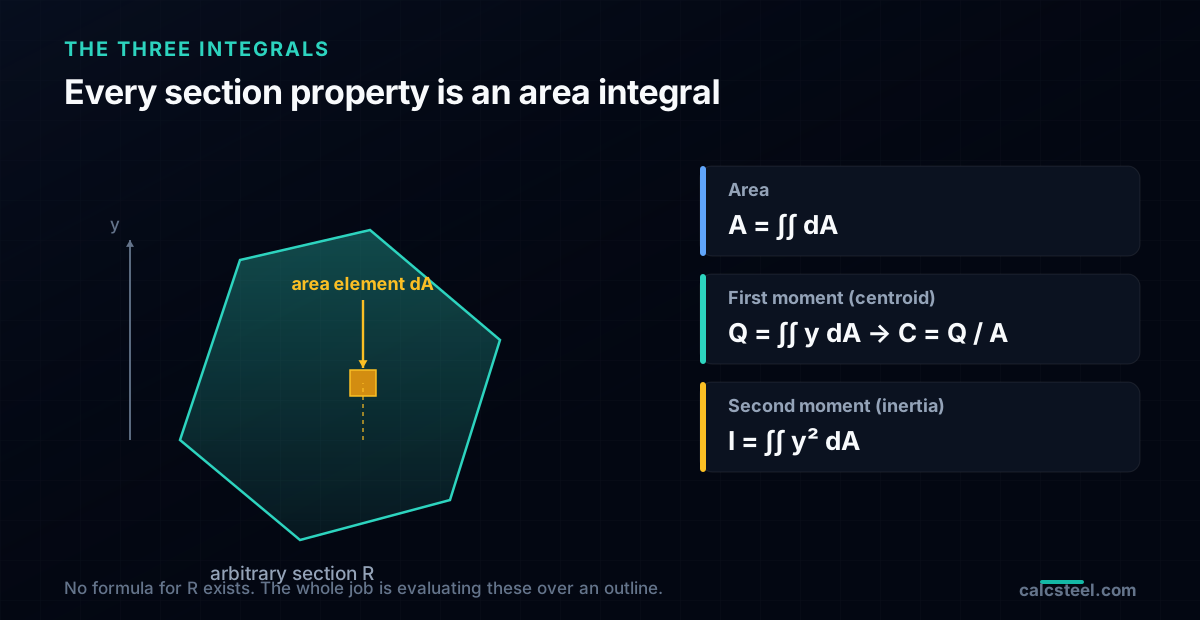
Open the Calculus II syllabus at the chapter on double integrals and you already have the definitions. Over the region R that the cross-section occupies:
A = ∫∫R dA
Qx = ∫∫R y dA, Qy = ∫∫R x dA (the first moments; the centroid is Cy = Qx/A, Cx = Qy/A)
Ix = ∫∫R y² dA, Iy = ∫∫R x² dA, Ixy = ∫∫R xy dA
These are exact and completely general, and if the connection between an integral and a physical quantity feels abstract, the shear-and-moment case makes it concrete: the moment is literally the definite integral of the shear diagram. The difficulty here is purely practical: R is an arbitrary region, so there is no antiderivative to plug limits into. A first-year student would set up the limits by hand for one specific shape. A program cannot, because it does not know the shape until runtime.
There are three ways out, and it is worth naming them because people conflate them:
- Meshing / Monte Carlo: fill the interior with cells or random points and sum. Simple, always works, but approximate and slow, and it needs the interior, not just the outline. This is what finite-element software does for stress, not what it does for section properties.
- Gaussian quadrature: sample the integrand at a few clever points with clever weights. Exact for polynomials up to a degree, and since y² is a low-degree polynomial, a handful of points nails a straight-edged shape. This is the workhorse inside the element stiffness integrals of a finite-element engine.
- Green's theorem: convert the area integral to a boundary integral, then, for a polygon, evaluate it exactly as a finite sum. No mesh, no sampling, no error. This is what a section-property engine uses.
Option 3 is the one that turns an unbounded problem into a one-line loop, so it is the one we follow.
Green's theorem: turning an area integral into a walk around the edge
Green's theorem is the Calculus II result that relates a double integral over a region to a line integral around its boundary ∂R:
∫∫R (∂M/∂x − ∂L/∂y) dA = ∮∂R (L dx + M dy)
The trick is to choose L and M so that the left side becomes the property we want. For the area, pick L = 0, M = x, and the theorem gives A = ∮ x dy. For the second moment about the x-axis, pick the pair that makes ∂M/∂x − ∂L/∂y = y², and Ix becomes a line integral of y² terms around the edge. The same move works for every property in the list.
Why is this such a win? Because the boundary of a polygon is a sequence of straight segments, and a line integral over a straight segment is something you can integrate in closed form once, symbolically, forever. You do the calculus a single time on a generic edge from (xᵢ, yᵢ) to (xᵢ₊₁, yᵢ₊₁), and from then on the computer only adds up the resulting algebra. The two-dimensional integral over an unknown region has collapsed into a one-dimensional sum over n edges.
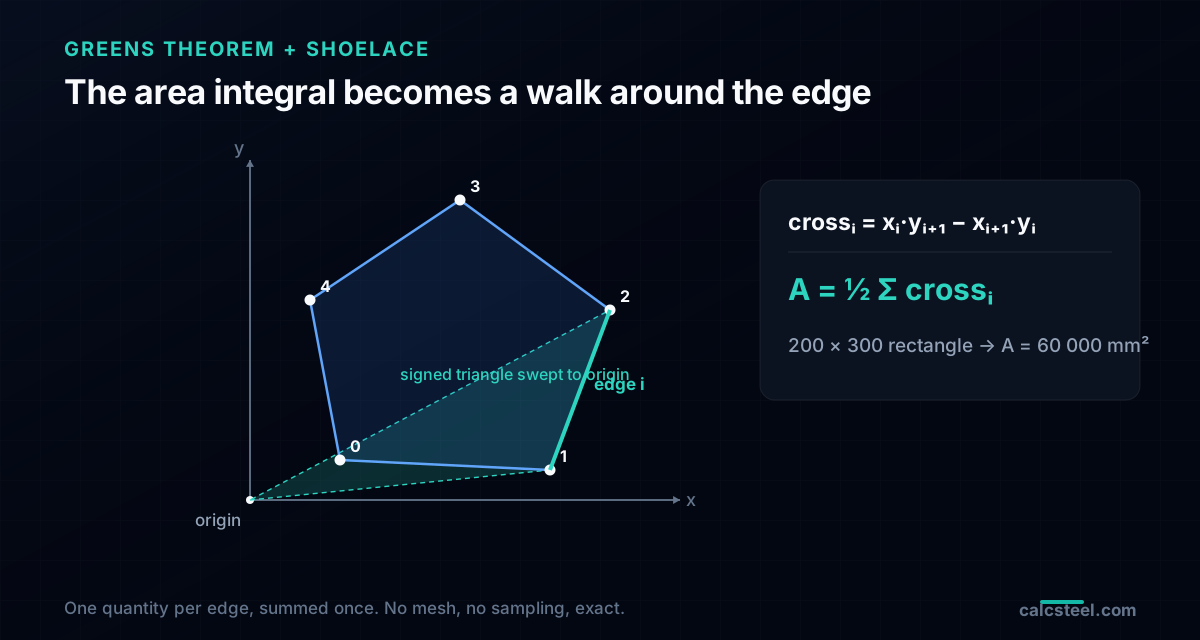
Geometrically, each edge sweeps out a signed triangle back to the origin. Edges on the far side of the origin sweep positive area, edges on the near side sweep negative area, and the overlaps cancel exactly, leaving the true enclosed region. That signed-sweep picture is the whole idea behind the formula in the next section.
The shoelace formula: polygon area in one pass
Carry out the boundary integral for a polygon with vertices (xᵢ, yᵢ), listed in order and closed (the last vertex connects back to the first), and every property reduces to a sum of one quantity per edge, the cross term:
crossᵢ = xᵢ · yᵢ₊₁ − xᵢ₊₁ · yᵢ
That is exactly the numerator of a 2×2 determinant, the signed area of the triangle formed by the origin and edge i. The area is then:
A = ½ Σ crossᵢ
This is the shoelace formula (Gauss's area formula), named because the cross-multiplication pattern looks like lacing a shoe. It is signed: list the vertices counter-clockwise and A comes out positive, clockwise and it comes out negative. Software uses that sign deliberately, positive for a solid boundary, negative for a hole, so a section with a cavity is handled by listing the hole's vertices the other way and adding.
Worked example: a 200 × 300 mm rectangle
Place the corners at (0,0), (200,0), (200,300), (0,300), counter-clockwise. The four cross terms:
- edge (0,0)→(200,0): 0·0 − 200·0 = 0
- edge (200,0)→(200,300): 200·300 − 200·0 = 60 000
- edge (200,300)→(0,300): 200·300 − 0·300 = 60 000
- edge (0,300)→(0,0): 0·0 − 0·300 = 0
A = ½ (0 + 60 000 + 60 000 + 0) = 60 000 mm², which is 200 × 300 to the digit. Two of the four edges contributed nothing, because an edge lying along a line through the origin sweeps zero triangle. The formula does not care; it just adds.
> CalcSteel note: the section engine that powers the profile pages runs exactly this loop. The signed cross term is line one of the function; everything else is more of the same algebra.
The centroid of an arbitrary polygon
The centroid uses the same cross term, weighted by the coordinate that is moving:
Cx = 1/(6A) Σ (xᵢ + xᵢ₊₁) · crossᵢ
Cy = 1/(6A) Σ (yᵢ + yᵢ₊₁) · crossᵢ
The centroid matters because the moment of inertia the code wants is measured about the centroid, not about your drawing origin. Get the centroid wrong and every inertia after it is wrong by the parallel-axis term.
Worked example: a right triangle, 120 base × 180 height
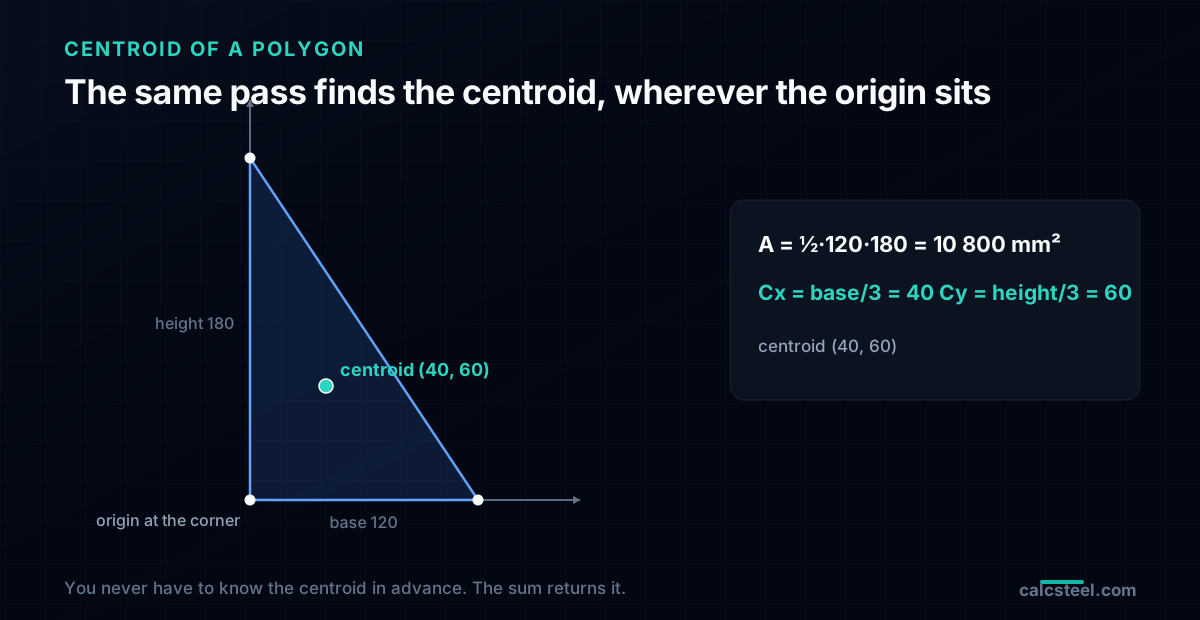
Vertices (0,0), (120,0), (0,180). The shoelace area is ½ · 120 · 180 = 10 800 mm². Feeding the same vertices through the centroid sums gives:
- Cx = 40 mm = base / 3
- Cy = 60 mm = height / 3
which is the textbook centroid of a right triangle, one third of each leg from the right-angle corner. Notice the origin sat at a corner, not at the centroid: the formula found the centroid for us, which is the entire point. You never have to know where the centroid is in advance.
Second moments of area, and the parallel-axis transfer
The second moments come out of the same boundary integral, one algebraic step heavier. About the drawing origin:
Ix0 = 1/12 Σ (yᵢ² + yᵢ·yᵢ₊₁ + yᵢ₊₁²) · crossᵢ
Iy0 = 1/12 Σ (xᵢ² + xᵢ·xᵢ₊₁ + xᵢ₊₁²) · crossᵢ
Ixy0 = 1/24 Σ (xᵢ·yᵢ₊₁ + 2xᵢ·yᵢ + 2xᵢ₊₁·yᵢ₊₁ + xᵢ₊₁·yᵢ) · crossᵢ
These are about the origin, which is almost never where you want them. The last step is the parallel-axis theorem (the Steiner transfer), used in reverse to slide the axis from the origin to the centroid:
Ix = Ix0 − A · Cy², Iy = Iy0 − A · Cx², Ixy = Ixy0 − A · Cx · Cy
Because we subtract the centroid contribution once, at the end, the whole computation is still a single pass over the edges followed by three subtractions. Nothing is meshed, nothing is sampled.
Back to the rectangle
For the 200 × 300 rectangle, the origin sums give Ix0, and after the transfer by Cy = 150 mm the result is Ix = 450 × 10⁶ mm⁴, exactly b·h³/12 = 200·300³/12. Likewise Iy = 200 × 10⁶ mm⁴. From there the derived numbers the code uses fall out: Sx = Ix/c = 450×10⁶/150 = 3.0 × 10⁶ mm³, and rx = √(Ix/A) = 86.6 mm. The polygon route reproduces the closed form to the last digit, which is the point: it is not an approximation of the formula, it is the formula, derived once for a generic edge.
Product of inertia and principal axes: when x and y are the wrong axes
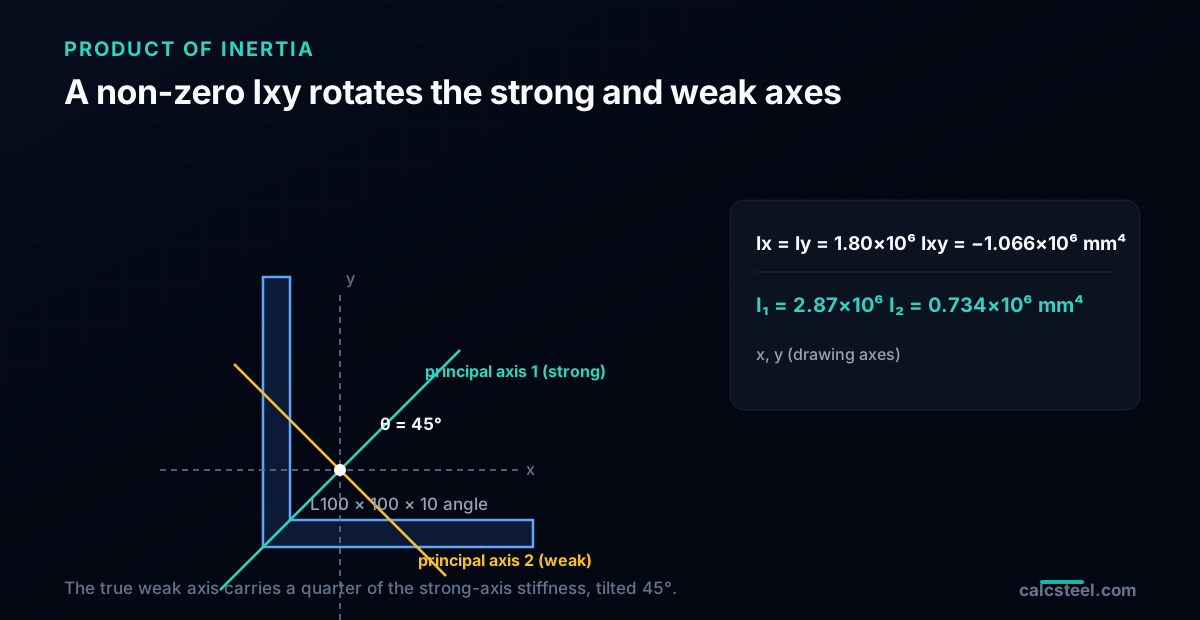
The product of inertia Ixy is the property nobody remembers from the formula table, because for any section with an axis of symmetry it is zero. But an angle, a Z, a monosymmetric channel loaded off-axis, or any clipped or unsymmetric shape has a non-zero Ixy, and that changes the physics: a vertical load produces sideways bending, because the strong and weak axes are rotated away from horizontal and vertical.
The engine gets Ixy from the same one-pass sum shown above, then finds the principal axes with the Mohr's-circle-of-inertia relations, which are pure Calculus-level trigonometry, the rotation of a quadratic form:
R = √( ((Ix − Iy)/2)² + Ixy² ), I₁ = (Ix+Iy)/2 + R, I₂ = (Ix+Iy)/2 − R
θ = ½ · atan2(2 Ixy, Iy − Ix) locates the axis.
Worked example: an equal-leg angle L100 × 100 × 10
Trace the L as six vertices, corner at the origin, both legs 10 mm thick. One pass returns:
- A = 1 900 mm², centroid at (28.68, 28.68), on the 45° line as symmetry demands.
- Ix = Iy = 1.80 × 10⁶ mm⁴ (equal, because the legs are equal).
- Ixy = −1.066 × 10⁶ mm⁴, and the fact that it is not zero is the whole story.
The principal values are I₁ = 2.87 × 10⁶ mm⁴ and I₂ = 0.734 × 10⁶ mm⁴, at θ = 45°. So the true weak axis of an equal-leg angle carries only about a quarter of the stiffness of its strong axis, and both are tilted 45° from the legs. An engineer who checked bending about the horizontal leg axis, using Ix = 1.80 × 10⁶, would be wrong in both magnitude and direction. The polygon engine hands you I₂ and θ without any of that being obvious from the outline.
Worked example: an I-section straight from its vertices
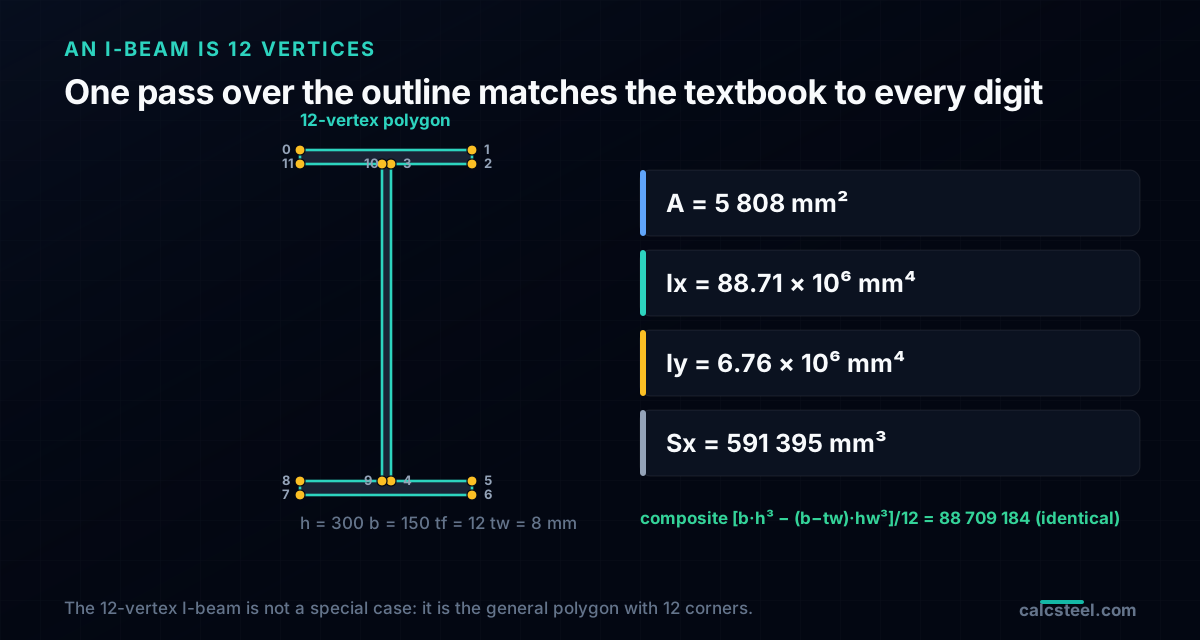
Here is the example that shows why this method is worth trusting for real profiles. Take an I-section, h = 300, b = 150, flange tf = 12, web tw = 8 mm, and describe it the only way a program can: as the 12 corner points of its outline, tracing the flanges and web tips in order. No formula, no decomposition, just the polygon.
One pass of the shoelace family over those 12 vertices returns:
- A = 5 808 mm²
- Ix = 88 709 184 mm⁴ ≈ 88.71 × 10⁶
- Iy = 6 761 776 mm⁴ ≈ 6.76 × 10⁶
- Sx = 591 395 mm³, rx = 123.59 mm, ry = 34.12 mm
Now check it the textbook way, the composite of three rectangles with the parallel-axis theorem, Ix = [b·h³ − (b−tw)·hw³] / 12 with hw = 276: [150·300³ − 142·276³] / 12 = 88 709 184 mm⁴. The two agree to every digit, not to three decimals, to every digit, because the polygon integral and the composite integral are the same integral evaluated two ways.
That exactness is why a single polygon function can drive an entire profile database. It also composes: a plate girder, a castellated beam with hexagonal web holes (see castellated and cellular beams), a box with an internal void, all are just more vertices, or an outer loop plus a hole loop. The 12-vertex I-beam is not a special case in the code; it is the general case with 12 corners.
Curved boundaries: how a circle becomes a polygon, and how big the error is
Everything so far was exact because the edges were straight. A circle, a fillet, a tube wall has a curved boundary, and that is the one place real numerical integration, in the approximate sense, actually enters. The universal move is to replace the curve with a many-sided polygon and run the exact polygon formula on it. The only question is how many sides you need, and the answer is a clean convergence result.
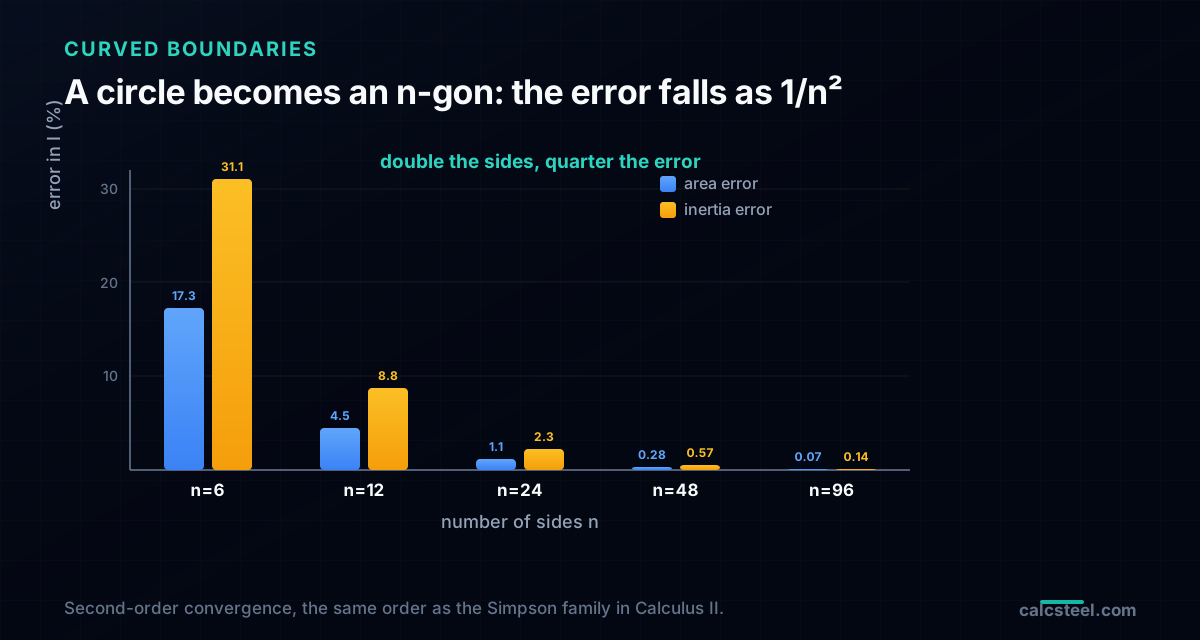
Approximate a circle of radius 100 mm (exact A = πr² = 31 415.9 mm², exact I = πr⁴/4 = 78.54 × 10⁶ mm⁴) by an inscribed regular n-gon:
- n = 6: A off by −17.3 %, I off by −31.1 % (a hexagon is a poor circle)
- n = 12: A off by −4.51 %, I off by −8.77 %
- n = 24: A off by −1.14 %, I off by −2.26 %
- n = 48: A off by −0.285 %, I off by −0.570 %
- n = 96: A off by −0.071 %, I off by −0.143 %
- n = 360: A off by −0.005 %, I off by −0.010 %
The pattern is exact and worth internalizing: the error falls as 1/n². Going from 12 sides to 24 cut the area error from 4.51 % to 1.14 %, a factor of 3.96, essentially the theoretical 4. Every doubling of the sides quarters the error. That is second-order convergence, the same order you meet in the trapezoidal and Simpson family in Calculus II, and it is why a section engine can hit five-significant-figure accuracy on a round bar with a couple of hundred sides and never think about it again.
The alternative, and what a stress solver uses on the element interior rather than the section outline, is Gaussian quadrature: instead of many equal sides, sample the integrand at a few optimally placed points. Because y² is only a quadratic, a 2-point Gauss rule integrates it exactly over a straight-sided element. Same Calculus II idea, sampling to replace an integral, tuned for a different job.
Holes, composites and the sign that does the work
Two extensions cover almost every real section, and both fall straight out of the signed area.
Holes by subtraction
A hollow section, a tube, a box girder, a plate with a bolt hole, is an outer boundary minus an inner one. Because the shoelace area is signed, you list the outer loop counter-clockwise (positive) and the hole loop clockwise (negative), add every property from both, and the hole simply subtracts itself. There is no special hole code: A = Aouter − Ahole, and the same cancellation happens for the first and second moments before the single centroid transfer at the end. A rectangular tube is a four-vertex outer loop and a four-vertex inner loop, eight numbers, and the exact I of an RHS drops out.
Composites by summation
The other common workflow is the welded built-up member: a girder is a top flange plate, a bottom flange plate and a web plate. Here you do not even need the polygon route; the parallel-axis theorem on rectangles is enough. For each plate, add its own b·h³/12 plus A·d² to the running total, where d is the plate centroid's distance to the section centroid. Sum area, sum first moments to find the centroid, then sum the transferred inertias. It is the same Steiner term as before, now used forward, one rectangle at a time.
The one thing to watch: overlapping plates double-count. If two rectangles in a composite share interior area, the summation adds that region twice and silently inflates A and I. Touching edges, the normal welded case, are fine; genuine overlap is a modeling error the engine flags rather than swallows.
Common mistakes: winding order, the missing transfer, and units
The math is short, so the errors are always in the bookkeeping. The ones that bite, in order of how often they show up:
- Winding order. List the outer polygon clockwise and the signed area comes out negative. A robust engine forces the outer loop positive and the hole negative regardless of how you entered them, but a hand implementation that trusts the raw sign will report a negative area and, worse, a plausible-looking but wrong inertia.
- Forgetting the centroid transfer. The one-pass sums give the inertia about the origin. If you stop there and report Ix0 as Ix, you have overstated the stiffness by A·Cy², which for an off-origin section can be larger than the real answer. The subtraction is not optional.
- An open polygon. The loop assumes the last vertex connects back to the first. Feed it an unclosed list, or accidentally repeat the closing vertex without the code expecting it, and one phantom edge corrupts every sum. Good engines dedupe an explicitly repeated closing point and close the rest implicitly.
- Self-intersecting outlines. A figure-eight or a boundary that crosses itself violates the simple-polygon assumption; the signed triangles no longer partition the region and the result is meaningless. Trace the boundary once, without crossings.
- Units. Inertia scales as length to the fourth power. Enter the outline in centimetres when the rest of the model is in millimetres and I is off by 10⁴. Keep one length unit end to end; a section engine that works internally in mm⁴ expects mm in.
None of these are subtle once named, and every one of them has produced a section that looked fine and checked wrong. The value of using the shipped engine is that all five are handled for you.
Try it, and see how CalcSteel does it in production
Everything above is live in the CalcSteel Moment of Inertia calculator. The custom-section builder takes either a list of welded plates (the composite route) or the raw vertices of any polygon, optionally with one hole, and returns A, the centroid, Ix, Iy, Ixy, the principal axes, S and r, drawn to scale, and matched live against the real 1,309-profile database. It is the exact Green's-theorem loop from this article, the same function that computes the properties behind every profile page, so the number you get in the browser is the number the analysis engine uses.
Type in the 200 × 300 rectangle and watch 60 000 mm² and 450 × 10⁶ mm⁴ come back. Paste the 12 vertices of the I-beam and read 88.71 × 10⁶. Trace the equal-leg angle and see the principal axes swing to 45°. There is no meshing, no waiting, because there is no approximation to converge, just one pass over the edges.
Once you have the section, the next step is what the structure does with it: feed I into a beam deflection check or the Euler buckling load, or read how the same I drives the serviceability deflection limits. The section properties are the bridge from Calculus II to a member that passes.
Formula — hover a variable to highlight it on the drawing
Ix = [ b·h³ − (b − tw)·hw³ ] / 12= 1,845.6 cm⁴(hw = h − 2·tf)
Iy = [ 2·tf·b³ + hw·tw³ ] / 12= 141.9 cm⁴
Root fillets are neglected — rolled-section tables run 1–5% higher on Ix.
Parallel-axis theorem, live — Ix = Σ ( I₀ + A·d² )
| Part | A (cm²) | d (cm) | I₀ (cm⁴) | A·d² (cm⁴) | I₀ + A·d² (cm⁴) |
|---|---|---|---|---|---|
| Web | 10.25 | 0 | 286 | 0 | 286 |
| Flange (top) | 8.5 | 9.58 | 0.512 | 779.3 | 779.8 |
| Flange (bottom) | 8.5 | 9.58 | 0.512 | 779.3 | 779.8 |
| Σ = Ix | 287 | 1,558.6 | 1,845.6 |
Exact rectangle parts (web + two flanges) about the section centroid — the flange A·d² transfer terms are the whole story of the I-beam. Change any dimension above and watch the table re-derive.
Section properties
Moment of inertia Ix
1,845.6 cm⁴
1.846 × 10⁷ mm⁴
Moment of inertia Iy
141.9 cm⁴
1.419 × 10⁶ mm⁴
Area A
27.25 cm²
Mass
21.39 kg/m
Section modulus Sx
184.6 cm³
Section modulus Sy
28.39 cm³
Plastic modulus Zx
209.7 cm³
Plastic modulus Zy
43.93 cm³
Radius of gyration rx
8.23 cm
Radius of gyration ry
2.28 cm
Centroid x̄ (from left)
50 mm
Centroid ȳ (from bottom)
100 mm
Local slenderness — NBR 8800 / AISC 360 fingerprint
Flange
λ = b / 2·tf = 5.88
λp = 10.75 · λr = 28.28
Web
λ = hw / tw = 32.68
λp = 106.3 · λr = 161.2
Flexure limits per AISC 360 Table B4.1b (≈ NBR 8800 Annex F), fy = 250 MPa, E = 200 GPa — λp/λr scale with √(E/fy). Compact sections reach the full plastic moment Mp = Z·fy; non-compact and slender elements are capped by local buckling.
Closest standard profiles — matched by Ix against 876 real catalog sections
Ix = 1,845.6 cm⁴ (-0.0%)
Iy = 141.9 cm⁴ (-0.0%)
21.39 kg/mlightest
Best match — design checks
Ix = 1,844.2 cm⁴ (-0.1%)
Iy = 902.5 cm⁴ (+535.8%)
34.19 kg/m#2 by weight
Design checks
Ix = 1,838.7 cm⁴ (-0.4%)
Iy = 1,838.7 cm⁴ (+1195.4%)
43.96 kg/m#3 by weight
Design checks
Same 1,309-profile database that powers the CalcSteel 3D editor and profile pages — ABNT cold-formed (Ue, U, rounds), AISC (W, HSS, L, Pipe), European (IPE, HEA, HEB, HEM, UPN) and Indian (ISMB/ISMC) series. Opening a match carries your custom section along as the comparison baseline.
Sources
Try CalcSteel for free
Model, analyze and design steel structures in your browser. No install, no signup.
Open the 3D editor