Free Software for Professional Structural Design
Free structural software is older than the commercial industry it spawned — the first widely-used analysis package was given away from UC Berkeley. The honest question is not "free or paid?" but "which tool carries you all the way from a model to a code-checked design you can responsibly stamp?" This deep-dive traces where these tools came from, what they cost, and where the real line sits.
Key takeaways
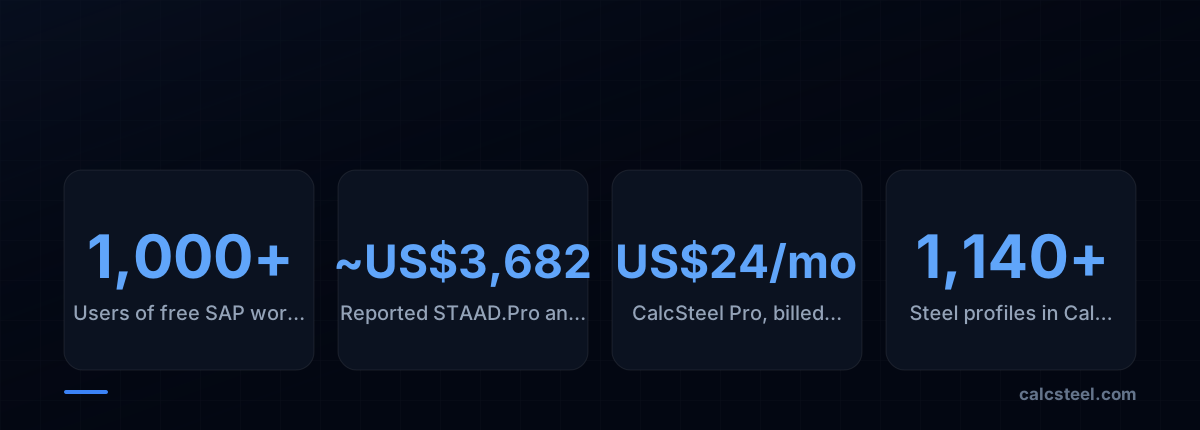
- The ancestor of every modern package — Edward Wilson's SAP — was distributed free to more than 1,000 users worldwide by 1974 from UC Berkeley, decades before today's subscription pricing.
- Most genuinely free tools (Ftool, Frame3DD, OpenSees) are excellent analysis engines but stop short of automated NBR/AISC/Eurocode member design, which is the legally load-bearing step.
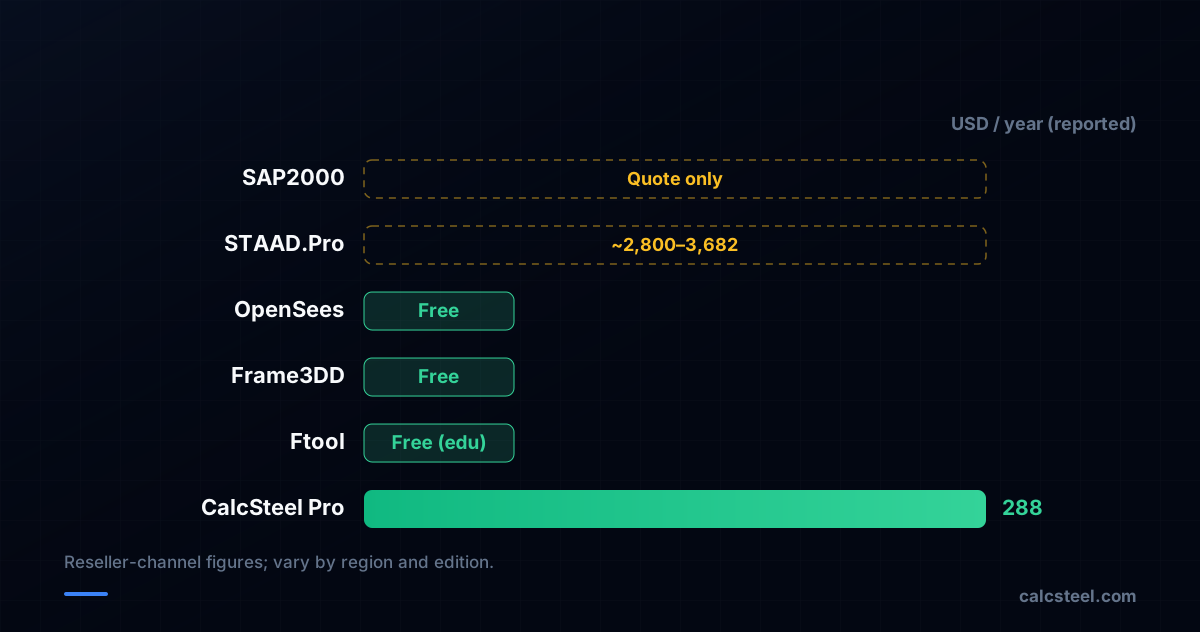
- Commercial suites such as STAAD.Pro are reported to start around US$3,682 per year on subscription, while SAP2000 is quote-only — a real barrier for students, freelancers and emerging markets.
- Free software disclaims all warranty; the engineer of record, not the code, is always responsible — which means the deciding factor is workflow completeness, not the price tag.
Structural software was born free
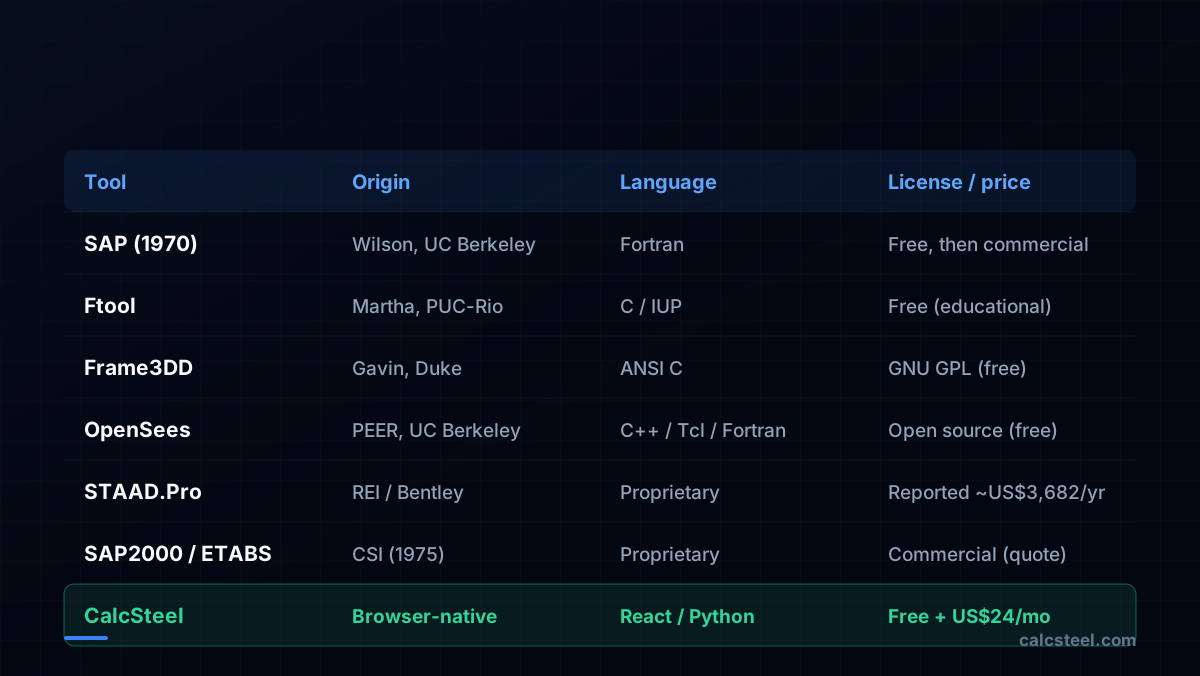
The story starts at the University of California, Berkeley. Working in the lineage of Ray Clough's finite element method, Edward L. Wilson wrote SAP — the Structural Analysis Program — around 1970. It is widely credited as the first broadly adopted computer package for structural analysis, and it was distributed freely: reportedly to more than 1,000 users worldwide by 1974.
SAP and its successor SAP IV ran on mainframes in Fortran, the scientific language of the era. The point worth absorbing is cultural: the field's foundational tool was an academic gift, not a product. The pay-per-seat model came later, when Computers and Structures, Inc. (CSI) was founded in 1975 — by Ashraf Habibullah, working alongside Wilson — to commercialize and support that lineage, eventually yielding SAP2000 and ETABS.
How the tools — and their prices — diverged
From that single free root, two branches grew. The commercial branch industrialised SAP into polished, validated, support-backed suites. STAAD emerged from Research Engineers International in the late 1970s and is now owned by Bentley Systems; SAP2000 and ETABS remained with CSI.
Pricing climbed accordingly. Reported figures put STAAD.Pro at roughly US$2,800–3,682 per year on subscription, while SAP2000 is quote-only — CSI no longer lists standalone prices publicly and directs buyers to its sales channel. These are vendor-channel and reseller numbers rather than universally published list prices, so treat them as reported, not fixed — but the order of magnitude is the story.
What 'free' actually means today
The free branch never died — it specialised into superb analysis engines, mostly from academia:
- Ftool — conceived and directed by Luiz Fernando Martha (with Marcelo Gattass) and the Tecgraf group at PUC-Rio (Brazil), in development since 1991, with version 2.00 released in February 1998. A beloved 2D frame teaching tool, free for educational use.
- Frame3DD — by Henri P. Gavin at Duke University, written in plain ANSI C and released under the GNU General Public License. Static and dynamic 2D/3D frame and truss analysis.
- OpenSees — the research-grade framework from UC Berkeley's PEER center (McKenna, Fenves and many others), written primarily in C++ with Tcl/Python scripting and Fortran solvers, aimed at earthquake simulation.
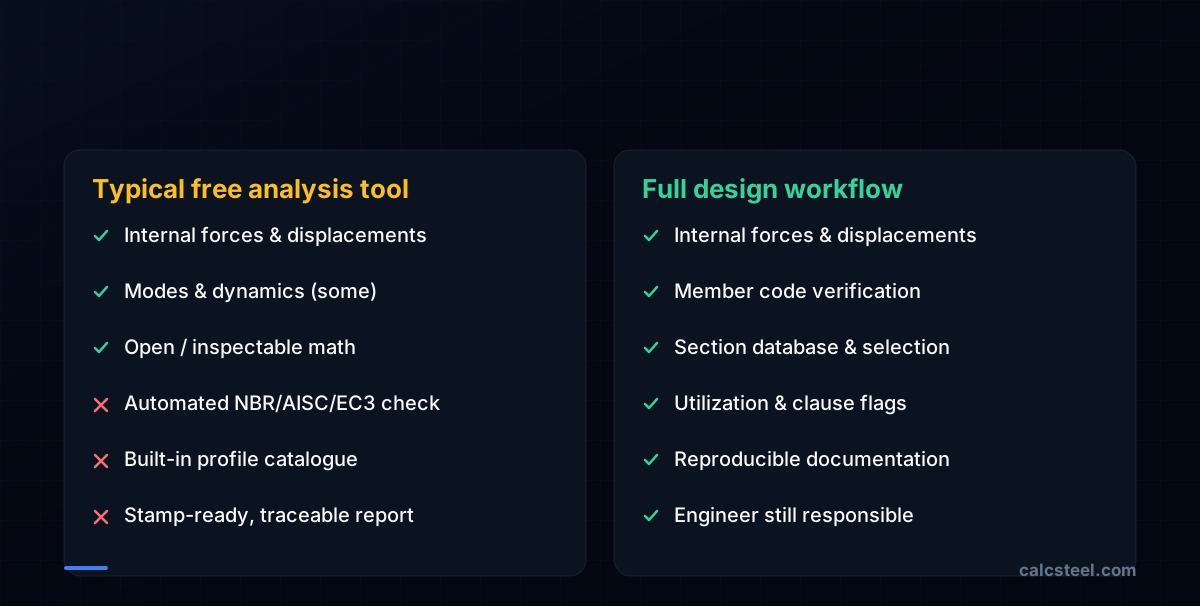
Each is genuinely powerful. But notice the common ceiling: they compute forces, displacements and modes — they do not, by default, run the code check that turns a force into a verified, compliant member.
The real line: analysis vs. code-checked design
Here is the distinction that matters more than price. Analysis answers "what are the forces?" Design answers "does this section pass the standard — buckling, slenderness, combined axial-and-bending interaction, deflection limits — and by how much?"
An academic analysis tool can hand you a 250 kN·m moment. A design tool tells you that a chosen profile passes NBR 8800, AISC 360, Eurocode 3 or IS 800 with a utilization of, say, 0.87 — and flags the clause if it does not. That automation is the difference between a homework engine and a tool you build a practice on.
Who is actually responsible — the tool or you?
A point engineers internalise early: software is never the responsible party. GPL-licensed tools spell this out — the license states there is explicitly no warranty, and use is at the user's sole risk. Commercial suites carry near-identical disclaimers buried in their EULAs.
In every jurisdiction, the engineer of record who signs and stamps the drawings owns the result, regardless of whether the math came from a four- or five-figure suite or a free academic program. This reframes the whole "free vs. professional" debate: since liability sits with you either way, the deciding factor is not the brand or the price — it is whether the tool gives you a traceable, code-referenced, reproducible verification you can defend.
Verdict: free is fine — incomplete is not
So, can you use free software for professional structural design? For analysis, absolutely — Ftool, Frame3DD and OpenSees are credible, and SAP itself proves free tools can be world-class. The catch is that most free tools stop at analysis, leaving you to perform code checks by hand or to graduate to a four-figure annual license for automated verification.
CalcSteel was built to collapse that gap honestly. It is a browser-native app — a React/TypeScript front-end over a Python finite-element backend — with a genuinely free plan and a Pro tier at US$24/month billed annually, a fraction of the commercial band. It ships 1,140+ steel profiles and automated checks against NBR 8800, AISC 360, Eurocode 3 and IS 800, so the design step is included, not paywalled into the thousands. It will not stamp your drawings — nothing does; you remain the engineer of record — but it gives you a traceable, code-referenced result to stand behind. Open the editor and judge it against the tools above on your own frame.
Sources
- 1.Edward L. Wilson — Wikipedia (SAP, first widely accepted structural analysis package)
- 2.Computers and Structures (company) — Wikipedia (founded 1975, Habibullah & Wilson)
- 3.OpenSees — Wikipedia (PEER/UC Berkeley; McKenna & Fenves; C++/Tcl/Fortran)
- 4.About FTool — Tecgraf/PUC-Rio (Martha & Gattass, since 1991, v2.00 Feb 1998, free edu)
- 5.Frame3DD — Henri P. Gavin, Duke University (ANSI C, GNU GPL)
- 6.STAAD Reviews 2026 — SelectHub (reported pricing starts at US$3,682/yr)
- 7.SAP2000 sales / licensing — CSI America (quote-only; cloud sign-in licensing)
- 8.GNU General Public License — 'no warranty' clause
- 9.Image: daisuke1230 — CC BY-SA 2.0 (Wikimedia Commons)
Try CalcSteel for free
Model, analyze and design steel structures in your browser. No install, no signup.
Open the 3D editor