CalcSteel Free vs Pro: Full Feature Comparison
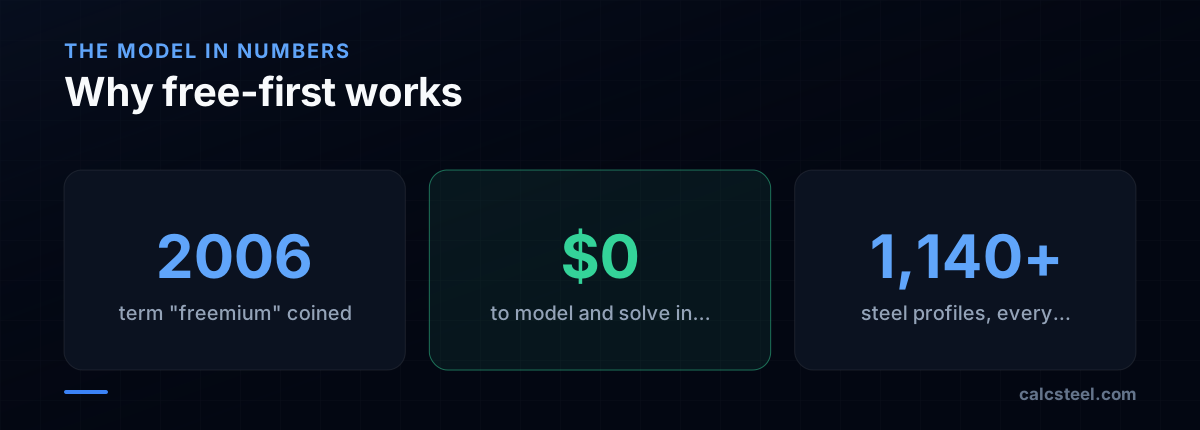
The short answer: on CalcSteel the engineering is free. The Free plan gives you the full browser-based 3D editor, the finite-element solver, 1,140+ steel profiles and member code checks — at no cost. What the paid plans add is keeping and shipping that work. CalcSteel sells three tiers — Free ($0), Starter (US$9/month) and Pro (US$24/month), both billed annually — under a freemium model (free to start, pay to scale). This article gives the row-by-row comparison first, then traces the fifty-year history of how engineering software arrived at free-then-pay.
Key takeaways
- Direct answer: Free covers genuine modeling, solving, 1,140+ profiles and code checks; CalcSteel then sells two paid tiers — Starter (US$9/mo annual) and Pro (US$24/mo annual).
- The real boundary is usage and deliverables, not analysis capability: Free caps at 25 analyses/month, 3 saved projects and 1 sheet each, and watermarks PDF reports. A paid plan removes those limits.
- Clean (watermark-free) PDF reports and IFC/DXF export unlock on a paid plan — Starter already includes both; Pro adds unlimited analyses and sheets, a company logo on reports and priority support.
- Against a browser rival, CalcSteel Free has no per-model element cap, whereas SkyCiv's free account is reported to cap at 5 elements, 2 supports and 3 loads.
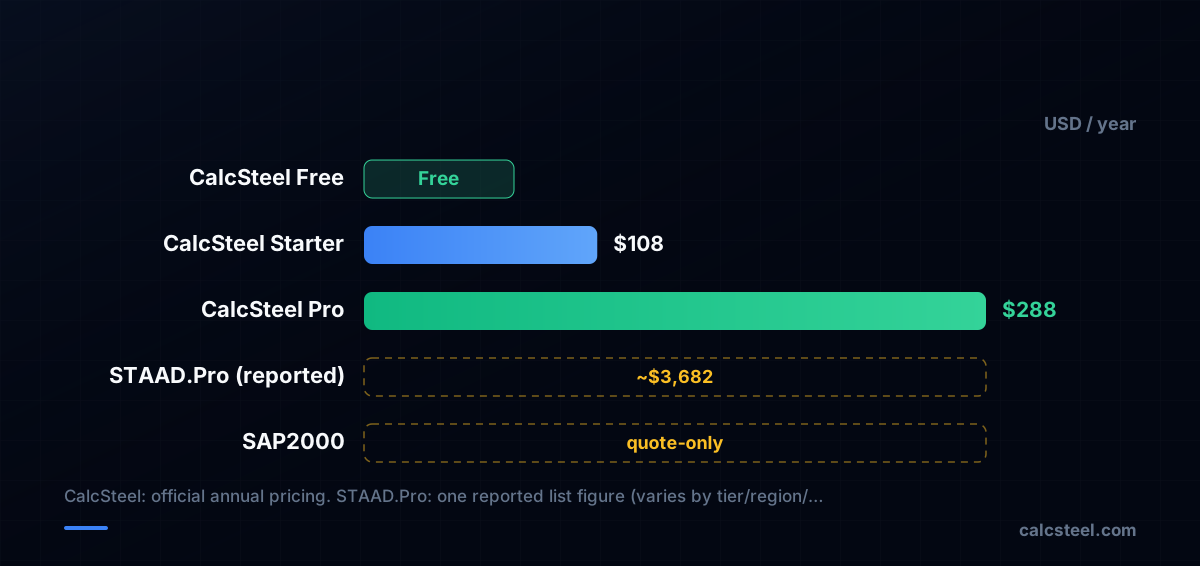
- Legacy desktop pricing is far higher: STAAD.Pro is listed at about US$3,682/year by one software directory (SelectHub, 2026), while SAP2000 is generally quote-only — context for why a browser freemium tier exists at all.
CalcSteel Free vs Pro: the feature comparison
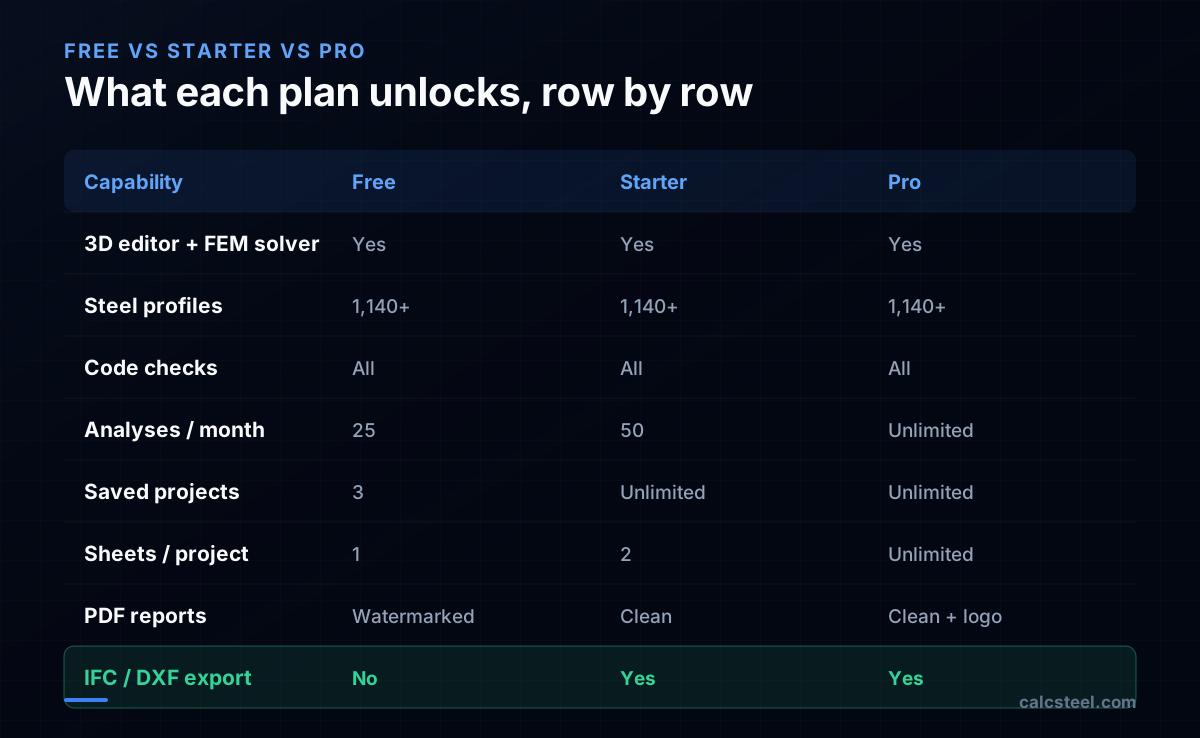
If you only need the practical difference, here it is. The engineering itself is not paywalled. On every plan — Free included — you get the full browser-based 3D editor, the finite-element solver, the catalog of 1,140+ steel profiles, and member code checks (NBR 8800, AISC 360, Eurocode 3 and IS 800 for hot-rolled steel, plus NBR 14762 for cold-formed sections). You can build a model, solve it, and verify members without paying, and there is no per-model size cap on Free.
What the paid plans change is usage volume and deliverables, not solver power. The Free plan caps you at 25 analyses per month, 3 saved projects and 1 sheet per project, and stamps a watermark on PDF reports; IFC/DXF export is locked. Starter (US$9/month, billed annually) lifts that to 50 analyses/month, unlimited saved projects, 2 sheets each, clean watermark-free PDFs, and unlocks IFC/DXF export. Pro (US$24/month, billed annually) removes the remaining ceilings — unlimited analyses and sheets — and adds Pro-only extras: your company logo and custom title block on reports, and priority support. So this FAQ's "Free vs Pro" really spans a three-step ladder, and most of the everyday unlocks (saving, clean PDF, export) already arrive at the lower-cost Starter tier.
What you actually give up on the Free plan
An honest comparison names the downsides, not just the price of the alternatives. On Free the most-cited limit is saving: you can keep up to 3 projects, each with a single sheet, and you can reopen them later — they do not expire — but a fourth project means deleting one or upgrading. Heavy iterative work hits the 25-analyses-per-month ceiling, after which you wait for the next cycle or move to a paid plan.
Two further Free limits matter for client-facing work. PDF reports are watermarked, which is fine for study and self-checking but not for a deliverable you stamp and hand over; clean reports require a paid plan. And IFC/DXF export is disabled on Free, so BIM/CAD handoff to Revit, Tekla or AutoCAD waits until Starter or Pro. Support on Free is community/standard; priority support is a Pro-only line. None of this touches the analysis: the solver, profile catalog and code checks are the same regardless of what you pay.
How CalcSteel Free compares to other browser tools
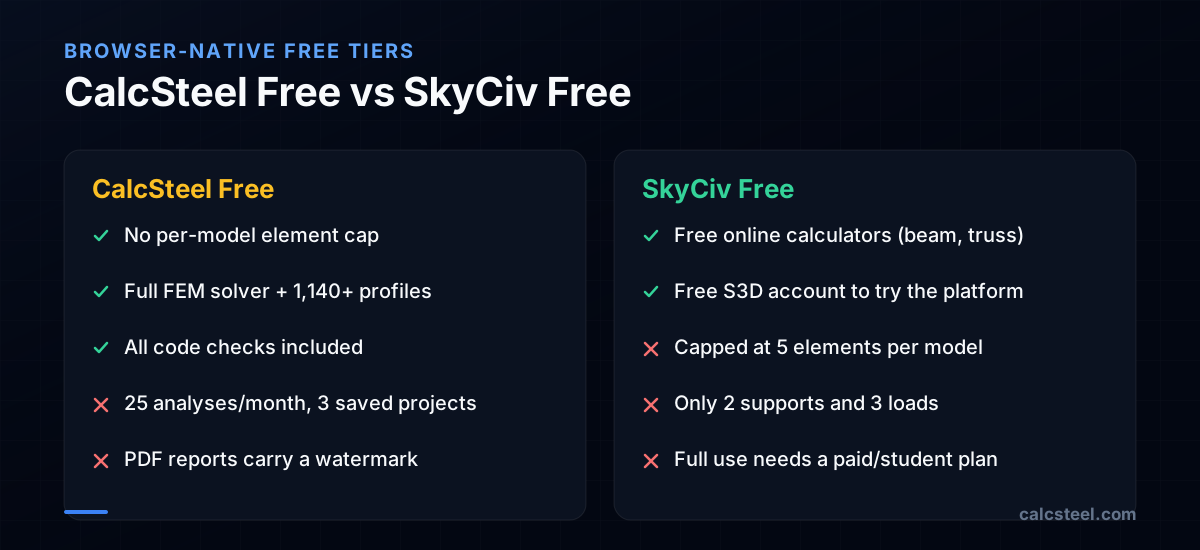
CalcSteel is one option among several, and its closest analogue is browser-native rather than desktop. SkyCiv, founded in 2013, was an early cloud structural platform; it offers free online calculators (beam, truss, frame) and a free Structural 3D account to try the product. Its free account, however, is reported to cap models at 5 elements, 2 supports and 3 loads — enough to evaluate the interface, not to model a real frame — after which you move to a paid or discounted student account for full use.
CalcSteel takes the opposite trade on the free tier: it imposes no per-model element cap, so you can model and solve a genuine portal frame or truss for free, but it limits you on volume (25 analyses/month, 3 saved projects) and on deliverables (watermarked PDFs, no export). Neither approach is strictly better — if you want to size one full structure end-to-end without paying, the no-element-cap model fits; if you want full features on tiny demo models, the calculator-style free tools fit. Established desktop tools such as STAAD.Pro and SAP2000 sit in a different price bracket entirely, covered below.
The first structural software was already free
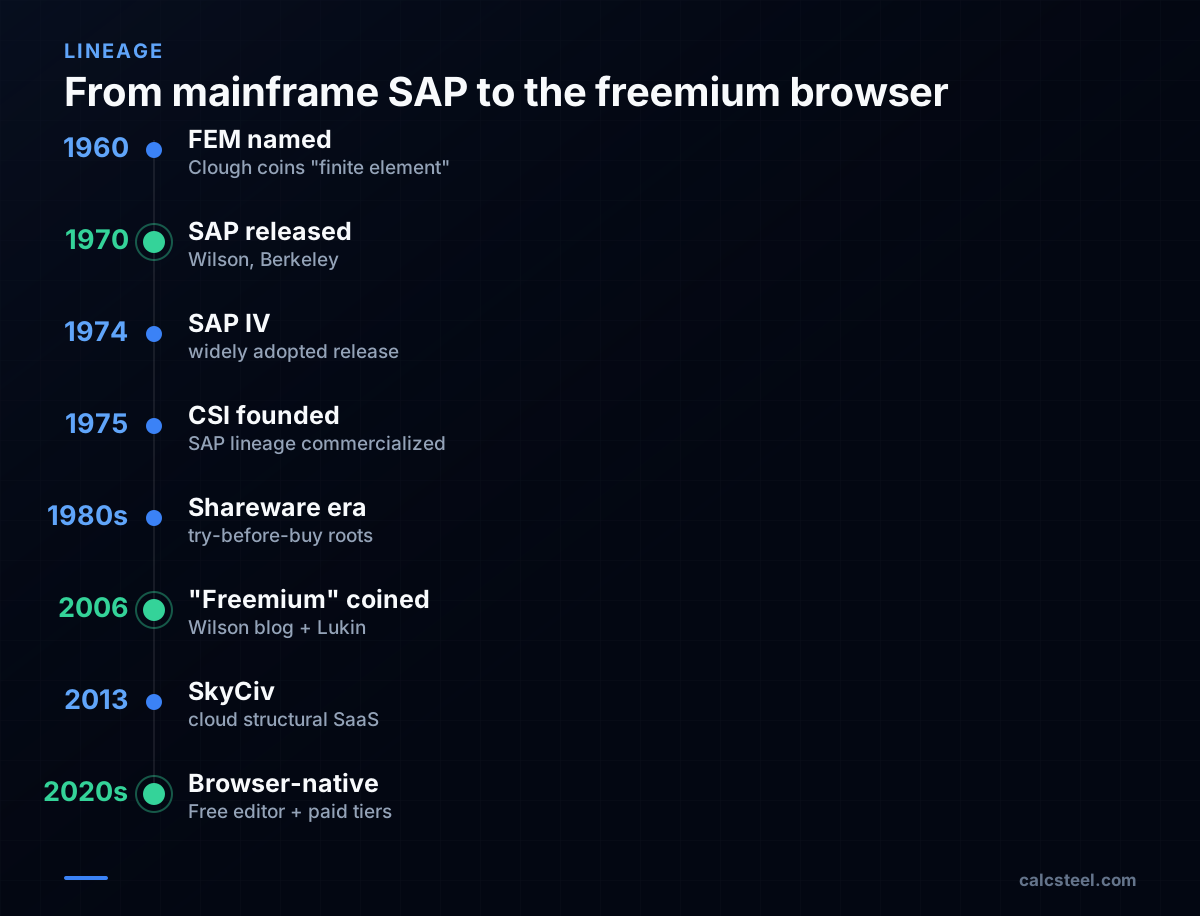
The free-first idea is older than the web. The finite element method was formalized at the University of California, Berkeley, where Ray W. Clough coined the term "finite element" in a 1960 paper. His Berkeley colleague Edward L. Wilson wrote what is widely credited as the first broadly adopted structural analysis package, the Structural Analysis Program — SAP — first released around 1970 out of Berkeley.
Those early Berkeley programs circulated openly among researchers and practitioners well before any commercial license existed; the 1974 successor, SAP IV, became widely used across academia and industry, though specific user counts from the period are difficult to verify from primary sources. The commercial layer came later: Computers and Structures, Inc. (CSI) was founded in 1975 by Ashraf Habibullah, building on Wilson's SAP lineage; that lineage eventually became today's SAP2000 and ETABS. So the very first thing the industry did was give the engine away, and only afterward charge for the polished, supported product — in spirit, exactly the Free-then-paid split.
How "freemium" got its name in 2006
The strategy stayed nameless for decades, living inside 1980s–90s shareware and "try-before-you-buy" software. It finally got a label in 2006. Venture capitalist Fred Wilson described the model in a blog post: give the service away to acquire users efficiently, then sell premium, value-added tiers to that base. A reader, Jarid Lukin of Alacra (one of Wilson's portfolio companies), suggested the portmanteau freemium, which Wilson adopted.
That single word gave the practice a name, and consumer software ran with it — Dropbox, Evernote and LinkedIn turned it into a default playbook. Engineering was slower, because its software was complex, desktop-bound and license-protected. The logic only crossed over once the browser became powerful enough to run a real solver; SkyCiv (2013) was an early browser-native predecessor, and a current generation of tools, CalcSteel among them, now runs the full editor and FEM solver in the page.
Why the desktop made everything expensive
Between SAP's free origins and today, structural software became a high-ticket purchase, and that is the backdrop a freemium tier is competing against. As a concrete anchor: one software directory, SelectHub, lists STAAD.Pro starting at about US$3,682 per year (2026). Treat that as a single reported data point, not a universal price — desktop and cloud figures vary widely by tier, region, add-on modules and reseller, with some single-seat listings reported nearer US$1,000–1,500/year, and SAP2000 is generally sold by quote rather than a public list price.
Those prices reflect a desktop reality: per-seat installs, license servers, version upgrades and support contracts. They make sense for a large firm and far less sense for a student, a freelancer, or someone sizing a single mezzanine. Against that backdrop, a browser tool whose paid tiers run from a single-digit monthly Starter up to a Pro plan in the low-hundreds-per-year range is a different order of magnitude — which is precisely the long tail the desktop priced out.
The verdict: free to engineer, pay to keep and ship
The choice is best read through history. SAP was given away around 1970; freemium got its name in 2006; and the browser finally made it practical to put a real solver in front of anyone, for free. CalcSteel sits in that lineage as one option among several — a browser-native app with a React/TypeScript front-end and a Python finite-element backend — where the Free plan covers genuine modeling, solving, 1,140+ profiles and the major steel codes (including NBR 14762 for cold-formed sections), and the paid tiers add the volume, saving, export and reporting that working delivery needs.
So decide by what you produce, not by analysis capability. If you are learning, prototyping or checking a single frame, Free is a complete tool, not a teaser. If you need to save more than three projects, export IFC/DXF, or hand a client a clean, watermark-free report, the lower-cost Starter already covers it; Pro is the step up for unlimited analyses and sheets, a company logo on reports and priority support. Browser rivals such as SkyCiv, or desktop tools like STAAD.Pro and SAP2000, occupy the same market at different caps and price points; the fastest way to judge the fit is to open the editor and model something real — no install, no dongle, no quote.
Sources
- 1.CalcSteel — official site (Free plan, Starter and Pro pricing, codes, 1,140+ profiles)
- 2.Freemium — Wikipedia (origin of the term, 2006, Fred Wilson / Jarid Lukin of Alacra)
- 3.STAAD (STAAD.Pro) pricing — SelectHub (starting price ~US$3,682/year, 2026)
- 4.SkyCiv Account Limits — free account caps (elements/supports/loads)
- 5.SkyCiv Student Account — discounted full-access educational plan
- 6.SAP IV: A Structural Analysis Program (1974), Bathe, Wilson & Peterson — NISEE e-Library (Berkeley)
- 7.Computers and Structures (company) — Wikipedia (founded 1975 by Ashraf Habibullah; Wilson collaboration)
- 8.SkyCiv — About (cloud/browser-based structural software, founded 2013)
- 9.Image: Luuva — CC BY-SA 3.0 (Wikimedia Commons)
Try CalcSteel for free
Model, analyze and design steel structures in your browser. No install, no signup.
Open the 3D editor